RollerCAN Unit
支持以下产品:
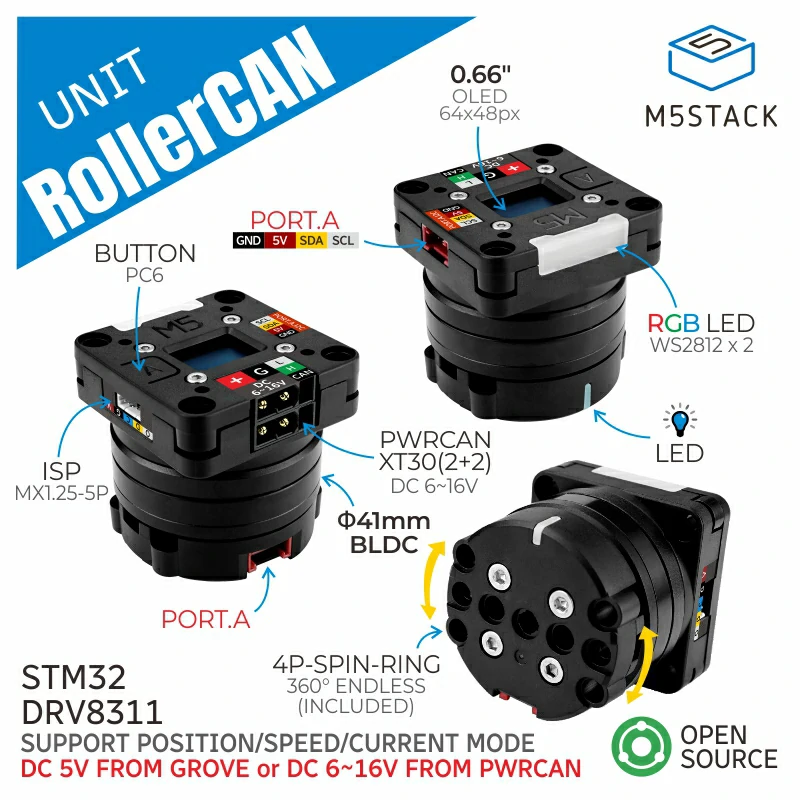
RollerCAN I2C 应用示例:
 1# SPDX-FileCopyrightText: 2024 M5Stack Technology CO LTD
 2#
 3# SPDX-License-Identifier: MIT
 4
 5import os, sys, io
 6import M5
 7from M5 import *
 8from hardware import *
 9from unit import RollerCANUnit
10
11
12title0 = None
13label0 = None
14label1 = None
15label2 = None
16label3 = None
17label4 = None
18i2c1 = None
19rollercan_0 = None
20
21
22output = None
23mode = None
24
25
26def btnb__event(state):
27    global title0, label0, label1, label2, label3, label4, i2c1, rollercan_0, output, mode
28    output = output ^ (0x01 << 0)
29    rollercan_0.set_motor_output_state(output)
30
31
32def btna__event(state):
33    global title0, label0, label1, label2, label3, label4, i2c1, rollercan_0, output, mode
34    mode = mode + 1
35    if mode > 4:
36        mode = 1
37    rollercan_0.set_motor_mode(mode)
38
39
40def setup():
41    global title0, label0, label1, label2, label3, label4, i2c1, rollercan_0, output, mode
42
43    M5.begin()
44    Widgets.fillScreen(0x222222)
45    title0 = Widgets.Title("RollerCAN I2C Example", 3, 0xFFFFFF, 0x0000FF, Widgets.FONTS.DejaVu18)
46    label0 = Widgets.Label("mode:", 1, 63, 1.0, 0xFFFFFF, 0x222222, Widgets.FONTS.DejaVu18)
47    label1 = Widgets.Label("motor state:", 2, 108, 1.0, 0xFFFFFF, 0x222222, Widgets.FONTS.DejaVu18)
48    label2 = Widgets.Label("speed:", 2, 152, 1.0, 0xFFFFFF, 0x222222, Widgets.FONTS.DejaVu18)
49    label3 = Widgets.Label("mode", 40, 215, 1.0, 0xFFFFFF, 0x222222, Widgets.FONTS.DejaVu18)
50    label4 = Widgets.Label("on/off", 126, 215, 1.0, 0xFFFFFF, 0x222222, Widgets.FONTS.DejaVu18)
51
52    BtnB.setCallback(type=BtnB.CB_TYPE.WAS_CLICKED, cb=btnb__event)
53    BtnA.setCallback(type=BtnA.CB_TYPE.WAS_CLICKED, cb=btna__event)
54
55    i2c1 = I2C(1, scl=Pin(22), sda=Pin(21), freq=100000)
56    rollercan_0 = RollerCANUnit(i2c1, address=0x64, mode=RollerCANUnit.I2C_MODE)
57    rollercan_0.set_motor_output_state(0)
58    output = 0
59    mode = rollercan_0.get_motor_mode()
60    label0.setText(str((str("mode:") + str(mode))))
61    label1.setText(str((str("motor state:") + str(output))))
62
63
64def loop():
65    global title0, label0, label1, label2, label3, label4, i2c1, rollercan_0, output, mode
66    M5.update()
67    label0.setText(str((str("mode:") + str(mode))))
68    label1.setText(str((str("motor state:") + str(output))))
69    if mode == 1:
70        rollercan_0.set_motor_speed(20000)
71        rollercan_0.set_speed_max_current(400)
72        label2.setText(str((str("speed:") + str((rollercan_0.get_motor_speed_readback())))))
73    elif mode == 2:
74        rollercan_0.set_motor_position(1000)
75        rollercan_0.set_position_max_current(400)
76        label2.setText(str((str("position:") + str((rollercan_0.get_motor_position_readback())))))
77    elif mode == 3:
78        rollercan_0.set_motor_max_current(400)
79        label2.setText(str((str("current:") + str((rollercan_0.get_motor_current_readback())))))
80    elif mode == 4:
81        label2.setText(str((str("encoder:") + str((rollercan_0.get_encoder_value())))))
82
83
84if __name__ == "__main__":
85    try:
86        setup()
87        while True:
88            loop()
89    except (Exception, KeyboardInterrupt) as e:
90        try:
91            from utility import print_error_msg
92
93            print_error_msg(e)
94        except ImportError:
95            print("please update to latest firmware")
RollerCAN I2C UiFlow2 应用示例:
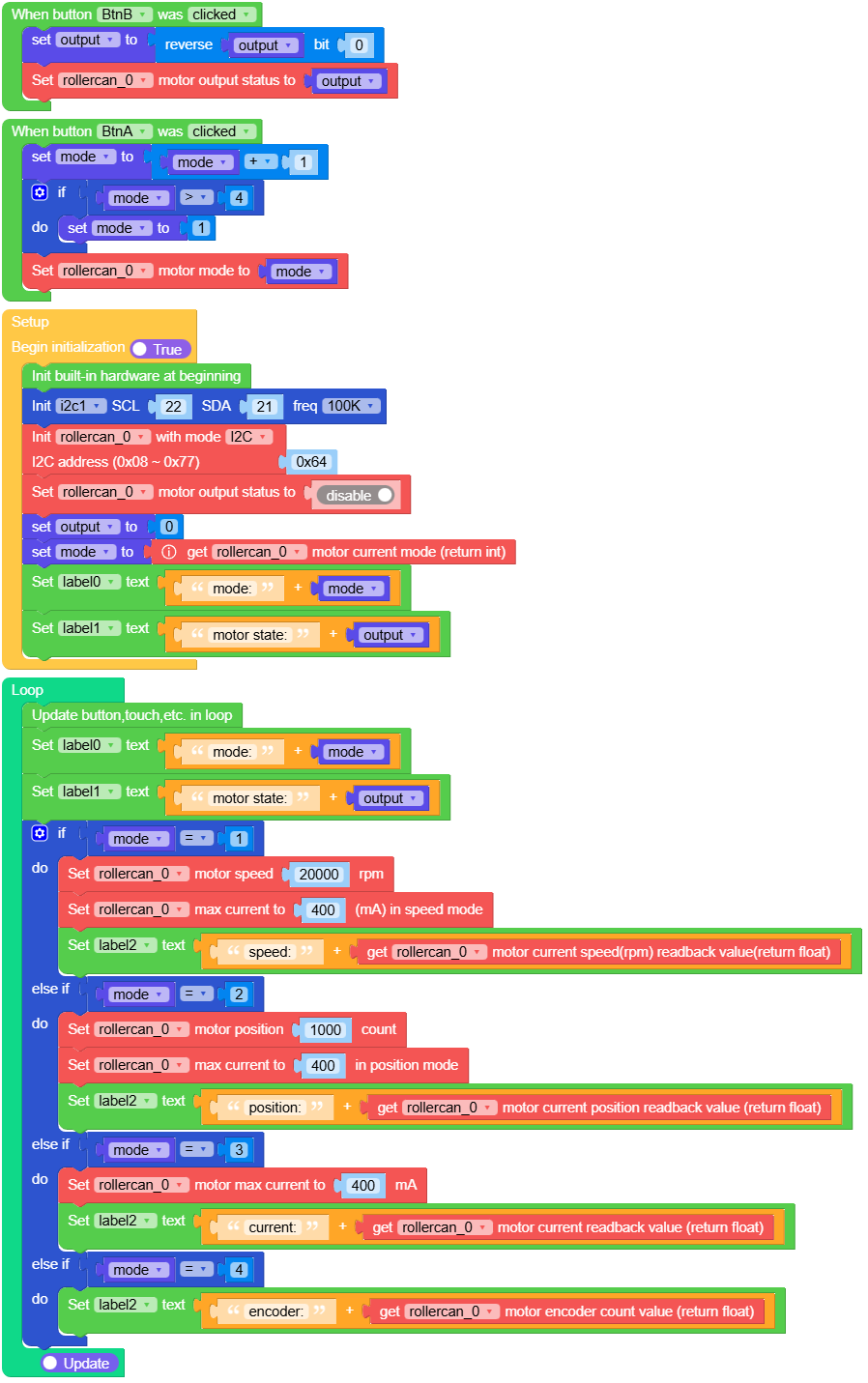
rollercan_i2c_fire_example.m5f2
RollerCAN CAN 应用示例:
 1# SPDX-FileCopyrightText: 2024 M5Stack Technology CO LTD
 2#
 3# SPDX-License-Identifier: MIT
 4
 5import os, sys, io
 6import M5
 7from M5 import *
 8from hardware import *
 9from unit import RollerCANUnit
10from unit import CANUnit
11
12
13title0 = None
14label0 = None
15label1 = None
16label2 = None
17label3 = None
18label4 = None
19can_0 = None
20rollercan_0 = None
21
22
23mode = None
24output = None
25
26
27def btna__event(state):
28    global title0, label0, label1, label2, label3, label4, can_0, rollercan_0, mode, output
29    mode = mode + 1
30    if mode > 4:
31        mode = 1
32    rollercan_0.set_motor_mode(mode)
33
34
35def btnb__event(state):
36    global title0, label0, label1, label2, label3, label4, can_0, rollercan_0, mode, output
37    output = output ^ (0x01 << 0)
38    rollercan_0.set_motor_output_state(output)
39
40
41def setup():
42    global title0, label0, label1, label2, label3, label4, can_0, rollercan_0, mode, output
43
44    M5.begin()
45    Widgets.fillScreen(0x222222)
46    title0 = Widgets.Title("RollerCAN CAN Example", 3, 0xFFFFFF, 0x0000FF, Widgets.FONTS.DejaVu18)
47    label0 = Widgets.Label("mode:", 1, 63, 1.0, 0xFFFFFF, 0x222222, Widgets.FONTS.DejaVu18)
48    label1 = Widgets.Label("motor state:", 2, 108, 1.0, 0xFFFFFF, 0x222222, Widgets.FONTS.DejaVu18)
49    label2 = Widgets.Label("speed:", 2, 152, 1.0, 0xFFFFFF, 0x222222, Widgets.FONTS.DejaVu18)
50    label3 = Widgets.Label("mode", 40, 215, 1.0, 0xFFFFFF, 0x222222, Widgets.FONTS.DejaVu18)
51    label4 = Widgets.Label("on/off", 126, 215, 1.0, 0xFFFFFF, 0x222222, Widgets.FONTS.DejaVu18)
52
53    BtnA.setCallback(type=BtnA.CB_TYPE.WAS_CLICKED, cb=btna__event)
54    BtnB.setCallback(type=BtnB.CB_TYPE.WAS_CLICKED, cb=btnb__event)
55
56    can_0 = CANUnit((13, 15), CANUnit.NORMAL, baudrate=1000000)
57    rollercan_0 = RollerCANUnit(can_0, address=0xA8, mode=RollerCANUnit.CAN_MODE)
58    rollercan_0.set_motor_output_state(0)
59    output = 0
60    mode = rollercan_0.get_motor_mode()
61    label0.setText(str((str("mode:") + str(mode))))
62    label1.setText(str((str("motor state:") + str(output))))
63
64
65def loop():
66    global title0, label0, label1, label2, label3, label4, can_0, rollercan_0, mode, output
67    M5.update()
68    label0.setText(str((str("mode:") + str(mode))))
69    label1.setText(str((str("motor state:") + str(output))))
70    if mode == 1:
71        rollercan_0.set_motor_speed(20000)
72        rollercan_0.set_speed_max_current(400)
73        label2.setText(str((str("speed:") + str((rollercan_0.get_motor_speed_readback())))))
74    elif mode == 2:
75        rollercan_0.set_motor_position(1000)
76        rollercan_0.set_position_max_current(400)
77        label2.setText(str((str("position:") + str((rollercan_0.get_motor_position_readback())))))
78    elif mode == 3:
79        rollercan_0.set_motor_max_current(400)
80        label2.setText(str((str("current:") + str((rollercan_0.get_motor_current_readback())))))
81    elif mode == 4:
82        label2.setText(str((str("encoder:") + str((rollercan_0.get_encoder_value())))))
83
84
85if __name__ == "__main__":
86    try:
87        setup()
88        while True:
89            loop()
90    except (Exception, KeyboardInterrupt) as e:
91        try:
92            from utility import print_error_msg
93
94            print_error_msg(e)
95        except ImportError:
96            print("please update to latest firmware")
RollerCAN CAN UiFlow2 应用示例:
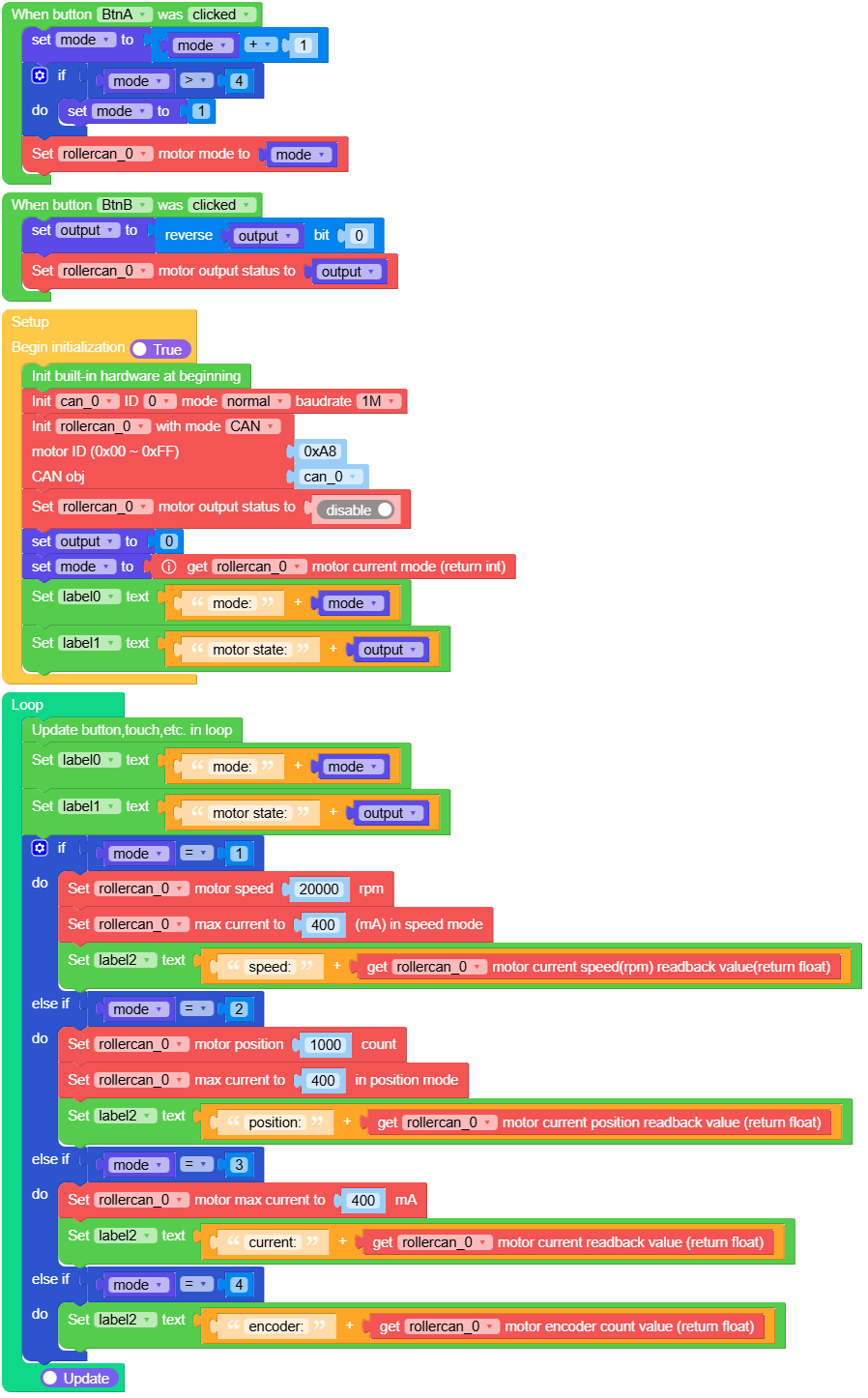
rollercan_can_fire_example.m5f2
RollerCAN CANToI2C 应用示例:
  1# SPDX-FileCopyrightText: 2024 M5Stack Technology CO LTD
  2#
  3# SPDX-License-Identifier: MIT
  4
  5import os, sys, io
  6import M5
  7from M5 import *
  8from hardware import *
  9from unit import RollerCANUnit
 10from unit import CANUnit
 11from unit import ENVUnit
 12
 13
 14title0 = None
 15label5 = None
 16label7 = None
 17label0 = None
 18label6 = None
 19label1 = None
 20label2 = None
 21label3 = None
 22label4 = None
 23env3_0 = None
 24can_0 = None
 25rollercan_0 = None
 26
 27
 28output = None
 29mode = None
 30
 31
 32def btnb__event(state):
 33    global \
 34        title0, \
 35        label5, \
 36        label7, \
 37        label0, \
 38        label6, \
 39        label1, \
 40        label2, \
 41        label3, \
 42        label4, \
 43        env3_0, \
 44        can_0, \
 45        rollercan_0, \
 46        output, \
 47        mode
 48    output = output ^ (0x01 << 0)
 49    rollercan_0.set_motor_output_state(output)
 50
 51
 52def btna__event(state):
 53    global \
 54        title0, \
 55        label5, \
 56        label7, \
 57        label0, \
 58        label6, \
 59        label1, \
 60        label2, \
 61        label3, \
 62        label4, \
 63        env3_0, \
 64        can_0, \
 65        rollercan_0, \
 66        output, \
 67        mode
 68    mode = mode + 1
 69    if mode > 4:
 70        mode = 1
 71    rollercan_0.set_motor_mode(mode)
 72
 73
 74def btnc__event(state):
 75    global \
 76        title0, \
 77        label5, \
 78        label7, \
 79        label0, \
 80        label6, \
 81        label1, \
 82        label2, \
 83        label3, \
 84        label4, \
 85        env3_0, \
 86        can_0, \
 87        rollercan_0, \
 88        output, \
 89        mode
 90    label5.setText(str((str("temp:") + str((env3_0.read_temperature())))))
 91    label6.setText(str((str("humi:") + str((env3_0.read_pressure())))))
 92
 93
 94def setup():
 95    global \
 96        title0, \
 97        label5, \
 98        label7, \
 99        label0, \
100        label6, \
101        label1, \
102        label2, \
103        label3, \
104        label4, \
105        env3_0, \
106        can_0, \
107        rollercan_0, \
108        output, \
109        mode
110
111    M5.begin()
112    Widgets.fillScreen(0x222222)
113    title0 = Widgets.Title(
114        "RollerCAN CANToI2C Example", 3, 0xFFFFFF, 0x0000FF, Widgets.FONTS.DejaVu18
115    )
116    label5 = Widgets.Label("temp:", 182, 66, 1.0, 0xFFFFFF, 0x222222, Widgets.FONTS.DejaVu18)
117    label7 = Widgets.Label("update env", 199, 213, 1.0, 0xFFFFFF, 0x222222, Widgets.FONTS.DejaVu18)
118    label0 = Widgets.Label("mode:", 1, 63, 1.0, 0xFFFFFF, 0x222222, Widgets.FONTS.DejaVu18)
119    label6 = Widgets.Label("humi:", 182, 131, 1.0, 0xFFFFFF, 0x222222, Widgets.FONTS.DejaVu18)
120    label1 = Widgets.Label("motor state:", 2, 108, 1.0, 0xFFFFFF, 0x222222, Widgets.FONTS.DejaVu18)
121    label2 = Widgets.Label("speed:", 2, 152, 1.0, 0xFFFFFF, 0x222222, Widgets.FONTS.DejaVu18)
122    label3 = Widgets.Label("mode", 40, 215, 1.0, 0xFFFFFF, 0x222222, Widgets.FONTS.DejaVu18)
123    label4 = Widgets.Label("on/off", 126, 215, 1.0, 0xFFFFFF, 0x222222, Widgets.FONTS.DejaVu18)
124
125    BtnB.setCallback(type=BtnB.CB_TYPE.WAS_CLICKED, cb=btnb__event)
126    BtnA.setCallback(type=BtnA.CB_TYPE.WAS_CLICKED, cb=btna__event)
127    BtnC.setCallback(type=BtnC.CB_TYPE.WAS_CLICKED, cb=btnc__event)
128
129    can_0 = CANUnit((13, 15), CANUnit.NORMAL, baudrate=1000000)
130    rollercan_0 = RollerCANUnit(can_0, address=0xA8, mode=RollerCANUnit.CAN_TO_I2C_MODE)
131    env3_0 = ENVUnit(i2c=rollercan_0, type=3)
132    rollercan_0.set_motor_output_state(0)
133    output = 0
134    mode = rollercan_0.get_motor_mode()
135    label0.setText(str((str("mode:") + str(mode))))
136    label1.setText(str((str("motor state:") + str(output))))
137
138
139def loop():
140    global \
141        title0, \
142        label5, \
143        label7, \
144        label0, \
145        label6, \
146        label1, \
147        label2, \
148        label3, \
149        label4, \
150        env3_0, \
151        can_0, \
152        rollercan_0, \
153        output, \
154        mode
155    M5.update()
156    label0.setText(str((str("mode:") + str(mode))))
157    label1.setText(str((str("motor state:") + str(output))))
158    if mode == 1:
159        rollercan_0.set_motor_speed(20000)
160        rollercan_0.set_speed_max_current(400)
161        label2.setText(str((str("speed:") + str((rollercan_0.get_motor_speed_readback())))))
162    elif mode == 2:
163        rollercan_0.set_motor_position(1000)
164        rollercan_0.set_position_max_current(400)
165        label2.setText(str((str("position:") + str((rollercan_0.get_motor_position_readback())))))
166    elif mode == 3:
167        rollercan_0.set_motor_max_current(400)
168        label2.setText(str((str("current:") + str((rollercan_0.get_motor_current_readback())))))
169    elif mode == 4:
170        label2.setText(str((str("encoder:") + str((rollercan_0.get_encoder_value())))))
171
172
173if __name__ == "__main__":
174    try:
175        setup()
176        while True:
177            loop()
178    except (Exception, KeyboardInterrupt) as e:
179        try:
180            from utility import print_error_msg
181
182            print_error_msg(e)
183        except ImportError:
184            print("please update to latest firmware")
RollerCAN CANToI2C UiFlow2 应用示例:
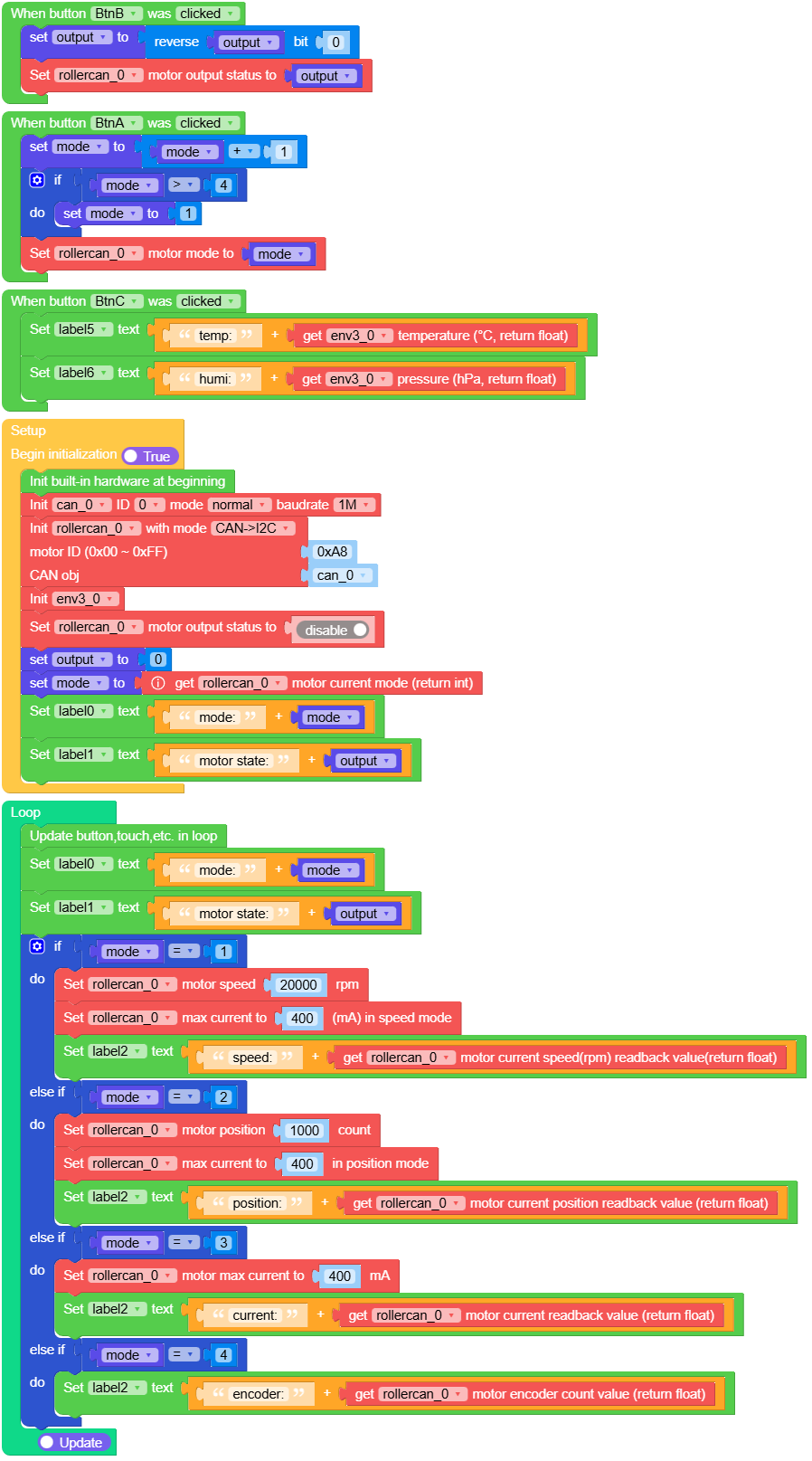
rollercan_cantoi2c_fire_example.m5f2
class RollerCANUnit
构造函数
- class RollerCANUnit(bus, address, mode)
根据通信模式初始化 RollerCANUnit 对象。
- 参数:
bus – I2C/CAN 总线实例。
address – 电机的 CAN 地址。默认为 _ROLLERCAN_CAN_ADDR。
mode – RollerCAN 通信模式。
UIFLOW2:

class RollerBase
构造函数
- class RollerBase
Methods

- RollerBase.get_motor_output_state() bool
获取电机输出状态。
- 返回:
如果电机输出处于激活状态,则为 True;否则为 False。
UIFLOW2:


- RollerBase.get_motor_mode() int
获取电机模式。
- 返回:
当前电机模式。
UIFLOW2:

- RollerBase.set_motor_over_range_protect_state(state) None
设置电机超量程保护状态。
- 参数:
state (int) – 保护状态值(1 表示启用,0 表示禁用)。
UIFLOW2:

- RollerBase.get_motor_over_range_protect_state() bool
获取电机超范围保护状态。
- 返回:
如果启用了保护,则为 True;否则为 False。
UIFLOW2:

- RollerBase.remove_motor_jam_protect() None
设置电机卡滞释放保护。
UIFLOW2:

- RollerBase.get_motor_status() int
获取电机状态。
- 返回:
电机的当前状态。
UIFLOW2:

- RollerBase.get_motor_error_code() int
获取电机错误代码。
- 返回:
电机的当前错误代码。
UIFLOW2:

- RollerBase.set_button_change_mode(state) None
设置按键切换模式。
- 参数:
state (int) – 更改模式状态值(1 为启用,0 为禁用)。
UIFLOW2:

- RollerBase.get_button_change_mode() int
获取按钮切换模式。
- 返回:
当前按钮用于切换模式值。
UIFLOW2:

- RollerBase.set_motor_jam_protect_state(state) None
设置电机卡滞保护启用/禁用。
- 参数:
state (int) – 保护状态值(1 表示启用,0 表示禁用)。
UIFLOW2:

- RollerBase.get_motor_jam_protect_state() bool
获取电机堵转保护状态。
- 返回:
如果启用了防夹保护则为 True,否则为 False。
UIFLOW2:


- RollerBase.get_motor_id() int
获取电机 ID。
- 返回:
当前电机 ID。
UIFLOW2:




- RollerBase.get_rgb_brightness() int
获取 RGB 亮度。
- 返回:
当前 RGB 亮度值。
UIFLOW2:


- RollerBase.get_motor_speed() int
获取电机速度和最大电流设置。
- 返回:
当前电机速度。
UIFLOW2:

- RollerBase.set_speed_max_current(current) None
设置电机速度和最大电流配置。
- 参数:
current (int) – 要设置的最大电流值。
UIFLOW2:

- RollerBase.get_speed_max_current() int
获取电机速度和最大电流设置。
- 返回:
当前最大电流设置。
UIFLOW2:

- RollerBase.get_motor_speed_readback() float
获取电机速度回读值。
- 返回:
电机转速的回读值。
UIFLOW2:

- RollerBase.set_motor_speed_pid(p, i, d) None
设置电机速度 PID。
UIFLOW2:

- RollerBase.get_motor_speed_pid() tuple
获取电机速度 PID。
- 返回:
包含 PID 值的元组。
UIFLOW2:


- RollerBase.get_motor_position() int
获取电机位置和最大电流设置。
- 返回:
当前电机位置。
UIFLOW2:

- RollerBase.set_position_max_current(current) None
设置电机位置和最大电流设置。
- 参数:
current (int) – 要设置的最大电流值。
UIFLOW2:

- RollerBase.get_position_max_current() int
获取电机位置和最大电流设置。
- 返回:
当前最大电流设置。
UIFLOW2:

- RollerBase.get_motor_position_readback() float
获取电机位置反馈值。
- 返回:
电机位置的回读值。
UIFLOW2:

- RollerBase.get_motor_position_pid() tuple
获取电机位置 PID。
- 返回:
一个包含位置 PID 值的元组。
UIFLOW2:

- RollerBase.set_motor_position_pid(p, i, d) None
设置电机位置 PID。
UIFLOW2:

- RollerBase.set_motor_max_current(current) None
设置电机最大电流。
- 参数:
current (int) – 电机的最大电流,在发送前乘以 100。
UIFLOW2:

- RollerBase.get_motor_max_current() int
获取电机最大电流。
- 返回:
电机最大电流,读取后除以 100。
UIFLOW2:

- RollerBase.get_motor_current_readback() float
获取电机电流读回值。
- 返回:
电机电流回读值,读取后除以 100。
UIFLOW2:


- RollerBase.get_rgb_color() tuple
获取系统 RGB 颜色。
- 返回:
RGB 颜色,以元组 (R, G, B) 表示。
UIFLOW2:


- RollerBase.get_rgb_mode() int
获取系统 RGB 模式。
- 返回:
当前的 RGB 模式值。
UIFLOW2:

- RollerBase.get_vin_voltage() int
获取系统 VIN 电压。
- 返回:
系统 VIN 电压值,读取后乘以 10。
UIFLOW2:

- RollerBase.get_temperature_value() int
获取系统温度。
- 返回:
当前系统温度值。
UIFLOW2:


- RollerBase.get_encoder_value() int
获取系统编码器的值。
- 返回:
当前的编码器值。
UIFLOW2:

- RollerBase.save_param_to_flash() None
将电机数据保存到 flash。
UIFLOW2:

- RollerBase.get_firmware_version() int
获取设备固件版本。
- 返回:
当前固件版本。
UIFLOW2:

- RollerBase.set_i2c_address(addr) None
设置 I2C 地址。
- 参数:
addr (int) – 新的 I2C 地址。必须在 0x08 到 0x77 之间。
UIFLOW2:

- RollerBase.get_i2c_address() int
获取当前 I2C 地址。
- 返回:
当前 I2C 地址。
UIFLOW2:

class RollerI2C(RollerBase)
构造函数
Methods
- RollerI2C.read(register, length) bytes
从 I2C 设备上的指定寄存器读取数据。
- 参数:
register – 要读取的寄存器名称。
length – 要读取的字节数。
- 返回:
从设备读取的数据,以 bytes 对象形式返回。
- RollerI2C.write(register, bytes) None
将数据写入 I2C 设备上的指定寄存器。
- 参数:
register – 要写入的寄存器名称。
bytes – 要写入寄存器的数据,格式为 bytes 对象。
class RollerCAN(RollerBase)
构造函数
- class RollerCAN(bus, address, mode)
初始化 RollerCAN 对象。
- 参数:
bus – CAN 总线实例。
address – 电机的 CAN 地址。默认为 _ROLLERCAN_CAN_ADDR。
mode – 用于设置特定运行模式的可选模式。
Methods
- RollerCAN.create_frame(register, option, data, is_read)
创建一个用于发送命令的 CAN 帧。
- 参数:
register – 用于命令识别的寄存器。
option – 用于指定数据的命令选项。
data – 帧的数据负载。
is_read – 该帧是否为读命令。
- RollerCAN.read(register, length)
向指定寄存器发送读命令。
- 参数:
register – 要读取的寄存器地址。
length – 要读取的数据长度。
- RollerCAN.i2c_read(register, length)
通过 CAN 从 I2C 从机读取数据。
- 参数:
register – 要读取的 I2C 寄存器地址。
length – 要读取的字节数。
- RollerCAN.i2c_write(register, data, stop)
通过 CAN 向 I2C 从设备写入数据。
- 参数:
register – 要写入的 I2C 寄存器地址。
data – 要写入的数据。
stop – 是否使用停止条件结束传输。
- RollerCAN.write(register, data)
将数据写入指定寄存器。
- 参数:
register – 要写入的寄存器地址。
data – 要发送到寄存器的数据负载。
- RollerCAN.read_response()
从 CAN 总线读取响应数据。
class RollerCANToI2CBus(RollerBase)
构造函数
- class RollerCANToI2CBus(bus, address, mode)
使用 CAN 总线和地址初始化 RollerCANToI2CBus 对象。
- 参数:
bus – CAN 总线实例。
address – I2C 设备地址,默认为 _ROLLERCAN_I2C_ADDR。
mode – 用于设置特定运行模式的可选模式。
Methods
- RollerCANToI2CBus.writeto_mem(addr, mem_addr, buf)
写入数据到 I2C 存储器寄存器。
- RollerCANToI2CBus.writeto(addr, buf, stop)
将数据分块写入 I2C 设备。