ByteButton Unit
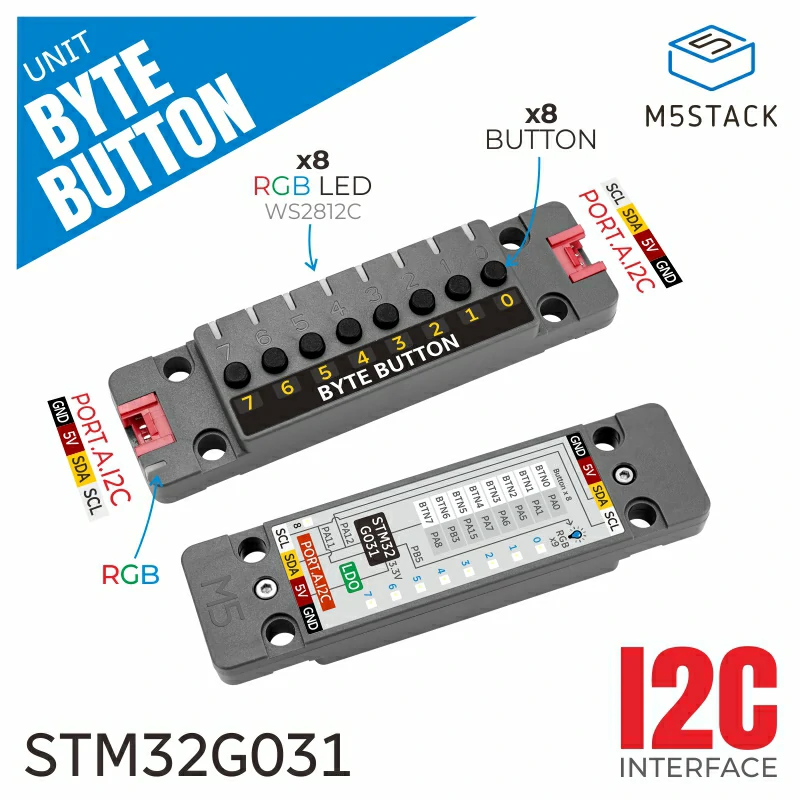
Unit ByteButton 是一款 8 键触摸开关输入 Unit,配备 8 个按键输入和 9 颗 WS2812C RGB LED。它采用 STM32 微控制器并支持 I2C 通信。板载 2 路 Port A 接口,支持级联多个 Unit ByteButton 模块,适用于复杂系统。它可实现按键输入检测与动态灯光反馈,适合用于智能家居控制、游戏设备、教育平台、工业状态显示以及交互式展览等场景。
支持以下产品:
MicroPython 应用示例
 1# SPDX-FileCopyrightText: 2024 M5Stack Technology CO LTD
 2#
 3# SPDX-License-Identifier: MIT
 4import os, sys, io
 5import M5
 6from M5 import *
 7from hardware import *
 8from unit import ByteButtonUnit
 9import time
10
11
12title0 = None
13label0 = None
14label1 = None
15i2c0 = None
16bytebutton_0 = None
17
18
19state_byte = None
20i = None
21
22
23def setup():
24    global title0, label0, label1, i2c0, bytebutton_0, state_byte, i
25
26    M5.begin()
27    Widgets.fillScreen(0x222222)
28    title0 = Widgets.Title(
29        "ByteButton CoreS3 Example", 3, 0xFFFFFF, 0x0000FF, Widgets.FONTS.DejaVu18
30    )
31    label0 = Widgets.Label("label0", 4, 87, 1.0, 0xFFFFFF, 0x222222, Widgets.FONTS.DejaVu18)
32    label1 = Widgets.Label("label1", 5, 125, 1.0, 0xFFFFFF, 0x222222, Widgets.FONTS.DejaVu18)
33
34    i2c0 = I2C(0, scl=Pin(1), sda=Pin(2), freq=100000)
35    bytebutton_0 = ByteButtonUnit(i2c0, 0x47)
36    bytebutton_0.set_led_show_mode(ByteButtonUnit.BYTEBUTTON_LED_USER_MODE)
37    bytebutton_0.set_indicator_color(0x33FF33)
38    for i in range(8):
39        bytebutton_0.set_led_color(i, 0xFF0000, ByteButtonUnit.BYTEBUTTON_LED_USER_MODE)
40        bytebutton_0.set_indicator_brightness(255)
41        time.sleep(0.2)
42        bytebutton_0.set_led_color(i + 1, 0x333300, ByteButtonUnit.BYTEBUTTON_LED_USER_MODE)
43    time.sleep(1)
44    for i in range(7, -1, -1):
45        bytebutton_0.set_led_color(i, 0x66FF99, ByteButtonUnit.BYTEBUTTON_LED_USER_MODE)
46        time.sleep(0.2)
47    time.sleep(1)
48    bytebutton_0.set_led_show_mode(ByteButtonUnit.BYTEBUTTON_LED_SYS_MODE)
49    for i in range(8):
50        bytebutton_0.set_led_color(i, 0xFFFFFF, ByteButtonUnit.BYTEBUTTON_LED_SYS_MODE, False)
51        bytebutton_0.set_led_color(i, 0xFF0000, ByteButtonUnit.BYTEBUTTON_LED_SYS_MODE, True)
52
53
54def loop():
55    global title0, label0, label1, i2c0, bytebutton_0, state_byte, i
56    M5.update()
57    state_byte = bytebutton_0.get_byte_button_status()
58    label0.setText(
59        str(
60            [
61                (str("B0:") + str(((state_byte >> 0) & 0x01))),
62                (str("B1:") + str(((state_byte >> 1) & 0x01))),
63                (str("B2:") + str(((state_byte >> 2) & 0x01))),
64                (str("B3:") + str(((state_byte >> 3) & 0x01))),
65            ]
66        )
67    )
68    label1.setText(
69        str(
70            [
71                (str("B4:") + str(((state_byte >> 4) & 0x01))),
72                (str("B5:") + str(((state_byte >> 5) & 0x01))),
73                (str("B6:") + str(((state_byte >> 6) & 0x01))),
74                (str("B7:") + str(((state_byte >> 7) & 0x01))),
75            ]
76        )
77    )
78
79
80if __name__ == "__main__":
81    try:
82        setup()
83        while True:
84            loop()
85    except (Exception, KeyboardInterrupt) as e:
86        try:
87            from utility import print_error_msg
88
89            print_error_msg(e)
90        except ImportError:
91            print("please update to latest firmware")
UiFlow2 应用示例
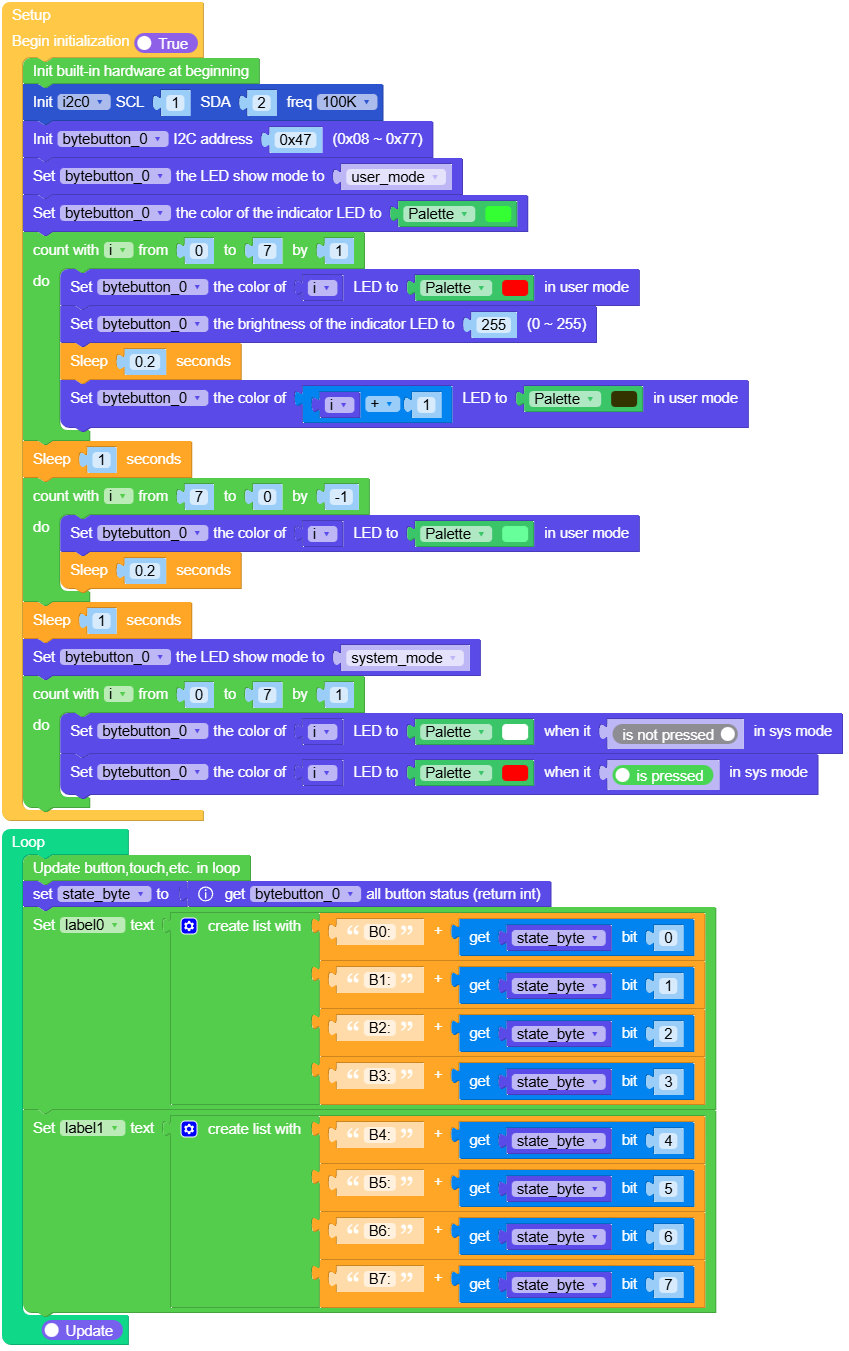
bytebutton_cores3_example.m5f2
“”

Methods



- ByteButtonUnit.set_led_show_mode(mode)
设置 LED 显示模式。
- 参数:
mode (int) – 要设置的 LED 显示模式。可选项: -
BYTEBUTTON_LED_USER_MODE:0 -BYTEBUTTON_LED_SYS_MODE:1
UIFLOW2:

- ByteButtonUnit.set_led_brightness(num, brightness)
设置指定 LED 的亮度。
UIFLOW2:


- ByteButtonUnit.set_led_color(num, color, led_show_mode, btn_is_pressed)
设置指定 LED 的颜色。
- 参数:
UIFLOW2:




- ByteButtonUnit.set_indicator_brightness(brightness)
设置指示 LED 的亮度。
- 参数:
brightness (int) – 亮度级别(0-255)。
UIFLOW2:


- ByteButtonUnit.set_indicator_color(color)
以 RGB888 格式设置指示灯 LED 的颜色。
- 参数:
color (int) – 要设置的 RGB888 颜色值。
UIFLOW2:


- ByteButtonUnit.rgb888_to_rgb233(color)
将 RGB888 颜色值转换为 RGB233 格式。
- 参数:
color (int) – RGB888 颜色值,以 32 位整数表示。
- ByteButtonUnit.set_rgb233(num, color)
设置指定 LED 的颜色(RGB233 格式)。
- ByteButtonUnit.set_irq_enable(enable)
启用或禁用 IRQ 功能。
- 参数:
enable (bool) – 是否启用 (True) 或禁用 (False) IRQ。
- ByteButtonUnit.get_irq_enable()
获取当前 IRQ 使能状态。
- ByteButtonUnit.save_to_flash()
将当前用户设置保存到 flash。
UIFLOW2:



