Accel Unit
这是 Accel Unit 的驱动库,用于获取加速度传感器的数据,并支持运动检测。
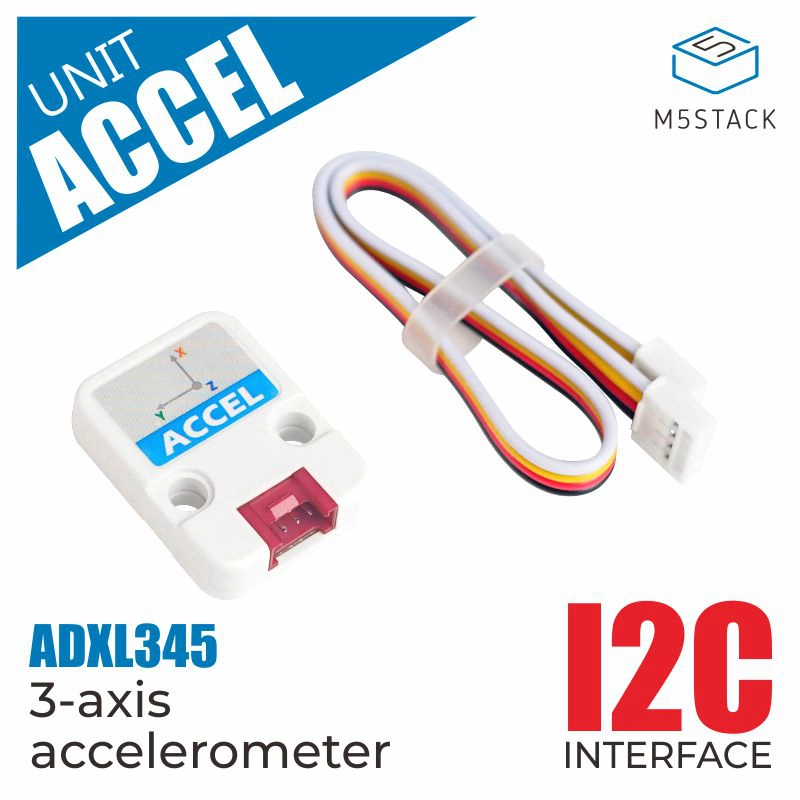
支持以下产品:
UiFlow2 应用示例
获取加速度计数值
在 UiFlow2 中打开 stickcplus2_unit_accel_example.m5f2 项目。
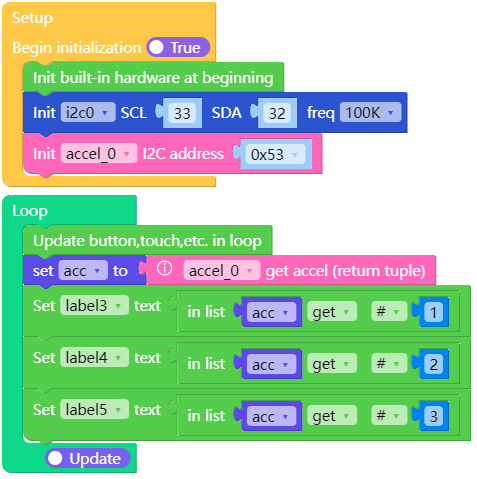
该示例获取 Accel Unit 的加速度值,并将其显示在屏幕上。
UiFlow2 代码块:
示例输出:
None
MicroPython 应用示例
获取加速度计数值
该示例获取 Accel Unit 的加速度值,并将其显示在屏幕上。
MicroPython 代码块:
 1# SPDX-FileCopyrightText: 2024 M5Stack Technology CO LTD
 2#
 3# SPDX-License-Identifier: MIT
 4
 5import os, sys, io
 6import M5
 7from M5 import *
 8from hardware import *
 9from unit import AccelUnit
10
11
12label0 = None
13label1 = None
14label2 = None
15title0 = None
16label3 = None
17label4 = None
18label5 = None
19i2c0 = None
20accel_0 = None
21
22
23acc = None
24
25
26def setup():
27    global label0, label1, label2, title0, label3, label4, label5, i2c0, accel_0, acc
28
29    M5.begin()
30    label0 = Widgets.Label("x:", 4, 48, 1.0, 0xFFFFFF, 0x222222, Widgets.FONTS.DejaVu18)
31    label1 = Widgets.Label("y:", 4, 88, 1.0, 0xFFFFFF, 0x222222, Widgets.FONTS.DejaVu18)
32    label2 = Widgets.Label("z:", 4, 128, 1.0, 0xFFFFFF, 0x222222, Widgets.FONTS.DejaVu18)
33    title0 = Widgets.Title("ACCEL UNIT", 3, 0xFFFFFF, 0x0000FF, Widgets.FONTS.DejaVu18)
34    label3 = Widgets.Label("label3", 24, 48, 1.0, 0xFFFFFF, 0x222222, Widgets.FONTS.DejaVu18)
35    label4 = Widgets.Label("label4", 24, 88, 1.0, 0xFFFFFF, 0x222222, Widgets.FONTS.DejaVu18)
36    label5 = Widgets.Label("label5", 24, 128, 1.0, 0xFFFFFF, 0x222222, Widgets.FONTS.DejaVu18)
37
38    i2c0 = I2C(0, scl=Pin(33), sda=Pin(32), freq=100000)
39    accel_0 = AccelUnit(i2c0, 0x53)
40
41
42def loop():
43    global label0, label1, label2, title0, label3, label4, label5, i2c0, accel_0, acc
44    M5.update()
45    acc = accel_0.get_accel()
46    label3.setText(str(acc[0]))
47    label4.setText(str(acc[1]))
48    label5.setText(str(acc[2]))
49
50
51if __name__ == "__main__":
52    try:
53        setup()
54        while True:
55            loop()
56    except (Exception, KeyboardInterrupt) as e:
57        try:
58            from utility import print_error_msg
59
60            print_error_msg(e)
61        except ImportError:
62            print("please update to latest firmware")
示例输出:
None
API参考
AccelUnit
- class unit.accel.AccelUnit(i2c, address=83)
基类:
ADXL345创建一个 AccelUnit 对象。
UiFlow2 代码块:

MicroPython 代码块:
from hardware import I2C
from unit import AccelUnit

acceli2c0 = I2C(0, scl=Pin(1), sda=Pin(2), freq=100000)
accel_0 = AccelUnit(i2c0)
- get_accel()
返回 x、y、z 加速度值,以 \(m / s ^ 2\) 为单位的 3 元组。
UiFlow2 代码块:

MicroPython 代码块:
accel_0.get_accel()
- enable_motion_detection(*, threshold=18)
活动检测参数。
- 参数:
threshold (int) – 加速度在任意轴上必须超过该值,才会被注册为活跃。比例因子为 62.5 mg/LSB。
- 返回类型:
None
如果您希望自行设置它们而不是使用默认值,则必须使用关键字参数:
accelerometer.enable_motion_detection(threshold=20)
UiFlow2 代码块:


MicroPython 代码块:
accel_0.enable_motion_detection(threshold=18)
- disable_motion_detection()
禁用运动检测。
UiFlow2 代码块:

MicroPython 代码块:
accel_0.disable_motion_detection()
- 返回类型:
None
- get_data_rate()
获取传感器的数据速率。
- 返回:
传感器的数据速率。
- 返回类型:
速率选项为:
0:0.1 Hz1:0.20 Hz2:0.39 Hz
3:0.78 Hz4:1.56 Hz5:3.13 Hz6:6.25 Hz7:12.5 Hz8:25 Hz9:50 Hz10:100 Hz11:200 Hz400 Hz
13:800 Hz14:1600 Hz15:3200 Hz
UiFlow2 代码块:

MicroPython 代码块:
accel_0.get_data_rate()
- set_data_rate(rate)
设置传感器的数据速率。
- 参数:
rate (int) – 传感器的数据速率。
- 返回类型:
None
速率选项为:
0:0.1 Hz1:0.20 Hz2:0.39 Hz
3:0.78 Hz4:1.56 Hz5:3.13 Hz6:6.25 Hz7:12.5 Hz8:25 Hz9:50 Hz10:100 Hz11:200 Hz400 Hz
13:800 Hz14:1600 Hz15:3200 Hz
UiFlow2 代码块:

MicroPython 代码块:
accel_0.set_data_rate(accel_0.RATE_3200_HZ)
- get_range()
获取传感器的测量范围。
- 返回:
传感器的测量范围。
- 返回类型:
范围选项包括:
0:2G4G
2:8G16G
UiFlow2 代码块:

MicroPython 代码块:
accel_0.get_range()
- set_range(range)
传感器的测量范围。
- 参数:
range (int) – 传感器的测量范围。
- 返回类型:
None
范围选项包括:
0:2G4G
2:8G16G
UiFlow2 代码块:

MicroPython 代码块:
accel_0.set_range(accel_0.RANGE_2_G)
- is_tap()
Returns True if a tap has been detected.
- 返回:
如果检测到点击,则为 True。
- 返回类型:
UiFlow2 代码块:

MicroPython 代码块:
accel_0.is_tap()
- is_motion()
检测到运动时返回 True。
- 返回:
如果检测到运动,则为 True。
- 返回类型:
- UiFlow2 代码块:

MicroPython 代码块:
accel_0.is_motion()
- is_freefall()
Returns True if freefall has been detected.
- 返回:
如果检测到自由落体,则为 True。
- 返回类型:
UiFlow2 代码块:

MicroPython 代码块:
accel_0.is_freefall()
- enable_freefall_detection(*, threshold=10, time=25)
自由落体检测参数:
- 参数:
- 返回类型:
None
如果您希望自行设置它们,而不是使用默认值,则必须使用关键字参数:
accelerometer.enable_freefall_detection(time=30)
UiFlow2 代码块:


MicroPython 代码块:
accel_0.enable_freefall_detection()
- disable_freefall_detection()
禁用自由落体检测。
UiFlow2 代码块:

MicroPython 代码块:
accel_0.disable_freefall_detection()
- 返回类型:
None
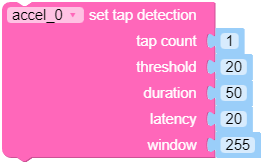
- enable_tap_detection(tap_count=1, threshold=20, duration=50, latency=20, window=255)
轻触检测参数。
- 参数:
tap_count (int) – 1 用于仅检测单击,2 用于仅检测双击。
threshold (int) – 轻触检测的阈值。比例因子为 62.5 mg/LSB。数值越大,检测灵敏度越低。
duration (int) – 这将限制高于
threshold的脉冲持续时间。任何超过duration的脉冲都不会被识别为一次轻触。缩放因子为 625 µs/LSB。latency (int) – (仅双击)在初始脉冲低于
threshold后,到开始用于检测第二个脉冲的时间窗口之前的时长。比例因子为 1.25 ms/LSB。window (int) – (仅双击)用于检测第二次点击的时间窗口长度。比例因子为 1.25 ms/LSB。
- 返回类型:
None
如果您希望自行设置它们,而不是使用默认值,则必须使用关键字参数:
accelerometer.enable_tap_detection(duration=30, threshold=25)
UiFlow2 代码块:

MicroPython 代码块:
accel_0.enable_tap_detection(tap_count=1, threshold=20, duration=50, latency=20, window=255)
- disable_tap_detection()
禁用点击检测。
UiFlow2 代码块:

MicroPython 代码块:
accel_0.disable_tap_detection()
- 返回类型:
None
ADXL345
- class unit.accel.ADXL345(i2c, address=micropython.const)
基类:
objectADXL345 三轴加速度计驱动程序。
快速入门:导入并使用设备
下面是使用
ADXL345类的示例。首先,你需要导入用于使用该传感器的库:import machine import adxl34x
完成后,你可以定义你的 I2C 对象,并定义你的传感器对象:
i2c = machine.I2C(0)  # uses board default SDA and SCL pins
accelerometer = adxl34x.ADXL343(i2c)
现在你可以访问
acceleration属性:acceleration = accelerometer.acceleration
- property events: dict[str, bool]
events将返回一个字典,其中包含每个已启用事件类型对应的键。可能的键为:
Key
Description
tap
如果最近检测到一次轻触,则为 True。是检测单击还是双击,由 enable_tap_detection 的 tap 参数决定。
motion
如果传感器检测到加速度超过通过 enable_motion_detection 设置的阈值,则为 True。
freefall
如果传感器处于自由落体状态,则为 True。参数在使用 enable_freefall_detection 启用时设置。
- enable_motion_detection(*, threshold=18)
活动检测参数。
- 参数:
threshold (int) – 加速度在任意轴上必须超过该值,才会被注册为活跃。比例因子为 62.5 mg/LSB。
如果您希望自行设置它们,而不是使用默认值,则必须使用关键字参数:
accelerometer.enable_motion_detection(threshold=20)
- disable_motion_detection()
禁用运动检测。
- 返回类型:
None
- enable_freefall_detection(*, threshold=10, time=25)
自由落体检测参数:
- 参数:
- 返回类型:
None
如果您希望自行设置它们,而不是使用默认值,则必须使用关键字参数:
accelerometer.enable_freefall_detection(time=30)
- disable_freefall_detection()
禁用自由落体检测。
- 返回类型:
None
- enable_tap_detection(*, tap_count=1, threshold=20, duration=50, latency=20, window=255)
轻触检测参数。
- 参数:
tap_count (int) – 1 用于仅检测单击,2 用于仅检测双击。
threshold (int) – 轻触检测的阈值。比例因子为 62.5 mg/LSB。数值越大,检测灵敏度越低。
duration (int) – 这将限制高于
threshold的脉冲持续时间。任何超过duration的脉冲都不会被识别为一次轻触。缩放因子为 625 µs/LSB。latency (int) – (仅双击)在初始脉冲低于
threshold后,到开始用于检测第二个脉冲的时间窗口之前的时长。比例因子为 1.25 ms/LSB。window (int) – (仅双击)用于检测第二次点击的时间窗口长度。比例因子为 1.25 ms/LSB。
如果您希望自行设置它们,而不是使用默认值,则必须使用关键字参数:
accelerometer.enable_tap_detection(duration=30, threshold=25)
- disable_tap_detection()
禁用点击检测。
- 返回类型:
None