Encoder8 Unit
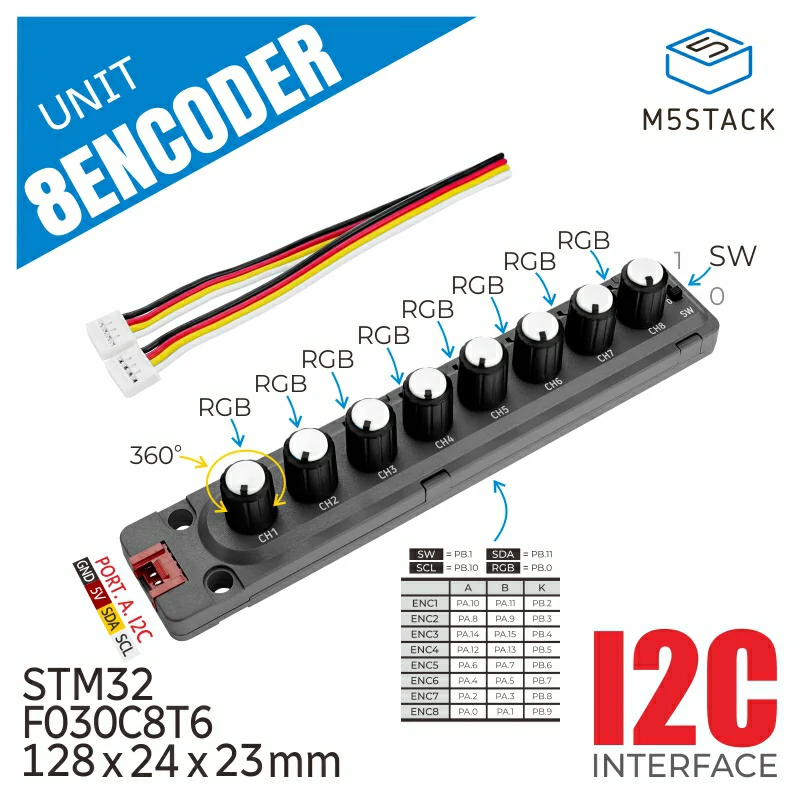
UNIT 8Encoder 是一套包含 8 个旋转编码器的输入单元,内部使用 STM32 单片机作为采集与通信处理器,并通过 I2C 通信接口与上位机连接。每个旋转编码器对应 1 个 RGB LED 灯,编码器除可左右旋转外,还支持径向按压;另外还包含 1 个物理拨动开关及其对应的 RGB LED 灯,并集成 5V->3V3 DCDC 电路。
支持以下产品:
MicroPython 应用示例
 1# SPDX-FileCopyrightText: 2024 M5Stack Technology CO LTD
 2#
 3# SPDX-License-Identifier: MIT
 4
 5import os, sys, io
 6import M5
 7from M5 import *
 8from hardware import *
 9from unit import Encoder8Unit
10
11
12label0 = None
13title0 = None
14label1 = None
15label2 = None
16i2c0 = None
17encoder8_0 = None
18
19
20def setup():
21    global label0, title0, label1, label2, i2c0, encoder8_0
22
23    M5.begin()
24    Widgets.fillScreen(0x222222)
25    label0 = Widgets.Label("label0", 2, 72, 1.0, 0xFFFFFF, 0x222222, Widgets.FONTS.DejaVu18)
26    title0 = Widgets.Title(
27        "8EncoderUnit CoreS3 Example", 3, 0xFFFFFF, 0x0000FF, Widgets.FONTS.DejaVu18
28    )
29    label1 = Widgets.Label("label1", 2, 116, 1.0, 0xFFFFFF, 0x222222, Widgets.FONTS.DejaVu18)
30    label2 = Widgets.Label("label2", 2, 161, 1.0, 0xFFFFFF, 0x222222, Widgets.FONTS.DejaVu18)
31
32    i2c0 = I2C(0, scl=Pin(1), sda=Pin(2), freq=100000)
33    encoder8_0 = Encoder8Unit(i2c0, 0x41)
34    encoder8_0.set_led_rgb_from(1, 8, 0x33FF33)
35    encoder8_0.set_counter_value(1, 0)
36
37
38def loop():
39    global label0, title0, label1, label2, i2c0, encoder8_0
40    M5.update()
41    label0.setText(str((str("CH1 Counter Value:") + str((encoder8_0.get_counter_value(1))))))
42    label1.setText(str((str("CH1 Button State:") + str((encoder8_0.get_button_status(1))))))
43    label2.setText(str((str("Switch State:") + str((encoder8_0.get_switch_status())))))
44
45
46if __name__ == "__main__":
47    try:
48        setup()
49        while True:
50            loop()
51    except (Exception, KeyboardInterrupt) as e:
52        try:
53            from utility import print_error_msg
54
55            print_error_msg(e)
56        except ImportError:
57            print("please update to latest firmware")
UiFlow2 应用示例

class Encoder8Unit
“”

Methods
- Encoder8Unit.init_i2c_address(slave_addr)
设置或更改 Encoder8 Unit 的 I2C 地址。
- 参数:
slave_addr (int) – 要设置的新 I2C 地址。
- Encoder8Unit.available()
检查 Encoder8 Unit 是否已连接到 I2C 总线上。
- Encoder8Unit.get_counter_value(channel)
获取指定通道的当前计数器值。
- 参数:
channel (int) – 编码器通道(1-8)。默认值为 1。
- 返回:
当前计数器值(整数)。
UiFlow2

- Encoder8Unit.set_counter_value(channel, value)
设置指定通道的计数器值。
UiFlow2

- Encoder8Unit.get_increment_value(channel)
获取指定通道的增量值。
- 参数:
channel (int) – 编码器通道(1-8)。默认值为 1。
- 返回:
递增值(整数)。
UiFlow2

- Encoder8Unit.reset_counter_value(channel)
重置指定通道的计数器值。
- 参数:
channel (int) – 编码器通道(1-8)。默认值为 1。
UiFlow2

- Encoder8Unit.get_button_status(channel)
获取指定通道的按键状态。
- 参数:
channel (int) – 编码器通道(1-8)。默认值为 1。
- 返回:
如果按钮被按下则为 True,否则为 False。
UiFlow2

- Encoder8Unit.get_switch_status()
获取全局开关的状态。
- 返回:
如果开关处于开启状态,则为 True;否则为 False。
UiFlow2

- Encoder8Unit.set_led_rgb(channel, rgb)
设置指定通道的 LED 的 RGB 颜色。
UiFlow2

- Encoder8Unit.set_led_rgb_from(begin, end, rgb)
为一组通道范围内的 LED 设置 RGB 颜色。
UiFlow2

- Encoder8Unit.get_device_status(mode)
获取设备固件版本或 I2C 地址。
- 参数:
mode (int) – 读取的模式。0xFE 表示固件版本,0xFF 表示 I2C 地址。默认值为 0xFE。
- 返回:
从指定的模式寄存器读取的值。
UiFlow2


- Encoder8Unit.write_reg_data(reg, byte_lst)
将数据写入指定寄存器。
- 参数:
reg – 要写入的寄存器地址。
byte_lst – 要写入寄存器的字节列表。
- Encoder8Unit.deinit()
反初始化 Encoder8 Unit 实例。