秤单位
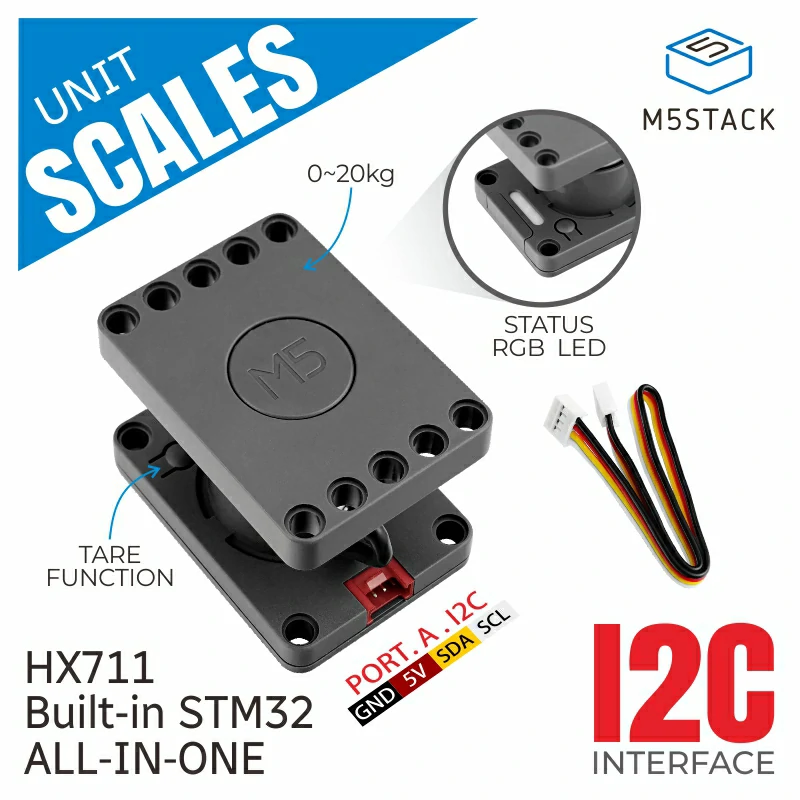
UNIT Scales 是一款高精度、低成本的 I2C 端口称重传感器,总称重范围为 20 kg。采用 STM32F030 作为控制器、HX711 作为采样芯片,并配备 20 kg 称重传感器。带有去皮(tare)按键和可编程 RGB LED。该 Unit 为用户提供高度集成的称重解决方案,适用于称重、物品计数、物品移动检测等应用场景。
支持以下产品:
MicroPython 应用示例
 1# SPDX-FileCopyrightText: 2024 M5Stack Technology CO LTD
 2#
 3# SPDX-License-Identifier: MIT
 4
 5import os, sys, io
 6import M5
 7from M5 import *
 8from hardware import *
 9from unit import ScalesUnit
10
11
12title1 = None
13label0 = None
14label1 = None
15i2c0 = None
16scales_0 = None
17
18
19def setup():
20    global title1, label0, label1, i2c0, scales_0
21
22    M5.begin()
23    Widgets.fillScreen(0x222222)
24    title1 = Widgets.Title(
25        "ScaleUnit CoreS3 Example", 3, 0xFFFFFF, 0x0000FF, Widgets.FONTS.DejaVu18
26    )
27    label0 = Widgets.Label("label0", 3, 89, 1.0, 0xFFFFFF, 0x222222, Widgets.FONTS.DejaVu18)
28    label1 = Widgets.Label("label1", 3, 132, 1.0, 0xFFFFFF, 0x222222, Widgets.FONTS.DejaVu18)
29
30    i2c0 = I2C(0, scl=Pin(1), sda=Pin(2), freq=100000)
31    scales_0 = ScalesUnit(i2c0, 0x26)
32    scales_0.set_rgb_led(0x6600CC)
33
34
35def loop():
36    global title1, label0, label1, i2c0, scales_0
37    M5.update()
38    if not (scales_0.get_button_status(2)):
39        scales_0.set_current_raw_offset()
40        label0.setText(str("Reset to zero"))
41    else:
42        label0.setText(str("Press Btn to reset"))
43    label1.setText(
44        str((str("Current weight:") + str((str((scales_0.get_scale_value(1))) + str("g")))))
45    )
46
47
48if __name__ == "__main__":
49    try:
50        setup()
51        while True:
52            loop()
53    except (Exception, KeyboardInterrupt) as e:
54        try:
55            from utility import print_error_msg
56
57            print_error_msg(e)
58        except ImportError:
59            print("please update to latest firmware")
UiFlow2 应用示例

class ScalesUnit
Constructors
- class ScalesUnit(i2c, address)
使用 I2C 通信并可选指定 I2C 地址来初始化 ScalesUnit。
- 参数:
i2c – 用于通信的 I2C 或 PAHUBUnit 实例。
address – 用于称重单元的 I2C 地址,或包含多个地址的 list/tuple。
UiFlow2

Methods
- ScalesUnit.get_button_status(status)
获取称重单元上按钮的状态。
- 参数:
status – 按钮状态标识符。
- 返回:
指定按钮的当前状态。
UiFlow2

- ScalesUnit.set_button_offset(enable)
启用或禁用 scales unit 的按键偏移。
- 参数:
enable – 偏移使能值(1 表示启用,0 表示禁用)。
UiFlow2

- ScalesUnit.set_rgbled_sync(control)
设置 RGB LED 的同步模式。
- 参数:
control – 用于同步的控制值。
UiFlow2

- ScalesUnit.get_rgbled_sync()
获取 RGB LED 的同步模式。
- 返回:
同步模式的值。
- ScalesUnit.set_rgb_led(rgb)
设置 LED 的 RGB 值。
- 参数:
rgb – RGB 值,以 24 位整数表示。
UiFlow2

- ScalesUnit.get_rgb_led()
获取 LED 当前的 RGB 值。
- 返回:
包含 RGB 值的列表。
UiFlow2

- ScalesUnit.get_scale_value(scale)
获取指定比例类型的比例值。
- 参数:
scale – 缩放类型标识符。
- 返回:
缩放值(整数)。
UiFlow2

- ScalesUnit.set_raw_offset(value)
为称重单元设置原始偏移量。
- 参数:
value – 原始偏移量值,类型为整数。
UiFlow2

- ScalesUnit.set_current_raw_offset()
设置称重单位的当前原始偏移值。
UiFlow2

- ScalesUnit.set_calibration_zero()
校准秤的单位为零重量。
UiFlow2

- ScalesUnit.set_calibration_load(gram)
使用指定重量对 scales unit 进行校准。
- 参数:
gram – 用于校准的重量值(单位:克)。
UiFlow2

- ScalesUnit.get_device_inform(mode)
获取指定模式的设备信息。
- 参数:
mode – 所请求信息的模式标识符。
- 返回:
设备信息值。
UiFlow2

- ScalesUnit.set_i2c_address(addr)
更改称重单元的 I2C 地址。
- 参数:
addr – 新的 I2C 地址值。
UiFlow2
