LaserRX Unit
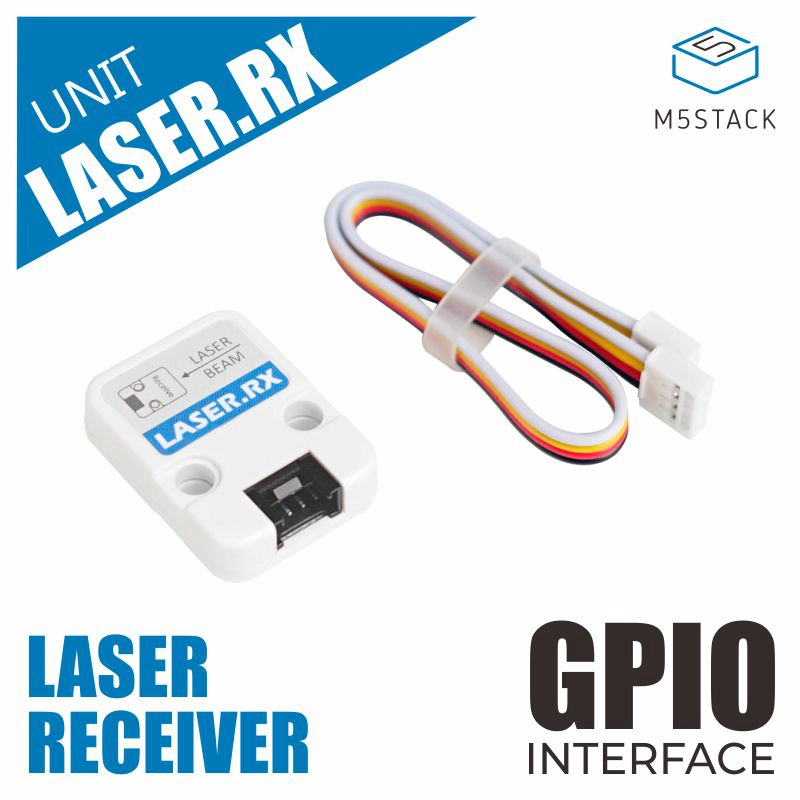
LASER.RX 是 M5Units 中的一种通信设备,即激光接收器。它主要由激光三极管构成。激光通信设备是通过大气进行的无线连接,其工作方式类似于光纤链路,不同之处在于光束是通过自由空间传输的。虽然发射器和接收器必须满足视距条件,但其优势在于无需广播许可,也不需要铺设地下电缆。激光通信系统易于部署,因为它们成本低、体积小、功耗低,并且不需要进行任何无线电干扰研究。需要两束平行光束,一束用于发射,一束用于接收。因此我们还配套提供了 LASER.TX。
支持以下产品:
LaserTX 示例:
 1# SPDX-FileCopyrightText: 2024 M5Stack Technology CO LTD
 2#
 3# SPDX-License-Identifier: MIT
 4
 5import os, sys, io
 6import M5
 7from M5 import *
 8from unit import LaserTXUnit
 9import time
10
11
12title1 = None
13label0 = None
14laser_tx_0 = None
15
16
17def setup():
18    global title1, label0, laser_tx_0
19
20    M5.begin()
21    Widgets.fillScreen(0x222222)
22    title1 = Widgets.Title(
23        "LaserTXUnit CoreS3 Example", 3, 0xFFFFFF, 0x0000FF, Widgets.FONTS.DejaVu18
24    )
25    label0 = Widgets.Label("label0", 2, 116, 1.0, 0xFFFFFF, 0x222222, Widgets.FONTS.DejaVu18)
26
27    laser_tx_0 = LaserTXUnit((1, 2), mode=2, id=1)
28    laser_tx_0.init_uart(9600, 8, None, 1)
29
30
31def loop():
32    global title1, label0, laser_tx_0
33    M5.update()
34    if M5.Touch.getCount():
35        laser_tx_0.write("Hello")
36        label0.setText(str("Write Message"))
37        time.sleep(1)
38    else:
39        label0.setText(str("Wait to write Message"))
40
41
42if __name__ == "__main__":
43    try:
44        setup()
45        while True:
46            loop()
47    except (Exception, KeyboardInterrupt) as e:
48        try:
49            from utility import print_error_msg
50
51            print_error_msg(e)
52        except ImportError:
53            print("please update to latest firmware")
LaserRX 示例:
 1# SPDX-FileCopyrightText: 2024 M5Stack Technology CO LTD
 2#
 3# SPDX-License-Identifier: MIT
 4
 5import os, sys, io
 6import M5
 7from M5 import *
 8from unit import LaserRXUnit
 9
10
11title0 = None
12laser_rx_0 = None
13
14
15def setup():
16    global title0, laser_rx_0
17
18    M5.begin()
19    Widgets.fillScreen(0x222222)
20    title0 = Widgets.Title(
21        "LaserRXUnit Core2 Example", 3, 0xFFFFFF, 0x0000FF, Widgets.FONTS.DejaVu18
22    )
23
24    laser_rx_0 = LaserRXUnit((33, 32), mode=2, id=1)
25    laser_rx_0.init_uart(9600, 8, None, 1)
26
27
28def loop():
29    global title0, laser_rx_0
30    M5.update()
31    if laser_rx_0.any():
32        print(laser_rx_0.read())
33
34
35if __name__ == "__main__":
36    try:
37        setup()
38        while True:
39            loop()
40    except (Exception, KeyboardInterrupt) as e:
41        try:
42            from utility import print_error_msg
43
44            print_error_msg(e)
45        except ImportError:
46            print("please update to latest firmware")
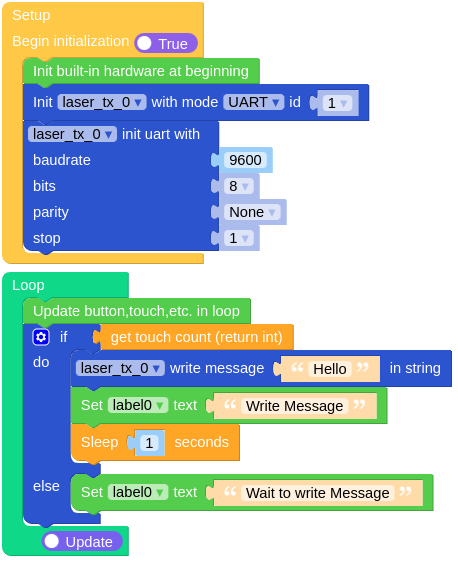
LaserTX UiFlow2 应用示例:
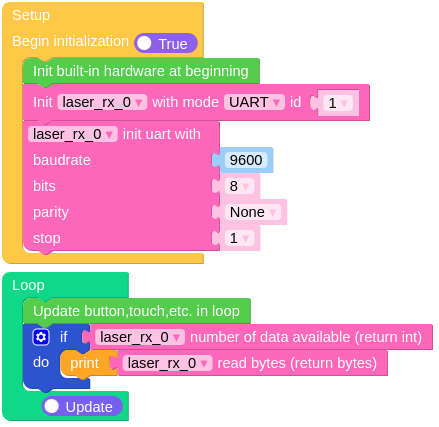
LaserRX UiFlow2 应用示例:
class LaserRXUnit
Constructors

Methods
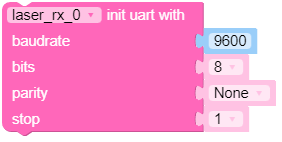
- LaserRXUnit.init_uart(baudrate, bits, parity, stop)
使用指定参数初始化 UART 通信。
- 参数:
UiFlow2
- LaserRXUnit.read(byte)
从 UART 读取数据。可选指定要读取的字节数。
- 参数:
byte – 要读取的字节数。如果为 None,则读取所有可用数据。
- 返回:
从 UART 读取到的数据;如果没有可用数据,则返回 None。
UiFlow2

- LaserRXUnit.readline()
从 UART 读取单行数据。
- 返回:
从 UART 读取的一行数据;如果没有可用数据,则返回 None。
- LaserRXUnit.any()
检查 UART 缓冲区中是否有可用数据。
- 返回:
如果数据可用则为 True;否则为 False。
UiFlow2

- LaserRXUnit.value()
在使用 PIN_MODE 时获取输入引脚的当前值。
- 返回:
引脚的值(0 或 1)。