RTC Unit
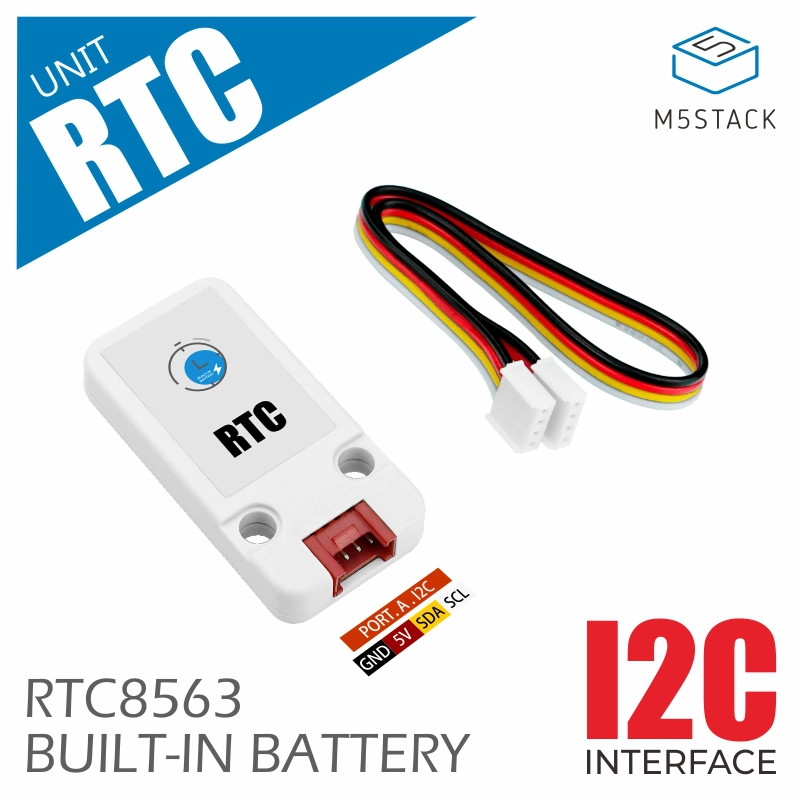
支持以下产品:
UiFlow2 应用示例
获取实时时间
在 UiFlow2 中打开 rtc_core2_example.m5f2 项目。
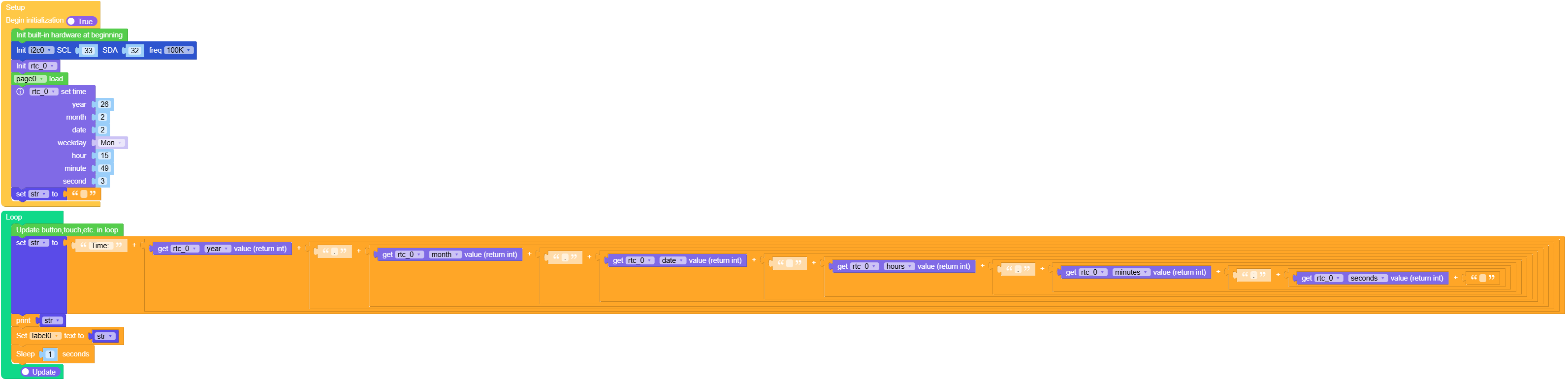
该示例在屏幕和串口上显示实时时间。
UiFlow2 代码块:
示例输出:
None
MicroPython 应用示例
获取实时时间
该示例在屏幕和串口上显示实时时间。
MicroPython 代码块:
  1# SPDX-FileCopyrightText: 2026 M5Stack Technology CO LTD
  2#
  3# SPDX-License-Identifier: MIT
  4
  5import os, sys, io
  6import M5
  7from M5 import *
  8import m5ui
  9import lvgl as lv
 10from hardware import Pin
 11from hardware import I2C
 12from unit import RTC8563Unit
 13import time
 14
 15
 16page0 = None
 17label0 = None
 18i2c0 = None
 19rtc_0 = None
 20
 21
 22str2 = None
 23
 24
 25def setup():
 26    global page0, label0, i2c0, rtc_0, str2
 27
 28    M5.begin()
 29    Widgets.setRotation(1)
 30    m5ui.init()
 31    page0 = m5ui.M5Page(bg_c=0xFFFFFF)
 32    label0 = m5ui.M5Label(
 33        "label0",
 34        x=3,
 35        y=99,
 36        text_c=0x000000,
 37        bg_c=0xFFFFFF,
 38        bg_opa=0,
 39        font=lv.font_montserrat_14,
 40        parent=page0,
 41    )
 42
 43    i2c0 = I2C(0, scl=Pin(33), sda=Pin(32), freq=100000)
 44    rtc_0 = RTC8563Unit(i2c0)
 45    page0.screen_load()
 46    rtc_0.set_date_time(3, 49, 15, 0, 2, 2, 26)
 47    str2 = ""
 48
 49
 50def loop():
 51    global page0, label0, i2c0, rtc_0, str2
 52    M5.update()
 53    str2 = str("Time: ") + str(
 54        (
 55            str((rtc_0.get_date_time(6)))
 56            + str(
 57                (
 58                    str(".")
 59                    + str(
 60                        (
 61                            str((rtc_0.get_date_time(5)))
 62                            + str(
 63                                (
 64                                    str(".")
 65                                    + str(
 66                                        (
 67                                            str((rtc_0.get_date_time(4)))
 68                                            + str(
 69                                                (
 70                                                    str(" ")
 71                                                    + str(
 72                                                        (
 73                                                            str((rtc_0.get_date_time(2)))
 74                                                            + str(
 75                                                                (
 76                                                                    str(":")
 77                                                                    + str(
 78                                                                        (
 79                                                                            str(
 80                                                                                (
 81                                                                                    rtc_0.get_date_time(
 82                                                                                        1
 83                                                                                    )
 84                                                                                )
 85                                                                            )
 86                                                                            + str(
 87                                                                                (
 88                                                                                    str(":")
 89                                                                                    + str(
 90                                                                                        (
 91                                                                                            str(
 92                                                                                                (
 93                                                                                                    rtc_0.get_date_time(
 94                                                                                                        0
 95                                                                                                    )
 96                                                                                                )
 97                                                                                            )
 98                                                                                            + str(
 99                                                                                                ""
100                                                                                            )
101                                                                                        )
102                                                                                    )
103                                                                                )
104                                                                            )
105                                                                        )
106                                                                    )
107                                                                )
108                                                            )
109                                                        )
110                                                    )
111                                                )
112                                            )
113                                        )
114                                    )
115                                )
116                            )
117                        )
118                    )
119                )
120            )
121        )
122    )
123    print(str2)
124    label0.set_text(str(str2))
125    time.sleep(1)
126
127
128if __name__ == "__main__":
129    try:
130        setup()
131        while True:
132            loop()
133    except (Exception, KeyboardInterrupt) as e:
134        try:
135            m5ui.deinit()
136            from utility import print_error_msg
137
138            print_error_msg(e)
139        except ImportError:
140            print("please update to latest firmware")
示例输出:
None
API参考
Class RTC8563Unit
- class unit.rtc8563.RTC8563Unit(i2c, address=micropython.const)
基类:
object创建 RTC8563Unit 对象。
UiFlow2 代码块:

MicroPython 代码块:
from machine import I2C, Pin
from unit import RTC8563Unit

i2c0 = I2C(0, scl=Pin(26), sda=Pin(32), freq=400000)
rtc_0 = RTC8563Unit(i2c0)
- get_date_time(select=0)
获取特定的日期或时间组件。
UiFlow2 代码块:

MicroPython 代码块:
rtc_0.get_date_time(0) # Get seconds
- set_date_time(seconds=None, minutes=None, hours=None, day=None, date=None, month=None, year=None)
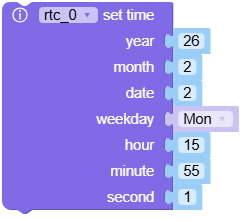
设置日期和时间值。
- 参数:
UiFlow2 代码块:
MicroPython 代码块:
rtc_0.set_date_time(hours=12, minutes=30)
- datetime(dt)
使用元组设置完整的日期和时间。
- 参数:
dt (tuple) – (年、月、日、小时、分钟、秒、星期)。
MicroPython 代码块:
rtc_0.datetime((2024, 5, 20, 10, 0, 0, 1))
- write_now()
将当前系统时间(来自 ESP32)写入 RTC。
MicroPython 代码块:
rtc_0.write_now()
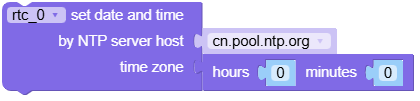
- set_internet_time(source='ntp', host='cn.pool.ntp.org', tzone=0, win=True)
将 RTC 与网络时间同步。
UiFlow2 代码块:
MicroPython 代码块:
rtc_0.set_internet_time(tzone=8)
- set_clk_out_frequency(frequency=micropython.const)
设置 CLKOUT 引脚的频率。
- 参数:
frequency (int) – 频率常量(例如,CLOCK_CLK_OUT_FREQ_1_HZ)。
MicroPython 代码块:
rtc_0.set_clk_out_frequency(0x83)
- check_if_alarm_on()
检查报警标志是否被触发。
- 返回:
如果触发了告警则为 True,否则为 False。
- 返回类型:
UiFlow2 代码块:

MicroPython 代码块:
rtc_0.check_if_alarm_on()
- turn_off_alarm()
禁用警报功能。
UiFlow2 代码块:

MicroPython 代码块:
rtc_0.turn_off_alarm()
- clear_alarm_flag()
清除报警状态标志并重置报警寄存器。
UiFlow2 代码块:

MicroPython 代码块:
rtc_0.clear_alarm_flag()
- set_daily_alarm(hours=None, minutes=None, date=None, weekday=None)
设置每日或定期闹钟。
UiFlow2 代码块:
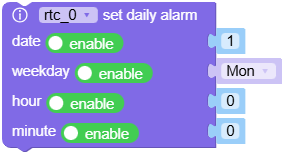
MicroPython 代码块:
rtc_0.set_daily_alarm(hours=7, minutes=0)
- set_timer_mode(mode=0, value=0)
设置倒计时定时器模式和初始值。
UiFlow2 代码块:

MicroPython 代码块:
rtc_0.set_timer_mode(mode=2, value=60)
- get_timer_value()
获取当前倒计时计时器值。
- 返回:
当前定时器值。
- 返回类型:
UiFlow2 代码块:

MicroPython 代码块:
rtc_0.get_timer_value()
- check_if_timer_on()
检查定时器标志是否被触发。
- 返回:
如果定时器被触发则返回 True,否则返回 False。
- 返回类型:
UiFlow2 代码块:

MicroPython 代码块:
rtc_0.check_if_timer_on()
- turn_off_timer()
禁用定时器并清除定时器标志。
UiFlow2 代码块:

MicroPython 代码块:
rtc_0.turn_off_timer()
- clear_timer_flag()
清除定时器状态标志。
UiFlow2 代码块:

MicroPython 代码块:
rtc_0.clear_timer_flag()