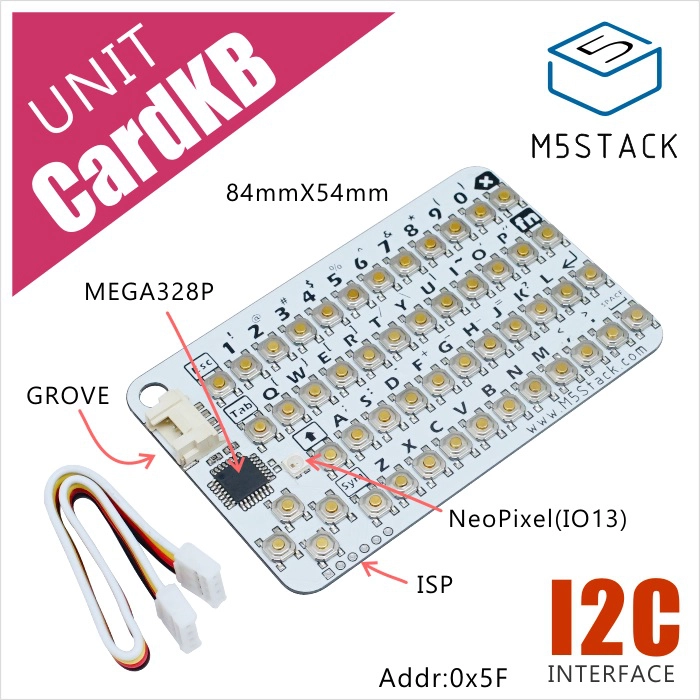
CardKB Unit
支持以下产品:

MicroPython 应用示例
 1# SPDX-FileCopyrightText: 2024 M5Stack Technology CO LTD
 2#
 3# SPDX-License-Identifier: MIT
 4
 5import os, sys, io
 6import M5
 7from M5 import *
 8from unit import CardKBUnit
 9from hardware import *
10
11
12label0 = None
13i2c0 = None
14cardkb_0 = None
15
16
17def cardkb_0_pressed_event(kb):
18    global label0, i2c0, cardkb_0
19    label0.setText(str(cardkb_0.get_string()))
20
21
22def setup():
23    global label0, i2c0, cardkb_0
24
25    M5.begin()
26    Widgets.fillScreen(0x222222)
27    label0 = Widgets.Label("label0", 132, 109, 1.0, 0xFFFFFF, 0x222222, Widgets.FONTS.DejaVu18)
28
29    i2c0 = I2C(0, scl=Pin(1), sda=Pin(2), freq=100000)
30    cardkb_0 = CardKBUnit(i2c0)
31    cardkb_0.set_callback(cardkb_0_pressed_event)
32
33
34def loop():
35    global label0, i2c0, cardkb_0
36    M5.update()
37    cardkb_0.tick()
38
39
40if __name__ == "__main__":
41    try:
42        setup()
43        while True:
44            loop()
45    except (Exception, KeyboardInterrupt) as e:
46        try:
47            from utility import print_error_msg
48
49            print_error_msg(e)
50        except ImportError:
51            print("please update to latest firmware")
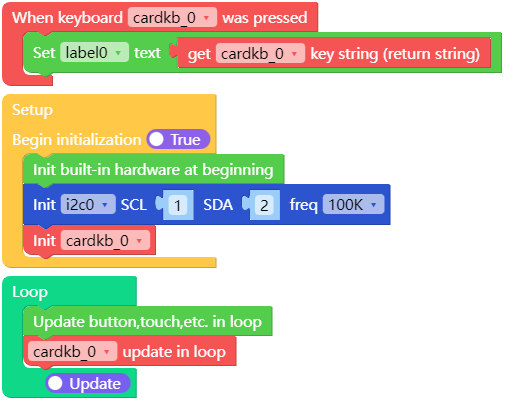
UiFlow2 应用示例:
class CardKBUnit
Constructors

Methods



- CardKBUnit.set_callback(handler)
设置按键按下事件回调函数。
- 参数:
handler – 回调函数
UIFLOW2:

UiFlow2 应用示例
from cardkb_unit import CardKBUnit

def cb(key):
    print(key)

cardkb = CardKBUnit(i2c)
cardkb.set_callback(cb)
while True:
    cardkb.tick()
- CardKBUnit.tick()
更新按键状态。
UIFLOW2:
