ASR Unit
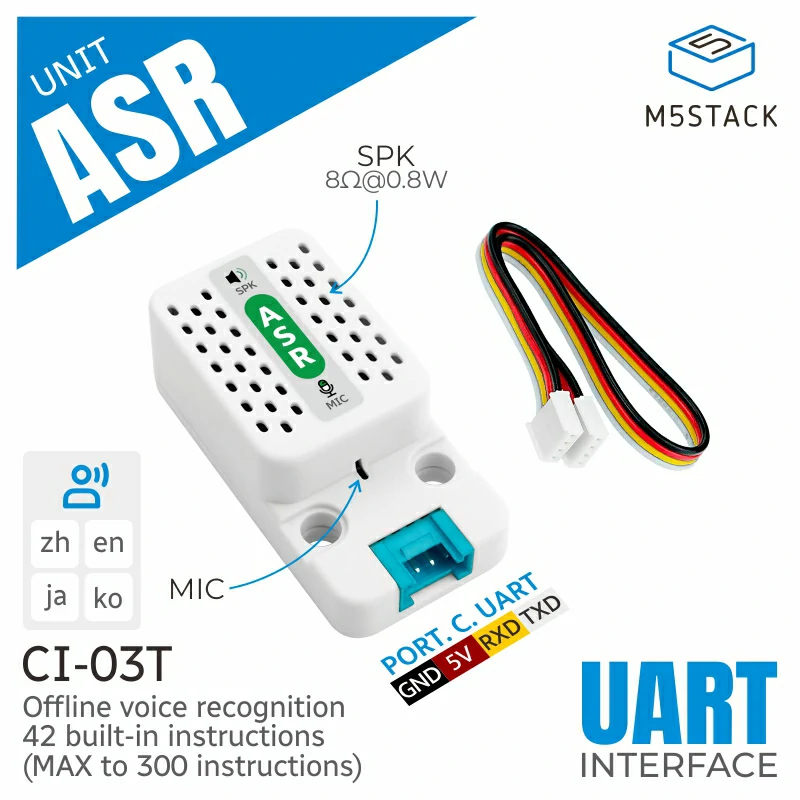
Unit ASR 是一款 AI 离线语音识别单元,内置 AI 智能离线语音模块 CI-03T。该单元提供语音识别、声纹识别、语音增强、语音检测等强大功能。支持 AEC(Acoustic Echo Cancellation,声学回声消除),可有效消除回声与噪声干扰,提高语音识别准确率。此外,支持语音中途打断,可在识别过程中灵活中断并快速响应新指令。产品出厂已预置唤醒词与反馈指令。设备使用 UART 串口通信进行数据传输,同时也支持通过 UART 或语音关键词唤醒设备。该单元支持用户自定义 wake-up 唤醒识别词,并可识别最多 300 个命令词。内置 microphone 用于清晰拾音,并配备 speaker 提供高品质语音反馈。本产品广泛应用于 AI 助手、智能家居、安防监控、车载系统、机器人、智能硬件、医疗健康等领域,是实现智能语音交互的理想选择。
支持以下产品:
UiFlow2 应用示例
ASR 应用示例
在 UiFlow2 中打开 asr_cores3_example.m5f2 项目。
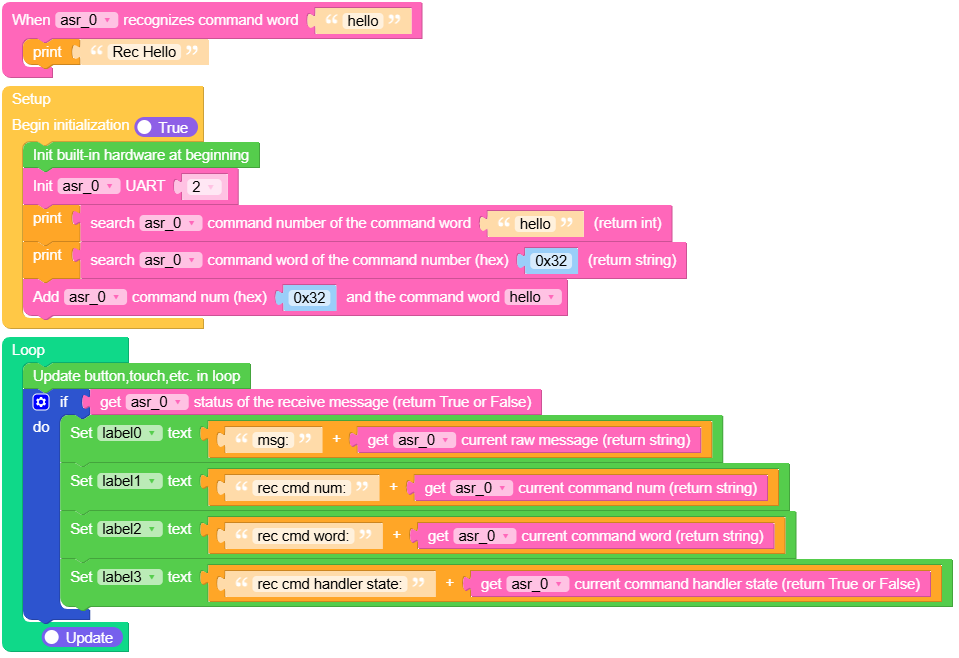
该示例演示如何使用 Unit ASR 获取当前命令词和命令编号,并在你说 “hello” 时触发事件,以执行你想要执行的操作。
UiFlow2 代码块:
示例输出:
None
MicroPython 应用示例
ASR 应用示例
该示例演示如何使用 Unit ASR 获取当前命令词和命令编号,并在你说 “hello” 时触发事件,以执行你想要执行的操作。
MicroPython 代码块:
 1# SPDX-FileCopyrightText: 2024 M5Stack Technology CO LTD
 2#
 3# SPDX-License-Identifier: MIT
 4
 5import os, sys, io
 6import M5
 7from M5 import *
 8from unit import ASRUnit
 9
10
11title0 = None
12label0 = None
13label1 = None
14label2 = None
15label3 = None
16asr_0 = None
17
18
19def asr_0_hello_event(args):
20    global title0, label0, label1, label2, label3, asr_0
21    print("Rec Hello")
22
23
24def setup():
25    global title0, label0, label1, label2, label3, asr_0
26
27    M5.begin()
28    Widgets.fillScreen(0x222222)
29    title0 = Widgets.Title(
30        "UnitASR M5CoreSe Example", 3, 0xFFFFFF, 0x0000FF, Widgets.FONTS.DejaVu18
31    )
32    label0 = Widgets.Label("msg:", 0, 51, 1.0, 0xFFFFFF, 0x222222, Widgets.FONTS.DejaVu18)
33    label1 = Widgets.Label("rec cmd num:", 0, 93, 1.0, 0xFFFFFF, 0x222222, Widgets.FONTS.DejaVu18)
34    label2 = Widgets.Label(
35        "rec cmd word:", 0, 134, 1.0, 0xFFFFFF, 0x222222, Widgets.FONTS.DejaVu18
36    )
37    label3 = Widgets.Label(
38        "rec cmd handler state:", 0, 178, 1.0, 0xFFFFFF, 0x222222, Widgets.FONTS.DejaVu18
39    )
40
41    asr_0 = ASRUnit(2, port=(1, 2))
42    print(asr_0.search_command_num("hello"))
43    print(asr_0.search_command_word(0x32))
44    asr_0.add_command_word(0x32, "hello", asr_0_hello_event)
45
46
47def loop():
48    global title0, label0, label1, label2, label3, asr_0
49    M5.update()
50    if asr_0.get_received_status():
51        label0.setText(str((str("msg:") + str((asr_0.get_current_raw_message())))))
52        label1.setText(str((str("rec cmd num:") + str((asr_0.get_current_command_num())))))
53        label2.setText(str((str("rec cmd word:") + str((asr_0.get_current_command_word())))))
54        label3.setText(str((str("rec cmd handler state:") + str((asr_0.get_command_handler())))))
55
56
57if __name__ == "__main__":
58    try:
59        setup()
60        while True:
61            loop()
62    except (Exception, KeyboardInterrupt) as e:
63        try:
64            from utility import print_error_msg
65
66            print_error_msg(e)
67        except ImportError:
68            print("please update to latest firmware")
示例输出:
None
API参考
ASRUnit
- class unit.asr.ASRUnit(id=1, port=None, verbose=False)
基类:
object语音识别硬件模块。
UiFlow2 代码块:

MicroPython 代码块:
from unit import ASRUnit

# Initialize with UART1, TX on pin 2, RX on pin 1
asr = ASRUnit(id=2, port=(1, 2))
- get_received_status()
获取消息接收状态。
- 返回:
如果接收到消息则为 True,否则为 False。
- 返回类型:
UiFlow2 代码块:

MicroPython 代码块:
asr.get_received_status()
- send_message(command_num)
通过 UART 发送命令。
- 参数:
command_num (int) – 要发送的命令编号(0-255)
- 返回类型:
None
UiFlow2 代码块:

MicroPython 代码块:
asr.send_message(0x30)
- get_current_raw_message()
获取以十六进制格式接收的原始消息。
- 返回:
以十六进制格式表示的原始消息字符串。
- 返回类型:
UiFlow2 代码块:

MicroPython 代码块:
asr.get_current_raw_message()
- get_current_command_word()
获取与当前命令编号对应的命令字。
- 返回:
命令字(字符串)。
- 返回类型:
UiFlow2 代码块:

MicroPython 代码块:
asr.get_current_command_word()
- get_current_command_num()
获取当前命令编号。
- 返回:
当前命令编号的字符串形式。
- 返回类型:
UiFlow2 代码块:

MicroPython 代码块:
asr.get_current_command_num()
- get_command_handler()
检查当前命令是否有关联的处理程序。
- 返回:
如果该命令具有关联的处理程序则为 True,否则为 False。
- 返回类型:
UiFlow2 代码块:

MicroPython 代码块:
asr.get_command_handler()
- add_command_word(command_num, command_word, event_handler=None)
注册自定义命令和处理器。
- 参数:
- 返回类型:
None
UiFlow2 代码块:

MicroPython 代码块:
def custom_handler(unit):
    print("Custom command detected!")

asr.add_command_word(0x50, "custom command", custom_handler)
- remove_command_word(command_word)
通过命令词从命令列表中移除一个命令词。
- 参数:
command_word (str) – 移除命令词
- 返回类型:
None
UiFlow2 代码块:

MicroPython 代码块:
asr.remove_command_word("custom command")
- search_command_num(command_word)
搜索与命令字对应的命令编号。
UiFlow2 代码块:

MicroPython 代码块:
asr.search_command_num("custom command")
- search_command_word(command_num)
搜索与命令编号关联的命令词。
UiFlow2 代码块:

MicroPython 代码块:
asr.search_command_word(0x50)
- get_command_list()
获取所有命令及其关联的处理程序列表。
- 返回:
命令编号及其对应的命令字和处理程序的字典。
- 返回类型:
UiFlow2 代码块:

MicroPython 代码块:
asr.get_command_list()
- check_tick_callback()
检查是否为当前命令定义了处理程序,并安排其执行。
- 返回:
如果定义了 handler,则返回该 handler,否则返回 None。
- 返回类型:
None
MicroPython 代码块:
asr.check_tick_callback()