DAC2 Unit
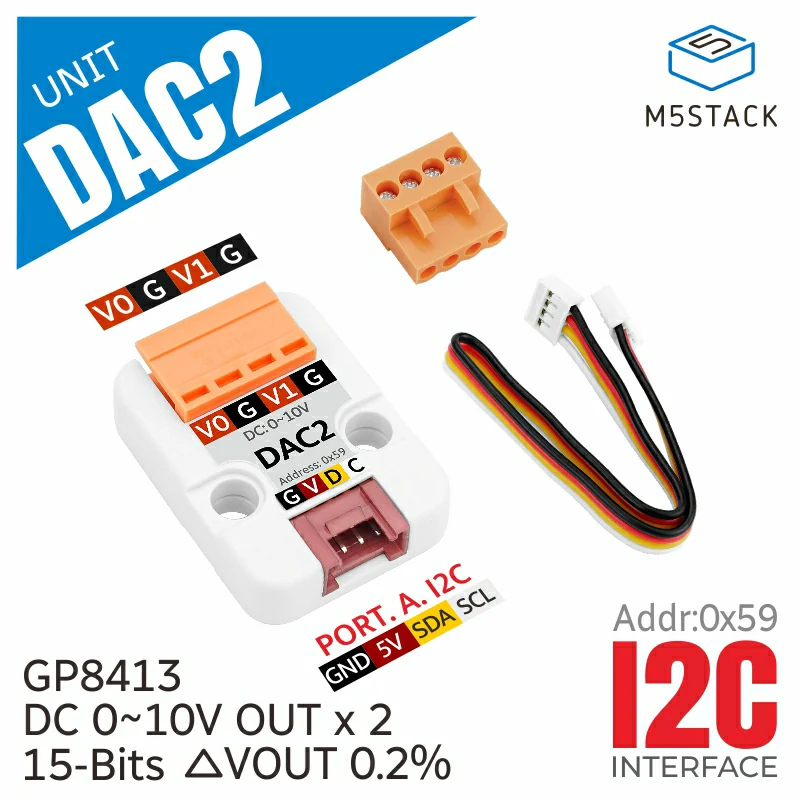
Dac2 类用于与 GP8413 15 位 Digital to Analog Converter (DAC) 交互,可将数字信号转换为两路模拟电压输出,输出范围为 0-5V 和 0-10V。
支持以下产品:
MicroPython 应用示例
 1# SPDX-FileCopyrightText: 2024 M5Stack Technology CO LTD
 2#
 3# SPDX-License-Identifier: MIT
 4
 5import os, sys, io
 6import M5
 7from M5 import *
 8from hardware import *
 9from unit import DAC2Unit
10
11
12i2c0 = None
13dac2_0 = None
14
15
16def setup():
17    global i2c0, dac2_0
18
19    M5.begin()
20    Widgets.fillScreen(0x222222)
21
22    i2c0 = I2C(0, scl=Pin(1), sda=Pin(2), freq=100000)
23    dac2_0 = DAC2Unit(i2c0, 0x59)
24    dac2_0.set_dacoutput_voltage_range(dac2_0.RANGE_10V)
25    dac2_0.set_voltage(7.5, channel=dac2_0.CHANNEL_0)
26
27
28def loop():
29    global i2c0, dac2_0
30    M5.update()
31
32
33if __name__ == "__main__":
34    try:
35        setup()
36        while True:
37            loop()
38    except (Exception, KeyboardInterrupt) as e:
39        try:
40            from utility import print_error_msg
41
42            print_error_msg(e)
43        except ImportError:
44            print("please update to latest firmware")
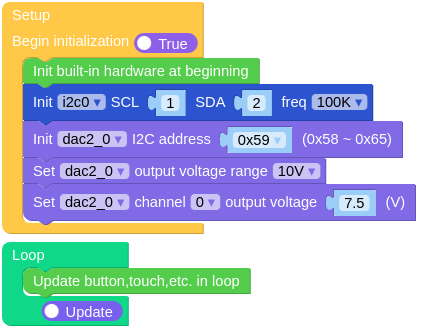
UiFlow2 应用示例
class DAC2Unit
Constructors
- class DAC2Unit(i2c0, addr)
创建一个 DAC2Unit 对象。
I2C0是 I2C 端口。addrDAC 的 I2C 地址(默认为 0x59)。
UIFLOW2:

Methods
- DAC2Unit.setDACOutputVoltageRange(_range)
设置 DAC 的输出电压范围。
_rangeDAC 输出电压范围,可选 DAC2Unit.RANGE_5V 或 DAC2Unit.RANGE_10V。
UIFLOW2:

- DAC2Unit.setVoltage(voltage, channel=Dac2.CHANNEL_BOTH)
设置 DAC 的输出电压。
voltage期望输出电压,范围为 0.0 到最大量程(5 V 或 10 V)。channel要设置的 DAC 通道。可选项为 Dac2.CHANNEL_0、Dac2.CHANNEL_1 或 Dac2.CHANNEL_BOTH。
UIFLOW2:

- DAC2Unit.setVoltageBoth(voltage0, voltage1)
设置两个通道的输出电压。
voltage0期望输出电压,范围为 0.0 到最大量程(5V 或 10V)。voltage1期望输出电压,范围为 0.0 到量程最大值(5V 或 10V)。
UIFLOW2:
