Widgets — 基础 UI 库
M5 系列显示库说明
1. 显示
底层图形库,提供屏幕绘制、文字、线条、颜色管理等基础功能。
可独立使用,适合只需要绘制图形或文字的场景。
2. M5Widgets
基础控件库,提供标签、图片显示等 UI 控件。
底层依赖 M5GFX。
适合需要简单交互控件的界面。
3. M5UI
高层 UI 框架,基于 LVGL 封装。
提供页面管理、多控件布局和统一事件处理。
使用提示
⚠️ 不建议同时混用 M5GFX、M5Widgets、M5UI,可能导致渲染异常或事件冲突。
单独绘图 → 使用 M5GFX。
简单控件交互 → 使用 M5Widgets。
多页面 UI → 使用 M5UI。
MicroPython 应用示例
 1# SPDX-FileCopyrightText: 2024 M5Stack Technology CO LTD
 2#
 3# SPDX-License-Identifier: MIT
 4
 5import os, sys, io
 6import M5
 7from M5 import *
 8
 9
10def setup():
11    M5.begin()
12    Widgets.fillScreen(0x222222)
13
14    Widgets.setBrightness(100)
15    Widgets.fillScreen(0x6600CC)
16    Widgets.setRotation(0)
17
18
19def loop():
20    M5.update()
21
22
23if __name__ == "__main__":
24    try:
25        setup()
26        while True:
27            loop()
28    except (Exception, KeyboardInterrupt) as e:
29        try:
30            from utility import print_error_msg
31
32            print_error_msg(e)
33        except ImportError:
34            print("please update to latest firmware")
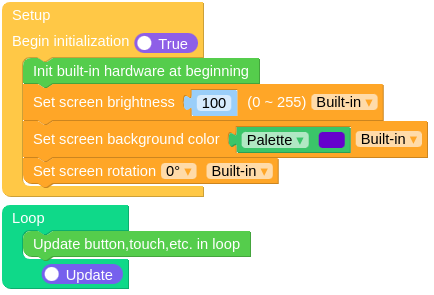
UiFlow2 应用示例