EncoderMotor Driver Unit
The EncoderMotorDriverUnit class controls Unit EncoderMotor Driver over I2C.
It supports signed open-loop PWM, position and speed control, encoder feedback,
motor sleep, soft start and stop, RGB LED control, and input power monitoring.
Support the following products:
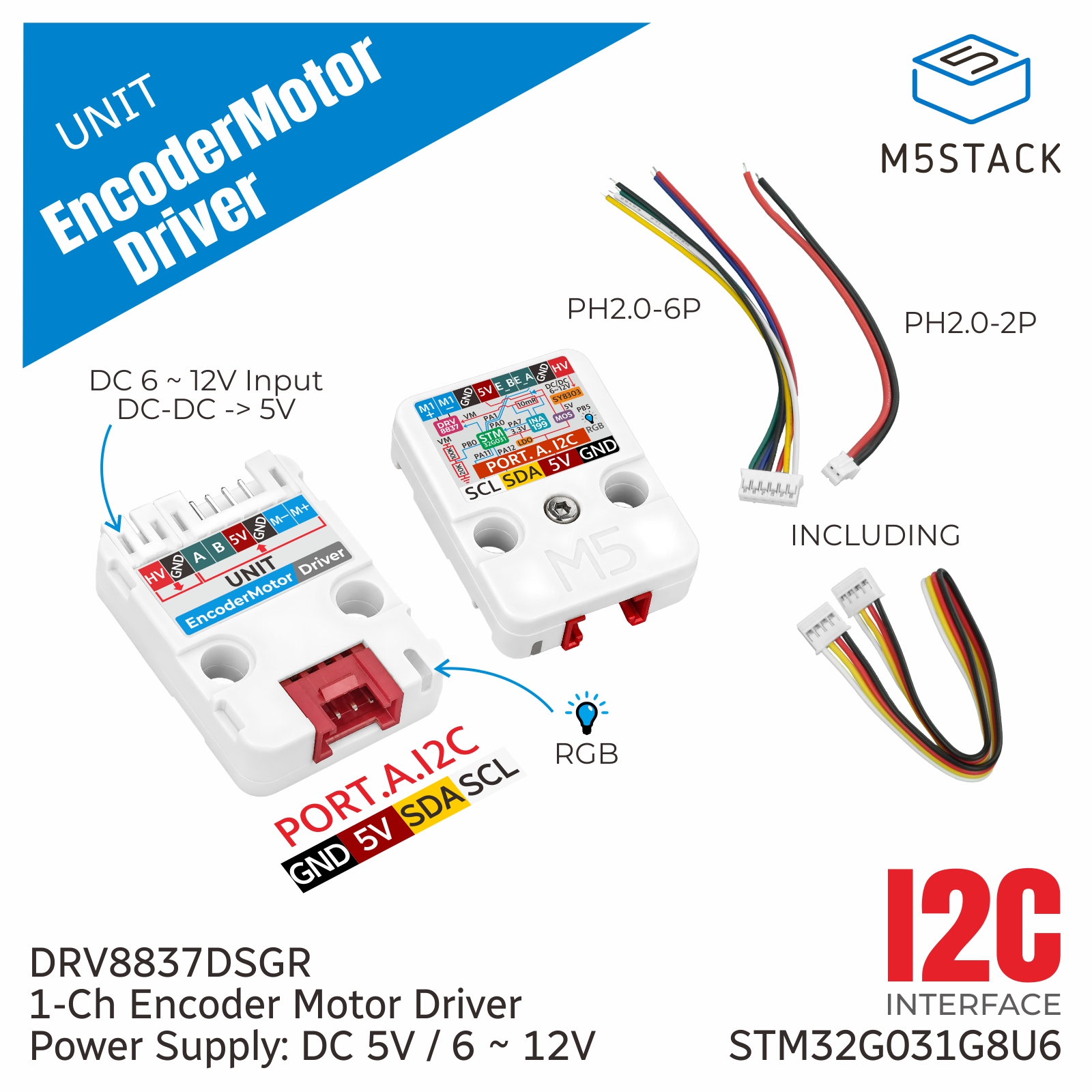
UiFlow2 Example
Basic Motor Control
Open the m5cores3_unit_encoder_motor_driver_basic_example.m5f2 project in UiFlow2.
Select CoreS3 and connect the Unit to Port A
(SDA=G2, SCL=G1, I2C 100 kHz). The default Unit address is 0x2F.
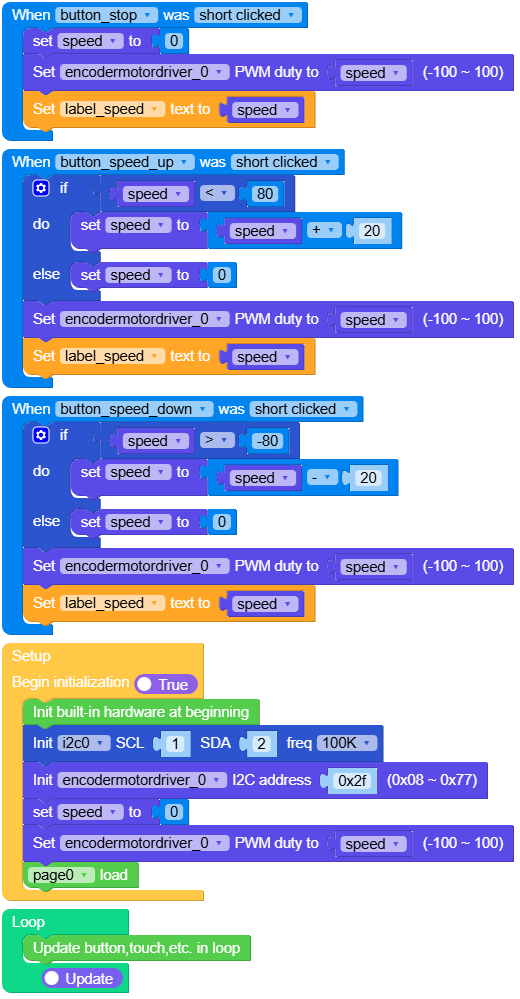
The m5ui page provides three touch buttons:
+ adds 20 percentage points to the signed PWM target. Pressing it while the target is 80 sets the target to 0.
- subtracts 20 percentage points from the signed PWM target. Pressing it while the target is -80 sets the target to 0.
STOP sets PWM to 0.
Positive and negative PWM select opposite directions. The center label displays
the commanded PWM percentage in the range -80~80; it does not display RPM
or encoder counts. The target starts at 0.
Note
This example uses the Unit’s default open-loop mode and enabled motor
driver. If a previous program selected a closed-loop mode or disabled the
driver, restore open-loop mode with set_motor_mode(MODE_OPEN_LOOP) and
enable it with enable_motor() before running this example. Restarting
the Unit also restores these runtime defaults. Motor power must be present.
Press STOP before ending the example.
UiFlow2 Code Block:
Example output:
The CoreS3 screen shows the signed PWM target. For example, two + taps from startup display
40; STOP displays0.
MicroPython Example
Basic Motor Control
Run the following example on CoreS3 with the same connection and Unit runtime
settings described above. The +, - and STOP controls have the same
behavior as the UiFlow2 project.
MicroPython Code Block:
  1# SPDX-FileCopyrightText: 2026 M5Stack Technology CO LTD
  2#
  3# SPDX-License-Identifier: MIT
  4
  5import os, sys, io
  6import M5
  7from M5 import *
  8import m5ui
  9import lvgl as lv
 10from unit import EncoderMotorDriverUnit
 11from hardware import Pin
 12from hardware import I2C
 13
 14
 15page0 = None
 16label_title = None
 17button_speed_up = None
 18button_speed_down = None
 19label_speed = None
 20button_stop = None
 21i2c0 = None
 22encodermotordriver_0 = None
 23speed = None
 24
 25
 26def button_stop_short_clicked_event(event_struct):
 27    global \
 28        page0, \
 29        label_title, \
 30        button_speed_up, \
 31        button_speed_down, \
 32        label_speed, \
 33        button_stop, \
 34        i2c0, \
 35        encodermotordriver_0, \
 36        speed
 37    speed = 0
 38    encodermotordriver_0.set_motor_pwm_duty(speed)
 39    label_speed.set_text(str(speed))
 40
 41
 42def button_speed_up_short_clicked_event(event_struct):
 43    global \
 44        page0, \
 45        label_title, \
 46        button_speed_up, \
 47        button_speed_down, \
 48        label_speed, \
 49        button_stop, \
 50        i2c0, \
 51        encodermotordriver_0, \
 52        speed
 53    if speed < 80:
 54        speed = speed + 20
 55    else:
 56        speed = 0
 57    encodermotordriver_0.set_motor_pwm_duty(speed)
 58    label_speed.set_text(str(speed))
 59
 60
 61def button_speed_down_short_clicked_event(event_struct):
 62    global \
 63        page0, \
 64        label_title, \
 65        button_speed_up, \
 66        button_speed_down, \
 67        label_speed, \
 68        button_stop, \
 69        i2c0, \
 70        encodermotordriver_0, \
 71        speed
 72    if speed > -80:
 73        speed = speed - 20
 74    else:
 75        speed = 0
 76    encodermotordriver_0.set_motor_pwm_duty(speed)
 77    label_speed.set_text(str(speed))
 78
 79
 80def button_stop_event_handler(event_struct):
 81    global \
 82        page0, \
 83        label_title, \
 84        button_speed_up, \
 85        button_speed_down, \
 86        label_speed, \
 87        button_stop, \
 88        i2c0, \
 89        encodermotordriver_0, \
 90        speed
 91    event = event_struct.code
 92    if event == lv.EVENT.SHORT_CLICKED and True:
 93        button_stop_short_clicked_event(event_struct)
 94    return
 95
 96
 97def button_speed_up_event_handler(event_struct):
 98    global \
 99        page0, \
100        label_title, \
101        button_speed_up, \
102        button_speed_down, \
103        label_speed, \
104        button_stop, \
105        i2c0, \
106        encodermotordriver_0, \
107        speed
108    event = event_struct.code
109    if event == lv.EVENT.SHORT_CLICKED and True:
110        button_speed_up_short_clicked_event(event_struct)
111    return
112
113
114def button_speed_down_event_handler(event_struct):
115    global \
116        page0, \
117        label_title, \
118        button_speed_up, \
119        button_speed_down, \
120        label_speed, \
121        button_stop, \
122        i2c0, \
123        encodermotordriver_0, \
124        speed
125    event = event_struct.code
126    if event == lv.EVENT.SHORT_CLICKED and True:
127        button_speed_down_short_clicked_event(event_struct)
128    return
129
130
131def setup():
132    global \
133        page0, \
134        label_title, \
135        button_speed_up, \
136        button_speed_down, \
137        label_speed, \
138        button_stop, \
139        i2c0, \
140        encodermotordriver_0, \
141        speed
142
143    M5.begin()
144    Widgets.setRotation(0)
145    m5ui.init()
146    page0 = m5ui.M5Page(bg_c=0x000000)
147    label_title = m5ui.M5Label(
148        "Encoder Motor Control",
149        x=20,
150        y=5,
151        text_c=0x079EE1,
152        bg_c=0xFFFFFF,
153        bg_opa=0,
154        font=lv.font_montserrat_24,
155        parent=page0,
156    )
157    button_speed_up = m5ui.M5Button(
158        text="+",
159        x=50,
160        y=165,
161        bg_c=0x2196F3,
162        text_c=0xFFFFFF,
163        font=lv.font_montserrat_24,
164        parent=page0,
165    )
166    button_speed_down = m5ui.M5Button(
167        text="-",
168        x=230,
169        y=165,
170        bg_c=0x2196F3,
171        text_c=0xFFFFFF,
172        font=lv.font_montserrat_24,
173        parent=page0,
174    )
175    label_speed = m5ui.M5Label(
176        "00",
177        x=132,
178        y=75,
179        text_c=0x079EE1,
180        bg_c=0xFFFFFF,
181        bg_opa=0,
182        font=lv.font_montserrat_40,
183        parent=page0,
184    )
185    button_stop = m5ui.M5Button(
186        text="STOP",
187        x=112,
188        y=165,
189        bg_c=0xF32121,
190        text_c=0xFFFFFF,
191        font=lv.font_montserrat_24,
192        parent=page0,
193    )
194
195    button_stop.add_event_cb(button_stop_event_handler, lv.EVENT.ALL, None)
196    button_speed_up.add_event_cb(button_speed_up_event_handler, lv.EVENT.ALL, None)
197    button_speed_down.add_event_cb(button_speed_down_event_handler, lv.EVENT.ALL, None)
198
199    i2c0 = I2C(0, scl=Pin(1), sda=Pin(2), freq=100000)
200    encodermotordriver_0 = EncoderMotorDriverUnit(i2c0, 0x2F)
201    speed = 0
202    encodermotordriver_0.set_motor_pwm_duty(speed)
203    page0.screen_load()
204
205
206def loop():
207    global \
208        page0, \
209        label_title, \
210        button_speed_up, \
211        button_speed_down, \
212        label_speed, \
213        button_stop, \
214        i2c0, \
215        encodermotordriver_0, \
216        speed
217    M5.update()
218
219
220if __name__ == "__main__":
221    try:
222        setup()
223        while True:
224            loop()
225    except (Exception, KeyboardInterrupt) as e:
226        try:
227            m5ui.deinit()
228            from utility import print_error_msg
229
230            print_error_msg(e)
231        except ImportError:
232            print("please update to latest firmware")
Example output:
The center label shows the PWM target. If the Unit is not detected, the screen shows a connection-check prompt.
API
EncoderMotorDriverUnit
- class unit.encoder_motor_driver.EncoderMotorDriverUnit(i2c, address=micropython.const)
Bases:
objectControl the Unit EncoderMotor Driver over I2C.
The Unit supports signed open-loop PWM, position and speed control, encoder feedback, motor sleep, soft start and stop, RGB LED control, and input power monitoring. The object borrows the supplied I2C bus and does not deinitialize it. If the configured address is not found, check the Unit’s Grove connection, power supply, and I2C address.
- Parameters:
UiFlow2 Code Block:

MicroPython Code Block:
from hardware import I2C, Pin
from unit import EncoderMotorDriverUnit

i2c0 = I2C(0, scl=Pin(1), sda=Pin(2), freq=100000)
encodermotordriver_0 = EncoderMotorDriverUnit(i2c0, 0x2F)
Control mode constants:
MODE_OPEN_LOOP = 0: open-loop PWM control.MODE_POSITION = 1: position control.MODE_SPEED = 2: speed control.
Encoder phase constants:
ENCODER_MODE_AB = 0: AB phase order.ENCODER_MODE_BA = 1: BA phase order.
- set_motor_mode(mode)
Set the motor control mode.
- Parameters:
mode (int) – One of
MODE_OPEN_LOOP,MODE_POSITION, orMODE_SPEED.- Returns:
None.
UiFlow2 Code Block:


- get_motor_mode()
Get the current motor control mode.
- Returns:
Current mode. Range: 0~2.
- Return type:
UiFlow2 Code Block:

- set_motor_pwm_duty(percent)
Set the signed open-loop motor PWM duty.
- Parameters:
percent (int or float) – Signed duty. Unit: percent. Range: -100~100. The sign selects the direction.
- Returns:
None.
UiFlow2 Code Block:

- get_motor_pwm_duty()
Get the motor PWM value as a signed percentage.
In open-loop mode this is the commanded PWM duty. In a closed-loop mode the firmware may update the register with its live motor output.
- Returns:
Signed PWM duty. Unit: percent. Range: -100~100.
- Return type:
UiFlow2 Code Block:

- read_motor_speed()
Read the live device-native motor speed sample.
- Returns:
Signed native speed sample. Range: -127~127. The firmware updates this value every 20 ms. It is not RPM and has no verified physical-unit conversion.
- Return type:
UiFlow2 Code Block:

- stop_motor()
Stop the motor and leave it in open-loop mode.
The method clears PWM before and after changing the mode so a previous closed-loop output cannot remain active after the mode transition.
- Returns:
None.
UiFlow2 Code Block:

- read_encoder_count()
Read the current encoder count without clearing it.
- Returns:
Signed encoder count. Range: -2147483648~2147483647.
- Return type:
UiFlow2 Code Block:

- set_encoder_count(count)
Set the current encoder count.
- Parameters:
count (int) – Signed encoder count. Range: -2147483648~2147483647.
- Returns:
None.
UiFlow2 Code Block:

- clear_encoder_count()
Clear the encoder count to zero.
- Returns:
None.
UiFlow2 Code Block:

- set_encoder_mode(mode)
Set the encoder AB or BA phase order.
A changed value is retained in the Unit’s flash and immediately restarts the Unit. The call waits for the current I2C address to become available again. Avoid unnecessary calls to limit flash writes.
- Parameters:
mode (int) –
ENCODER_MODE_ABorENCODER_MODE_BA.- Returns:
None.
UiFlow2 Code Block:


- get_encoder_mode()
Get the encoder phase order.
- Returns:
ENCODER_MODE_ABorENCODER_MODE_BA.- Return type:
UiFlow2 Code Block:

- set_position_pid(kp, ki, kd)
Set the position-loop PID coefficients.
- Parameters:
- Returns:
None.
UiFlow2 Code Block:

- get_position_pid()
Get the position-loop PID coefficients.
- Returns:
(kp, ki, kd). Each native coefficient is 0~255.- Return type:
UiFlow2 Code Block:

- set_position_target_count(count)
Set the position-loop target in encoder counts.
- Parameters:
count (int) – Signed target. Unit: encoder counts. Range: -2147483648~2147483647.
- Returns:
None.
UiFlow2 Code Block:

- get_position_target_count()
Get the configured position-loop target in encoder counts.
- Returns:
Signed target. Unit: encoder counts. Range: -2147483648~2147483647.
- Return type:
UiFlow2 Code Block:

- set_position_speed_limit(speed_limit)
Set the native position-loop maximum speed.
The position controller uses the absolute value of this speed limit. The value is a device-native setting without a documented RPM conversion.
- Parameters:
speed_limit (int) – Signed device-native speed limit. Range: -127~127.
- Returns:
None.
UiFlow2 Code Block:

- get_position_speed_limit()
Get the native position-loop maximum speed.
- Returns:
Signed, dimensionless device value. Range: -127~127. This value is not RPM.
- Return type:
UiFlow2 Code Block:

- set_speed_pid(kp, ki, kd)
Set the speed-loop PID coefficients.
- Parameters:
- Returns:
None.
UiFlow2 Code Block:

- get_speed_pid()
Get the speed-loop PID coefficients.
- Returns:
(kp, ki, kd). Each native coefficient is 0~255.- Return type:
UiFlow2 Code Block:

- set_speed_target(speed)
Set the native closed-loop speed target.
- Parameters:
speed (int) – Signed, dimensionless target. Range: -127~127. The value is not RPM.
- Returns:
None.
UiFlow2 Code Block:

- get_speed_target()
Get the configured closed-loop speed target.
- Returns:
Signed, dimensionless target. Range: -127~127. This value is not RPM.
- Return type:
UiFlow2 Code Block:

- enable_soft_start()
Enable soft start and stop in open-loop mode.
The setting is retained in the Unit’s flash. Repeating the call while already enabled avoids another write.
- Returns:
None.
UiFlow2 Code Block:

- disable_soft_start()
Disable soft start and stop in open-loop mode.
The setting is retained in the Unit’s flash. Repeating the call while already disabled avoids another write.
- Returns:
None.
UiFlow2 Code Block:
- is_soft_start_enabled()
Return whether soft start and stop is enabled.
- Returns:
Truewhen soft start and stop is enabled.- Return type:
UiFlow2 Code Block:

- enable_motor()
Set Motor nSleep to run and enable the motor driver.
- Returns:
None.
UiFlow2 Code Block:

- disable_motor()
Set Motor nSleep to sleep and disable the motor driver.
- Returns:
None.
UiFlow2 Code Block:
- is_motor_enabled()
Return whether Motor nSleep is in the run state.
- Returns:
Truewhen the motor driver is enabled.- Return type:
UiFlow2 Code Block:

- set_rgb_color(color)
Set the onboard RGB LED color.
- Parameters:
color (int) – RGB888 color in
0xRRGGBBformat. Range: 0x000000~0xFFFFFF.- Returns:
None.
UiFlow2 Code Block:

- get_rgb_color()
Get the onboard RGB LED color.
- Returns:
RGB888 color in
0xRRGGBBformat. Range: 0x000000~0xFFFFFF.- Return type:
UiFlow2 Code Block:

- set_rgb_brightness(percent)
Set the onboard RGB LED brightness.
UiFlow2 Code Block:

- get_rgb_brightness()
Get the onboard RGB LED brightness.
- Returns:
Brightness. Unit: percent. Range: 0~100.
- Return type:
UiFlow2 Code Block:

- read_input_voltage()
Read the motor-supply input voltage.
- Returns:
Input voltage. Unit: V. Range depends on the supply.
- Return type:
UiFlow2 Code Block:

- read_input_voltage_adc()
Read the raw 12-bit motor-supply voltage ADC sample.
- Returns:
Raw ADC sample. Range: 0~4095. Use
read_input_voltage()for volts.- Return type:
UiFlow2 Code Block:

- read_input_current()
Read the motor-supply input current.
- Returns:
Input current. Unit: A. Range depends on the load.
- Return type:
UiFlow2 Code Block:

- get_firmware_version()
Get the Unit firmware version register value.
- Returns:
Firmware version value. Range: 0~255.
- Return type:
UiFlow2 Code Block:

- get_uid()
Get the device’s 12-byte STM32 unique identifier.
- Returns:
Device UID with exactly 12 bytes in protocol order.
- Return type:
UiFlow2 Code Block:

- get_i2c_address()
Get the Unit I2C address from the device.
- Returns:
7-bit I2C address. Range: 0x08~0x77.
- Return type:
UiFlow2 Code Block:

- set_i2c_address(address)
Set the Unit I2C address and switch this object to it.
A changed address is retained in the Unit’s flash. The protocol states that the Unit restarts and requires about 300 ms before responding at the new address. This method waits and polls before updating the object’s address. Avoid unnecessary calls to limit flash writes.
- Parameters:
address (int) – New 7-bit I2C address. Range: 0x08~0x77.
- Returns:
None.
UiFlow2 Code Block:
