NB-IoT Unit
The NB-IOT Unit is a wireless communication module suitable for global wide Cat-NB frequency band . It has a built-in SIM7020G communication module, uses serial communication (AT instruction set control).
Support the following products:
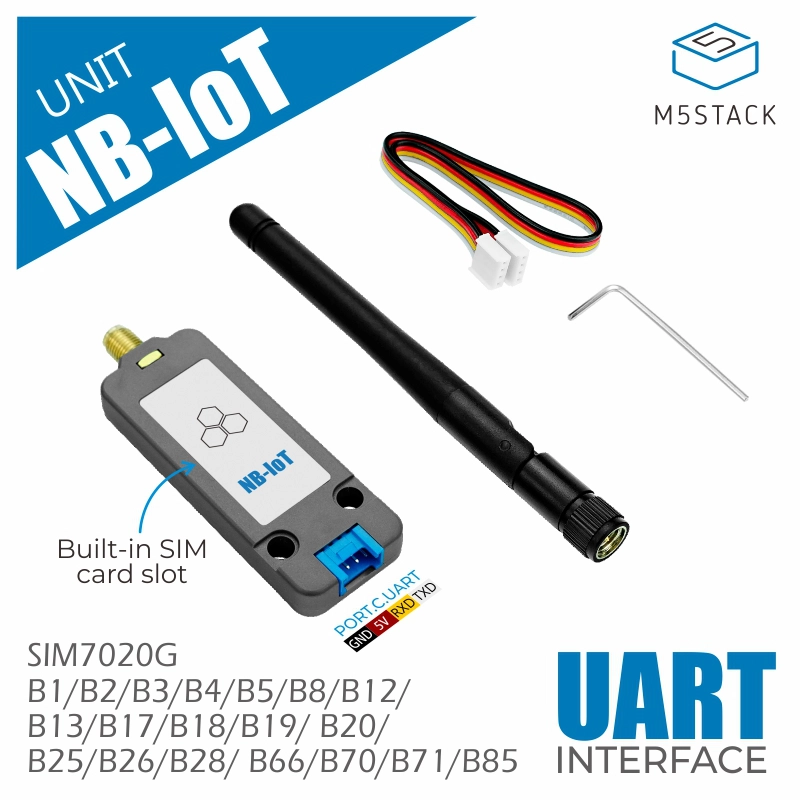
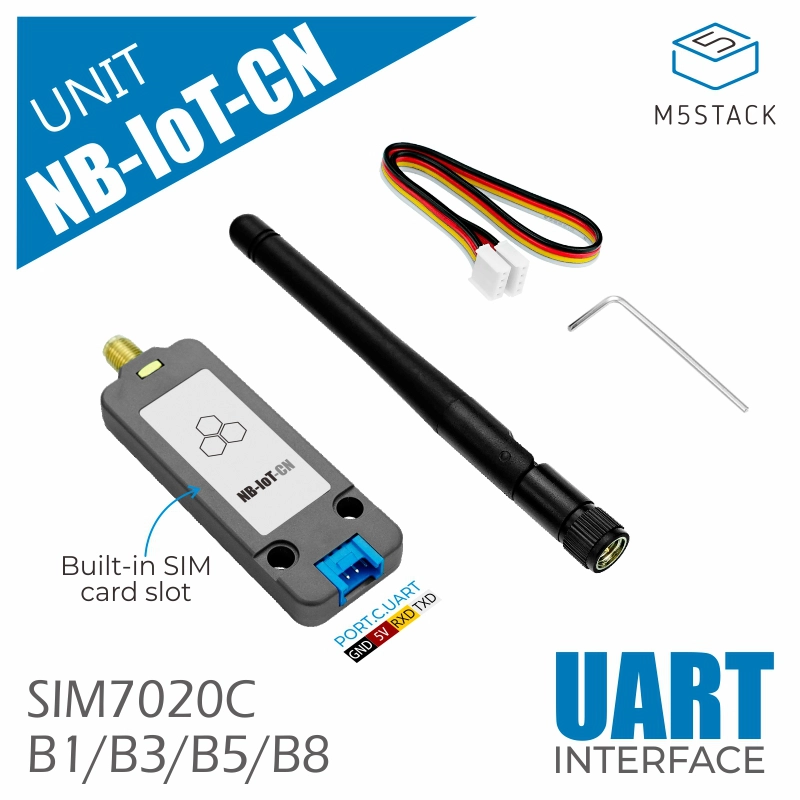
Note
Please ensure that the device supports the NB-IoT frequency bands in your area before use.
Note
Please ensure that the firmware version of SIM7020 is greater than or equal to 1752B12SIM7020C.
 can be used to check the firmware version.
UiFlow2 Example
NBIoT HTTP Example
Open the cores3_unit_nbiot_http_example.m5f2 project in UiFlow2.
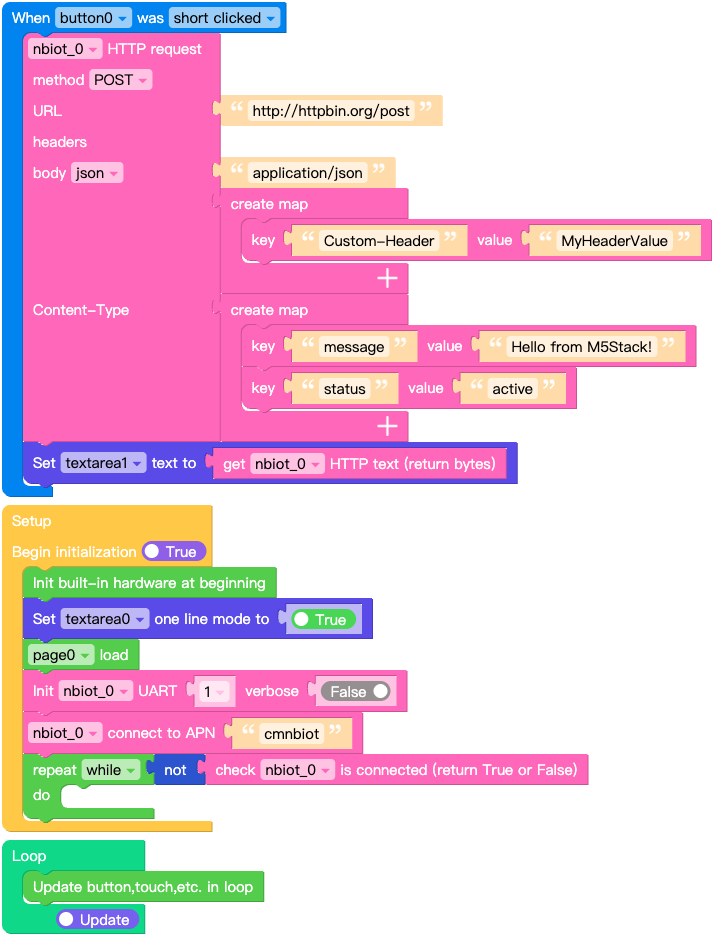
This example shows how to send HTTP request using the NBIoT Unit.
click Send button to send HTTP request. Response data will be printed in the textarea.
UiFlow2 Code Block:
Example output:
Output of received NBIoT message data on screen.
MQTT Example
Open the cores3_unit_nbiot_mqtt_example.m5f2 project in UiFlow2.
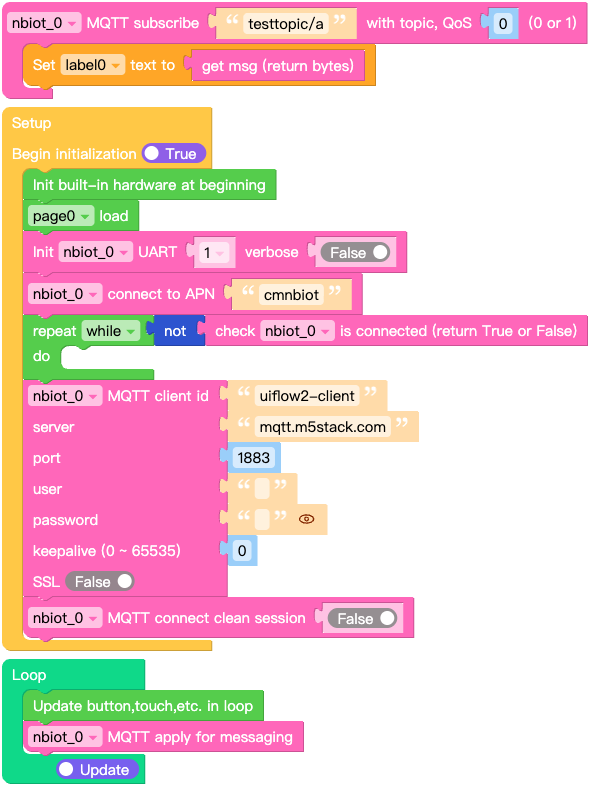
This example shows how to send MQTT message using the NBIoT Unit.
UiFlow2 Code Block:
Example output:
Output of received NBIoT message data on screen.
MicroPython Example
NBIoT HTTP Example
This example shows how to send HTTP request using the NBIoT Unit.
click Send button to send HTTP request. Response data will be printed in the textarea.
MicroPython Code Block:
  1# SPDX-FileCopyrightText: 2026 M5Stack Technology CO LTD
  2#
  3# SPDX-License-Identifier: MIT
  4
  5import os, sys, io
  6import M5
  7from M5 import *
  8import m5ui
  9import lvgl as lv
 10from unit import NBIOTUnit
 11
 12
 13page0 = None
 14label0 = None
 15label1 = None
 16button0 = None
 17textarea0 = None
 18textarea1 = None
 19nbiot_0_http_req = None
 20nbiot_0 = None
 21
 22
 23def button0_short_clicked_event(event_struct):
 24    global page0, label0, label1, button0, textarea0, textarea1, nbiot_0_http_req, nbiot_0
 25    nbiot_0_http_req = nbiot_0.post(
 26        "http://httpbin.org/post",
 27        json={"message": "Hello from M5Stack!", "status": "active"},
 28        headers={
 29            "Content-Type": "application/json",
 30            "Custom-Header": "MyHeaderValue",
 31        },
 32    )
 33    textarea1.set_text(str(nbiot_0_http_req.text))
 34
 35
 36def button0_event_handler(event_struct):
 37    global page0, label0, label1, button0, textarea0, textarea1, nbiot_0_http_req, nbiot_0
 38    event = event_struct.code
 39    if event == lv.EVENT.SHORT_CLICKED and True:
 40        button0_short_clicked_event(event_struct)
 41    return
 42
 43
 44def setup():
 45    global page0, label0, label1, button0, textarea0, textarea1, nbiot_0_http_req, nbiot_0
 46
 47    M5.begin()
 48    Widgets.setRotation(1)
 49    m5ui.init()
 50    page0 = m5ui.M5Page(bg_c=0xFFFFFF)
 51    textarea0 = m5ui.M5TextArea(
 52        text="http://httpbin.org/post",
 53        placeholder="Placeholder...",
 54        x=46,
 55        y=10,
 56        w=195,
 57        h=21,
 58        font=lv.font_montserrat_14,
 59        bg_c=0xFFFFFF,
 60        border_c=0xE0E0E0,
 61        text_c=0x212121,
 62        parent=page0,
 63    )
 64    textarea1 = m5ui.M5TextArea(
 65        text="textarea1",
 66        placeholder="Placeholder...",
 67        x=10,
 68        y=68,
 69        w=300,
 70        h=162,
 71        font=lv.font_montserrat_14,
 72        bg_c=0xFFFFFF,
 73        border_c=0xE0E0E0,
 74        text_c=0x212121,
 75        parent=page0,
 76    )
 77    label0 = m5ui.M5Label(
 78        "url:",
 79        x=10,
 80        y=10,
 81        text_c=0x000000,
 82        bg_c=0xFFFFFF,
 83        bg_opa=0,
 84        font=lv.font_montserrat_16,
 85        parent=page0,
 86    )
 87    label1 = m5ui.M5Label(
 88        "Response",
 89        x=10,
 90        y=44,
 91        text_c=0x000000,
 92        bg_c=0xFFFFFF,
 93        bg_opa=0,
 94        font=lv.font_montserrat_14,
 95        parent=page0,
 96    )
 97    button0 = m5ui.M5Button(
 98        text="Send",
 99        x=251,
100        y=10,
101        bg_c=0x2196F3,
102        text_c=0xFFFFFF,
103        font=lv.font_montserrat_14,
104        parent=page0,
105    )
106
107    button0.add_event_cb(button0_event_handler, lv.EVENT.ALL, None)
108
109    textarea0.set_one_line(True)
110    page0.screen_load()
111    nbiot_0 = NBIOTUnit(1, port=(18, 17), verbose=False)
112    nbiot_0.connect(apn="cmnbiot")
113    while not (nbiot_0.isconnected()):
114        pass
115
116
117def loop():
118    global page0, label0, label1, button0, textarea0, textarea1, nbiot_0_http_req, nbiot_0
119    M5.update()
120
121
122if __name__ == "__main__":
123    try:
124        setup()
125        while True:
126            loop()
127    except (Exception, KeyboardInterrupt) as e:
128        try:
129            m5ui.deinit()
130            from utility import print_error_msg
131
132            print_error_msg(e)
133        except ImportError:
134            print("please update to latest firmware")
Example output:
Output of received NBIoT message data on screen.
MQTT Example
This example shows how to send MQTT message using the NBIoT Unit.
MicroPython Code Block:
 1# SPDX-FileCopyrightText: 2026 M5Stack Technology CO LTD
 2#
 3# SPDX-License-Identifier: MIT
 4
 5import os, sys, io
 6import M5
 7from M5 import *
 8import m5ui
 9import lvgl as lv
10from unit import NBIOTUnit
11
12
13page0 = None
14label0 = None
15nbiot_0_mqtt = None
16nbiot_0 = None
17
18
19def nbiot_0__testtopic_a_event(data):
20    global page0, label0, nbiot_0_mqtt, nbiot_0
21    label0.set_text(str(data[1]))
22
23
24def setup():
25    global page0, label0, nbiot_0_mqtt, nbiot_0
26
27    M5.begin()
28    Widgets.setRotation(1)
29    m5ui.init()
30    page0 = m5ui.M5Page(bg_c=0xFFFFFF)
31    label0 = m5ui.M5Label(
32        "label0",
33        x=130,
34        y=105,
35        text_c=0x000000,
36        bg_c=0xFFFFFF,
37        bg_opa=0,
38        font=lv.font_montserrat_14,
39        parent=page0,
40    )
41
42    page0.screen_load()
43    nbiot_0 = NBIOTUnit(1, port=(18, 17), verbose=False)
44    nbiot_0.connect(apn="cmnbiot")
45    while not (nbiot_0.isconnected()):
46        pass
47    nbiot_0_mqtt = nbiot_0.MQTTClient(
48        "uiflow2-client", "mqtt.m5stack.com", port=1883, user="", password="", keepalive=0
49    )
50    nbiot_0_mqtt.connect(clean_session=False)
51    nbiot_0_mqtt.subscribe("testtopic/a", nbiot_0__testtopic_a_event, qos=0)
52
53
54def loop():
55    global page0, label0, nbiot_0_mqtt, nbiot_0
56    M5.update()
57    nbiot_0_mqtt.check_msg()
58
59
60if __name__ == "__main__":
61    try:
62        setup()
63        while True:
64            loop()
65    except (Exception, KeyboardInterrupt) as e:
66        try:
67            m5ui.deinit()
68            from utility import print_error_msg
69
70            print_error_msg(e)
71        except ImportError:
72            print("please update to latest firmware")
Example output:
Output of received NBIoT message data on screen.
API
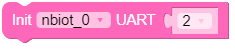
- class unit.nbiot.NBIOTUnit(uart_or_id, port=None, verbose=False)
Bases:
SIM7020Create an NBIOTUnit object.
- Parameters:
uart_or_id (machine.UART | int) – The UART object or UART ID.
port (list | tuple) – A list or tuple containing the RX and TX pin numbers. Required if uart_or_id is an ID.
verbose (bool) – Whether to print debug information.
UiFlow2 Code Block:
MicroPython Code Block:
from unit import NBIOTUnit
import machine

# Using UART ID and pins (rx, tx)
nbiot = NBIOTUnit(1, (16, 17))

# Or using UART object
uart = machine.UART(1, tx=17, rx=16)
nbiot = NBIOTUnit(uart)
- connect(apn='cmnbiot')
Connect to the NB-IoT network.
- Parameters:
apn (str) – The APN of the NB-IoT network. Default is “cmnbiot”.
UiFlow2 Code Block:

MicroPython Code Block:
nbiot.connect("cmnbiot")
- isconnected()
Check if the NB-IoT unit is connected to the network.
- Returns:
True if connected, False otherwise.
- Return type:
UiFlow2 Code Block:

MicroPython Code Block:
if nbiot.isconnected():
    print("NB-IoT unit is connected")
else:
    print("NB-IoT unit is not connected")
- active(en)
Activate or deactivate the NB-IoT unit. Deactivating will enter low power consumption mode.
- Parameters:
en (bool) – True to activate, False to deactivate.
UiFlow2 Code Block:

MicroPython Code Block:
nbiot.active(True)
- status([param])
Get the status of the NB-IoT unit.
Following are commonly supported parameters.
Parameter
Description
rssi
signal strength
pin
SIM Card status
station
station registration status
- Parameters:
param (str) – Optional parameter to specify the status type.
- Returns:
Status information.
- Return type:
UiFlow2 Code Block:



MicroPython Code Block:
# get signal strength
print(nbiot.status("rssi"))

# get SIM Card status
print(nbiot.status("pin"))

# get station registration status
print(nbiot.status("station"))
- ifconfig()
Get IP-level network interface parameters: IP address, subnet mask, gateway and DNS server.
- Returns:
A tuple with the network interface parameters.
- Return type:
UiFlow2 Code Block:




MicroPython Code Block:
# Get IP address
print(nbiot.ifconfig()[0])
# Get subnet mask
print(nbiot.ifconfig()[1])
# Get gateway
print(nbiot.ifconfig()[2])
# Get DNS server
print(nbiot.ifconfig()[3])
- config('param')
- config(param=value)
Get or set the configuration parameters of the NB-IoT unit.
Following are commonly supported parameters.
Parameter
permissions
Description
apn
R
Access Point Name
mode
R
Network mode(only supported NB-IoT)
band
R/W
Frequency Band
ccid
R
SIM Card CCID
imei
R
Device IMEI
imsi
R
SIM Card IMSI
mfr
R
Manufacturer
model
R
Module Model
version
R
Firmware Version
- Parameters:
param (str) – The configuration parameter to get or set.
value – The value to set for the configuration parameter.
- Returns:
The value of the configuration parameter when getting.
- Return type:
UiFlow2 Code Block:







MicroPython Code Block:
# Get apn
print(nbiot.config('apn'))

# Get network mode
nbiot.config('mode')

# Get Frequency Band
nbiot.config('band')

# Set Frequency Band
nbiot.config(band=(1, 3, 5, 8))

# Get CCID
nbiot.config('ccid')

# Get IMEI
nbiot.config('imei')

# Get IMSI
nbiot.config('imsi')

# Get Manufacturer
nbiot.config('mfr')

# Get Module Model
nbiot.config('model')

# Get Firmware Version
nbiot.config('version')
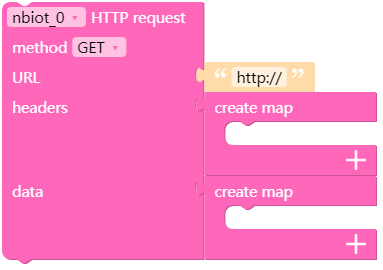
- request(method, url, data=None, json=None, headers={}, stream=None, auth=None, timeout=None, parse_headers=True)
- head(url, **kw)
- get(url, **kw)
- post(url, **kw)
- put(url, **kw)
- patch(url, **kw)
- delete(url, **kw)
Send an HTTP request.
- Parameters:
method (str) – HTTP method to use (e.g. “GET”, “POST”).
url (str) – URL to send the request to.
data – (optional) Dictionary, list of tuples, bytes, or file-like object to send in the body of the Request.
json – (optional) A JSON serializable Python object to send in the body of the Request.
headers (dict) – (optional) Dictionary of HTTP Headers to send with the Request.
stream (bool) – (optional) if False, the response content will be immediately downloaded.
auth (tuple) – (optional) Auth tuple to enable Basic/Digest/Custom HTTP Auth.
timeout (float) – (optional) How many seconds to wait for the server to send data before giving up.
parse_headers (bool) – (optional) Whether to parse response headers.
- Returns:
A Response object.
Note
See
requests2for more details.UiFlow2 Code Block:
MicroPython Code Block:
# GET request
response = nbiot.get("http://httpbin.org/get")
print(response.status_code)
print(response.text)
response.close()

# POST request with JSON data
response = nbiot.post("http://httpbin.org/post", json={"key": "value"})
print(response.json())
response.close()
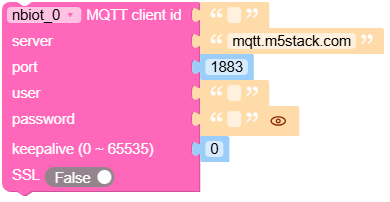
- MQTTClient(client_id, server, port=0, user=None, password=None, keepalive=0, ssl=False, ssl_params={})
Create an MQTT client.
- Parameters:
client_id (str) – The unique client ID string.
server (str) – The hostname or IP address of the remote broker.
port (int) – Network port of the server host to connect to. Default is 0.
user (str) – User name for authentication.
password (str) – Password for authentication.
keepalive (int) – Maximum period in seconds allowed between communications with the broker. Default is 0.
ssl (bool) – Whether to use SSL/TLS support. Default is False.
ssl_params (dict) – SSL/TLS parameters.
- Returns:
An MQTTClient object.
Note
See
MQTTClientfor more details.UiFlow2 Code Block:
MicroPython Code Block:
mqtt = nbiot.MQTTClient("client_id", "mqtt.m5stack.com", port=1883, user="user", password="password")
mqtt.connect()
mqtt.publish("topic", "message")
mqtt.subscribe("topic", lambda topic, msg: print(topic, msg))
mqtt.check_msg()