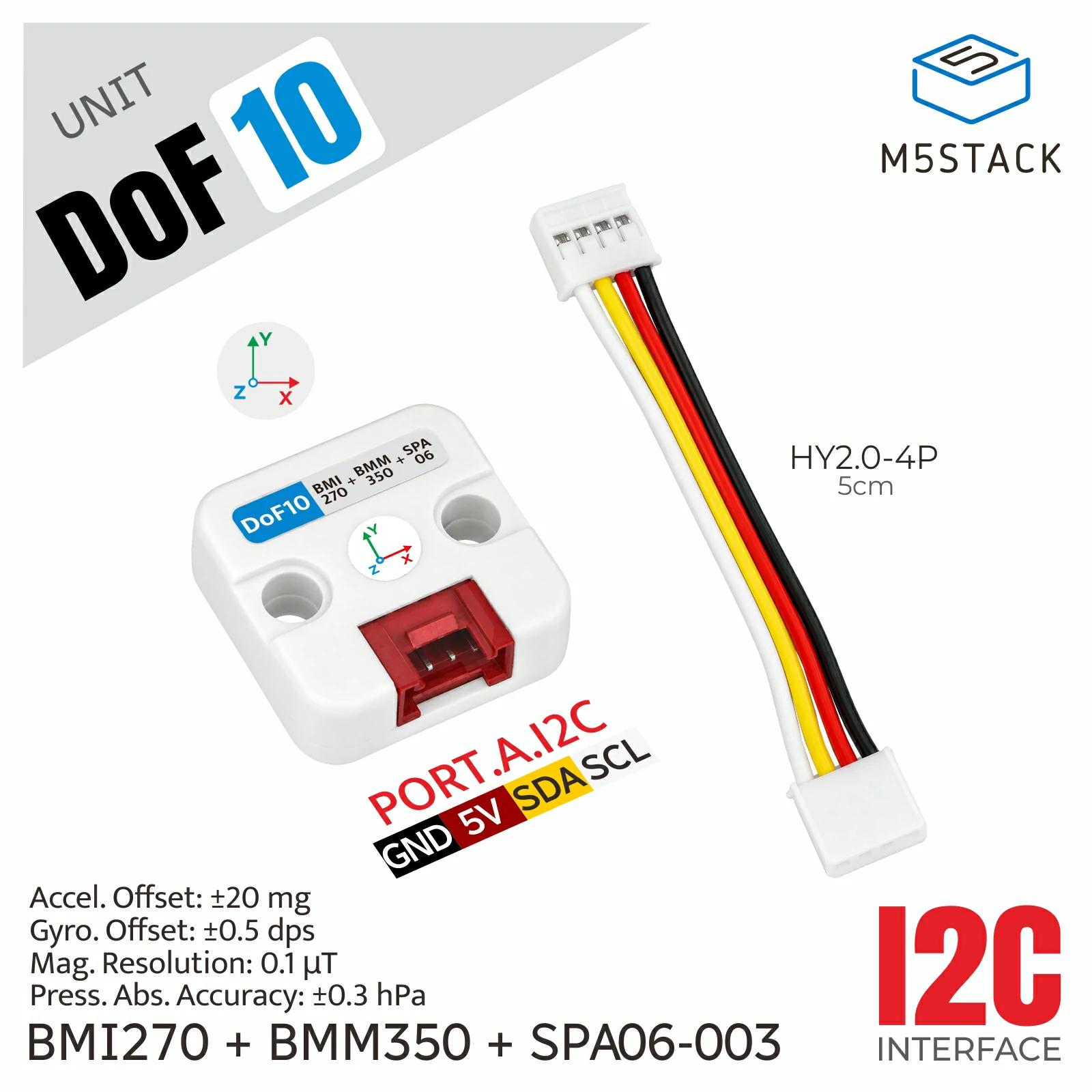
DoF10 Unit
This library is the driver for Unit DoF10.
Support the following products:
UiFlow2 Example
Read Acceleration
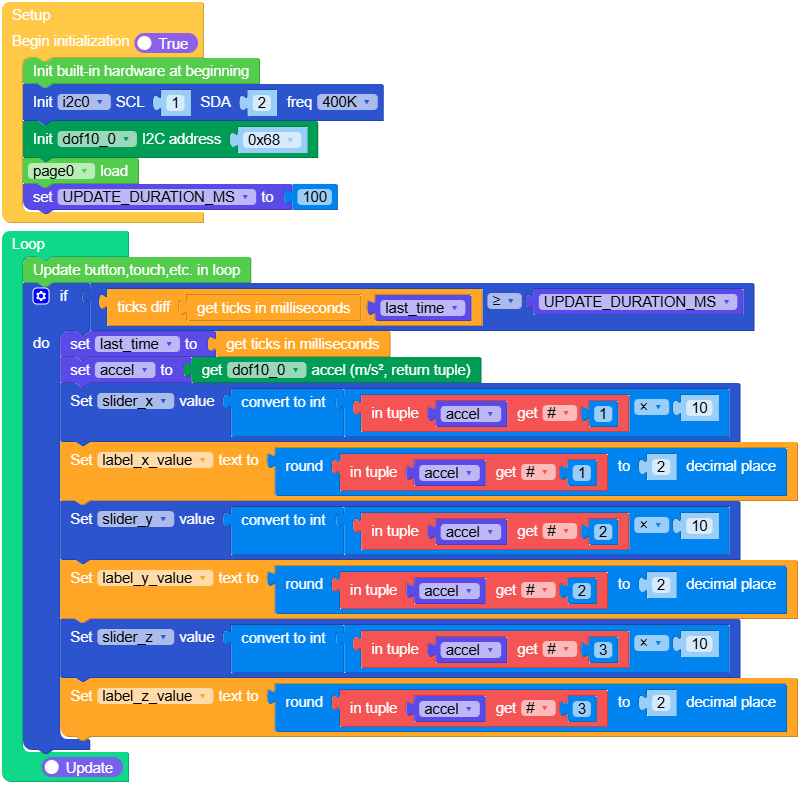
Open the cores3_unit_dof10_accel_example.m5f2 project in UiFlow2.
This example shows how to read and display X, Y, and Z acceleration.
UiFlow2 Code Block:
Example output:
None
Read Barometer
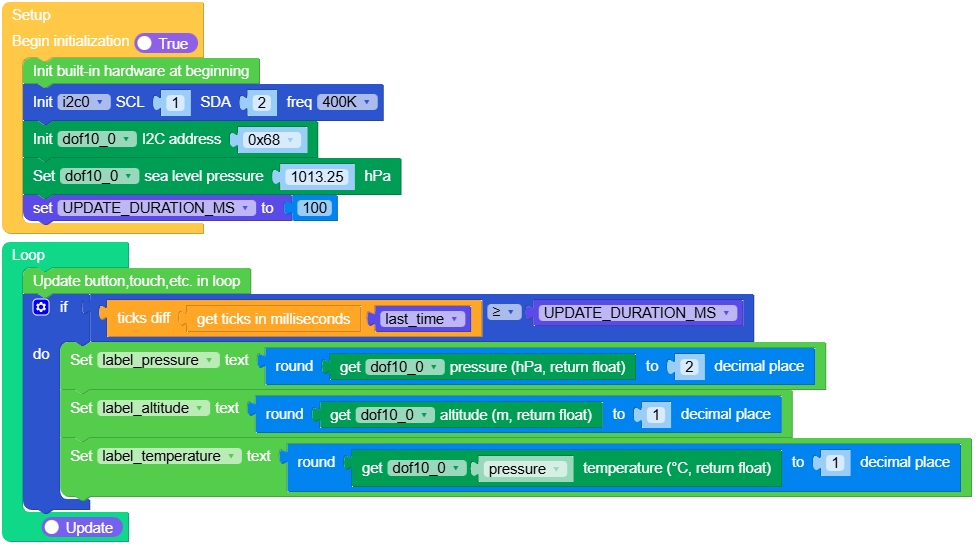
Open the cores3_unit_dof10_barometer_example.m5f2 project in UiFlow2.
This example shows how to read and display pressure, altitude, and temperature.
UiFlow2 Code Block:
Example output:
None
MicroPython Example
Read Acceleration
This example shows how to read and display X, Y, and Z acceleration.
MicroPython Code Block:
  1# SPDX-FileCopyrightText: 2025 M5Stack Technology CO LTD
  2#
  3# SPDX-License-Identifier: MIT
  4
  5import os, sys, io
  6import M5
  7from M5 import *
  8import m5ui
  9import lvgl as lv
 10from hardware import Pin
 11from hardware import I2C
 12from unit import DoF10Unit
 13import time
 14
 15
 16page0 = None
 17title = None
 18unit_label = None
 19range_label = None
 20axis_x = None
 21axis_y = None
 22axis_z = None
 23slider_x = None
 24slider_y = None
 25slider_z = None
 26label_x_value = None
 27label_y_value = None
 28label_z_value = None
 29scale_low = None
 30scale_zero = None
 31scale_high = None
 32i2c0 = None
 33dof10_0 = None
 34
 35
 36last_time = None
 37UPDATE_DURATION_MS = None
 38accel = None
 39
 40
 41def setup():
 42    global \
 43        page0, \
 44        title, \
 45        unit_label, \
 46        range_label, \
 47        axis_x, \
 48        axis_y, \
 49        axis_z, \
 50        slider_x, \
 51        slider_y, \
 52        slider_z, \
 53        label_x_value, \
 54        label_y_value, \
 55        label_z_value, \
 56        scale_low, \
 57        scale_zero, \
 58        scale_high, \
 59        i2c0, \
 60        dof10_0, \
 61        last_time, \
 62        UPDATE_DURATION_MS, \
 63        accel
 64
 65    M5.begin()
 66    Widgets.setRotation(0)
 67    m5ui.init()
 68    page0 = m5ui.M5Page(bg_c=0x10171D)
 69    title = m5ui.M5Label(
 70        "DoF10 / Accel Vector",
 71        x=12,
 72        y=8,
 73        text_c=0xF2F6F8,
 74        bg_c=0x10171D,
 75        bg_opa=0,
 76        font=lv.font_montserrat_18,
 77        parent=page0,
 78    )
 79    unit_label = m5ui.M5Label(
 80        "m/s2",
 81        x=274,
 82        y=11,
 83        text_c=0x4CD7D0,
 84        bg_c=0x10171D,
 85        bg_opa=0,
 86        font=lv.font_montserrat_14,
 87        parent=page0,
 88    )
 89    range_label = m5ui.M5Label(
 90        "Range  -20.0 ~ +20.0",
 91        x=12,
 92        y=34,
 93        text_c=0x8FA1AD,
 94        bg_c=0x10171D,
 95        bg_opa=0,
 96        font=lv.font_montserrat_12,
 97        parent=page0,
 98    )
 99    axis_x = m5ui.M5Label(
100        "X",
101        x=11,
102        y=69,
103        text_c=0xFF6B6B,
104        bg_c=0x10171D,
105        bg_opa=0,
106        font=lv.font_montserrat_18,
107        parent=page0,
108    )
109    axis_y = m5ui.M5Label(
110        "Y",
111        x=11,
112        y=115,
113        text_c=0x63D08C,
114        bg_c=0x10171D,
115        bg_opa=0,
116        font=lv.font_montserrat_18,
117        parent=page0,
118    )
119    axis_z = m5ui.M5Label(
120        "Z",
121        x=11,
122        y=159,
123        text_c=0x63A8FF,
124        bg_c=0x10171D,
125        bg_opa=0,
126        font=lv.font_montserrat_18,
127        parent=page0,
128    )
129    slider_x = m5ui.M5Slider(
130        x=44,
131        y=70,
132        w=200,
133        h=10,
134        mode=lv.slider.MODE.NORMAL,
135        min_value=-200,
136        max_value=200,
137        value=0,
138        bg_c=0x27323A,
139        color=0xFF6B6B,
140        parent=page0,
141    )
142    slider_y = m5ui.M5Slider(
143        x=44,
144        y=115,
145        w=200,
146        h=10,
147        mode=lv.slider.MODE.NORMAL,
148        min_value=-200,
149        max_value=200,
150        value=0,
151        bg_c=0x27323A,
152        color=0x63D08C,
153        parent=page0,
154    )
155    slider_z = m5ui.M5Slider(
156        x=44,
157        y=160,
158        w=200,
159        h=10,
160        mode=lv.slider.MODE.NORMAL,
161        min_value=-200,
162        max_value=200,
163        value=0,
164        bg_c=0x27323A,
165        color=0x63A8FF,
166        parent=page0,
167    )
168    label_x_value = m5ui.M5Label(
169        "0.00",
170        x=260,
171        y=70,
172        text_c=0xF2F6F8,
173        bg_c=0x10171D,
174        bg_opa=0,
175        font=lv.font_montserrat_16,
176        parent=page0,
177    )
178    label_y_value = m5ui.M5Label(
179        "0.00",
180        x=260,
181        y=115,
182        text_c=0xF2F6F8,
183        bg_c=0x10171D,
184        bg_opa=0,
185        font=lv.font_montserrat_16,
186        parent=page0,
187    )
188    label_z_value = m5ui.M5Label(
189        "0.00",
190        x=260,
191        y=160,
192        text_c=0xF2F6F8,
193        bg_c=0x10171D,
194        bg_opa=0,
195        font=lv.font_montserrat_16,
196        parent=page0,
197    )
198    scale_low = m5ui.M5Label(
199        "-20",
200        x=55,
201        y=211,
202        text_c=0x8FA1AD,
203        bg_c=0x10171D,
204        bg_opa=0,
205        font=lv.font_montserrat_12,
206        parent=page0,
207    )
208    scale_zero = m5ui.M5Label(
209        "0",
210        x=153,
211        y=211,
212        text_c=0xF2F6F8,
213        bg_c=0x10171D,
214        bg_opa=0,
215        font=lv.font_montserrat_12,
216        parent=page0,
217    )
218    scale_high = m5ui.M5Label(
219        "+20",
220        x=235,
221        y=211,
222        text_c=0x8FA1AD,
223        bg_c=0x10171D,
224        bg_opa=0,
225        font=lv.font_montserrat_12,
226        parent=page0,
227    )
228
229    i2c0 = I2C(0, scl=Pin(1), sda=Pin(2), freq=400000)
230    dof10_0 = DoF10Unit(i2c0, addr=0x68)
231    page0.screen_load()
232    UPDATE_DURATION_MS = 100
233    last_time = time.ticks_ms()
234
235
236def loop():
237    global \
238        page0, \
239        title, \
240        unit_label, \
241        range_label, \
242        axis_x, \
243        axis_y, \
244        axis_z, \
245        slider_x, \
246        slider_y, \
247        slider_z, \
248        label_x_value, \
249        label_y_value, \
250        label_z_value, \
251        scale_low, \
252        scale_zero, \
253        scale_high, \
254        i2c0, \
255        dof10_0, \
256        last_time, \
257        UPDATE_DURATION_MS, \
258        accel
259    M5.update()
260    if (time.ticks_diff((time.ticks_ms()), last_time)) >= UPDATE_DURATION_MS:
261        last_time = time.ticks_ms()
262        accel = dof10_0.get_accel()
263        slider_x.set_value(int(accel[0] * 10), True)
264        label_x_value.set_text(str(round(accel[0], 2)))
265        slider_y.set_value(int(accel[1] * 10), True)
266        label_y_value.set_text(str(round(accel[1], 2)))
267        slider_z.set_value(int(accel[2] * 10), True)
268        label_z_value.set_text(str(round(accel[2], 2)))
269
270
271if __name__ == "__main__":
272    try:
273        setup()
274        while True:
275            loop()
276    except (Exception, KeyboardInterrupt) as e:
277        try:
278            m5ui.deinit()
279            from utility import print_error_msg
280
281            print_error_msg(e)
282        except ImportError:
283            print("please update to latest firmware")
Example output:
None
Read Barometer
This example shows how to read and display pressure, altitude, and temperature.
MicroPython Code Block:
  1# SPDX-FileCopyrightText: 2025 M5Stack Technology CO LTD
  2#
  3# SPDX-License-Identifier: MIT
  4
  5import os, sys, io
  6import M5
  7from M5 import *
  8from hardware import Pin
  9from hardware import I2C
 10from unit import DoF10Unit
 11import time
 12
 13
 14title = None
 15live = None
 16pressure_caption = None
 17label_pressure = None
 18pressure_unit = None
 19altitude_caption = None
 20label_altitude = None
 21altitude_unit = None
 22temperature_caption = None
 23label_temperature = None
 24temperature_unit = None
 25sea_level_caption = None
 26i2c0 = None
 27dof10_0 = None
 28
 29
 30UPDATE_DURATION_MS = None
 31last_time = None
 32
 33
 34def setup():
 35    global \
 36        title, \
 37        live, \
 38        pressure_caption, \
 39        label_pressure, \
 40        pressure_unit, \
 41        altitude_caption, \
 42        label_altitude, \
 43        altitude_unit, \
 44        temperature_caption, \
 45        label_temperature, \
 46        temperature_unit, \
 47        sea_level_caption, \
 48        i2c0, \
 49        dof10_0, \
 50        UPDATE_DURATION_MS, \
 51        last_time
 52
 53    M5.begin()
 54    Widgets.setRotation(0)
 55    Widgets.fillScreen(0x10171D)
 56    title = Widgets.Label(
 57        "DoF10 / Barometer", 12, 8, 1.0, 0x4CD7D0, 0x10171D, Widgets.FONTS.Montserrat18
 58    )
 59    live = Widgets.Label("Live", 272, 11, 1.0, 0x63D08C, 0x10171D, Widgets.FONTS.Montserrat14)
 60    pressure_caption = Widgets.Label(
 61        "Pressure", 12, 44, 1.0, 0x8FA1AD, 0x10171D, Widgets.FONTS.Montserrat14
 62    )
 63    label_pressure = Widgets.Label(
 64        "----.--", 12, 62, 1.0, 0xF2F6F8, 0x10171D, Widgets.FONTS.Montserrat40
 65    )
 66    pressure_unit = Widgets.Label(
 67        "hPa", 170, 84, 1.0, 0x4CD7D0, 0x10171D, Widgets.FONTS.Montserrat18
 68    )
 69    altitude_caption = Widgets.Label(
 70        "Altitude", 12, 132, 1.0, 0x8FA1AD, 0x10171D, Widgets.FONTS.Montserrat14
 71    )
 72    label_altitude = Widgets.Label(
 73        "---.-", 12, 151, 1.0, 0xF2F6F8, 0x10171D, Widgets.FONTS.Montserrat24
 74    )
 75    altitude_unit = Widgets.Label(
 76        "m", 116, 158, 1.0, 0x63A8FF, 0x10171D, Widgets.FONTS.Montserrat18
 77    )
 78    temperature_caption = Widgets.Label(
 79        "SPL06 Temp", 170, 132, 1.0, 0x8FA1AD, 0x10171D, Widgets.FONTS.Montserrat14
 80    )
 81    label_temperature = Widgets.Label(
 82        "--.-", 170, 151, 1.0, 0xFFB454, 0x10171D, Widgets.FONTS.Montserrat24
 83    )
 84    temperature_unit = Widgets.Label(
 85        "DEG C", 244, 158, 1.0, 0x8FA1AD, 0x10171D, Widgets.FONTS.Montserrat14
 86    )
 87    sea_level_caption = Widgets.Label(
 88        "SEA LEVEL  1013.25 hPa", 12, 211, 1.0, 0x8FA1AD, 0x10171D, Widgets.FONTS.Montserrat14
 89    )
 90
 91    i2c0 = I2C(0, scl=Pin(1), sda=Pin(2), freq=400000)
 92    dof10_0 = DoF10Unit(i2c0, addr=0x68)
 93    dof10_0.set_sea_level_pressure(1013.25)
 94    UPDATE_DURATION_MS = 100
 95    last_time = time.ticks_ms()
 96
 97
 98def loop():
 99    global \
100        title, \
101        live, \
102        pressure_caption, \
103        label_pressure, \
104        pressure_unit, \
105        altitude_caption, \
106        label_altitude, \
107        altitude_unit, \
108        temperature_caption, \
109        label_temperature, \
110        temperature_unit, \
111        sea_level_caption, \
112        i2c0, \
113        dof10_0, \
114        UPDATE_DURATION_MS, \
115        last_time
116    M5.update()
117    if (time.ticks_diff((time.ticks_ms()), last_time)) >= UPDATE_DURATION_MS:
118        last_time = time.ticks_ms()
119        label_pressure.setText(str(round(dof10_0.get_pressure(), 2)))
120        label_altitude.setText(str(round(dof10_0.get_altitude(), 1)))
121        label_temperature.setText(str(round(dof10_0.get_temperature("pressure"), 1)))
122
123
124if __name__ == "__main__":
125    try:
126        setup()
127        while True:
128            loop()
129    except (Exception, KeyboardInterrupt) as e:
130        try:
131            from utility import print_error_msg
132
133            print_error_msg(e)
134        except ImportError:
135            print("please update to latest firmware")
Example output:
None
API
DoF10Unit
Constructors
- class DoF10Unit(i2c, addr=0x68)
Create a DoF10Unit on the host I2C bus. The BMI270 address can be
0x68or0x69(default:0x68). The BMM350 and SPL06-001 addresses remain0x14and0x76.- Parameters:
- Raises:
TypeError – addr is not an integer.
ValueError – addr is not 0x68 or 0x69.
UnitError – No BMI270 responds at the selected address.
OSError – Sensor initialization or I2C communication fails.
UiFlow2 Code Block:

MicroPython Code Block:
dof = DoF10Unit(i2c)  # Default BMI270 address: 0x68
# Use this instead when the BMI270 is configured at 0x69:
# dof = DoF10Unit(i2c, addr=0x69)
Methods
The complete DoF10 interface is listed below.
- get_accel()
Return mapped acceleration as
(x, y, z)inm/s2.UiFlow2 Code Block:

- get_accel_raw()
Return signed 16-bit BMI270 counts from
-32768to32767.UiFlow2 Code Block:

- get_gyro()
Return mapped, offset-corrected angular velocity as
(x, y, z)inrad/s.UiFlow2 Code Block:

- get_gyro_raw()
Return signed 16-bit BMI270 gyroscope counts from
-32768to32767.UiFlow2 Code Block:

- get_mag()
Return mapped and calibrated magnetic field as
(x, y, z)inuT.UiFlow2 Code Block:

- get_mag_raw()
Return signed 24-bit BMM350 counts from
-8388608to8388607.UiFlow2 Code Block:

- get_temperature(sensor='pressure')
Return temperature in degrees Celsius.
sensoraccepts"imu","magnetometer", or"pressure"; the default is"pressure".- Parameters:
sensor (str) – Temperature source.
- Returns:
Temperature in degrees Celsius.
- Return type:
UiFlow2 Code Block:

- get_pressure()
Return compensated atmospheric pressure in
hPa.- Returns:
Pressure in hPa.
- Return type:
UiFlow2 Code Block:

- get_altitude()
Return barometric altitude in meters using the configured sea-level pressure.
- Returns:
Altitude in meters.
- Return type:
UiFlow2 Code Block:

- set_sea_level_pressure(pressure)
Set the sea-level reference pressure in
hPa. The default is 1013.25.- Parameters:
pressure (float) – Reference pressure in hPa.
- Raises:
ValueError – If pressure is not positive.
UiFlow2 Code Block:

- get_heading()
Sample motion and magnetic data and return tilt-compensated heading from 0 to less than 360 degrees.
- Returns:
Heading in degrees.
- Return type:
UiFlow2 Code Block:

- get_attitude()
Sample motion and magnetic data and return
(yaw, pitch, roll)in degrees.UiFlow2 Code Block:

- set_accel_range(accel_scale)
Set one of
ACCEL_RANGE_2G,ACCEL_RANGE_4G,ACCEL_RANGE_8G, orACCEL_RANGE_16G.- Parameters:
accel_scale (int) – Full-scale range in g.
UiFlow2 Code Block:

- set_gyro_range(gyro_scale)
Set one of
GYRO_RANGE_125DPS,GYRO_RANGE_250DPS,GYRO_RANGE_500DPS,GYRO_RANGE_1000DPS, orGYRO_RANGE_2000DPS.- Parameters:
gyro_scale (int) – Full-scale range in deg/s.
UiFlow2 Code Block:

- set_accel_gyro_odr(accel_odr, gyro_odr)
Set BMI270 output data rates using
ACCEL_ODR_VALUESandGYRO_ODR_VALUES.UiFlow2 Code Block:

- set_gyro_offsets(x, y, z)
Set mapped gyroscope offsets in
rad/s.- Parameters:
UiFlow2 Code Block:

- calibrate_gyro(samples=32)
Estimate offsets while stationary and return
Trueon success.- Parameters:
samples (int) – Number of samples.
- Returns:
Whether calibration succeeded.
- Return type:
UiFlow2 Code Block:

- set_magnetometer_calibration(offsets, scales)
Set hard-iron offsets in
uTand unitless soft-iron scale factors.- Parameters:
UiFlow2 Code Block:

- set_axis_mapping(sensor, x_axis, y_axis, z_axis)
Map
accelerometer,gyroscope, ormagnetometeraxes. Values1/-1,2/-2, and3/-3select source X/Y/Z with sign; source axes cannot repeat.- Parameters:
UiFlow2 Code Block:

- set_fusion_time_constant(seconds)
Set the non-negative complementary-filter time constant in seconds.
- Parameters:
seconds (float) – Non-negative filter time constant.
UiFlow2 Code Block:

- reset_fusion()
Reset the attitude filter; the next attitude sample reinitializes it.
UiFlow2 Code Block: