BMM350 Unit
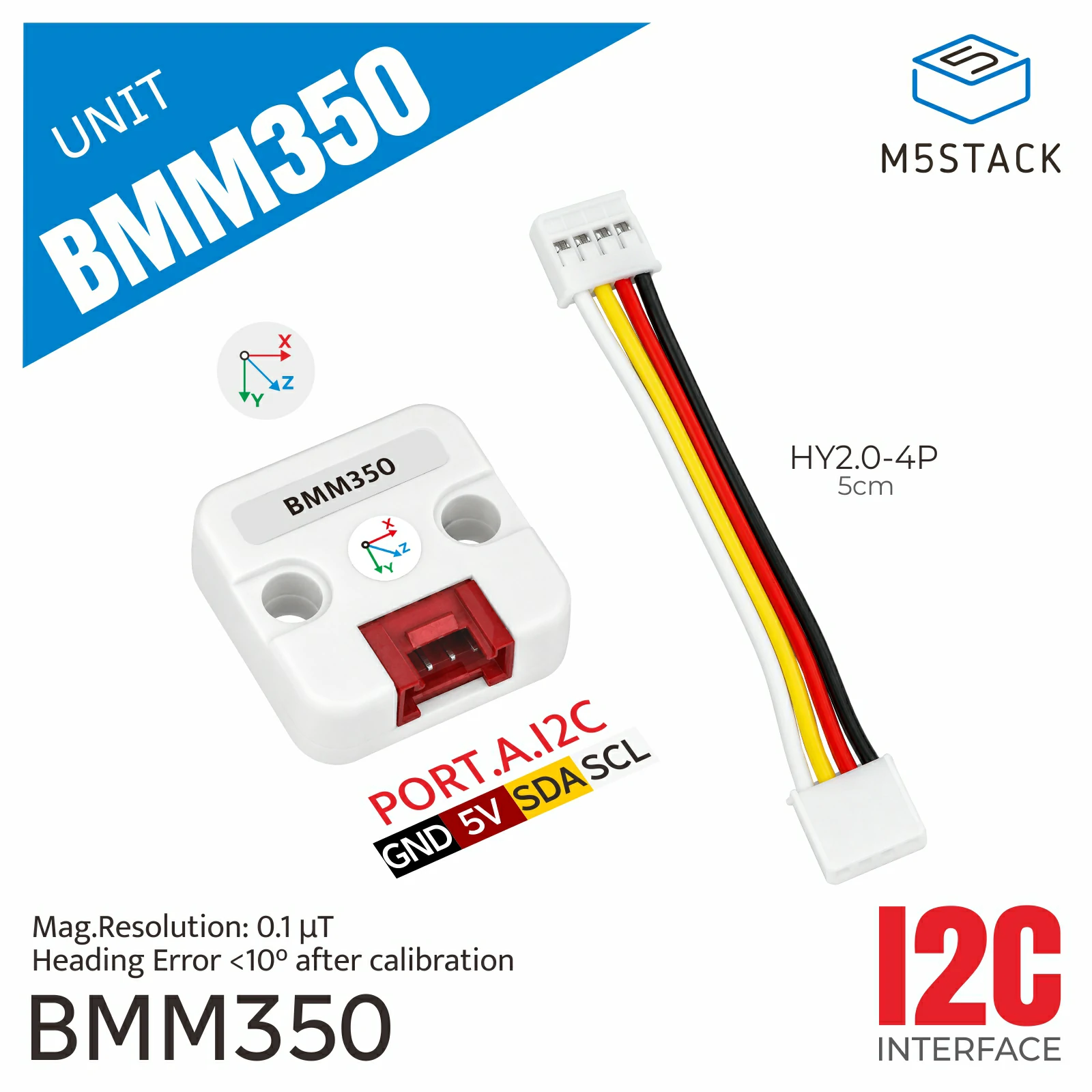
This library is the driver for BMM350 Unit, a three-axis BMM350 magnetometer.
Support the following products:
UiFlow2 Example
Read magnetic field and heading
Open the cores3_unit_bmm350_example.m5f2 project in UiFlow2.
This example displays the heading, X/Y/Z magnetic field values, and sensor temperature. Tap the calibration button to start collecting samples, rotate the Unit through all three axes, then tap the button again to finish.
UiFlow2 Code Block:
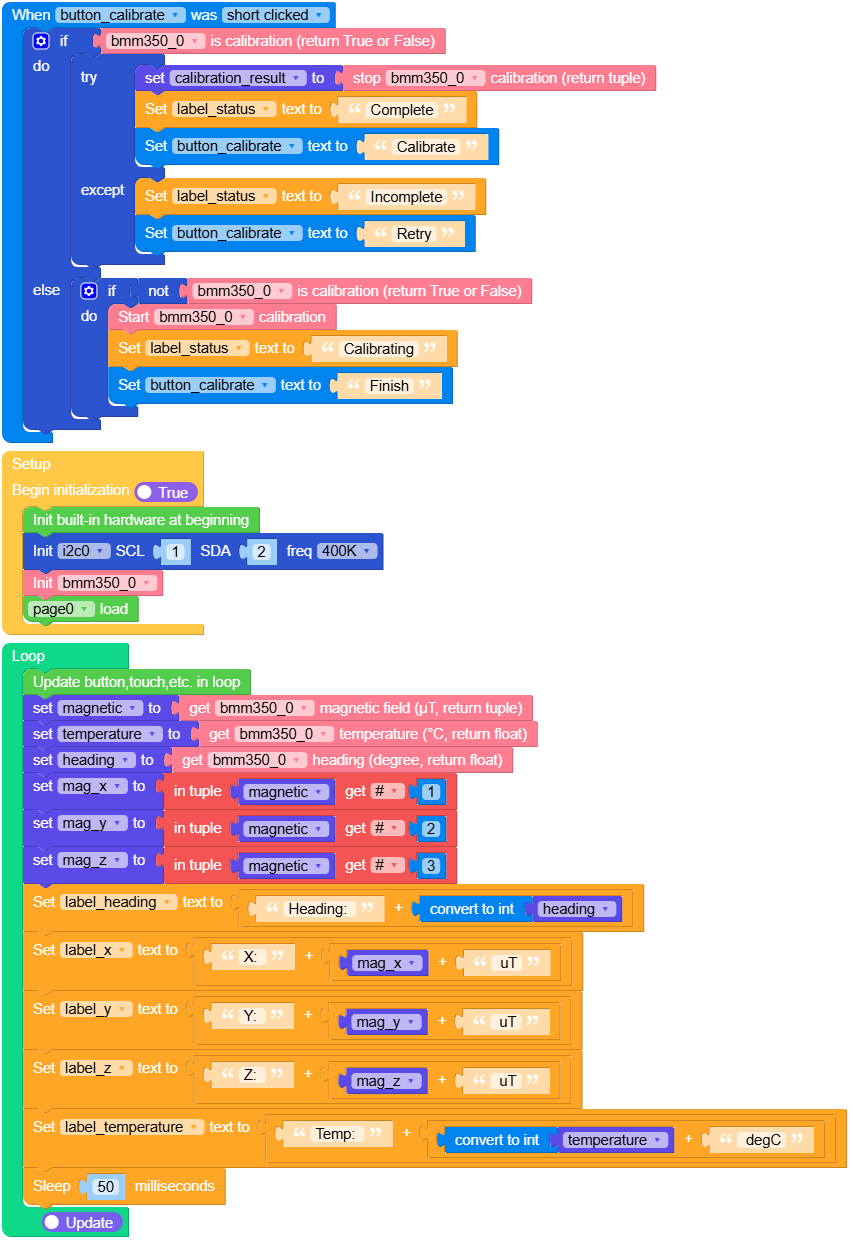
Calibration requires at least 32 samples and at least 10 uT of range on
each axis. When the range is insufficient, the example keeps the previous
calibration and reports that the calibration should be retried.
MicroPython Example
Read magnetic field and heading
This example uses CoreS3 Unit A I2C and continuously refreshes the graphical display with the current magnetic field, temperature, and heading.
MicroPython Code Block:
  1# SPDX-FileCopyrightText: 2026 M5Stack Technology CO LTD
  2#
  3# SPDX-License-Identifier: MIT
  4
  5import os, sys, io
  6import M5
  7from M5 import *
  8import m5ui
  9import lvgl as lv
 10from unit import BMM350Unit
 11from hardware import Pin
 12from hardware import I2C
 13import time
 14
 15
 16page0 = None
 17label_title = None
 18label_status = None
 19label_heading = None
 20label_x = None
 21label_y = None
 22label_z = None
 23label_temperature = None
 24button_calibrate = None
 25i2c0 = None
 26bmm350_0 = None
 27magnetic = None
 28calibration_result = None
 29temperature = None
 30heading = None
 31mag_x = None
 32mag_y = None
 33mag_z = None
 34
 35
 36def button_calibrate_short_clicked_event(event_struct):
 37    global \
 38        page0, \
 39        label_title, \
 40        label_status, \
 41        label_heading, \
 42        label_x, \
 43        label_y, \
 44        label_z, \
 45        label_temperature, \
 46        button_calibrate, \
 47        i2c0, \
 48        bmm350_0, \
 49        magnetic, \
 50        calibration_result, \
 51        temperature, \
 52        heading, \
 53        mag_x, \
 54        mag_y, \
 55        mag_z
 56    if bmm350_0.is_calibrating():
 57        try:
 58            calibration_result = bmm350_0.stop_calibration()
 59            label_status.set_text(str("Complete"))
 60            button_calibrate.set_btn_text(str("Calibrate"))
 61        except:
 62            label_status.set_text(str("Incomplete"))
 63            button_calibrate.set_btn_text(str("Retry"))
 64
 65    else:
 66        if not (bmm350_0.is_calibrating()):
 67            bmm350_0.start_calibration()
 68            label_status.set_text(str("Calibrating"))
 69            button_calibrate.set_btn_text(str("Finish"))
 70
 71
 72def button_calibrate_event_handler(event_struct):
 73    global \
 74        page0, \
 75        label_title, \
 76        label_status, \
 77        label_heading, \
 78        label_x, \
 79        label_y, \
 80        label_z, \
 81        label_temperature, \
 82        button_calibrate, \
 83        i2c0, \
 84        bmm350_0, \
 85        magnetic, \
 86        calibration_result, \
 87        temperature, \
 88        heading, \
 89        mag_x, \
 90        mag_y, \
 91        mag_z
 92    event = event_struct.code
 93    if event == lv.EVENT.SHORT_CLICKED and True:
 94        button_calibrate_short_clicked_event(event_struct)
 95    return
 96
 97
 98def setup():
 99    global \
100        page0, \
101        label_title, \
102        label_status, \
103        label_heading, \
104        label_x, \
105        label_y, \
106        label_z, \
107        label_temperature, \
108        button_calibrate, \
109        i2c0, \
110        bmm350_0, \
111        magnetic, \
112        calibration_result, \
113        temperature, \
114        heading, \
115        mag_x, \
116        mag_y, \
117        mag_z
118
119    M5.begin()
120    Widgets.setRotation(0)
121    m5ui.init()
122    page0 = m5ui.M5Page(bg_c=0x111820)
123    label_title = m5ui.M5Label(
124        "BMM350 Unit",
125        x=76,
126        y=9,
127        text_c=0x58D6C7,
128        bg_c=0x111820,
129        bg_opa=0,
130        font=lv.font_montserrat_24,
131        parent=page0,
132    )
133    label_status = m5ui.M5Label(
134        "Ready",
135        x=215,
136        y=138,
137        text_c=0x95A4B3,
138        bg_c=0x111820,
139        bg_opa=0,
140        font=lv.font_montserrat_14,
141        parent=page0,
142    )
143    label_heading = m5ui.M5Label(
144        "Heading: ---.-",
145        x=86,
146        y=70,
147        text_c=0xFFFFFF,
148        bg_c=0x111820,
149        bg_opa=0,
150        font=lv.font_montserrat_24,
151        parent=page0,
152    )
153    label_x = m5ui.M5Label(
154        "X: ----.-- uT",
155        x=10,
156        y=140,
157        text_c=0xFF6B6B,
158        bg_c=0x111820,
159        bg_opa=0,
160        font=lv.font_montserrat_14,
161        parent=page0,
162    )
163    label_y = m5ui.M5Label(
164        "Y: ----.-- uT",
165        x=10,
166        y=160,
167        text_c=0x58D68D,
168        bg_c=0x111820,
169        bg_opa=0,
170        font=lv.font_montserrat_14,
171        parent=page0,
172    )
173    label_z = m5ui.M5Label(
174        "Z: ----.-- uT",
175        x=10,
176        y=180,
177        text_c=0x5DADE2,
178        bg_c=0x111820,
179        bg_opa=0,
180        font=lv.font_montserrat_14,
181        parent=page0,
182    )
183    label_temperature = m5ui.M5Label(
184        "Temp: --.- degC",
185        x=10,
186        y=205,
187        text_c=0xE8EDF2,
188        bg_c=0x111820,
189        bg_opa=0,
190        font=lv.font_montserrat_14,
191        parent=page0,
192    )
193    button_calibrate = m5ui.M5Button(
194        text="Calibrate",
195        x=180,
196        y=173,
197        bg_c=0x147D73,
198        text_c=0xFFFFFF,
199        font=lv.font_montserrat_14,
200        parent=page0,
201    )
202
203    button_calibrate.add_event_cb(button_calibrate_event_handler, lv.EVENT.ALL, None)
204
205    i2c0 = I2C(0, scl=Pin(1), sda=Pin(2), freq=400000)
206    bmm350_0 = BMM350Unit(i2c0)
207    page0.screen_load()
208
209
210def loop():
211    global \
212        page0, \
213        label_title, \
214        label_status, \
215        label_heading, \
216        label_x, \
217        label_y, \
218        label_z, \
219        label_temperature, \
220        button_calibrate, \
221        i2c0, \
222        bmm350_0, \
223        magnetic, \
224        calibration_result, \
225        temperature, \
226        heading, \
227        mag_x, \
228        mag_y, \
229        mag_z
230    M5.update()
231    magnetic = bmm350_0.get_mag()
232    temperature = bmm350_0.get_temperature()
233    heading = bmm350_0.get_heading()
234    mag_x = magnetic[0]
235    mag_y = magnetic[1]
236    mag_z = magnetic[2]
237    label_heading.set_text(str((str("Heading: ") + str((int(heading))))))
238    label_x.set_text(str((str("X: ") + str((str(mag_x) + str(" uT"))))))
239    label_y.set_text(str((str("Y: ") + str((str(mag_y) + str(" uT"))))))
240    label_z.set_text(str((str("Z: ") + str((str(mag_z) + str(" uT"))))))
241    label_temperature.set_text(
242        str((str("Temp: ") + str((str((int(temperature))) + str(" degC")))))
243    )
244    time.sleep_ms(50)
245
246
247if __name__ == "__main__":
248    try:
249        setup()
250        while True:
251            loop()
252    except (Exception, KeyboardInterrupt) as e:
253        try:
254            m5ui.deinit()
255            from utility import print_error_msg
256
257            print_error_msg(e)
258        except ImportError:
259            print("please update to latest firmware")
API
BMM350Unit
- class unit.bmm350.BMM350Unit(i2c, addr=0x14, output_data_rate_hz=100)
Create a direct-I2C BMM350 Unit object.
- Parameters:
UIFLOW2:

- get_mag()
Sample and return the mapped, calibrated magnetic field as
(x, y, z)inuT.- Returns:
Magnetic field tuple.
- Return type:
UIFLOW2:

- get_temperature()
Sample and return the sensor temperature in degrees Celsius.
- Returns:
Sensor temperature.
- Return type:
UIFLOW2:

- get_heading()
Sample and return the horizontal heading in the range
0 <= heading < 360degrees. The Unit must be kept level for a meaningful heading.- Returns:
Horizontal heading in degrees.
- Return type:
UIFLOW2:

- set_output_data_rate(rate_hz)
Set the output data rate to
25,50,100,200, or400Hz.- Parameters:
rate_hz (int) – Output data rate in Hz.
- Return type:
None
UIFLOW2:

- get_output_data_rate()
Return the configured output data rate in Hz.
- Returns:
Output data rate.
- Return type:
UIFLOW2:

- set_axis_mapping(x_axis, y_axis, z_axis)
Set the output axis order and direction. Each value must be one of
1,-1,2,-2,3, or-3; each source axis must be used exactly once.- Parameters:
- Return type:
None
UIFLOW2:

- get_axis_mapping()
Return the current axis mapping tuple.
- Returns:
Source axis and sign mapping.
- Return type:
UIFLOW2:

- set_calibration(offsets, scales)
Apply three hard-iron offsets in
uTand three positive soft-iron scale factors. Both arguments must contain three finite numeric values.
- get_calibration()
Return
(offsets, scales)currently applied in memory.- Returns:
Current offsets and scale factors.
- Return type:
- clear_calibration()
Restore zero offsets and unit scale factors.
- Return type:
None
UIFLOW2:

- start_calibration()
Start non-blocking min/max sample collection. Continue calling a sampling getter while rotating the Unit through all three axes.
- Raises:
RuntimeError – If calibration is already active.
- Return type:
None
UIFLOW2:

- stop_calibration()
Finish sample collection, apply the calculated calibration, and return
(offsets, scales). At least 32 samples and at least10 uTof range on every axis are required; otherwiseRuntimeErroris raised.- Returns:
Calculated offsets and scale factors.
- Return type:
UIFLOW2:

- cancel_calibration()
Cancel active sample collection while preserving the previous calibration.
- Return type:
None
UIFLOW2:

- is_calibrating()
Return
Truewhile calibration samples are being collected.- Returns:
Whether calibration is active.
- Return type:
UIFLOW2:


