Miniscale Unit
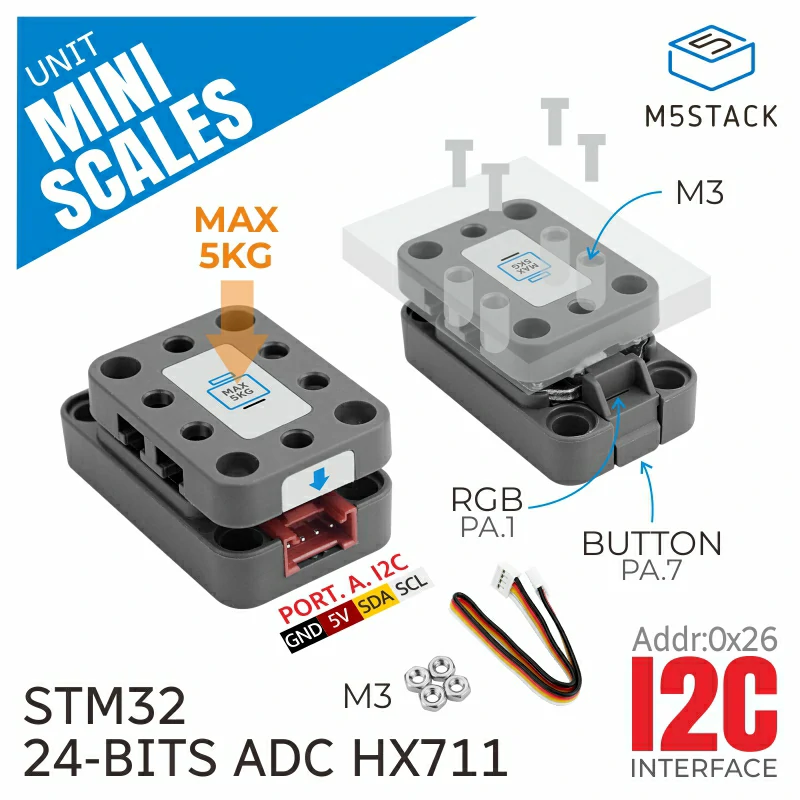
The Miniscale class is designed for interfacing with a mini scale weight sensor, which includes a HX711 22-bit ADC. This sensor is capable of measuring weight and also includes additional functionalities like LED control and various filters.
Support the following products:
UiFlow2 Example
Basic Example
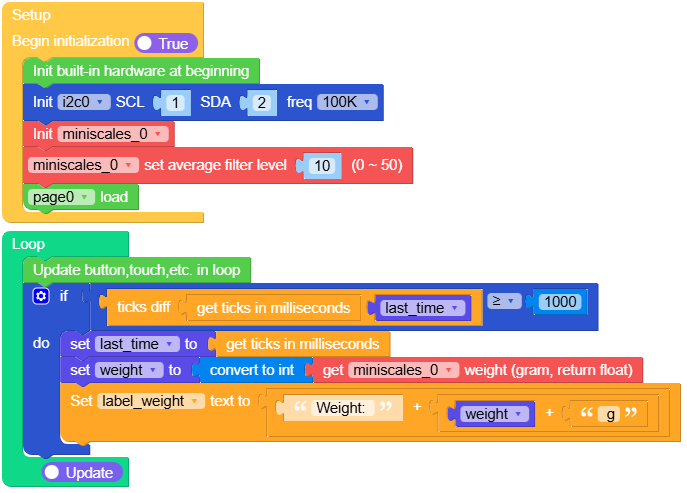
Open the m5cores3_miniscales_base_example.m5f2 project in UiFlow2.
This example demonstrates how to read and display weight values from the MiniScale unit. It sets up an average filter level of 10 for smoother readings and updates the weight display every second.
UiFlow2 Code Block:
Example output:
None
Calibration Example
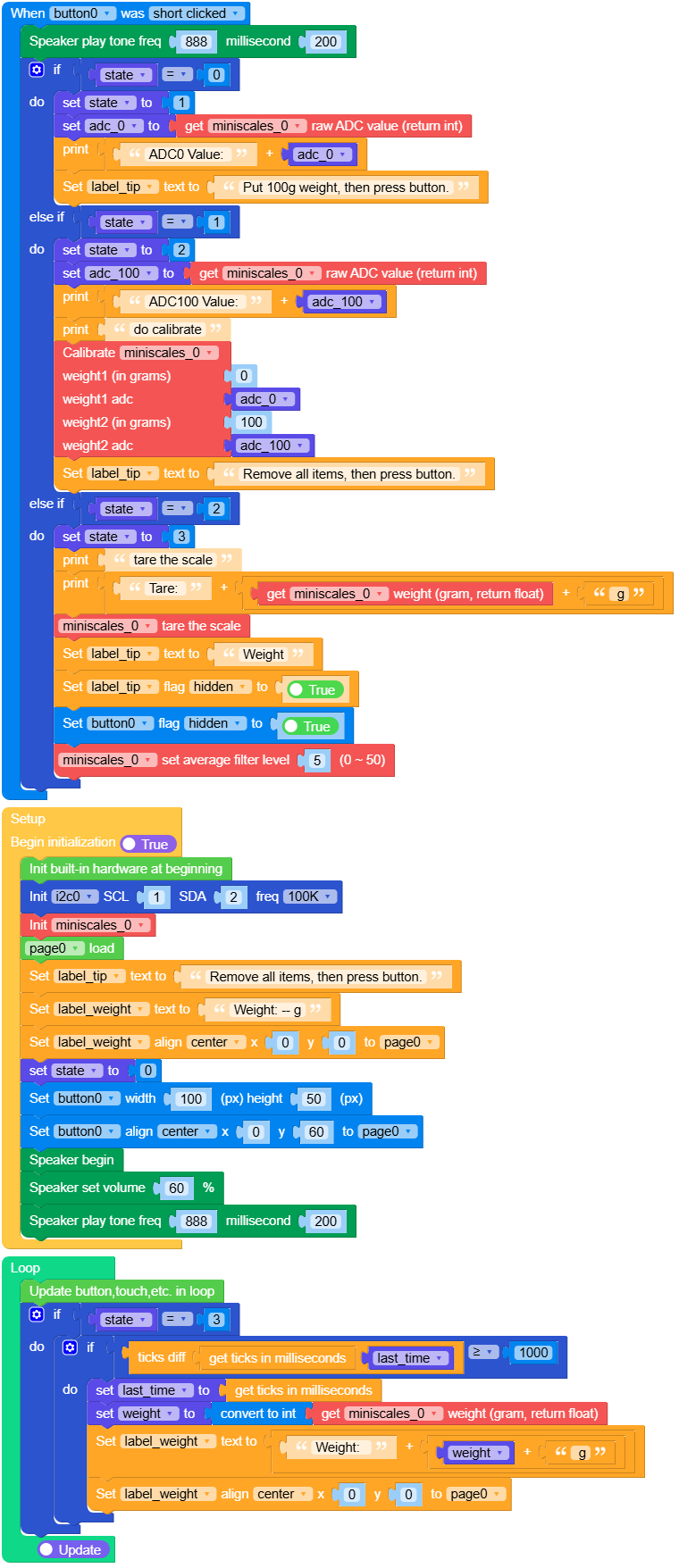
Open the m5cores3_miniscales_calibrate_example.m5f2 project in UiFlow2.
This example demonstrates the complete calibration process for the MiniScale unit. It guides users through a three-step calibration: first removing all items and recording the zero-point ADC value, then placing a 100g weight and recording that ADC value, and finally performing tare operation to set the zero point. After calibration, the weight is displayed with an average filter level of 5.
UiFlow2 Code Block:
Example output:
None
MicroPython Example
Basic Example
This example demonstrates how to read and display weight values from the MiniScale unit. It sets up an average filter level of 10 for smoother readings and updates the weight display every second.
MicroPython Code Block:
 1# SPDX-FileCopyrightText: 2025 M5Stack Technology CO LTD
 2#
 3# SPDX-License-Identifier: MIT
 4
 5
 6import os, sys, io
 7import M5
 8from M5 import *
 9import m5ui
10import lvgl as lv
11from hardware import I2C
12from hardware import Pin
13from unit import MiniScaleUnit
14import time
15
16
17page0 = None
18label_title = None
19label_weight = None
20i2c0 = None
21miniscales_0 = None
22last_time = None
23weight = None
24
25
26def setup():
27    global page0, label_title, label_weight, i2c0, miniscales_0, last_time, weight
28
29    M5.begin()
30    Widgets.setRotation(1)
31    m5ui.init()
32    page0 = m5ui.M5Page(bg_c=0xFFFFFF)
33    label_title = m5ui.M5Label(
34        "MiniScales",
35        x=94,
36        y=5,
37        text_c=0x0000FF,
38        bg_c=0xFFFFFF,
39        bg_opa=0,
40        font=lv.font_montserrat_24,
41        parent=page0,
42    )
43    label_weight = m5ui.M5Label(
44        "Weights: -- g",
45        x=81,
46        y=90,
47        text_c=0x0000FF,
48        bg_c=0xFFFFFF,
49        bg_opa=0,
50        font=lv.font_montserrat_24,
51        parent=page0,
52    )
53
54    i2c0 = I2C(0, scl=Pin(1), sda=Pin(2), freq=100000)
55    miniscales_0 = MiniScaleUnit(i2c0)
56    miniscales_0.set_average_filter_level(10)
57    page0.screen_load()
58
59
60def loop():
61    global page0, label_title, label_weight, i2c0, miniscales_0, last_time, weight
62    M5.update()
63    if (time.ticks_diff((time.ticks_ms()), last_time)) >= 1000:
64        last_time = time.ticks_ms()
65        weight = int(miniscales_0.weight)
66        label_weight.set_text(str((str("Weight: ") + str((str(weight) + str(" g"))))))
67
68
69if __name__ == "__main__":
70    try:
71        setup()
72        while True:
73            loop()
74    except (Exception, KeyboardInterrupt) as e:
75        try:
76            m5ui.deinit()
77            from utility import print_error_msg
78
79            print_error_msg(e)
80        except ImportError:
81            print("please update to latest firmware")
Example output:
None
Calibration Example
This example demonstrates the complete calibration process for the MiniScale unit. It guides users through a three-step calibration: first removing all items and recording the zero-point ADC value, then placing a 100g weight and recording that ADC value, and finally performing tare operation to set the zero point. After calibration, the weight is displayed with an average filter level of 5.
MicroPython Code Block:
  1# SPDX-FileCopyrightText: 2025 M5Stack Technology CO LTD
  2#
  3# SPDX-License-Identifier: MIT
  4
  5import os, sys, io
  6import M5
  7from M5 import *
  8import m5ui
  9import lvgl as lv
 10from hardware import I2C
 11from hardware import Pin
 12from unit import MiniScaleUnit
 13import time
 14
 15
 16page0 = None
 17label_weight = None
 18button0 = None
 19label_tip = None
 20label_title = None
 21i2c0 = None
 22miniscales_0 = None
 23state = None
 24adc_0 = None
 25adc_100 = None
 26last_time = None
 27weight = None
 28
 29
 30def button0_short_clicked_event(event_struct):
 31    global \
 32        page0, \
 33        label_weight, \
 34        button0, \
 35        label_tip, \
 36        label_title, \
 37        i2c0, \
 38        miniscales_0, \
 39        state, \
 40        adc_0, \
 41        adc_100, \
 42        last_time, \
 43        weight
 44    Speaker.tone(888, 200)
 45    if state == 0:
 46        state = 1
 47        adc_0 = miniscales_0.adc
 48        print((str("ADC0 Value: ") + str(adc_0)))
 49        label_tip.set_text(str("Put 100g weight, then press button."))
 50    elif state == 1:
 51        state = 2
 52        adc_100 = miniscales_0.adc
 53        print((str("ADC100 Value: ") + str(adc_100)))
 54        print("do calibrate")
 55        miniscales_0.calibration(0, adc_0, 100, adc_100)
 56        label_tip.set_text(str("Remove all items, then press button."))
 57    elif state == 2:
 58        state = 3
 59        print("tare the scale")
 60        print((str("Tare: ") + str((str((miniscales_0.weight)) + str(" g")))))
 61        miniscales_0.tare()
 62        label_tip.set_text(str("Weight"))
 63        label_tip.set_flag(lv.obj.FLAG.HIDDEN, True)
 64        button0.set_flag(lv.obj.FLAG.HIDDEN, True)
 65        miniscales_0.set_average_filter_level(5)
 66
 67
 68def button0_event_handler(event_struct):
 69    global \
 70        page0, \
 71        label_weight, \
 72        button0, \
 73        label_tip, \
 74        label_title, \
 75        i2c0, \
 76        miniscales_0, \
 77        state, \
 78        adc_0, \
 79        adc_100, \
 80        last_time, \
 81        weight
 82    event = event_struct.code
 83    if event == lv.EVENT.SHORT_CLICKED and True:
 84        button0_short_clicked_event(event_struct)
 85    return
 86
 87
 88def setup():
 89    global \
 90        page0, \
 91        label_weight, \
 92        button0, \
 93        label_tip, \
 94        label_title, \
 95        i2c0, \
 96        miniscales_0, \
 97        state, \
 98        adc_0, \
 99        adc_100, \
100        last_time, \
101        weight
102
103    M5.begin()
104    Widgets.setRotation(1)
105    m5ui.init()
106    page0 = m5ui.M5Page(bg_c=0xFFFFFF)
107    label_weight = m5ui.M5Label(
108        "Weight: ",
109        x=14,
110        y=90,
111        text_c=0x0000FF,
112        bg_c=0xFFFFFF,
113        bg_opa=0,
114        font=lv.font_montserrat_24,
115        parent=page0,
116    )
117    button0 = m5ui.M5Button(
118        text="Button",
119        x=116,
120        y=160,
121        bg_c=0x2196F3,
122        text_c=0xFFFFFF,
123        font=lv.font_montserrat_16,
124        parent=page0,
125    )
126    label_tip = m5ui.M5Label(
127        "Tip:",
128        x=10,
129        y=50,
130        text_c=0x000000,
131        bg_c=0xFFFFFF,
132        bg_opa=0,
133        font=lv.font_montserrat_16,
134        parent=page0,
135    )
136    label_title = m5ui.M5Label(
137        "MiniScales",
138        x=93,
139        y=5,
140        text_c=0x0000FF,
141        bg_c=0xFFFFFF,
142        bg_opa=0,
143        font=lv.font_montserrat_24,
144        parent=page0,
145    )
146
147    button0.add_event_cb(button0_event_handler, lv.EVENT.ALL, None)
148
149    i2c0 = I2C(0, scl=Pin(1), sda=Pin(2), freq=100000)
150    miniscales_0 = MiniScaleUnit(i2c0)
151    page0.screen_load()
152    label_tip.set_text(str("Remove all items, then press button."))
153    label_weight.set_text(str("Weight: -- g"))
154    label_weight.align_to(page0, lv.ALIGN.CENTER, 0, 0)
155    state = 0
156    button0.set_size(100, 50)
157    button0.align_to(page0, lv.ALIGN.CENTER, 0, 60)
158    Speaker.begin()
159    Speaker.setVolumePercentage(0.6)
160    Speaker.tone(888, 200)
161
162
163def loop():
164    global \
165        page0, \
166        label_weight, \
167        button0, \
168        label_tip, \
169        label_title, \
170        i2c0, \
171        miniscales_0, \
172        state, \
173        adc_0, \
174        adc_100, \
175        last_time, \
176        weight
177    M5.update()
178    if state == 3:
179        if (time.ticks_diff((time.ticks_ms()), last_time)) >= 1000:
180            last_time = time.ticks_ms()
181            weight = int(miniscales_0.weight)
182            label_weight.set_text(str((str("Weight:  ") + str((str(weight) + str(" g"))))))
183            label_weight.align_to(page0, lv.ALIGN.CENTER, 0, 0)
184
185
186if __name__ == "__main__":
187    try:
188        setup()
189        while True:
190            loop()
191    except (Exception, KeyboardInterrupt) as e:
192        try:
193            m5ui.deinit()
194            from utility import print_error_msg
195
196            print_error_msg(e)
197        except ImportError:
198            print("please update to latest firmware")
Example output:
None
API
class MiniScaleUnit
- class unit.miniscale.MiniScaleUnit(i2c, address=0x26)
Create a MiniScaleUnit object.
- Parameters:
UiFlow2 Code Block:

MicroPython Code Block:
from unit import MiniScaleUnit
from hardware import I2C, Pin

i2c0 = I2C(0, scl=Pin(1), sda=Pin(2), freq=100000)
miniscale_0 = MiniScaleUnit(i2c0)
- adc()
Read raw ADC value (unprocessed).
- Returns:
Raw ADC value (integer).
- Return type:
UiFlow2 Code Block:

MicroPython Code Block:
adc_value = miniscale_0.adc
- weight()
Read current weight (grams).
- Returns:
Actual weight (float after subtracting tare value).
- Return type:
UiFlow2 Code Block:

MicroPython Code Block:
weight_value = miniscale_0.weight
- button()
Read button state.
- Returns:
True if pressed, False if not pressed.
- Return type:
UiFlow2 Code Block:

MicroPython Code Block:
button_state = miniscale_0.button
- tare()
Tare operation. Record current weight as offset value, so subsequent weight readings use current as zero point.
UiFlow2 Code Block:

MicroPython Code Block:
miniscale_0.tare()
- set_led(r, g, b)
Set RGB indicator color.
- Parameters:
UiFlow2 Code Block:

MicroPython Code Block:
miniscale_0.set_led(255, 0, 0)
- reset()
Reset module internal weight register (clear to zero).
UiFlow2 Code Block:

MicroPython Code Block:
miniscale_0.reset()
- calibration(weight1_g, weight1_adc, weight2_g, weight2_adc)
Calibrate module gain (GAP value).
Calibration process example: 1. Reset offset 2. Read no-load ADC (RawADC_0g) 3. Place known weight (e.g., 100g) and read ADC (RawADC_100g) 4. Calculate GAP = (RawADC_100g - RawADC_0g) / 100 5. Write to module to save calibration coefficient
- Parameters:
- Raises:
ValueError – If two weights are equal.
UiFlow2 Code Block:
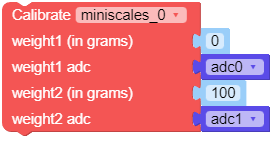
MicroPython Code Block:
miniscale_0.calibration(0, adc_0, 100, adc_100)
- set_low_pass_filter(enabled)
Enable or disable low-pass filter.
- Parameters:
enabled (bool) – True to enable filter, False to disable filter.
UiFlow2 Code Block:

MicroPython Code Block:
miniscale_0.set_low_pass_filter(True)
- get_low_pass_filter()
Get low-pass filter status.
- Returns:
True if filter is enabled.
- Return type:
UiFlow2 Code Block:

MicroPython Code Block:
filter_enabled = miniscale_0.get_low_pass_filter()
- set_average_filter_level(level)
Set average filter level.
- Parameters:
level (int) – Average count level (0~50), higher value means smoother but more delay.
- Raises:
ValueError – If out of range.
UiFlow2 Code Block:

MicroPython Code Block:
miniscale_0.set_average_filter_level(10)
- get_average_filter_level()
Get average filter level.
- Returns:
Current average filter level (integer).
- Return type:
UiFlow2 Code Block:

MicroPython Code Block:
filter_level = miniscale_0.get_average_filter_level()
- set_ema_filter_alpha(alpha)
Set exponential moving average (EMA) filter parameter.
The EMA (Exponential Moving Average) filter is more sensitive to changes in data compared to the average filter.
- Parameters:
alpha (int) – EMA filter coefficient (0~99), smaller value means smoother but more response delay.
- Raises:
ValueError – If out of range.
UiFlow2 Code Block:

MicroPython Code Block:
miniscale_0.set_ema_filter_alpha(50)
