NCIR2 Unit
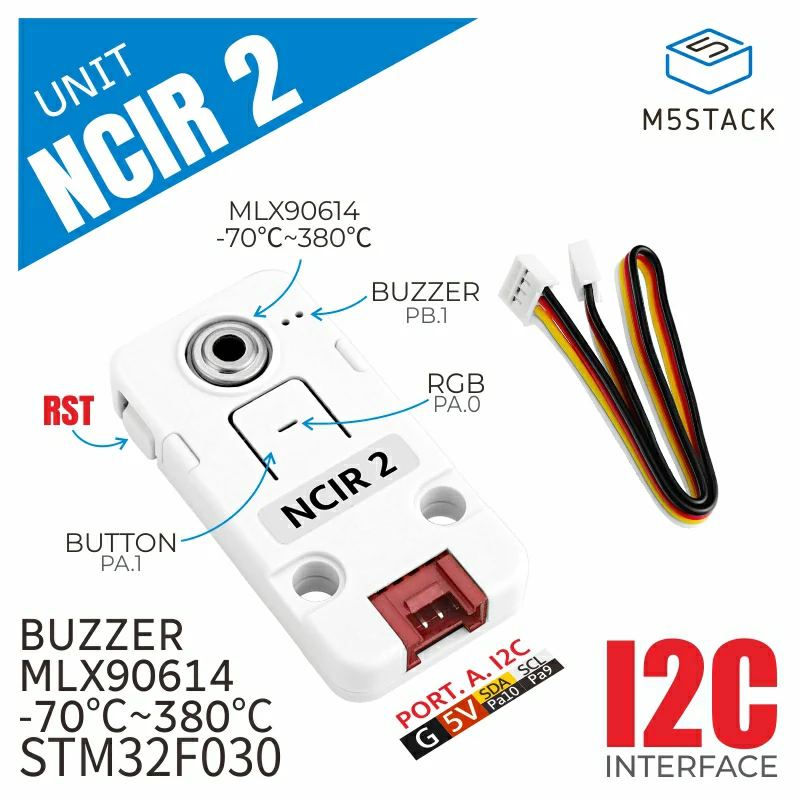
This library is the driver for Unit NCIR2.
Support the following products:
UiFlow2 Example
Infrared Temperature Display
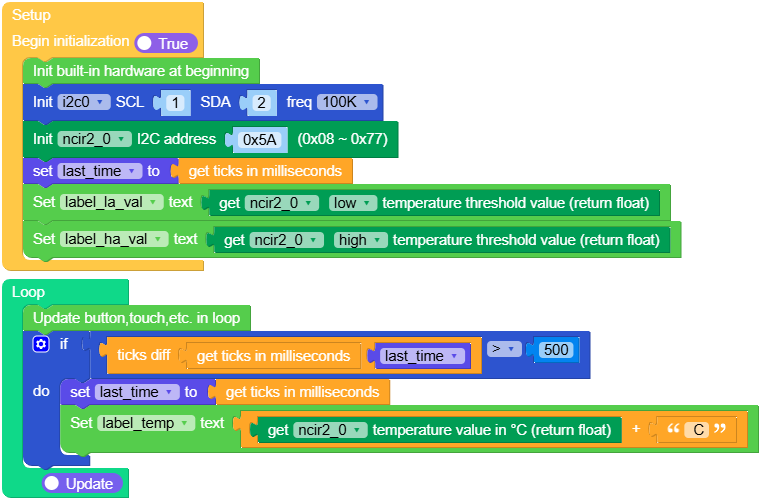
Open the m5cores3_ncir2_base_example.m5f2 project in UiFlow2.
This example uses the M5Stack CoreS3 board with the NCIR2 infrared temperature sensor to measure temperature in real time and display the current value along with the low and high temperature alarm thresholds on screen.
UiFlow2 Code Block:
Example output:
None
MicroPython Example
Infrared Temperature Display
This example uses the M5Stack CoreS3 board with the NCIR2 infrared temperature sensor to measure temperature in real time and display the current value along with the low and high temperature alarm thresholds on screen.
MicroPython Code Block:
 1# SPDX-FileCopyrightText: 2025 M5Stack Technology CO LTD
 2#
 3# SPDX-License-Identifier: MIT
 4
 5import os, sys, io
 6import M5
 7from M5 import *
 8from hardware import I2C
 9from hardware import Pin
10from unit import NCIR2Unit
11import time
12
13
14title0 = None
15label_temp = None
16label_la = None
17label_ha = None
18label_temp_val = None
19label_la_val = None
20label_ha_val = None
21i2c0 = None
22ncir2_0 = None
23last_time = None
24
25
26def setup():
27    global \
28        title0, \
29        label_temp, \
30        label_la, \
31        label_ha, \
32        label_temp_val, \
33        label_la_val, \
34        label_ha_val, \
35        i2c0, \
36        ncir2_0, \
37        last_time
38    M5.begin()
39    Widgets.fillScreen(0x222222)
40    title0 = Widgets.Title("Temperature meassure", 3, 0xFFFFFF, 0x0000FF, Widgets.FONTS.DejaVu24)
41    label_temp = Widgets.Label("Temp: ", 10, 116, 1.0, 0xFFFFFF, 0x222222, Widgets.FONTS.DejaVu24)
42    label_la = Widgets.Label(
43        "low temp alarm value: ", 10, 50, 1.0, 0x0000FF, 0x222222, Widgets.FONTS.DejaVu18
44    )
45    label_ha = Widgets.Label(
46        "high temp alarm value: ", 10, 80, 1.0, 0xFF0000, 0x222222, Widgets.FONTS.DejaVu18
47    )
48    label_temp_val = Widgets.Label(" ", 95, 116, 1.0, 0xFFFFFF, 0x222222, Widgets.FONTS.DejaVu24)
49    label_la_val = Widgets.Label(" ", 232, 50, 1.0, 0x0000FF, 0x222222, Widgets.FONTS.DejaVu18)
50    label_ha_val = Widgets.Label(" ", 239, 80, 1.0, 0xFF0000, 0x222222, Widgets.FONTS.DejaVu18)
51
52    i2c0 = I2C(0, scl=Pin(1), sda=Pin(2), freq=100000)
53    ncir2_0 = NCIR2Unit(i2c0, 0x5A)
54    last_time = time.ticks_ms()
55    label_la_val.setText(str(ncir2_0.get_temperature_threshold(0x20)))
56    label_ha_val.setText(str(ncir2_0.get_temperature_threshold(0x22)))
57
58
59def loop():
60    global \
61        title0, \
62        label_temp, \
63        label_la, \
64        label_ha, \
65        label_temp_val, \
66        label_la_val, \
67        label_ha_val, \
68        i2c0, \
69        ncir2_0, \
70        last_time
71    M5.update()
72    if (time.ticks_diff((time.ticks_ms()), last_time)) > 500:
73        last_time = time.ticks_ms()
74        label_temp.setText(str((str((ncir2_0.get_temperature_value)) + str(" C"))))
75
76
77if __name__ == "__main__":
78    try:
79        setup()
80        while True:
81            loop()
82    except (Exception, KeyboardInterrupt) as e:
83        try:
84            from utility import print_error_msg
85
86            print_error_msg(e)
87        except ImportError:
88            print("please update to latest firmware")
Example output:
None
API
NCIR2Unit
- class unit.hbridge.NCIR2Unit
Create an NCIR2Unit object.
- Parameters:
UiFlow2 Code Block:

MicroPython Code Block:
from unit import NCIR2Unit

unit_ncir2_0 = NCIR2Unit(i2c0, 0x5A)
- get_temperature_value()
Get object temperature.
- returns:
object temperature(unit: ℃)
- rtype:
float
UiFlow2 Code Block:

MicroPython Code Block:
unit_ncir2_0.get_temperature_value()
- get_emissivity_value()
Get current emissivity.
- Returns:
emissivity.
- Return type:
UiFlow2 Code Block:

MicroPython Code Block:
unit_ncir2_0.get_emissivity_value()
- set_emissivity_value(emissive)
Set the emissivity.
According to the material being measured; it affects temperature measurement accuracy.
A black body has an emissivity of 1.00 (ideal emitter).
Shiny metals often have low emissivity values (below 0.1).
Dark, rough surfaces like electrical tape or human skin typically have high emissivity (above 0.95).
- Param:
int emissive: The emissivity, range: 0 ~ 1.
UiFlow2 Code Block:

MicroPython Code Block:
unit_ncir2_0.set_emissivity_value(emissive)
- get_temperature_threshold(alarm_reg)
Get temperature alaram threshold.
- Param:
int alarm_reg: ALARM_LOW_TEMP_REG: Low temperature alarm threshold register, ALARM_HIGH_TEMP_REG: High temperature alarm threshold register.
- Returns:
alarm threshold.
- Return type:
UiFlow2 Code Block:

MicroPython Code Block:
unit_ncir2_0.get_temperature_threshold(alarm_reg)
- set_temperature_threshold(alarm_reg, temp)
Set temperature alarm threshold.
- Param:
int alarm_reg: temperature alarm register, ALARM_LOW_TEMP_REG: Low temperature alarm threshold register, ALARM_HIGH_TEMP_REG: High temperature alarm threshold register.
- Param:
float temp: alarm threshold.
UiFlow2 Code Block:

MicroPython Code Block:
unit_ncir2_0.set_temperature_threshold(alarm_reg, temp)
- get_temp_alarm_led(alarm_reg)
Get temperature alaram RGB LED value.
- Param:
int alarm_reg: temperature alarm RGB LED register, RGB_LOW_TEMP_REG: Low temperature alarm RGB LED value register, RGB_HIGH_TEMP_REG: High temperature alarm RGB LED value register.
- Returns:
temperature alarm RGB LED value.
- Return type:
list, RGB color list in the format [R, G, B], values from 0 to 255.
UiFlow2 Code Block:

MicroPython Code Block:
unit_ncir2_0.get_temp_alarm_led(alarm_reg)
- set_temp_alarm_led(alarm_reg, rgb)
Set temperature alaram RGB LED value.
- Param:
int alarm_reg: temperature alarm RGB LED register, RGB_LOW_TEMP_REG: Low temperature alarm RGB LED value register, RGB_HIGH_TEMP_REG: High temperature alarm RGB LED value register.
- Parameters:
rgb (int) – RGB color value (24-bit, range: 0 ~ 0xFFFFFF).
UiFlow2 Code Block:

MicroPython Code Block:
unit_ncir2_0.set_temp_alarm_led(alarm_reg, rgb)
- get_temp_buzzer_freq(alarm_reg)
Get the buzzer frequency for temperature alarm.
- Param:
int alarm_reg: temperature alarm buzzer frequency register, LOW_TEMP_FREQ_REG: Low temperature alarm buzzer frequency register, HIGH_TEMP_FREQ_REG: High temperature alarm buzzer frequency register.
- Returns:
buzzer frequency.
- Return type:
UiFlow2 Code Block:

MicroPython Code Block:
unit_ncir2_0.get_temp_buzzer_freq(alarm_reg)
- set_temp_buzzer_freq(alarm_reg, freq)
Set the buzzer frequency for temperature alarm.
- Param:
int alarm_reg: temperature alarm buzzer frequency register, LOW_TEMP_FREQ_REG: Low temperature alarm buzzer frequency register, HIGH_TEMP_FREQ_REG: High temperature alarm buzzer frequency register.
- Param:
int freq: buzzer frequency, range: 20~20000Hz
UiFlow2 Code Block:

MicroPython Code Block:
unit_ncir2_0.set_temp_buzzer_freq(alarm_reg, freq)
- get_temp_alarm_interval(alarm_reg)
Get the buzzer alarm interval.
- Param:
int alarm_reg: buzzer alarm interval register, LOW_ALARM_INTER_REG: Low temperature alarm interval register, HIGH_ALARM_INTER_REG: High temperature alarm interval register.
- Returns:
buzzer alarm interval. (unit: ms)
- Return type:
UiFlow2 Code Block:

MicroPython Code Block:
unit_ncir2_0.get_temp_alarm_interval(alarm_reg)
- set_temp_alarm_interval(alarm_reg, interval)
Set the buzzer alarm interval.
- Param:
int alarm_reg: buzzer alarm interval register, LOW_ALARM_INTER_REG: Low temperature alarm interval register, HIGH_ALARM_INTER_REG: High temperature alarm interval register.
- Param:
int interval: alarm interval, range: 1 ~ 5000(unit: ms).
UiFlow2 Code Block:

MicroPython Code Block:
unit_ncir2_0.set_temp_alarm_interval(alarm_reg, interval)
- get_temp_buzzer_duty(duty_reg)
Get the duty cycle of the temperature alarm buzzer signal.
- Parameters:
duty_reg (int) – Duty cycle register for the temperature alarm buzzer signal. LOW_ALARM_DUTY_REG: Register for low temperature alarm duty cycle. HIGH_ALARM_DUTY_REG: Register for high temperature alarm duty cycle.
- Returns:
duty cycle.
- Return type:
UiFlow2 Code Block:

MicroPython Code Block:
unit_ncir2_0.get_temp_buzzer_duty(duty_reg)
- set_temp_buzzer_duty(duty_reg, duty)
Set the duty cycle of the temperature alarm buzzer signal.
- Parameters:
duty_reg (int) – Duty cycle register for the temperature alarm buzzer signal. LOW_ALARM_DUTY_REG: Register for low temperature alarm duty cycle. HIGH_ALARM_DUTY_REG: Register for high temperature alarm duty cycle.
- Param:
int duty: Temperature alarm buzzer signal duty cycle, range: 0 ~ 255.
UiFlow2 Code Block:

MicroPython Code Block:
unit_ncir2_0.set_temp_buzzer_duty(duty_reg, duty)
- get_buzzer_freq()
Get the frequeny of the buzzer signal.
- Returns:
frequeny(Hz)
- Return type:
UiFlow2 Code Block:

MicroPython Code Block:
unit_ncir2_0.get_buzzer_freq()
- set_buzzer_freq(freq)
Set the frequeny of the buzzer signal.
- Param:
int freq: buzzer signal frequency, range: 20 ~ 20000 (Hz).
UiFlow2 Code Block:

MicroPython Code Block:
unit_ncir2_0.set_buzzer_freq(freq)
- get_buzzer_duty()
Get the duty cycle of the buzzer signal.
- Returns:
Duty cycle
- Return type:
UiFlow2 Code Block:

MicroPython Code Block:
unit_ncir2_0.get_buzzer_duty()
- set_buzzer_duty(duty)
Set the duty cycle of the buzzer signal.
- Param:
int duty: Duty cycle, range: 0 ~ 255.
UiFlow2 Code Block:

MicroPython Code Block:
unit_ncir2_0.set_buzzer_duty(duty)
- get_buzzer_control()
Get the buzzer control status
- Returns:
Returns the current buzzer control status
- Return type:
UiFlow2 Code Block:

MicroPython Code Block:
unit_ncir2_0.get_buzzer_control()
- set_buzzer_control(ctrl)
Set the buzzer control status
- Param:
int ctrl: Control value, 0 to turn off the buzzer, 1 to turn on the buzzer
UiFlow2 Code Block:

MicroPython Code Block:
unit_ncir2_0.set_buzzer_control(ctrl)
- get_rgb_led()
Get the current RGB LED value
- Returns:
The current RGB LED values in the format [r, g, b]
- Return type:
UiFlow2 Code Block:

MicroPython Code Block:
unit_ncir2_0.get_rgb_led()
- set_rgb_led(rgb)
Set the RGB LED value
- Param:
int rgb: RGB value in the range of 0 ~ 0xFFFFFF
UiFlow2 Code Block:

MicroPython Code Block:
unit_ncir2_0.set_rgb_led(rgb)
- get_button_status()
Get the button status
- Returns:
Button status, either 0 (not pressed) or 1 (pressed)
- Return type:
UiFlow2 Code Block:

MicroPython Code Block:
unit_ncir2_0.get_button_status()
- save_config_setting()
Save configuration settings
UiFlow2 Code Block:

MicroPython Code Block:
unit_ncir2_0.save_config_setting()
- get_chip_temperature()
Get the chip temperature
- Returns:
Chip temperature in Celsius (°C)
- Return type:
UiFlow2 Code Block:

MicroPython Code Block:
unit_ncir2_0.get_chip_temperature()
- get_device_spec(mode)
Get device specifications
- Returns:
Device specifications
- Return type:
UiFlow2 Code Block:

MicroPython Code Block:
unit_ncir2_0.get_device_spec()
- set_i2c_address(addr)
Set the I2C address of the device
- Param:
int addr: I2C address range: 1 ~ 127.
UiFlow2 Code Block:

MicroPython Code Block:
unit_ncir2_0.set_i2c_address(addr)