Widgets — A basic UI library
M5 Series Display Libraries
1. Display
A low-level graphics library providing basic screen drawing, text, lines, and color management.
Can be used independently, suitable for scenarios that only require drawing graphics or text.
2. M5Widgets
A basic UI widget library providing labels, image displays, and other UI controls.
Built on top of M5GFX.
Suitable for simple interactive UI elements.
3. M5UI
A high-level UI framework based on LVGL.
Provides page management, multi-widget layouts, and unified event handling.
Usage Tips
⚠️ Do not mix M5GFX, M5Widgets, and M5UI simultaneously, as it may cause rendering issues or event conflicts.
For graphics-only drawing → use M5GFX.
For simple interactive widgets → use M5Widgets.
For multi-page UI → use M5UI.
Micropython Example:
 1# SPDX-FileCopyrightText: 2024 M5Stack Technology CO LTD
 2#
 3# SPDX-License-Identifier: MIT
 4
 5import os, sys, io
 6import M5
 7from M5 import *
 8
 9
10def setup():
11    M5.begin()
12    Widgets.fillScreen(0x222222)
13
14    Widgets.setBrightness(100)
15    Widgets.fillScreen(0x6600CC)
16    Widgets.setRotation(0)
17
18
19def loop():
20    M5.update()
21
22
23if __name__ == "__main__":
24    try:
25        setup()
26        while True:
27            loop()
28    except (Exception, KeyboardInterrupt) as e:
29        try:
30            from utility import print_error_msg
31
32            print_error_msg(e)
33        except ImportError:
34            print("please update to latest firmware")
UIFLOW2 Example:
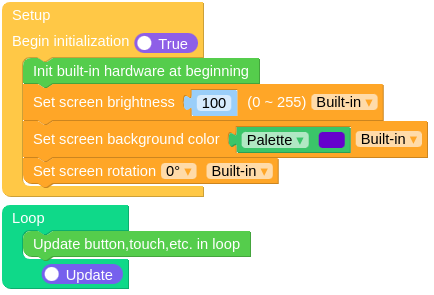
Screen functions
- Widgets.setBrightness(brightness: int)
Set the backlight of the monitor。
brightnessranges from 0 to 255.UIFLOW2:


