M5TextArea
M5TextArea is a widget that can be used to create text input areas in the user interface. It allows users to input and edit multi-line text with support for placeholders, scrolling, and various styling options.
UiFlow2 Example
basic textarea
Open the cores3_textarea_basic_example.m5f2 project in UiFlow2.
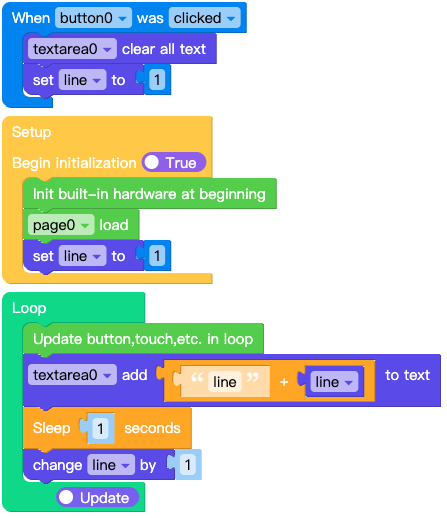
This example demonstrates how to add text content to a text box and clear the content of the text box using a button.
UiFlow2 Code Block:
Example output:
None
MicroPython Example
basic textarea
This example demonstrates how to add text content to a text box and clear the content of the text box using a button.
MicroPython Code Block:
 1# SPDX-FileCopyrightText: 2025 M5Stack Technology CO LTD
 2#
 3# SPDX-License-Identifier: MIT
 4
 5import os, sys, io
 6import M5
 7from M5 import *
 8import m5ui
 9import lvgl as lv
10import time
11
12
13page0 = None
14textarea0 = None
15button0 = None
16
17
18line = None
19
20
21def button0_clicked_event(event_struct):
22    global page0, textarea0, button0, line
23
24    textarea0.set_text("")
25    line = 1
26
27
28def button0_event_handler(event_struct):
29    global page0, textarea0, button0, line
30    event = event_struct.code
31    if event == lv.EVENT.CLICKED and True:
32        button0_clicked_event(event_struct)
33    return
34
35
36def setup():
37    global page0, textarea0, button0, line
38
39    M5.begin()
40    Widgets.setRotation(1)
41    m5ui.init()
42    page0 = m5ui.M5Page(bg_c=0xFFFFFF)
43    textarea0 = m5ui.M5TextArea(
44        text="",
45        placeholder="Placeholder...",
46        x=19,
47        y=26,
48        w=266,
49        h=124,
50        font=lv.font_montserrat_14,
51        bg_c=0xFFFFFF,
52        border_c=0xE0E0E0,
53        text_c=0x212121,
54        parent=page0,
55    )
56    button0 = m5ui.M5Button(
57        text="clear text",
58        x=22,
59        y=172,
60        bg_c=0x2196F3,
61        text_c=0xFFFFFF,
62        font=lv.font_montserrat_14,
63        parent=page0,
64    )
65
66    button0.add_event_cb(button0_event_handler, lv.EVENT.ALL, None)
67
68    page0.screen_load()
69    line = 1
70
71
72def loop():
73    global page0, textarea0, button0, line
74    M5.update()
75    textarea0.add_text(str((str("line") + str(line))))
76    time.sleep(1)
77    line = (line if isinstance(line, (int, float)) else 0) + 1
78
79
80if __name__ == "__main__":
81    try:
82        setup()
83        while True:
84            loop()
85    except (Exception, KeyboardInterrupt) as e:
86        try:
87            m5ui.deinit()
88            from utility import print_error_msg
89
90            print_error_msg(e)
91        except ImportError:
92            print("please update to latest firmware")
Example output:
None
API
M5TextArea
- class m5ui.textarea.M5TextArea(*args, **kwargs)
Bases:
textareaCreate a text area widget.
- Parameters:
text (str) – Initial text content of the text area.
placeholder (str) – Placeholder text when the text area is empty.
x (int) – X position of the text area.
y (int) – Y position of the text area.
w (int) – Width of the text area.
h (int) – Height of the text area.
font (lv.font_t) – Font used for the text.
bg_c (int) – Background color of the text area.
border_c (int) – Border color of the text area.
text_c (int) – Text color of the text area.
parent (lv.obj) – Parent object of the text area. If not specified, it will be set to the active screen.
- set_flag(flag, value)
Set a flag on the object. If
valueis True, the flag is added; if False, the flag is removed.- Parameters:
- Returns:
None
UiFlow2 Code Block:

MicroPython Code Block:
textarea_0.set_flag(lv.obj.FLAG.HIDDEN, True)
- toggle_flag(flag)
Toggle a flag on the object. If the flag is set, it is removed; if not set, it is added.
- Parameters:
flag (int) – The flag to toggle.
- Returns:
None
UiFlow2 Code Block:

MicroPython Code Block:
textarea_0.toggle_flag(lv.obj.FLAG.HIDDEN)
- set_state(state, value)
Set the state of the textarea. If
valueis True, the state is set; if False, the state is unset.- Parameters:
- Returns:
None
UiFlow2 Code Block:

MicroPython Code Block:
textarea_0.set_state(lv.STATE.PRESSED, True)
- toggle_state(state)
Toggle the state of the textarea. If the state is set, it is unset; if not set, it is set.
- Parameters:
state (int) – The state to toggle.
- Returns:
None
UiFlow2 Code Block:

MicroPython Code Block:
textarea_0.toggle_state(lv.STATE.PRESSED)
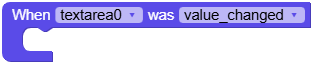
- add_event_cb(handler, event, user_data)
Add an event callback to the slider. The callback will be called when the specified event occurs.
- Parameters:
handler (function) – The callback function to call.
event (int) – The event to listen for.
user_data (Any) – Optional user data to pass to the callback.
- Returns:
None
UiFlow2 Code Block:
MicroPython Code Block:
def textarea_0_ready_event(event_struct):
    global page0, button0
    print("released")

def textarea_0_value_changed_event(event_struct):
    global page0, button0
    print("value changed")

def textarea_0_focused_event(event_struct):
    global page0, button0
    print("focused")

def textarea_0_defocused_event(event_struct):
    global page0, button0
    print("focused")

def textarea_0_event_handler(event_struct):
    event = event_struct.code
    if event == lv.EVENT.VALUE_CHANGED and True:
        textarea_0_value_changed_event(event_struct)
    elif event == lv.EVENT.READY and True:
        textarea_0_ready_event(event_struct) # 单行模式下才会触发
    elif event == lv.EVENT.FOCUSED:
        textarea_0_focused_event(event_struct)
    elif event == lv.EVENT.DEFOCUSED:
        textarea_0_defocused_event(event_struct)
    return

textarea_0.add_event_cb(textarea_0_event_handler, lv.EVENT.ALL, None)
- set_bg_color(color, opa, part)
Set the background color of the textarea.
- Parameters:
- Returns:
None
UiFlow2 Code Block:

MicroPython Code Block:
textarea_0.set_bg_color(lv.color_hex(0xFFFFFF), 255, lv.PART.MAIN | lv.STATE.DEFAULT)
- set_style_radius(radius, part)
Set the corner radius of the slider components.
- Parameters:
- Returns:
None
UiFlow2 Code Block:

MicroPython Code Block:
slider_0.set_style_radius(10, lv.PART.MAIN | lv.STATE.DEFAULT)
- set_border_color(color, opa, part)
Set the border color of the textarea.
- Parameters:
- Returns:
None
UiFlow2 Code Block:

MicroPython Code Block:
textarea_0.set_border_color(lv.color_hex(0xE0E0E0), 255, lv.PART.MAIN | lv.STATE.DEFAULT)
- set_style_border_width(width, part)
Set the border width of the textarea.
- Parameters:
- Returns:
None
UiFlow2 Code Block:

MicroPython Code Block:
textarea_0.set_style_border_width(2, lv.PART.MAIN | lv.STATE.DEFAULT)
- set_placeholder_text(text)
Set the placeholder text that appears when the textarea is empty.
- Parameters:
text (str) – The placeholder text to set.
- Returns:
None
UiFlow2 Code Block:

MicroPython Code Block:
textarea_0.set_placeholder_text("Enter text here...")
- set_text_color(color, opa, part)
Set the color of the text.
- Parameters:
- Returns:
None
UiFlow2 Code Block:

MicroPython Code Block:
textarea_0.set_text_color(lv.color_hex(0x000000), 255, lv.PART.MAIN | lv.STATE.DEFAULT)
- set_style_text_font(font, part)
Set the font of the textarea text.
- Parameters:
font (lv.font_t) – The font to set.
part (int) – The part of the object to apply the style to (e.g., lv.PART.MAIN).
- Returns:
None
UiFlow2 Code Block:


MicroPython Code Block:
textarea_0.set_style_text_font(lv.font_montserrat_14, lv.PART.MAIN | lv.STATE.DEFAULT)
- set_style_text_align(align, part)
Set the text alignment of the textarea.
- Parameters:
- Returns:
None
UiFlow2 Code Block:


MicroPython Code Block:
textarea_0.set_style_text_align(lv.TEXT_ALIGN.LEFT, lv.PART.MAIN | lv.STATE.DEFAULT)
- set_text(text)
Set the text content of the textarea.
- Parameters:
text (str) – The text to set.
- Returns:
None
UiFlow2 Code Block:

MicroPython Code Block:
textarea_0.set_text("Hello World")
textarea_0.set_text("") # Clear the text content
- get_text()
Get the current text content of the textarea.
- Returns:
The current text content.
- Return type:
UiFlow2 Code Block:

MicroPython Code Block:
text = textarea_0.get_text()
- add_text(text)
Add text to the current content of the textarea.
- Parameters:
text (str) – The text to add.
- Returns:
None
UiFlow2 Code Block:

MicroPython Code Block:
textarea_0.add_text(" Additional text")
- set_max_length(length)
Set the maximum length of text that can be entered in the textarea.
- Parameters:
length (int) – The maximum length of text.
- Returns:
None
UiFlow2 Code Block:

MicroPython Code Block:
textarea_0.set_max_length(256)
- set_password_mode(en)
Set whether the textarea should be in password mode (i.e., characters are hidden).
- Parameters:
en (bool) – True to enable password mode, False to disable.
- Returns:
None
UiFlow2 Code Block:

MicroPython Code Block:
textarea_0.set_password_mode(True)
- set_accepted_chars(chars)
Set the characters that are accepted in the textarea. Only these characters can be entered.
- Parameters:
chars (str) – The string of accepted characters.
- Returns:
None
UiFlow2 Code Block:

MicroPython Code Block:
textarea_0.set_accepted_chars("abcdefghijklmnopqrstuvwxyzABCDEFGHIJKLMNOPQRSTUVWXYZ0123456789")
- set_pos(x, y)
Set the position of the textarea.
- Parameters:
- Returns:
None
UiFlow2 Code Block:

MicroPython Code Block:
textarea_0.set_pos(100, 100)
- set_x(x)
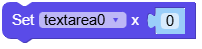
Set the x-coordinate of the textarea.
- Parameters:
x (int) – The x-coordinate of the textarea.
- Returns:
None
UiFlow2 Code Block:
MicroPython Code Block:
textarea_0.set_x(100)
- set_y(y)
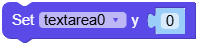
Set the y-coordinate of the textarea.
- Parameters:
y (int) – The y-coordinate of the textarea.
- Returns:
None
UiFlow2 Code Block:
MicroPython Code Block:
textarea_0.set_y(100)
- align_to(obj, align, x, y)
Align the textarea to another object.
- Parameters:
- Returns:
None
UiFlow2 Code Block:

MicroPython Code Block:
textarea_0.align_to(page_0, lv.ALIGN.CENTER, 0, 0)
- set_size(width, height)
Set the size of the textarea.
- Parameters:
- Returns:
None
UiFlow2 Code Block:

MicroPython Code Block:
textarea_0.set_size(200, 100)
- set_width(width)
Set the width of the textarea.
- Parameters:
width (int) – The width of the textarea.
- Returns:
None
UiFlow2 Code Block:

MicroPython Code Block:
textarea_0.set_width(200)
- set_height(height)
Set the height of the textarea.
- Parameters:
height (int) – The height of the textarea.
- Returns:
None
UiFlow2 Code Block:

MicroPython Code Block:
textarea_0.set_height(100)
- get_width()
Get the width of the textarea.
- Returns:
The width of the textarea.
- Return type:
UiFlow2 Code Block:

MicroPython Code Block:
width = textarea_0.get_width()
- get_height()
Get the height of the textarea.
- Returns:
The height of the textarea.
- Return type:
UiFlow2 Code Block:

MicroPython Code Block:
height = textarea_0.get_height()
