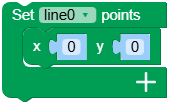
M5Line
M5Line is a widget that can be used to create lines in the user interface. It can be used to draw shapes and connect points.
UiFlow2 Example
points connect
Open the cores3_line_example.m5f2 project in UiFlow2.
This example creates a line that connects multiple points.
UiFlow2 Code Block:
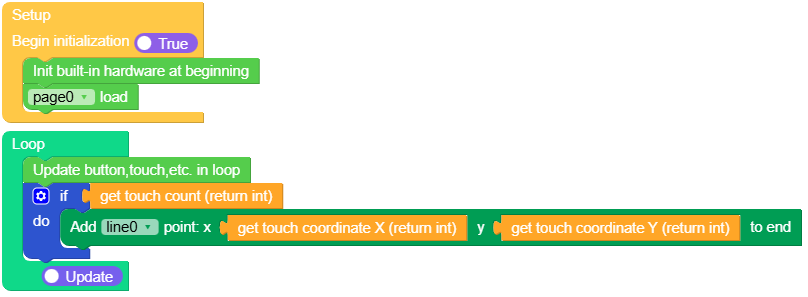
Example output:
None
MicroPython Example
points connect
This example creates a line that connects multiple points.
MicroPython Code Block:
 1# SPDX-FileCopyrightText: 2025 M5Stack Technology CO LTD
 2#
 3# SPDX-License-Identifier: MIT
 4
 5import os, sys, io
 6import M5
 7from M5 import *
 8import m5ui
 9import lvgl as lv
10
11
12page0 = None
13line0 = None
14
15
16def setup():
17    global page0, line0
18
19    M5.begin()
20    Widgets.setRotation(1)
21    m5ui.init()
22    page0 = m5ui.M5Page(bg_c=0xFFFFFF)
23    line0 = m5ui.M5Line(
24        points=[5, 5, 70, 70, 120, 10, 180, 60, 190, 70, 200, 80, 210, 90, 220, 100],
25        width=7,
26        color=0x2196F3,
27        rounded=True,
28        parent=page0,
29    )
30
31    page0.screen_load()
32
33
34def loop():
35    global page0, line0
36    M5.update()
37    if M5.Touch.getCount():
38        line0.add_point(M5.Touch.getX(), M5.Touch.getY())
39
40
41if __name__ == "__main__":
42    try:
43        setup()
44        while True:
45            loop()
46    except (Exception, KeyboardInterrupt) as e:
47        try:
48            m5ui.deinit()
49            from utility import print_error_msg
50
51            print_error_msg(e)
52        except ImportError:
53            print("please update to latest firmware")
Example output:
None
API
M5Line
- class m5ui.line.M5Line(*args, **kwargs)
Bases:
lineCreate a line object.
- Parameters:
points (list) – A list of points where each point is a pair of x and y coordinates.
width (int) – The width of the line.
color (int) – The color of the line in hexadecimal format.
rounded (bool) – If True, the line will have rounded ends; otherwise, it will have square ends.
parent (lv.obj) – The parent object to attach the line to. If not specified, the line will be attached to the default screen.
MicroPython Code Block:
from m5ui import M5Line
import lvgl as lv

m5ui.init()
line_0 = M5Line(
    points=[5, 5, 70, 70, 120, 10, 180, 60, 240, 20],
    width=2,
    color=0x2196F3,
    rounded=True,
    parent=page0,
)
- set_line_color(color, opa, part)
Set the color of the line.
- Parameters:
UiFlow2 Code Block:

MicroPython Code Block:
line_0.set_line_color(0xFF0000, 255, lv.PART.MAIN)
- set_style_line_width(width, part)
Set the width of the line.
- Parameters:
UiFlow2 Code Block:
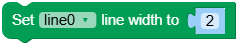
MicroPython Code Block:
line_0.set_style_line_width(2, lv.PART.MAIN)
- set_flag(flag, value)
Set a flag on the object. If
valueis True, the flag is added; if False, the flag is removed.- Parameters:
- Returns:
None
UiFlow2 Code Block:

MicroPython Code Block:
button_0.set_flag(lv.obj.FLAG.HIDDEN, True)
- set_pos(x, y)
Set the position of the line.
UiFlow2 Code Block:
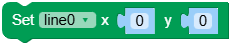
MicroPython Code Block:
line_0.set_pos(100, 100)
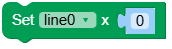
- set_x(x)
Set the x-coordinate of the line.
- Parameters:
x (int) – The x-coordinate of the line.
UiFlow2 Code Block:
MicroPython Code Block:
line_0.set_x(100)
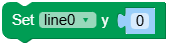
- set_y(y)
Set the y-coordinate of the line.
- Parameters:
y (int) – The y-coordinate of the line.
UiFlow2 Code Block:
MicroPython Code Block:
line_0.set_y(100)
- align_to(obj, align, x, y)
Align the line to another object.
- Parameters:
UiFlow2 Code Block:

MicroPython Code Block:
line_0.align_to(page_0, lv.ALIGN.CENTER, 0, 0)