M5Scale
M5Scale is a widget that can be used to create scales in the user interface. Scale Widgets show linear or circular scales with configurable ranges, tick counts, placement, labeling, and subsections (Sections) with custom styling.
UiFlow2 Example
scale example
Open the scale_core2_example.m5f2 project in UiFlow2.
This example demonstrates how to create a scale widget with a range of values and custom styling.
UiFlow2 Code Block:
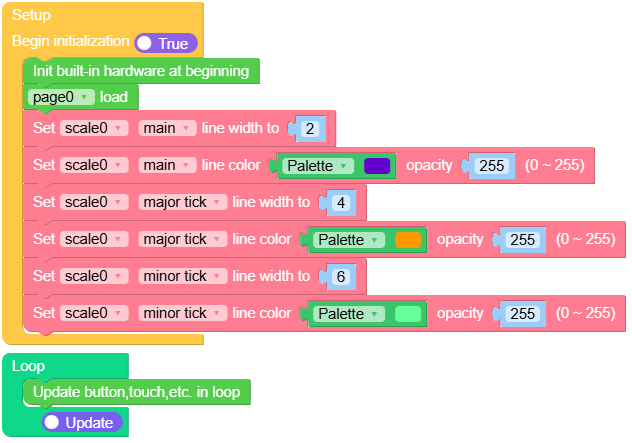
Example output:
None
MicroPython Example
scroll example
This example demonstrates how to create a scale widget with a range of values and custom styling.
MicroPython Code Block:
 1# SPDX-FileCopyrightText: 2025 M5Stack Technology CO LTD
 2#
 3# SPDX-License-Identifier: MIT
 4
 5import os, sys, io
 6import M5
 7from M5 import *
 8import m5ui
 9import lvgl as lv
10
11
12page0 = None
13scale0 = None
14
15
16def setup():
17    global page0, scale0
18
19    M5.begin()
20    Widgets.setRotation(1)
21    m5ui.init()
22    page0 = m5ui.M5Page(bg_c=0xFFFFFF)
23    scale0 = m5ui.M5Scale(
24        x=7,
25        y=92,
26        w=300,
27        h=0,
28        start_pos=0,
29        end_pos=100,
30        tick_count=11,
31        tick_every=2,
32        show_mode=lv.scale.MODE.HORIZONTAL_TOP,
33        parent=page0,
34    )
35
36    page0.screen_load()
37    scale0.set_style_line_width(2, lv.PART.MAIN)
38    scale0.set_line_color(0x6600CC, 255, lv.PART.MAIN)
39    scale0.set_style_line_width(4, lv.PART.INDICATOR)
40    scale0.set_line_color(0xFF9900, 255, lv.PART.INDICATOR)
41    scale0.set_style_line_width(6, lv.PART.ITEMS)
42    scale0.set_line_color(0x66FF99, 255, lv.PART.ITEMS)
43
44
45def loop():
46    global page0, scale0
47    M5.update()
48
49
50if __name__ == "__main__":
51    try:
52        setup()
53        while True:
54            loop()
55    except (Exception, KeyboardInterrupt) as e:
56        try:
57            m5ui.deinit()
58            from utility import print_error_msg
59
60            print_error_msg(e)
61        except ImportError:
62            print("please update to latest firmware")
Example output:
None
API
M5Scale
- class m5ui.scale.M5Scale(*args, **kwargs)
Bases:
scaleCreate a scale object.
- Parameters:
x (int) – The x position of the scale.
y (int) – The y position of the scale.
w (int) – The width of the scale. If not specified, it will be set based on the mode.
h (int) – The height of the scale. If not specified, it will be set based on the mode.
start_pos (int) – The starting position of the scale.
end_pos (int) – The ending position of the scale.
tick_count (int) – The total number of ticks on the scale.
tick_every (int) – The interval between major ticks on the scale.
mode (int) –
The mode of the scale. It can be one of the following:
Options:
lv.scale.MODE.HORIZONTAL_TOP: Horizontal top scale.
lv.scale.MODE.HORIZONTAL_BOTTOM: Horizontal bottom scale.
lv.scale.MODE.VERTICAL_LEFT: Vertical left scale.
lv.scale.MODE.VERTICAL_RIGHT: Vertical right scale.
lv.scale.MODE.ROUND_INNER: Round inner scale.
lv.scale.MODE.ROUND_OUTER: Round outer scale.
parent (lv.obj) – The parent object to attach the scale to. If not specified, the scale will be attached to the default screen.
MicroPython Code Block:
from m5ui import M5Scale
import lvgl as lv

m5ui.init()
scale_0 = M5Scale(x=10, y=10, w=200, h=20, start_pos=0, end_pos=100, tick_count=11, tick_every=2, mode=lv.scale.MODE.HORIZONTAL_TOP, parent=page0)
- set_flag(flag, value)
Set a flag on the object. If
valueis True, the flag is added; if False, the flag is removed.- Parameters:
UiFlow2 Code Block:

MicroPython Code Block:
scale_0.set_flag(lv.obj.FLAG.HIDDEN, True)
- set_range(start_pos, end_pos)
Set the range of the scale.
- Parameters:
UiFlow2 Code Block:

MicroPython Code Block:
scale_0.set_range(0, 100)
- set_major_tick_every(tick_every)
Set the interval for major ticks on the scale.
- Parameters:
tick_every (int) – The interval for major ticks.
UiFlow2 Code Block:

MicroPython Code Block:
scale_0.set_major_tick_every(10)
- set_total_tick_count(tick_count)
Set the total tick count of the scale.
- Parameters:
tick_count (int) – The total tick count.
UiFlow2 Code Block:

MicroPython Code Block:
scale_0.set_total_tick_count(11)
- set_label_show(label_show)
Set the visibility of the scale labels.
- Parameters:
label_show (bool) – If True, the labels are shown; if False, they are hidden.
UiFlow2 Code Block:

MicroPython Code Block:
scale_0.set_label_show(True)
- set_mode(show_mode)
Set the display mode of the scale.
- Parameters:
show_mode (int) –
The display mode.
Optional:
lv.scale.MODE.HORIZONTAL_TOP: Horizontal top scale.
lv.scale.MODE.HORIZONTAL_BOTTOM: Horizontal bottom scale.
lv.scale.MODE.VERTICAL_LEFT: Vertical left scale.
lv.scale.MODE.VERTICAL_RIGHT: Vertical right scale.
lv.scale.MODE.ROUND_INNER: Round inner scale.
lv.scale.MODE.ROUND_OUTER: Round outer scale.
UiFlow2 Code Block:

MicroPython Code Block:
scale_0.set_mode(lv.SCALE.MODE.HORIZONTAL_TOP)
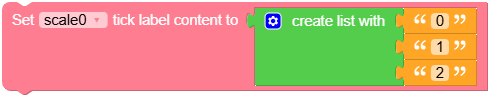
- set_text_src(text_src)
Set the source of the scale label text.
- Parameters:
text_src (list) – The source of the scale label text.
UiFlow2 Code Block:
MicroPython Code Block:
scale_0.set_text_src(["0", "10", "20", "30", "40", "50", "60", "70", "80", "90", "100", None])
- set_line_color(color, opa, part)
Set the color of the line.
- Parameters:
UiFlow2 Code Block:

MicroPython Code Block:
scale_0.set_line_color(0xFF0000, 255, lv.PART.MAIN)
scale_0.set_line_color(0x00FF00, 255, lv.PART.ITEMS)
scale_0.set_line_color(0x0000FF, 255, lv.PART.INDICATOR)
- set_style_line_width(width, part)
Set the line width of the scale.
- Parameters:
UiFlow2 Code Block:

MicroPython Code Block:
scale_0.set_style_line_width(2, lv.PART.MAIN)
scale_0.set_style_line_width(2, lv.PART.ITEMS)
scale_0.set_style_line_width(2, lv.PART.INDICATOR)
- set_text_color(color, opa, part)
Set the color of the text.
- Parameters:
UiFlow2 Code Block:

MicroPython Code Block:
scale_0.set_text_color(0xFF0000, 255, lv.PART.INDICATOR)
- set_style_text_font(font, part)
Set the font of the scale label text.
- Parameters:
font (lv.lv_font_t) – The font to set.
part (int) – The part of the object to apply the style to lv.PART.INDICATOR.
UiFlow2 Code Block:

MicroPython Code Block:
scale_0.set_style_text_font(lv.font_montserrat_14, lv.PART.INDICATOR)
- set_pos(x, y)
Set the position of the scale.
UiFlow2 Code Block:

MicroPython Code Block:
scale_0.set_pos(100, 100)
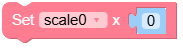
- set_x(x)
Set the x-coordinate of the scale.
- Parameters:
x (int) – The x-coordinate of the scale.
UiFlow2 Code Block:
MicroPython Code Block:
scale_0.set_x(100)
- set_y(y)
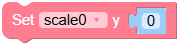
Set the y-coordinate of the scale.
- Parameters:
y (int) – The y-coordinate of the scale.
UiFlow2 Code Block:
MicroPython Code Block:
scale_0.set_y(100)
- set_size(width, height)
Set the size of the scale.
MicroPython Code Block:
scale_0.set_size(100, 50)
- set_width(width)
Set the width of the scale.
- Parameters:
width (int) – The width of the scale.
MicroPython Code Block:
scale_0.set_width(100)
- set_height(height)
Set the height of the scale.
- Parameters:
height (int) – The height of the scale.
MicroPython Code Block:
scale_0.set_height(50)
- align_to(obj, align, x, y)
Align the scale to another object.
- Parameters:
UiFlow2 Code Block:

MicroPython Code Block:
scale_0.align_to(page_0, lv.ALIGN.CENTER, 0, 0)