M5List
M5List is a widget that can be used to create lists in user interfaces. It is basically a rectangle with vertical layout to which Buttons and Text can be added.
UiFlow2 Example
list example
Open the cores3_list_example.m5f2 project in UiFlow2.
This example demonstrates how to create a list that displays a series of items.
UiFlow2 Code Block:
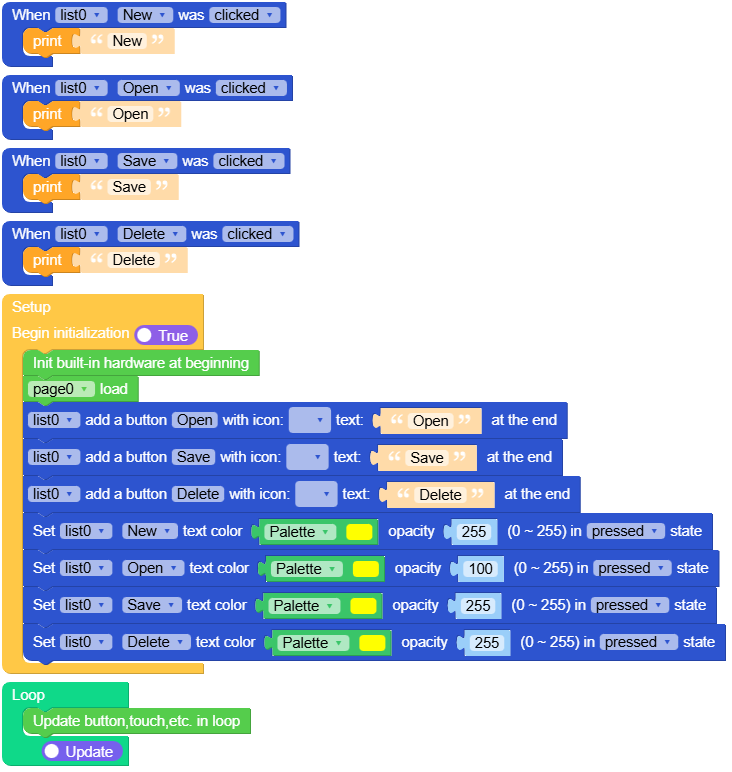
Example output:
None
MicroPython Example
list example
This example demonstrates how to create a list that displays a series of items.
MicroPython Code Block:
  1# SPDX-FileCopyrightText: 2025 M5Stack Technology CO LTD
  2#
  3# SPDX-License-Identifier: MIT
  4
  5import os, sys, io
  6import M5
  7from M5 import *
  8import m5ui
  9import lvgl as lv
 10
 11
 12page0 = None
 13list0 = None
 14File = None
 15New = None
 16Open = None
 17Save = None
 18Delete = None
 19
 20
 21def New_clicked_event(event_struct):  # noqa: N802
 22    global page0, list0, File, New, Open, Save, Delete
 23
 24    print("New")
 25
 26
 27def Open_clicked_event(event_struct):  # noqa: N802
 28    global page0, list0, File, New, Open, Save, Delete
 29
 30    print("Open")
 31
 32
 33def Save_clicked_event(event_struct):  # noqa: N802
 34    global page0, list0, File, New, Open, Save, Delete
 35
 36    print("Save")
 37
 38
 39def Delete_clicked_event(event_struct):  # noqa: N802
 40    global page0, list0, File, New, Open, Save, Delete
 41
 42    print("Delete")
 43
 44
 45def New_event_handler(event_struct):  # noqa: N802
 46    global page0, list0, File, New, Open, Save, Delete
 47    event = event_struct.code
 48    if event == lv.EVENT.CLICKED and True:
 49        New_clicked_event(event_struct)
 50    return
 51
 52
 53def Open_event_handler(event_struct):  # noqa: N802
 54    global page0, list0, File, New, Open, Save, Delete
 55    event = event_struct.code
 56    if event == lv.EVENT.CLICKED and True:
 57        Open_clicked_event(event_struct)
 58    return
 59
 60
 61def Save_event_handler(event_struct):  # noqa: N802
 62    global page0, list0, File, New, Open, Save, Delete
 63    event = event_struct.code
 64    if event == lv.EVENT.CLICKED and True:
 65        Save_clicked_event(event_struct)
 66    return
 67
 68
 69def Delete_event_handler(event_struct):  # noqa: N802
 70    global page0, list0, File, New, Open, Save, Delete
 71    event = event_struct.code
 72    if event == lv.EVENT.CLICKED and True:
 73        Delete_clicked_event(event_struct)
 74    return
 75
 76
 77def setup():
 78    global page0, list0, File, New, Open, Save, Delete
 79
 80    M5.begin()
 81    Widgets.setRotation(1)
 82    m5ui.init()
 83    page0 = m5ui.M5Page(bg_c=0xFFFFFF)
 84    list0 = m5ui.M5List(x=-1, y=2, w=320, h=240, parent=page0)
 85    File = list0.add_text("File")
 86    New = list0.add_button(lv.SYMBOL.BULLET, "New")
 87
 88    page0.screen_load()
 89    Open = list0.add_button(lv.SYMBOL.DIRECTORY, "Open")
 90    Save = list0.add_button(lv.SYMBOL.SAVE, "Save")
 91    Delete = list0.add_button(lv.SYMBOL.CLOSE, "Delete")
 92
 93    New.add_event_cb(New_event_handler, lv.EVENT.ALL, None)
 94    Open.add_event_cb(Open_event_handler, lv.EVENT.ALL, None)
 95    Save.add_event_cb(Save_event_handler, lv.EVENT.ALL, None)
 96    Delete.add_event_cb(Delete_event_handler, lv.EVENT.ALL, None)
 97
 98    New.set_text_color(0xFFFF00, 255, lv.PART.MAIN | lv.STATE.PRESSED)
 99    Open.set_text_color(0xFFFF00, 100, lv.PART.MAIN | lv.STATE.PRESSED)
100    Save.set_text_color(0xFFFF00, 255, lv.PART.MAIN | lv.STATE.PRESSED)
101    Delete.set_text_color(0xFFFF00, 255, lv.PART.MAIN | lv.STATE.PRESSED)
102
103
104def loop():
105    global page0, list0, File, New, Open, Save, Delete
106    M5.update()
107
108
109if __name__ == "__main__":
110    try:
111        setup()
112        while True:
113            loop()
114    except (Exception, KeyboardInterrupt) as e:
115        try:
116            m5ui.deinit()
117            from utility import print_error_msg
118
119            print_error_msg(e)
120        except ImportError:
121            print("please update to latest firmware")
Example output:
None
API
M5List
- class m5ui.list.M5List(*args, **kwargs)
Bases:
listCreate a list object.
- Parameters:
UiFlow2 Code Block:
None
MicroPython Code Block:
from m5ui import M5List
import lvgl as lv

m5ui.init()
list_0 = M5List(x=120, y=80, w=60, h=30, parent=page0)
- move_background()
Move the background of the list to the end.
UiFlow2 Code Block:


MicroPython Code Block:
button_0.move_background()
text_0.move_background()
- move_foreground()
Move the foreground of the list to the end.
UiFlow2 Code Block:
MicroPython Code Block:
button_0.move_foreground()
text_0.move_foreground()
- move_to_index(index)
Move the item at the specified index to the end of the list.
UiFlow2 Code Block:
MicroPython Code Block:
button_0.move_to_index(0)
text_0.move_to_index(1)
- delete()
Delete the item from the list.
UiFlow2 Code Block:


MicroPython Code Block:
button_0.delete()
text_0.delete()
- add_text(text, text_c=2171169, text_opa=255, bg_c=15131366, bg_opa=255, font=lvgl.font_montserrat_14)
Add a text label to the list.
- Parameters:
text (str) – The text to display on the label.
text_c (int) – The text color of the label in hexadecimal format.
text_opa (int) – The text opacity of the label (0-255).
bg_c (int) – The background color of the label in hexadecimal format.
bg_opa (int) – The background opacity of the label (0-255).
font (lv.font) – The font to use for the label.
- Returns:
The created label object m5ui.M5Label.
- Return type:
lv.obj
UiFlow2 Code Block:


MicroPython Code Block:
list_0.add_text("Item 1", text_c=0x000000, text_opa=255, bg_c=0xFFFFFF, bg_opa=255, font=lv.font_montserrat_14)
- add_button(icon, text='button0', h=0, bg_c=16777215, bg_opa=255, text_c=0, text_opa=255, font=lvgl.font_montserrat_14)
Add a button to the list.
- Parameters:
icon (int) – The icon to display on the button.
text (str) – The text to display on the button.
h (int) – The height of the button.
bg_c (int) – The background color of the button in hexadecimal format.
bg_opa (int) – The background opacity of the button (0-255).
text_c (int) – The text color of the button in hexadecimal format.
text_opa (int) – The text opacity of the button (0-255).
font (lv.font) – The font to use for the button text.
- Returns:
The created button object m5ui.M5Button.
- Return type:
lv.obj
UiFlow2 Code Block:

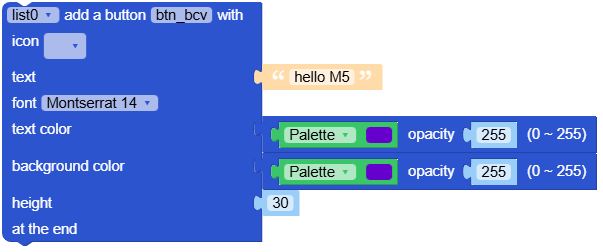
MicroPython Code Block:
list_0.add_button(lv.SYMBOL.BULLET, text="Home", h=40, bg_c=0xFFFFFF, text_c=0x000000, font=lv.font_montserrat_14)