M5LED
M5LED is a lightweight widget that simulates a light-emitting diode indicator in the user interface.
UiFlow2 Example
LED Basic Usage Example
Open the m5cores3_m5ui_led_example.m5f2 project in UiFlow2.
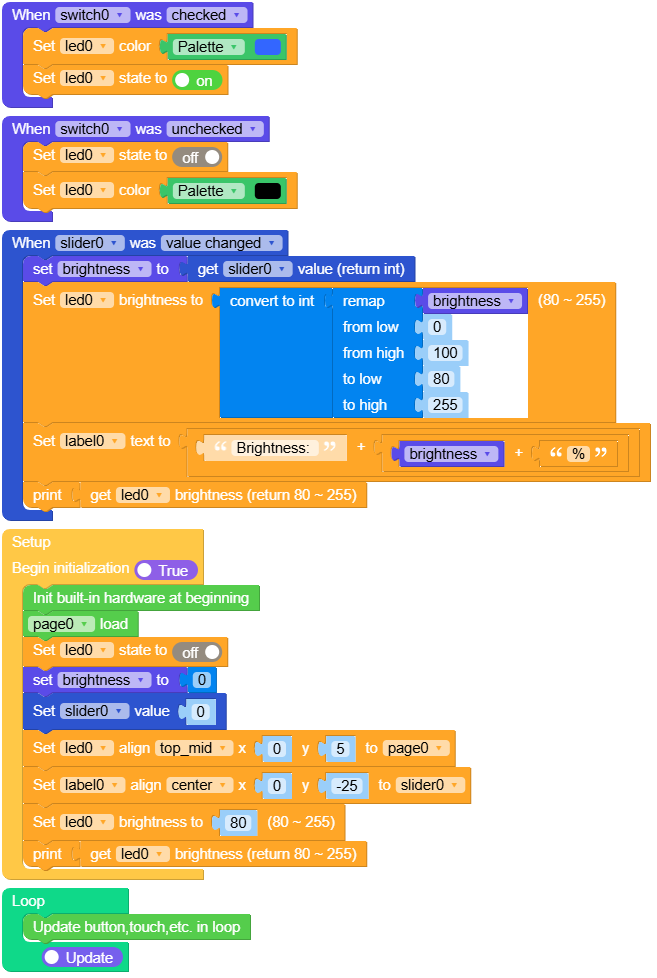
This example demonstrates how to create and control an LED widget. It shows how to turn the LED on and off, change its color, adjust brightness.
UiFlow2 Code Block:
Example output:
None.
MicroPython Example
LED Basic Usage Example
This example demonstrates how to create and control an LED widget. It shows how to turn the LED on and off, change its color, adjust brightness.
MicroPython Code Block:
  1# SPDX-FileCopyrightText: 2025 M5Stack Technology CO LTD
  2#
  3# SPDX-License-Identifier: MIT
  4
  5import os, sys, io
  6import M5
  7from M5 import *
  8import m5ui
  9import lvgl as lv
 10import m5utils
 11
 12
 13page0 = None
 14led0 = None
 15switch0 = None
 16slider0 = None
 17label0 = None
 18brightness = None
 19
 20
 21def switch0_checked_event(event_struct):
 22    global page0, led0, switch0, slider0, label0, brightness
 23    led0.set_color(0x3366FF)
 24    led0.on()
 25
 26
 27def switch0_unchecked_event(event_struct):
 28    global page0, led0, switch0, slider0, label0, brightness
 29    led0.off()
 30    led0.set_color(0x000000)
 31
 32
 33def slider0_value_changed_event(event_struct):
 34    global page0, led0, switch0, slider0, label0, brightness
 35    brightness = slider0.get_value()
 36    led0.set_brightness(int(m5utils.remap(brightness, 0, 100, 80, 255)))
 37    label0.set_text(str((str("Brightness: ") + str((str(brightness) + str("%"))))))
 38    print(led0.get_brightness())
 39
 40
 41def switch0_event_handler(event_struct):
 42    global page0, led0, switch0, slider0, label0, brightness
 43    event = event_struct.code
 44    obj = event_struct.get_target_obj()
 45    if event == lv.EVENT.VALUE_CHANGED:
 46        if obj.has_state(lv.STATE.CHECKED):
 47            switch0_checked_event(event_struct)
 48        else:
 49            switch0_unchecked_event(event_struct)
 50    return
 51
 52
 53def slider0_event_handler(event_struct):
 54    global page0, led0, switch0, slider0, label0, brightness
 55    event = event_struct.code
 56    if event == lv.EVENT.VALUE_CHANGED and True:
 57        slider0_value_changed_event(event_struct)
 58    return
 59
 60
 61def setup():
 62    global page0, led0, switch0, slider0, label0, brightness
 63    M5.begin()
 64    Widgets.setRotation(1)
 65    m5ui.init()
 66    page0 = m5ui.M5Page(bg_c=0x000000)
 67    led0 = m5ui.M5LED(x=135, y=14, size=50, color=0x00FF00, on=True, parent=page0)
 68    switch0 = m5ui.M5Switch(
 69        x=110,
 70        y=159,
 71        w=100,
 72        h=40,
 73        bg_c=0xE7E3E7,
 74        bg_c_checked=0x2196F3,
 75        circle_c=0xFFFFFF,
 76        parent=page0,
 77    )
 78    slider0 = m5ui.M5Slider(
 79        x=20,
 80        y=118,
 81        w=280,
 82        h=16,
 83        mode=lv.slider.MODE.NORMAL,
 84        min_value=0,
 85        max_value=100,
 86        value=25,
 87        bg_c=0x2193F3,
 88        color=0x2193F3,
 89        parent=page0,
 90    )
 91    label0 = m5ui.M5Label(
 92        "Brightness: 0%",
 93        x=99,
 94        y=85,
 95        text_c=0x2193F3,
 96        bg_c=0xFFFFFF,
 97        bg_opa=0,
 98        font=lv.font_montserrat_16,
 99        parent=page0,
100    )
101    switch0.add_event_cb(switch0_event_handler, lv.EVENT.ALL, None)
102    slider0.add_event_cb(slider0_event_handler, lv.EVENT.ALL, None)
103    page0.screen_load()
104    led0.off()
105    brightness = 0
106    slider0.set_value(0, True)
107    led0.align_to(page0, lv.ALIGN.TOP_MID, 0, 5)
108    label0.align_to(slider0, lv.ALIGN.CENTER, 0, -25)
109    led0.set_brightness(80)
110    print(led0.get_brightness())
111
112
113def loop():
114    global page0, led0, switch0, slider0, label0, brightness
115    M5.update()
116
117
118if __name__ == "__main__":
119    try:
120        setup()
121        while True:
122            loop()
123    except (Exception, KeyboardInterrupt) as e:
124        try:
125            m5ui.deinit()
126            from utility import print_error_msg
127
128            print_error_msg(e)
129        except ImportError:
130            print("please update to latest firmware")
Example output:
None.
API
M5LED
- class m5ui.led.M5LED(*args, **kwargs)
Bases:
ledCreate a LED object.
- Parameters:
x (int) – The x position of the LED.
y (int) – The y position of the LED.
size (int) – The size (width and height) of the LED.
color (int) – The color of the LED in RGB888 format.
on (bool) – Initial state of the LED (True for ON, False for OFF).
parent (lv.obj) – The parent object to attach the LED to. If not specified, the LED will be attached to the default screen.
UiFlow2 Code Block:
None
MicroPython Code Block:
from m5ui import M5Led
import lvgl as lv

m5ui.init()
led_0 = M5Led(x=50, y=50, size=50, color=0x00FF00, on=True, parent=page0)
- on()
Turn on the LED.
- Returns:
None
UiFlow2 Code Block:

MicroPython Code Block:
led_0.on()
- off()
Turn off the LED.
- Returns:
None
UiFlow2 Code Block:

MicroPython Code Block:
led_0.off()
- toggle()
Toggle the state of a LED.
- Returns:
None
UiFlow2 Code Block:

MicroPython Code Block:
led_0.toggle()
- set_color(color)
Set the color of the LED.
- Parameters:
color (int) – The color of the LED (RGB888 format).
- Returns:
None
UiFlow2 Code Block:

MicroPython Code Block:
led_0.set_color(color)
- set_pos(x, y)
Set the position of the LED.
UiFlow2 Code Block:

MicroPython Code Block:
led_0.set_pos(x, y)
- set_x(x)
Set the x position of the LED.
- Parameters:
x (int) – The x position of the LED.
- Returns:
None
UiFlow2 Code Block:

MicroPython Code Block:
led_0.set_x(x)
- set_y(y)
Set the y position of the LED.
- Parameters:
y (int) – The y position of the LED.
- Returns:
None
UiFlow2 Code Block:

MicroPython Code Block:
led_0.set_y(y)
- get_x()
Get the x position of the LED.
- Returns:
The x position of the LED.
- Return type:
UiFlow2 Code Block:

MicroPython Code Block:
x = led_0.get_x()
- get_y()
Get the y position of the LED.
- Returns:
The y position of the LED.
- Return type:
UiFlow2 Code Block:

MicroPython Code Block:
y = led_0.get_y()
- set_size(width, height)
Set the size of the LED.
UiFlow2 Code Block:

MicroPython Code Block:
led_0.set_size(width, height)
- set_width(width)
Set the width of the LED.
- Parameters:
width (int) – The width of the LED.
- Returns:
None
UiFlow2 Code Block:

MicroPython Code Block:
led_0.set_width(width)
- set_height(height)
Set the height of the LED.
- Parameters:
height (int) – The height of the LED.
- Returns:
None
UiFlow2 Code Block:

MicroPython Code Block:
led_0.set_height(height)
- align_to(obj, align, x, y)
Align the LED relative to another object.
- Parameters:
- Returns:
None
UiFlow2 Code Block:

MicroPython Code Block:
led_0.align_to(page0, lv.ALIGN.CENTER, 0, 0)
- lv.ALIGN
Alignment options for positioning objects.
lv.ALIGN.DEFAULT
lv.ALIGN.TOP_LEFT
lv.ALIGN.TOP_MID
lv.ALIGN.TOP_RIGHT
lv.ALIGN.BOTTOM_LEFT
lv.ALIGN.BOTTOM_MID
lv.ALIGN.BOTTOM_RIGHT
lv.ALIGN.LEFT_MID
lv.ALIGN.RIGHT_MID
lv.ALIGN.CENTER
lv.ALIGN.OUT_TOP_LEFT
lv.ALIGN.OUT_TOP_MID
lv.ALIGN.OUT_TOP_RIGHT
lv.ALIGN.OUT_BOTTOM_LEFT
lv.ALIGN.OUT_BOTTOM_MID
lv.ALIGN.OUT_BOTTOM_RIGHT
lv.ALIGN.OUT_LEFT_TOP
lv.ALIGN.OUT_LEFT_MID
lv.ALIGN.OUT_LEFT_BOTTOM
lv.ALIGN.OUT_RIGHT_TOP
lv.ALIGN.OUT_RIGHT_MID
lv.ALIGN.OUT_RIGHT_BOTTOM

