Atomic Speaker Base
The following products are supported:
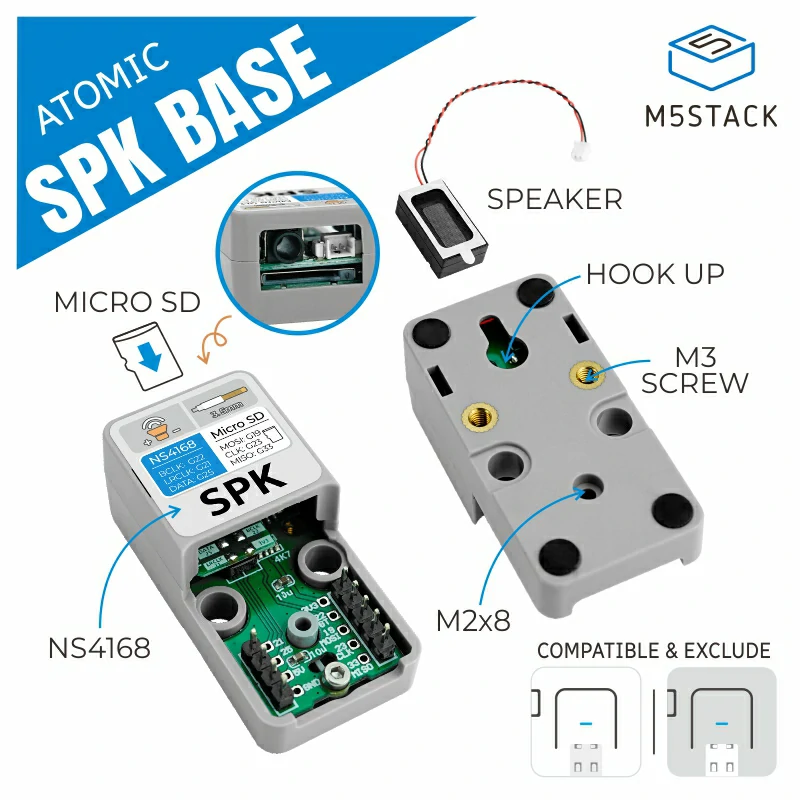
Below is the detailed support for Speaker on the host:
Controller |
NS4168 |
SDCard |
|---|---|---|
Atom Echo |
⭕ |
⭕ |
Atom Lite |
✅ |
✅ |
Atom Matrix |
⭕ |
✅ |
AtomS3 |
⭕ |
✅ |
AtomS3 Lite |
✅ |
✅ |
AtomS3R |
✅ |
✅ |
AtomS3R-CAM |
✅ |
✅ |
AtomS3R-Ext |
✅ |
✅ |
✅: Supported.
⭕: Optional, It conflicts with some internal resource of the host.
Micropython Example:
 1# SPDX-FileCopyrightText: 2024 M5Stack Technology CO LTD
 2#
 3# SPDX-License-Identifier: MIT
 4
 5import os, sys, io
 6import M5
 7from M5 import *
 8from base import SpeakerBase
 9from hardware import sdcard
10
11
12base_spk = None
13
14
15def setup():
16    global base_spk
17
18    M5.begin()
19    base_spk = SpeakerBase(1, 5, 39, 38)
20    sdcard.SDCard(slot=3, width=1, sck=7, miso=8, mosi=6, cs=None, freq=20000000)
21    base_spk.playWavFile("/flash/res/audio/66.wav")
22    base_spk.playWavFile("/sd/66.wav")
23
24
25def loop():
26    global base_spk
27    M5.update()
28
29
30if __name__ == "__main__":
31    try:
32        setup()
33        while True:
34            loop()
35    except (Exception, KeyboardInterrupt) as e:
36        try:
37            from utility import print_error_msg
38
39            print_error_msg(e)
40        except ImportError:
41            print("please update to latest firmware")
UIFLOW2 Example:
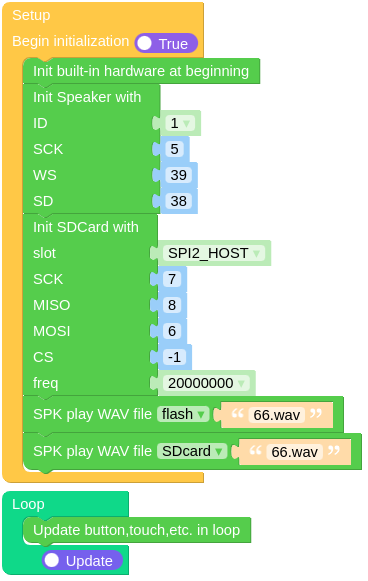
class SpeakerBase
Constructors
- class SpeakerBase(_id, sck, ws, sd)
Create an SpeakerBase object.
- Parameters:
UIFLOW2:
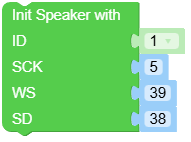
Micropython:
from base import SpeakerBase

# atoms3 lite / atoms3 / atoms3r / atoms3r-cam / atoms3-ext
spk = SpeakerBase(1, 5, 39, 38)

# atom lite / atom matrix / atom echo
spk = SpeakerBase(1, 22, 21, 25)
SpeakerBase class inherits M5.Speaker class, See hardware.Speaker.Methods for more details.
class SDCard
Constructors
- class SDCard(slot=2, width=1, sck=None, miso=None, mosi=None, cs=None, freq=20000000)
Create an SDCard object.
- Parameters:
slot (int) – The slot number of the SD card. Default is 2.
width (int) – width selects the bus width for the SD/MMC interface.
sck (int) – sck can be used to specify an SPI clock pin.
miso (int) – miso can be used to specify an SPI miso pin.
mosi (int) – mosi can be used to specify an SPI mosi pin.
cs (int) – cs can be used to specify an SPI chip select pin.
freq (int) – freq selects the SD/MMC interface frequency in Hz.
UIFLOW2:

Micropython:
from hardware import sdcard

# atoms lite / atom martrix / atom echo: SPI2
sd = sdcard.SDCard(slot=3, width=1, sck=23, miso=33, mosi=19, cs=None, freq=20000000)

# atoms3 / atoms3 lite / atoms3r / atoms3r-cam / atoms3-ext: SPI2
sd = SDCard(slot=3, width=1, sck=7, miso=8, mosi=6, cs=None, freq=20000000)