Atom Socket Base
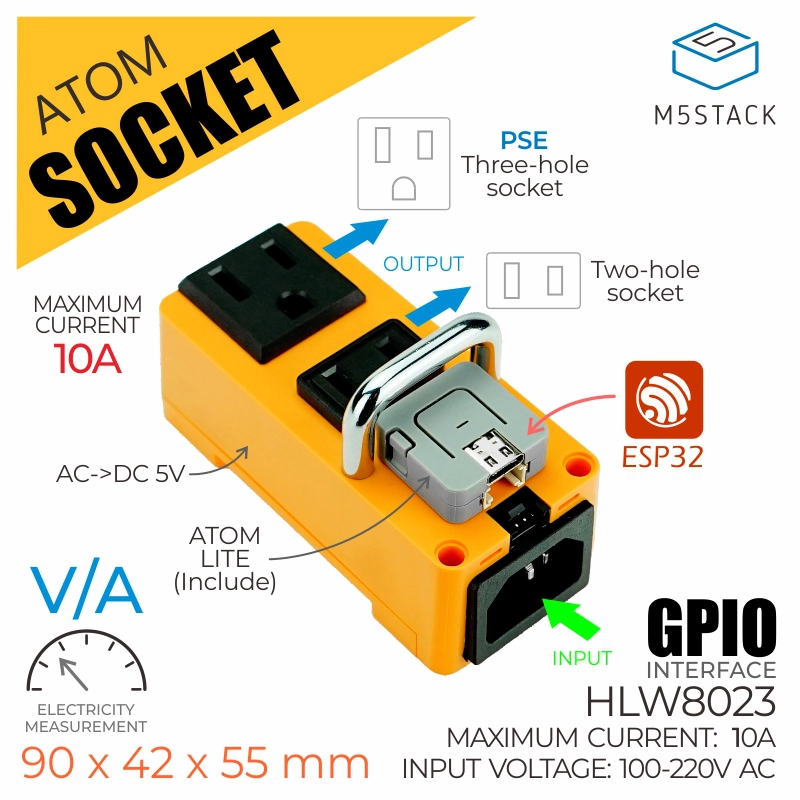
The ATOMSocketBase class is a smart power socket integrated with the M5 ATOM controller. It features a built-in HLW8032 high-precision power measurement IC, enabling it to measure the voltage, current, power, and energy of the load. Additionally, it can function as a smart socket to control the power state of the load, making it suitable for applications in smart homes, industrial control, and energy management.
Supports the following products:
Micropython Example:
 1# SPDX-FileCopyrightText: 2024 M5Stack Technology CO LTD
 2#
 3# SPDX-License-Identifier: MIT
 4
 5import os, sys, io
 6import M5
 7from M5 import *
 8from base import ATOMSocketBase
 9from hardware import *
10
11
12atomsocket = None
13
14
15as_voltage = None
16as_current = None
17as_power = None
18as_kwh = None
19onoff = None
20
21
22def atom_socket_receive_event(voltage, current, power, kwh):
23    global atomsocket, as_voltage, as_current, as_power, as_kwh, onoff
24    as_voltage = voltage
25    as_current = current
26    as_power = power
27    as_kwh = kwh
28    print("hello M5")
29    print("hello M5")
30
31
32def btnA_wasClicked_event(state):  # noqa: N802
33    global atomsocket, as_voltage, as_current, as_power, as_kwh, onoff
34    onoff = not onoff
35    if onoff:
36        atomsocket.set_relay(True)
37    else:
38        atomsocket.set_relay(False)
39
40
41def setup():
42    global atomsocket, as_voltage, as_current, as_power, as_kwh, onoff
43
44    M5.begin()
45    BtnA.setCallback(type=BtnA.CB_TYPE.WAS_CLICKED, cb=btnA_wasClicked_event)
46
47    atomsocket = ATOMSocketBase(1, port=(22, 33), relay=23)
48    onoff = False
49    atomsocket.set_relay(False)
50    atomsocket.receive_none_block(atom_socket_receive_event)
51
52
53def loop():
54    global atomsocket, as_voltage, as_current, as_power, as_kwh, onoff
55    M5.update()
56
57
58if __name__ == "__main__":
59    try:
60        setup()
61        while True:
62            loop()
63    except (Exception, KeyboardInterrupt) as e:
64        try:
65            from utility import print_error_msg
66
67            print_error_msg(e)
68        except ImportError:
69            print("please update to latest firmware")
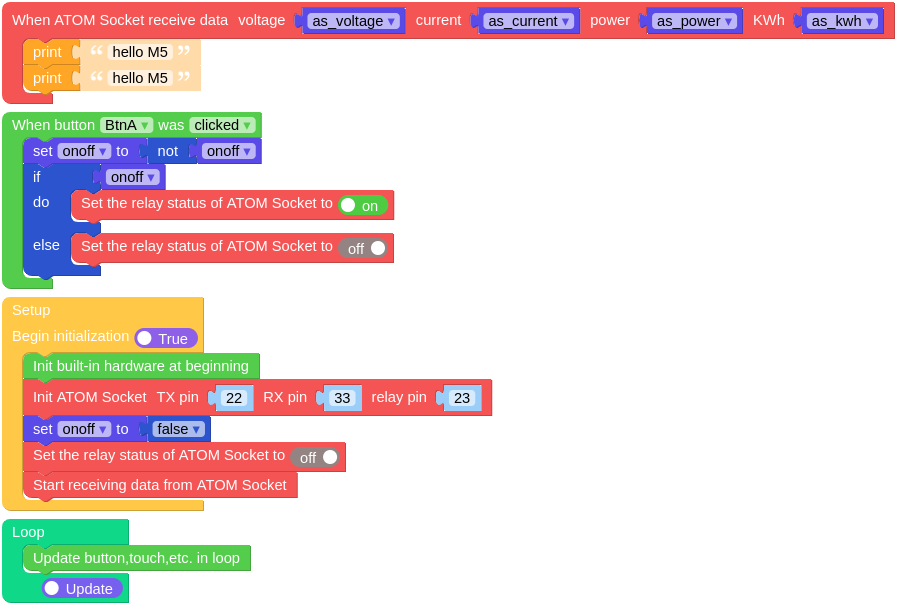
UIFLOW2 Example:
class ATOMSocketBase
Constructors

Methods
- ATOMSocketBase.set_relay(state: bool) None
Sets the state of the ATOM Socket’s relay.
state: The desired state of the relay, True = ON, False = OFF.
UIFLOW2:

- ATOMSocketBase.get_data(timeout=3000) tuple
Retrieves data from the ATOM Socket.
timeout: Function timeout period.
Returns the ATOM Socket data: Tuple (Voltage (V), Current (A), Power (W), Total Energy (KWh)), or None if timeout occurs.
UIFLOW2:

- ATOMSocketBase.get_voltage() float
Retrieves the voltage measurement from the ATOM Socket.
UIFLOW2:

- ATOMSocketBase.get_current() float
Retrieves the current measurement from the ATOM Socket.
UIFLOW2:



- ATOMSocketBase.get_inspecting_power() float
Calculates the inspecting power of the ATOM Socket.
UIFLOW2:




