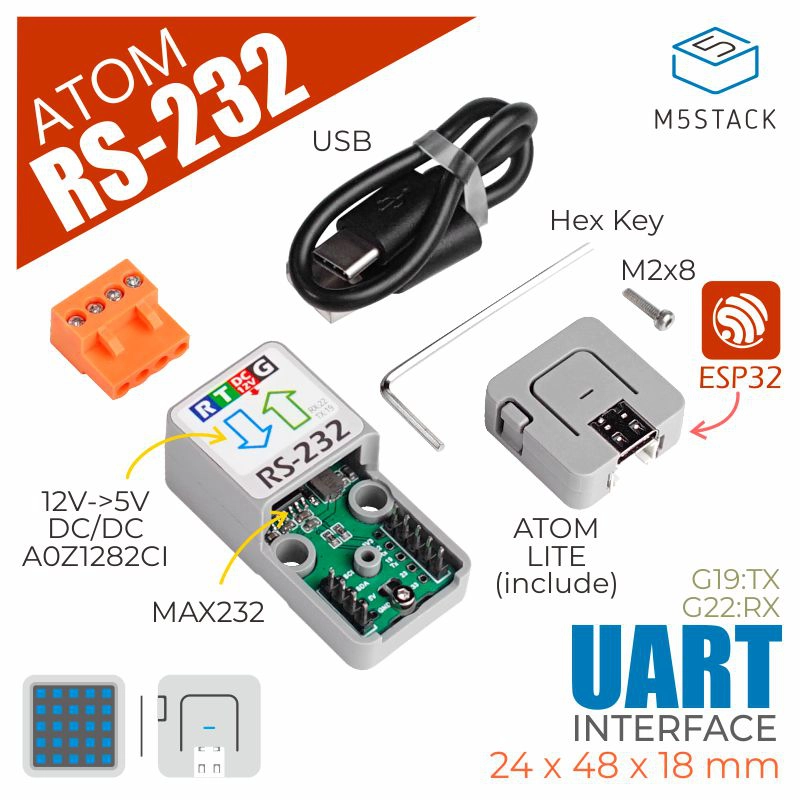
Atomic RS232 Base
AtomRS232 Class provides a set of methods to control the RS232 module. Through the UART interface, the module can transmit and receive data, supporting various baud rates and flow control configurations.
Support the following products:

UiFlow2 Example
RS232 Example
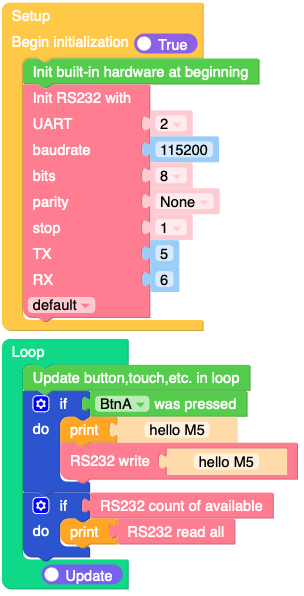
Open the atoms3r_rs232_example.m5f2 project in UiFlow2.
This example demonstrates how to send and receive data using the RS232 module via the UART interface.
UiFlow2 Code Block:
Example output:
None
MicroPython Example
RS232 Example
This example demonstrates how to send and receive data using the RS232 module via the UART interface.
MicroPython Code Block:
 1# SPDX-FileCopyrightText: 2025 M5Stack Technology CO LTD
 2#
 3# SPDX-License-Identifier: MIT
 4
 5import os, sys, io
 6import M5
 7from M5 import *
 8from base import AtomRS232
 9
10
11base_rs232 = None
12
13
14def setup():
15    global base_rs232
16
17    M5.begin()
18    base_rs232 = AtomRS232(
19        2,
20        baudrate=115200,
21        bits=8,
22        parity=None,
23        stop=1,
24        tx=5,
25        rx=6,
26        txbuf=256,
27        rxbuf=256,
28        timeout=0,
29        timeout_char=0,
30        invert=0,
31        flow=0,
32    )
33
34
35def loop():
36    global base_rs232
37    M5.update()
38    if BtnA.wasPressed():
39        print("hello M5")
40        base_rs232.write("hello M5")
41    if base_rs232.any():
42        print(base_rs232.read())
43
44
45if __name__ == "__main__":
46    try:
47        setup()
48        while True:
49            loop()
50    except (Exception, KeyboardInterrupt) as e:
51        try:
52            from utility import print_error_msg
53
54            print_error_msg(e)
55        except ImportError:
56            print("please update to latest firmware")
Example output:
None
API
AtomRS232
- class base.rs232.AtomRS232(id, **kwargs)
Bases:
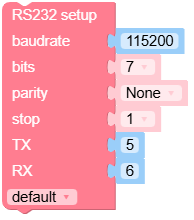
object- init(baudrate=9600, bits=8, parity=None, stop=1, *, ...)
Initialize the UART bus with the given parameters.
- Parameters:
UiFlow2 Code Block:
MicroPython Code Block:
rs232_0.init(baudrate=115200, bits=8, parity=None, stop=1)
- deinit()
Turn off the UART bus.
UiFlow2 Code Block:

MicroPython Code Block:
rs232_0.deinit()
- any()
Returns the number of characters that can be read without blocking.
- Returns:
The number of available bytes.
- Return type:
UiFlow2 Code Block:

MicroPython Code Block:
rs232_0.any()
- read([nbytes])
Read characters from the UART buffer.
- Parameters:
nbytes (int) – The maximum number of bytes to read (optional).
- Returns:
A bytes object containing the data read.
- Return type:
UiFlow2 Code Block:



MicroPython Code Block:
data = rs232_0.read()
- readinto(buf[, nbytes])
Read bytes into the
buf. Ifnbytesis specified, read at most that many bytes; otherwise, read at mostlen(buf)bytes. It may return sooner if a timeout is reached. The timeout is configurable in the constructor.- Parameters:
- Returns:
The number of bytes read and stored into
buf, orNoneif a timeout occurs.- Return type:
int or None
UiFlow2 Code Block:

MicroPython Code Block:
data = bytearray(10)
num_bytes = rs232_0.readinto(data)
num_bytes = rs232_0.readinto(data, 5)
- readline()
Read a line ending in a newline character. It may return sooner if a timeout is reached. The timeout is configurable in the constructor.
- Returns:
The line read as bytes, or
Noneif a timeout occurs.- Return type:
bytes or None
UiFlow2 Code Block:

MicroPython Code Block:
line = rs232_0.readline()
- sendbreak()
Send a break condition on the bus. This drives the bus low for a duration longer than required for a normal transmission of a character.
- Returns:
None
UiFlow2 Code Block:

MicroPython Code Block:
rs232_0.sendbreak()
- flush()
Waits until all data has been sent. In case of a timeout, an exception is raised. The timeout duration depends on the TX buffer size and the baud rate. Unless flow control is enabled, a timeout should not occur.
- Returns:
None
UiFlow2 Code Block:

MicroPython Code Block:
rs232_0.flush()
- txdone()
Check whether all data has been sent or no data transfer is happening. Returns
Trueif no transmission is ongoing, otherwise returnsFalse.- Returns:
Trueif no data transfer is happening, otherwiseFalse.- Return type:
UiFlow2 Code Block:

MicroPython Code Block:
status = rs232_0.txdone()