Atomic QRCode Base
This library is the driver for Atomic QRCode Base, and the module communicates via UART.
Support the following products:
/img-3fe4e63e-ae76-4a9b-b3fc-948adb3c274d.jpg)
UiFlow2 Example:
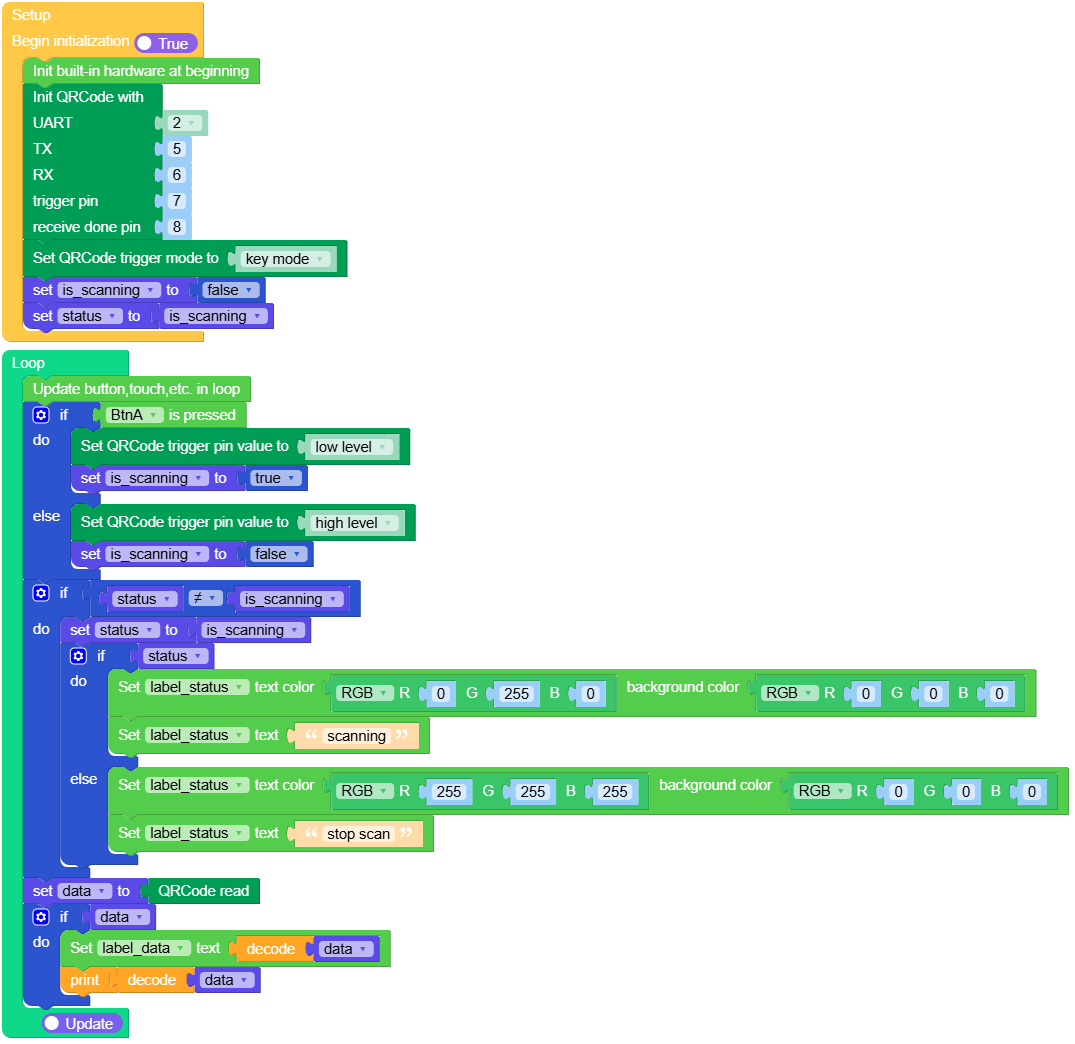
QRCode Scan in Key Mode
Open the atoms3_qrcode_key_mode_example.m5f2 project in UiFlow2.
In Key Mode, the module starts decoding when the button is pressed and stops decoding when the button is released. After a successful decoding, it stops decoding. To continue decoding, the button must be released and pressed again.
UiFlow2 Code Block:
Example output:
None
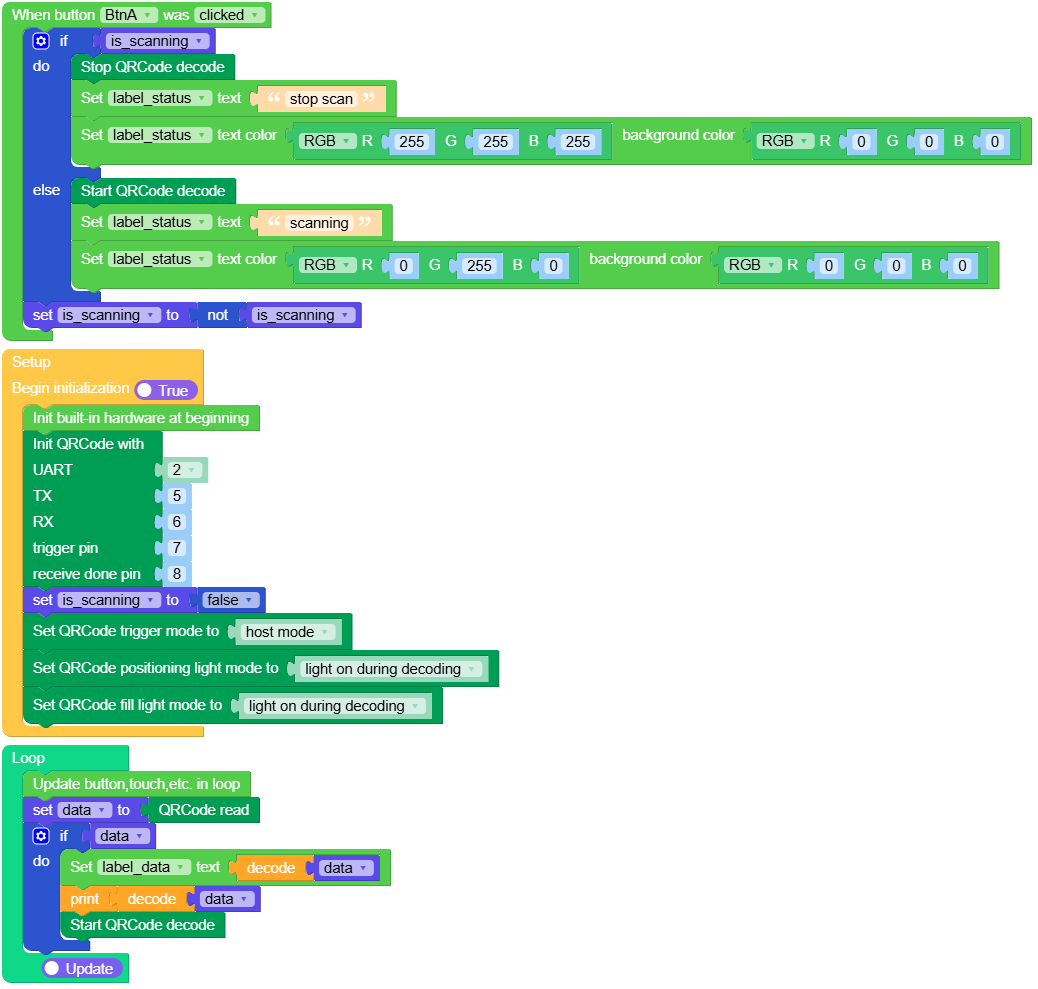
QRCode Scan in Host Mode
Open the atoms3_qrcode_host_mode_example.m5f2 project in UiFlow2.
In Host Mode, pressing the button once starts decoding, and pressing the button again stops decoding.
UiFlow2 Code Block:
Example output:
None
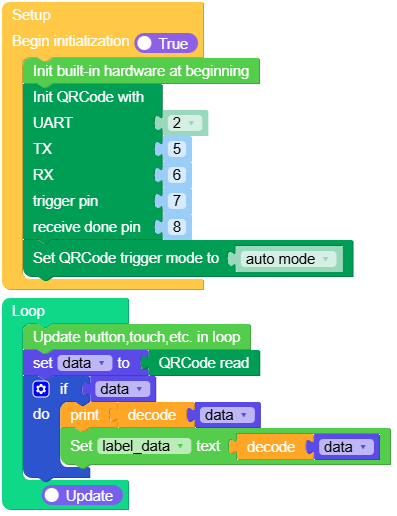
QRCode Scan in Auto Mode
Open the atoms3_qrcode_auto_mode_example.m5f2 project in UiFlow2.
In Auto Mode, the module starts decoding when powered on and cannot be stopped.
UiFlow2 Code Block:
Example output:
None
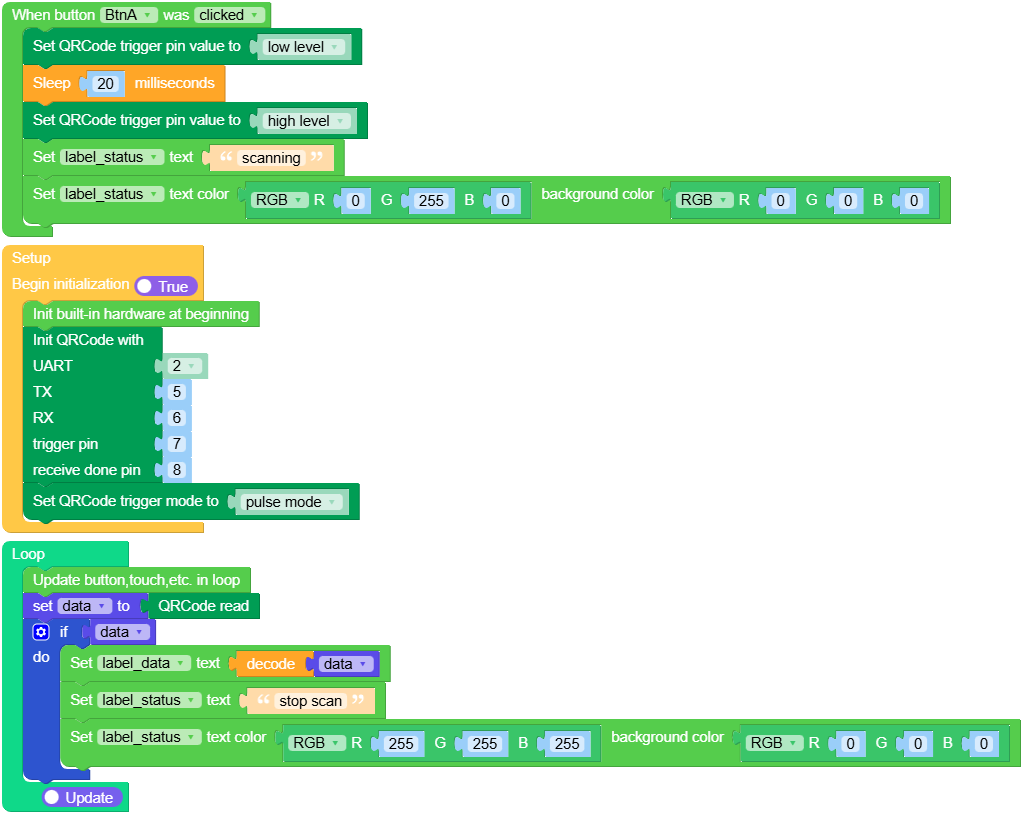
QRCode Scan in Pulse Mode
Open the atoms3_qrcode_pulse_mode_example.m5f2 project in UiFlow2.
In Pulse Mode, set the TRIG pin to hold a low level for more than 20ms to trigger decoding once.
UiFlow2 Code Block:
Example output:
None
QRCode Scan in Motion Sensing Mode
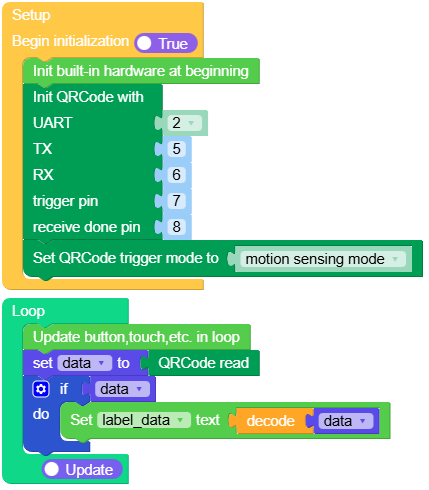
Open the atoms3_qrcode_motion_sensing_mode_example.m5f2 project in UiFlow2.
In Motion Sensing Mode, the module automatically triggers decoding when it detects a change in the scene based on visual recognition information.
UiFlow2 Code Block:
Example output:
None
MicroPython Example:
QRCode Scan in Key Mode
In Key Mode, the module starts decoding when the button is pressed and stops decoding when the button is released. After a successful decoding, it stops decoding. To continue decoding, the button must be released and pressed again.
MicroPython Code Block:
 1# SPDX-FileCopyrightText: 2025 M5Stack Technology CO LTD
 2#
 3# SPDX-License-Identifier: MIT
 4
 5import os, sys, io
 6import M5
 7from M5 import *
 8from base import AtomicQRCodeBase
 9
10
11title0 = None
12label_data = None
13label_status = None
14base_qrcode = None
15is_scanning = None
16status = None
17data = None
18
19
20def setup():
21    global title0, label_data, label_status, base_qrcode, is_scanning, status, data
22    M5.begin()
23    title0 = Widgets.Title("QRCode", 3, 0xFFFFFF, 0x0000FF, Widgets.FONTS.DejaVu18)
24    label_data = Widgets.Label("data", 5, 60, 1.0, 0xFFFFFF, 0x000000, Widgets.FONTS.DejaVu18)
25    label_status = Widgets.Label(
26        "stop scan", 5, 25, 1.0, 0xFFFFFF, 0x000000, Widgets.FONTS.DejaVu18
27    )
28    base_qrcode = AtomicQRCodeBase(2, 5, 6, 7, 8)
29    base_qrcode.set_trigger_mode(base_qrcode.TRIGGER_MODE_KEY)
30    is_scanning = False
31    status = is_scanning
32
33
34def loop():
35    global title0, label_data, label_status, base_qrcode, is_scanning, status, data
36    M5.update()
37    if BtnA.isPressed():
38        base_qrcode.set_trig(0)
39        is_scanning = True
40    else:
41        base_qrcode.set_trig(1)
42        is_scanning = False
43    if status != is_scanning:
44        status = is_scanning
45        if status:
46            label_status.setColor(0x00FF00, 0x000000)
47            label_status.setText(str("scanning"))
48        else:
49            label_status.setColor(0xFFFFFF, 0x000000)
50            label_status.setText(str("stop scan"))
51    data = base_qrcode.read()
52    if data:
53        label_data.setText(str(data.decode()))
54        print(data.decode())
55
56
57if __name__ == "__main__":
58    try:
59        setup()
60        while True:
61            loop()
62    except (Exception, KeyboardInterrupt) as e:
63        try:
64            from utility import print_error_msg
65
66            print_error_msg(e)
67        except ImportError:
68            print("please update to latest firmware")
Example output:
None
QRCode Scan in Host Mode
In Host Mode, pressing the button once starts decoding, and pressing the button again stops decoding.
MicroPython Code Block:
 1# SPDX-FileCopyrightText: 2025 M5Stack Technology CO LTD
 2#
 3# SPDX-License-Identifier: MIT
 4
 5import os, sys, io
 6import M5
 7from M5 import *
 8from base import AtomicQRCodeBase
 9
10
11title0 = None
12label_data = None
13label_status = None
14base_qrcode = None
15is_scanning = None
16data = None
17
18
19def btna_was_clicked_event(state):
20    global title0, label_data, label_status, base_qrcode, is_scanning, data
21    if is_scanning:
22        base_qrcode.stop_decode()
23        label_status.setText(str("stop scan"))
24        label_status.setColor(0xFFFFFF, 0x000000)
25    else:
26        base_qrcode.start_decode()
27        label_status.setText(str("scanning"))
28        label_status.setColor(0x00FF00, 0x000000)
29    is_scanning = not is_scanning
30
31
32def setup():
33    global title0, label_data, label_status, base_qrcode, is_scanning, data
34    M5.begin()
35    title0 = Widgets.Title("QRCode", 3, 0xFFFFFF, 0x0000FF, Widgets.FONTS.DejaVu18)
36    label_data = Widgets.Label("data", 5, 60, 1.0, 0xFFFFFF, 0x000000, Widgets.FONTS.DejaVu18)
37    label_status = Widgets.Label(
38        "stop scan", 5, 25, 1.0, 0xFFFFFF, 0x000000, Widgets.FONTS.DejaVu18
39    )
40    BtnA.setCallback(type=BtnA.CB_TYPE.WAS_CLICKED, cb=btna_was_clicked_event)
41    base_qrcode = AtomicQRCodeBase(2, 5, 6, 7, 8)
42    is_scanning = False
43    base_qrcode.set_trigger_mode(base_qrcode.TRIGGER_MODE_HOST)
44    base_qrcode.set_pos_light_mode(base_qrcode.POS_LIGHT_ON_DECODE)
45    base_qrcode.set_fill_light_mode(base_qrcode.FILL_LIGHT_ON_DECODE)
46
47
48def loop():
49    global title0, label_data, label_status, base_qrcode, is_scanning, data
50    M5.update()
51    data = base_qrcode.read()
52    if data:
53        label_data.setText(str(data.decode()))
54        print(data.decode())
55        base_qrcode.start_decode()
56
57
58if __name__ == "__main__":
59    try:
60        setup()
61        while True:
62            loop()
63    except (Exception, KeyboardInterrupt) as e:
64        try:
65            from utility import print_error_msg
66
67            print_error_msg(e)
68        except ImportError:
69            print("please update to latest firmware")
Example output:
None
QRCode Scan in Auto Mode
In Auto Mode, the module starts decoding when powered on and cannot be stopped.
MicroPython Code Block:
 1# SPDX-FileCopyrightText: 2025 M5Stack Technology CO LTD
 2#
 3# SPDX-License-Identifier: MIT
 4
 5import os, sys, io
 6import M5
 7from M5 import *
 8from base import AtomicQRCodeBase
 9
10
11title0 = None
12label_data = None
13label_status = None
14base_qrcode = None
15data = None
16
17
18def setup():
19    global title0, label_data, label_status, base_qrcode, data
20    M5.begin()
21    title0 = Widgets.Title("QRCode", 3, 0xFFFFFF, 0x0000FF, Widgets.FONTS.DejaVu18)
22    label_data = Widgets.Label("data", 5, 60, 1.0, 0xFFFFFF, 0x000000, Widgets.FONTS.DejaVu18)
23    label_status = Widgets.Label(
24        "scanning", 5, 25, 1.0, 0x00FF00, 0x000000, Widgets.FONTS.DejaVu18
25    )
26    base_qrcode = AtomicQRCodeBase(2, 5, 6, 7, 8)
27    base_qrcode.set_trigger_mode(base_qrcode.TRIGGER_MODE_AUTO)
28
29
30def loop():
31    global title0, label_data, label_status, base_qrcode, data
32    M5.update()
33    data = base_qrcode.read()
34    if data:
35        print(data.decode())
36        label_data.setText(str(data.decode()))
37
38
39if __name__ == "__main__":
40    try:
41        setup()
42        while True:
43            loop()
44    except (Exception, KeyboardInterrupt) as e:
45        try:
46            from utility import print_error_msg
47
48            print_error_msg(e)
49        except ImportError:
50            print("please update to latest firmware")
Example output:
None
QRCode Scan in Pulse Mode
In Pulse Mode, set the TRIG pin to hold a low level for more than 20ms to trigger decoding once.
MicroPython Code Block:
 1# SPDX-FileCopyrightText: 2025 M5Stack Technology CO LTD
 2#
 3# SPDX-License-Identifier: MIT
 4
 5import os, sys, io
 6import M5
 7from M5 import *
 8from base import AtomicQRCodeBase
 9import time
10
11
12title0 = None
13label_data = None
14label_status = None
15base_qrcode = None
16data = None
17
18
19def btna_was_clicked_event(state):
20    global title0, label_data, label_status, base_qrcode, data
21    base_qrcode.set_trig(0)
22    time.sleep_ms(20)
23    base_qrcode.set_trig(1)
24    label_status.setText(str("scanning"))
25    label_status.setColor(0x00FF00, 0x000000)
26
27
28def setup():
29    global title0, label_data, label_status, base_qrcode, data
30    M5.begin()
31    title0 = Widgets.Title("QRCode", 3, 0xFFFFFF, 0x0000FF, Widgets.FONTS.DejaVu18)
32    label_data = Widgets.Label("data", 5, 60, 1.0, 0xFFFFFF, 0x000000, Widgets.FONTS.DejaVu18)
33    label_status = Widgets.Label(
34        "stop scan", 5, 25, 1.0, 0xFFFFFF, 0x000000, Widgets.FONTS.DejaVu18
35    )
36    BtnA.setCallback(type=BtnA.CB_TYPE.WAS_CLICKED, cb=btna_was_clicked_event)
37    base_qrcode = AtomicQRCodeBase(2, 5, 6, 7, 8)
38    base_qrcode.set_trigger_mode(base_qrcode.TRIGGER_MODE_PULSE)
39
40
41def loop():
42    global title0, label_data, label_status, base_qrcode, data
43    M5.update()
44    data = base_qrcode.read()
45    if data:
46        label_data.setText(str(data.decode()))
47        label_status.setText(str("stop scan"))
48        label_status.setColor(0xFFFFFF, 0x000000)
49
50
51if __name__ == "__main__":
52    try:
53        setup()
54        while True:
55            loop()
56    except (Exception, KeyboardInterrupt) as e:
57        try:
58            from utility import print_error_msg
59
60            print_error_msg(e)
61        except ImportError:
62            print("please update to latest firmware")
Example output:
None
QRCode Scan in Motion Sensing Mode
In Motion Sensing Mode, the module automatically triggers decoding when it detects a change in the scene based on visual recognition information.
MicroPython Code Block:
 1# SPDX-FileCopyrightText: 2025 M5Stack Technology CO LTD
 2#
 3# SPDX-License-Identifier: MIT
 4
 5import os, sys, io
 6import M5
 7from M5 import *
 8from base import AtomicQRCodeBase
 9
10
11title0 = None
12label_data = None
13label_status = None
14base_qrcode = None
15data = None
16
17
18def setup():
19    global title0, label_data, label_status, base_qrcode, data
20    M5.begin()
21    title0 = Widgets.Title("QRCode", 3, 0xFFFFFF, 0x0000FF, Widgets.FONTS.DejaVu18)
22    label_data = Widgets.Label("data", 5, 60, 1.0, 0xFFFFFF, 0x000000, Widgets.FONTS.DejaVu18)
23    label_status = Widgets.Label(
24        "detecting", 5, 25, 1.0, 0x00FF00, 0x000000, Widgets.FONTS.DejaVu18
25    )
26    base_qrcode = AtomicQRCodeBase(2, 5, 6, 7, 8)
27    base_qrcode.set_trigger_mode(base_qrcode.TRIGGER_MODE_MOTION_SENSING)
28
29
30def loop():
31    global title0, label_data, label_status, base_qrcode, data
32    M5.update()
33    data = base_qrcode.read()
34    if data:
35        label_data.setText(str(data.decode()))
36
37
38if __name__ == "__main__":
39    try:
40        setup()
41        while True:
42            loop()
43    except (Exception, KeyboardInterrupt) as e:
44        try:
45            from utility import print_error_msg
46
47            print_error_msg(e)
48        except ImportError:
49            print("please update to latest firmware")
Example output:
None
API
AtomicQRCodeBase
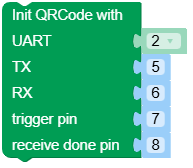
- class base.qrcode.AtomicQRCodeBase(id=1, tx=5, rx=6, trig=7, done=8)
Bases:
objectCreate an AtomicQRCodeBase object.
- Parameters:
UiFlow2 Code Block:
MicroPython Code Block:
from base import AtomicQRCodeBase

base_qrcode = AtomicQRCodeBase(id = 1, tx = 6, rx = 5, trig = 7, done = 8)
- set_trig(value)
Set trigger value.
- Parameters:
value (int) –
0- Low level,1- High level.- Return type:
None
UiFlow2 Code Block:

MicroPython Code Block:
base_qrcode.set_trig(value)
- start_decode()
Start decode.
UiFlow2 Code Block:

MicroPython Code Block:
base_qrcode.start_decode()
- Return type:
None
- stop_decode()
Stop decode.
UiFlow2 Code Block:

MicroPython Code Block:
base_qrcode.stop_decode()
- Return type:
None
- read()
Read decode data.
- Returns:
qrcode data.
- Return type:
None | bytes
UiFlow2 Code Block:

MicroPython Code Block:
base_qrcode.read()
- set_trigger_mode(mode)
Set trigger mode.
- Parameters:
mode (int) –
The trigger mode. Available options:
TRIGGER_MODE_KEY: Key Mode, Triggers a single decode; decoding stops after a successful read.TRIGGER_MODE_HOST: Host Mode, The command controls the start/stop of decoding. Once triggered, decoding will stop either upon successful decoding or after a timeout of 5 seconds.TRIGGER_MODE_AUTO: Auto Mode, Performs continuous decoding upon power-up and cannot be stopped.TRIGGER_MODE_PULSE: Pulse Mode, The Trig pin’s low-level signal triggers decoding, which stops after a successful read or when the single read time limit is reached.TRIGGER_MODE_MOTION_SENSING: Motion Sensing Mode, Uses image recognition; decoding starts when a scene change is detected.
- Return type:
None
UiFlow2 Code Block:

MicroPython Code Block:
base_qrcode.set_trigger_mode(mode)
- set_decode_continuous(delay_100ms)
Set continuous decode time.
- Parameters:
delay_100ms (int) – Continuous scanning time(unit: 100ms). Range: 099, i.e., 025,500 ms (0 means unlimited).
- Return type:
None
UiFlow2 Code Block:

MicroPython Code Block:
base_qrcode.set_decode_continuous(delay_100ms)
- set_decode_interval(interval_100ms)
Set decode interval.
- Parameters:
interval_100ms (int) – Decode interval time(unit: 100ms). Range: 0~99, i.e., 0~9,900 ms.
- Return type:
None
UiFlow2 Code Block:

MicroPython Code Block:
base_qrcode.set_decode_interval(interval_100ms)
- set_same_code_interval(interval_100ms)
Set same code interval.
- Parameters:
interval_100ms (int) – Decode interval for the same code(unit: 100ms). Range: 0~99, i.e., 0~9,900 ms.
- Return type:
None
UiFlow2 Code Block:

MicroPython Code Block:
base_qrcode.set_same_code_interval(interval_100ms)
- set_fill_light_mode(mode)
Set fill light mode.
- Parameters:
mode (int) – The fill light mode. Available options: -
FILL_LIGHT_OFF: Light off. -FILL_LIGHT_ON: Light on. -FILL_LIGHT_ON_DECODE: Light on during decoding.- Return type:
None
UiFlow2 Code Block:

MicroPython Code Block:
base_qrcode.set_fill_light_mode(mode)
- set_pos_light_mode(mode)
Set positioning light mode.
- Parameters:
mode (int) – The positioning light mode. Available options: -
POS_LIGHT_OFF: Light off. -POS_LIGHT_ON: Light on. -POS_LIGHT_ON_DECODE: Light flash during decoding.- Return type:
None
UiFlow2 Code Block:

MicroPython Code Block:
base_qrcode.set_pos_light_mode(mode)
- set_startup_tone(enable)
Set startup tone.
- Parameters:
enable (bool) – True - Enable startup tone, False - Disable startup tone.
- Return type:
None
UiFlow2 Code Block:

MicroPython Code Block:
base_qrcode.set_startup_tone(enable)

