Speaker
The Speaker is used to control the built-in speaker inside the host device. Below is the detailed support for Speaker on the host:
Controller |
NS4168 |
AW88298 |
Buzzer |
|---|---|---|---|
AirQ |
✔ |
||
Atom Echo |
✔ |
||
Atom Lite |
|||
Atom Martrix |
|||
AtomS3 |
|||
AtomS3 Lite |
|||
AtomS3U |
|||
AtomU |
|||
Basic |
|||
Capsule |
✔ |
||
Cardputer |
✔ |
||
Core2 |
✔ |
||
CoreInk |
✔ |
||
CoreS3 |
✔ |
||
Dial |
✔ |
||
DinMeter |
✔ |
||
Fire |
|||
Paper |
|||
Stamp PICO |
|||
StampS3 |
|||
Station |
|||
StickC |
✔ |
||
StickC PLUS |
✔ |
||
StickC PLUS2 |
✔ |
||
TOUGH |
✔ |
Micropython Example:
 1# SPDX-FileCopyrightText: 2024 M5Stack Technology CO LTD
 2#
 3# SPDX-License-Identifier: MIT
 4
 5import os, sys, io
 6import M5
 7from M5 import *
 8
 9
10circle0 = None
11label0 = None
12
13
14x = None
15y = None
16
17
18def setup():
19    global circle0, label0, x, y
20
21    M5.begin()
22    Widgets.fillScreen(0x222222)
23    circle0 = Widgets.Circle(160, 120, 60, 0xFFFFFF, 0xFFFFFF)
24    label0 = Widgets.Label("Play", 141, 110, 1.0, 0x222222, 0xFFFFFF, Widgets.FONTS.DejaVu18)
25
26    Speaker.begin()
27    Speaker.playWavFile("/flash/res/audio/poweron_2_5s.wav")
28
29
30def loop():
31    global circle0, label0, x, y
32    M5.update()
33    if M5.Touch.getCount():
34        x = M5.Touch.getX()
35        y = M5.Touch.getY()
36        if x >= 130 and x <= 190 and y >= 90 and y <= 150:
37            circle0.setColor(color=0xFF0000, fill_c=0xFF0000)
38            label0.setColor(0xFFFFFF, 0xFF0000)
39            label0.setText(str("Play..."))
40            Speaker.playWavFile("/flash/res/audio/poweron_2_5s.wav")
41            label0.setText(str("Play"))
42            circle0.setColor(color=0xFFFFFF, fill_c=0xFFFFFF)
43            label0.setColor(0x000000, 0xFFFFFF)
44
45
46if __name__ == "__main__":
47    try:
48        setup()
49        while True:
50            loop()
51    except (Exception, KeyboardInterrupt) as e:
52        try:
53            from utility import print_error_msg
54
55            print_error_msg(e)
56        except ImportError:
57            print("please update to latest firmware")
UIFLOW2 Example:
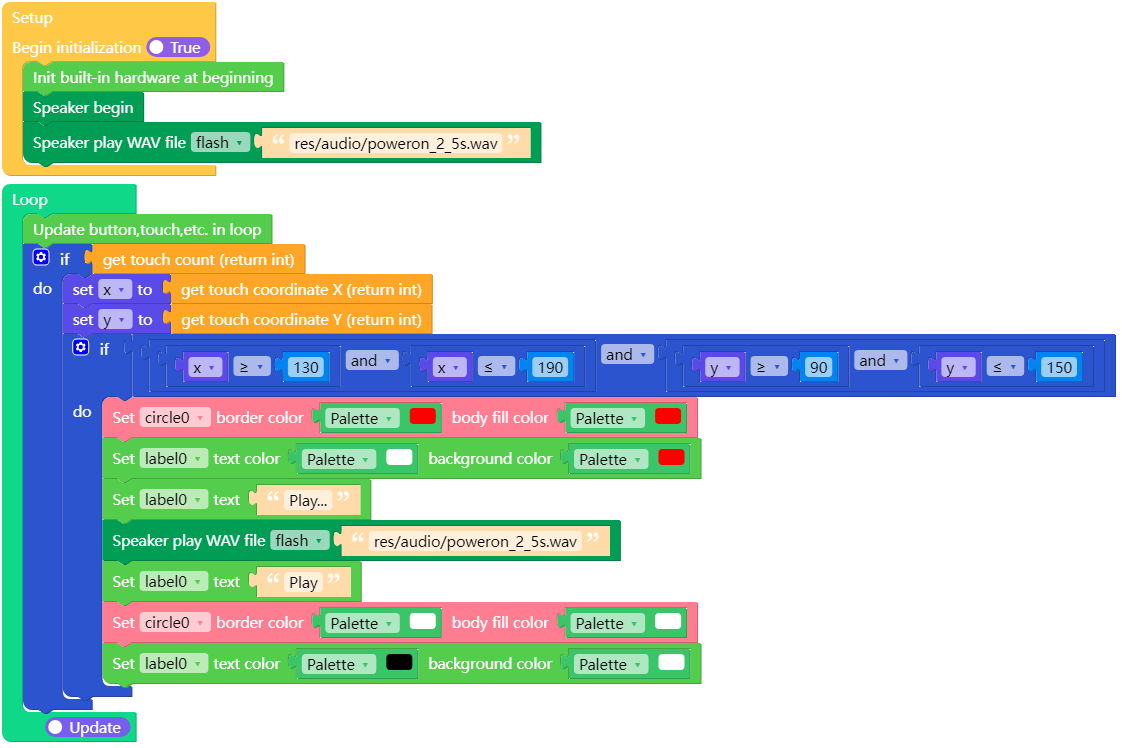
class Speaker
Important
Methods of the Speaker Class heavily rely on M5.begin()  and
and M5.update()  .
.
All calls to methods of Speaker objects should be placed after M5.begin() , and M5.update() should be called in the main loop.
Note
Speaker is registered in the M5 module, not in the hardware
module. Use from M5 import * to make Speaker available. Do not
write from hardware import Speaker.
Methods
- Speaker.config([cfg])
- Speaker.config('param')
- Speaker.config(param=value)
Get or set the parameters of the Speaker object.
UIFLOW2:
Read property:
Parameter
Type
Description
pin_data_out
(integer)
Serial data line of I2S, representing audio data in binary complement.
pin_bck
(integer)
Serial clock line of I2S, corresponding to each bit of digital audio data.
pin_ws
(integer)
Frame clock of I2S, used to switch left and right channel data.
sample_rate
(integer)
Target sampling rate of output audio.
stereo
(boolean)
Use stereo output.
buzzer
(boolean)
Use single GPIO buzzer.
use_dac
(boolean)
Use DAC speaker.
dac_zero_level
(integer)
Zero level reference value when using DAC.
magnification
(integer)
Multiplier of the input value.
dma_buf_len
(integer)
DMA buffer length of I2S.
dma_buf_count
(integer)
Number of DMA buffers of I2S.
task_priority
(integer)
Priority of background tasks.
task_pinned_core
(integer)
CPU used by background tasks.
i2s_port
(integer)
I2S port.
Python:
Speaker.config("pin_data_in")


Set property:
Python:
Speaker.config(pin_data_in=1)



- Speaker.isPlaying([channel]) bool
Check if the Speaker is playing sound. Returns a boolean value.
If the parameter
channelis provided, it checks the playback status of the specified channel.channelaccepts values from 0 to 7.UIFLOW2:


- Speaker.setVolume(volume: int) None
Set the master volume level for audio output.
volumeaccepts volume levels from 0 to 255.UIFLOW2:

- Speaker.getVolume() int
Get the master volume level for audio output. Returns volume levels from 0 to 255.
UIFLOW2:

- Speaker.setVolumePercentage(percentage: float) None
Set the master volume level for audio output as a percentage.
percentageranges from 0% to 100%.UIFLOW2:
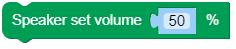
- Speaker.getVolumePercentage() float
Get the master volume level for audio output as a percentage. Returns volume levels from 0% to 100%.
UIFLOW2:

- Speaker.setAllChannelVolume(volume: int) None
Set the volume level for all virtual channels.
volumeaccepts volume levels from 0 to 255.UIFLOW2:

- Speaker.setChannelVolume(channel: int, volume: int) None
Set the volume level for a specific virtual channel.
Parameters:
volumeaccepts volume levels from 0 to 255.channelis the channel to play, ranging from 0 to 7.
UIFLOW2:

- Speaker.getChannelVolume(channel) int
Get the volume level for a specific virtual channel.
channelranges from 0 to 7.UIFLOW2:

- Speaker.stop([channel]) None
Stop sound output. If
channelis not specified, stop sound output for all channels.channelaccepts values from 0 to 7.UIFLOW2:

- Speaker.tone(frequency, duration[, channel[, stop_current_sound]]) None
Play a simple tone.
Parameters:
frequencyis the frequency of the tone in Hz.durationis the duration of the tone in milliseconds.channelis the channel to play, ranging from 0 to 7. By default, it is -1, which means using an available channel.stop_current_soundcontrols whether to wait for the previous audio playback to finish. If True, start the new output without waiting for the current output to finish.
UIFLOW2:

- Speaker.playRaw(wav_data: bytes|bytearray[, sample_rate: int[, stereo: bool[, repeat: int[, channel: int[, stop_current_sound: bool]]]]]) bool
Play PCM data.
Parameters:
wav_datais the buffer of audio data.sample_rateis the sample rate of the audio data.stereospecifies if the audio is stereo.repeatis the number of times to repeat the audio. Default is 1.channelis the channel to play, ranging from 0 to 7. By default, it is -1, which means using an available channel.stop_current_soundcontrols whether to wait for the previous audio playback to finish. If True, start the new output without waiting for the current output to finish.
UIFLOW2:

- Speaker.playWav(wav_data: bytes|bytearray[, repeat: int[, channel: int[, stop_current_sound: bool]]]) None
Play audio data in WAV format. Requires passing the raw data of the entire audio file.
Parameters:
wav_datais the buffer of audio data.repeatis the number of times to repeat the audio. Default is 1.channelis the channel to play, ranging from 0 to 7. By default, it is -1, which means using an available channel.stop_current_soundcontrols whether to wait for the previous audio playback to finish. If True, start the new output without waiting for the current output to finish.
UIFLOW2:

- Speaker.playWavFile(path: str[, repeat: int[, channel: int[, stop_current_sound: bool]]]) None
Play audio data in WAV format. Requires passing the raw data of the entire audio file.
Parameters:
pathis the path to the audio file.repeatis the number of times to repeat the audio. Default is 1.channelis the channel to play, ranging from 0 to 7. By default, it is -1, which means using an available channel.stop_current_soundcontrols whether to wait for the previous audio playback to finish. If True, start the new output without waiting for the current output to finish.
UIFLOW2:
