IR
IR is used to control the infrared receiving/transmitting tube built into the host device.
The specific support of the host for IR is as follows:
Controller |
IR Transmitter |
IR Receiver |
|---|---|---|
Atom Lite |
✔ |
|
Atom Matrix |
✔ |
|
Atom U |
✔ |
|
AtomS3 Lite |
✔ |
|
AtomS3U |
✔ |
|
StickC |
✔ |
|
StickC-Plus |
✔ |
|
StickC-Plus2 |
✔ |
|
Cardputer |
✔ |
|
Capsule |
✔ |
|
StickS3 |
✔ |
✔ |
UiFlow2 Example
IR Transmission
Open the sticks3_ir_tx_example.m5f2 project in UiFlow2.
This example demonstrates infrared (IR) transmission functionality. When button A is pressed, it sends IR data with a specified address and data value. The example displays the address and data being transmitted.
UiFlow2 Code Block:
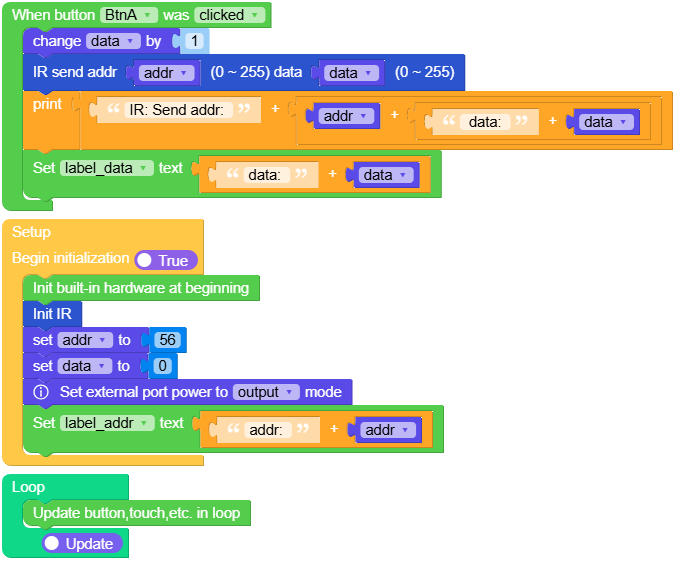
Example output:
None
IR Reception
Open the sticks3_ir_rx_example.m5f2 project in UiFlow2.
This example demonstrates infrared (IR) reception functionality using NEC decode protocol. When IR data is received, it displays the address and data values on the screen.
UiFlow2 Code Block:
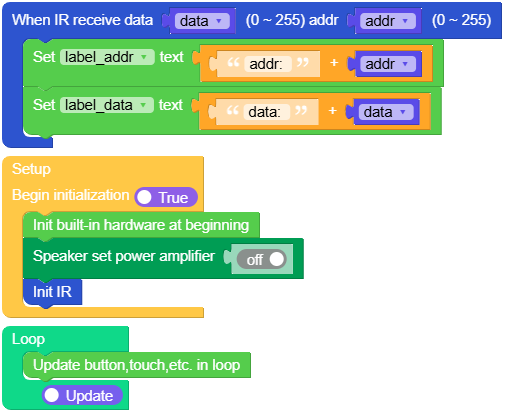
Example output:
None
MicroPython Example
IR Transmission
This example demonstrates infrared (IR) transmission functionality. When button A is pressed, it sends IR data with a specified address and data value. The example displays the address and data being transmitted.
MicroPython Code Block:
 1# SPDX-FileCopyrightText: 2025 M5Stack Technology CO LTD
 2#
 3# SPDX-License-Identifier: MIT
 4import os, sys, io
 5import M5
 6from M5 import *
 7from hardware import IR
 8
 9
10label_title = None
11label_addr = None
12label_data = None
13label_tip = None
14ir = None
15data = None
16addr = None
17
18
19def btna_click_event_cb(state):
20    global label_title, label_addr, label_data, label_tip, ir, data, addr
21    data = (data if isinstance(data, (int, float)) else 0) + 1
22    ir.tx(addr, data)
23    print((str("IR: Send addr: ") + str((str(addr) + str((str(" data: ") + str(data)))))))
24    label_data.setText(str((str("data: ") + str(data))))
25
26
27def setup():
28    global label_title, label_addr, label_data, label_tip, ir, data, addr
29    M5.begin()
30    Widgets.setRotation(0)
31    Widgets.fillScreen(0x000000)
32    label_title = Widgets.Label("IR", 58, 5, 1.0, 0x1AEAEB, 0x000000, Widgets.FONTS.DejaVu18)
33    label_addr = Widgets.Label("addr:", 5, 45, 1.0, 0xFFFFFF, 0x000000, Widgets.FONTS.DejaVu18)
34    label_data = Widgets.Label("data:", 5, 70, 1.0, 0xFFFFFF, 0x000000, Widgets.FONTS.DejaVu18)
35    label_tip = Widgets.Label(
36        "BtnA Send", 18, 200, 1.0, 0xFFFFFF, 0x000000, Widgets.FONTS.DejaVu18
37    )
38    BtnA.setCallback(type=BtnA.CB_TYPE.WAS_CLICKED, cb=btna_click_event_cb)
39    ir = IR()
40    ir.rx_cb(ir_rx_event)
41    addr = 56
42    data = 0
43    Power.setExtOutput(True)
44    label_addr.setText(str((str("addr: ") + str(addr))))
45
46
47def loop():
48    global label_title, label_addr, label_data, label_tip, ir, data, addr
49    M5.update()
50
51
52if __name__ == "__main__":
53    try:
54        setup()
55        while True:
56            loop()
57    except (Exception, KeyboardInterrupt) as e:
58        try:
59            from utility import print_error_msg
60
61            print_error_msg(e)
62        except ImportError:
63            print("please update to latest firmware")
Example output:
None
IR Reception
This example demonstrates infrared (IR) reception functionality using NEC decode protocol. When IR data is received, it displays the address and data values on the screen.
MicroPython Code Block:
 1# SPDX-FileCopyrightText: 2025 M5Stack Technology CO LTD
 2#
 3# SPDX-License-Identifier: MIT
 4import os, sys, io
 5import M5
 6from M5 import *
 7from hardware import IR
 8
 9
10label_title = None
11label0 = None
12label_addr = None
13label_data = None
14ir = None
15data = None
16addr = None
17
18
19def ir_rx_event(_data, _addr, _ctrl):
20    global label_title, label0, label_addr, label_data, ir, data, addr
21    data = _data
22    addr = _addr
23    label_addr.setText(str((str("addr: ") + str(addr))))
24    label_data.setText(str((str("data: ") + str(data))))
25
26
27def setup():
28    global label_title, label0, label_addr, label_data, ir, data, addr
29
30    M5.begin()
31    Widgets.setRotation(0)
32    Widgets.fillScreen(0x000000)
33    label_title = Widgets.Label("IR RX", 41, 5, 1.0, 0x0FBAE1, 0x000000, Widgets.FONTS.DejaVu18)
34    label0 = Widgets.Label("NEC Decode", 8, 50, 1.0, 0xFFFFFF, 0x000000, Widgets.FONTS.DejaVu18)
35    label_addr = Widgets.Label("addr:", 5, 115, 1.0, 0xFFFFFF, 0x000000, Widgets.FONTS.DejaVu18)
36    label_data = Widgets.Label("data:", 5, 145, 1.0, 0xFFFFFF, 0x000000, Widgets.FONTS.DejaVu18)
37
38    Speaker.setPA(False)
39    ir = IR()
40    ir.rx_cb(ir_rx_event)
41
42
43def loop():
44    global label_title, label0, label_addr, label_data, ir, data, addr
45    M5.update()
46
47
48if __name__ == "__main__":
49    try:
50        setup()
51        while True:
52            loop()
53    except (Exception, KeyboardInterrupt) as e:
54        try:
55            from utility import print_error_msg
56
57            print_error_msg(e)
58        except ImportError:
59            print("please update to latest firmware")
Example output:
None
class IR
Constructors
- class IR
Initializes the IR unit with the appropriate pins based on the M5Stack board type.
UiFlow2:

Methods
- IR.tx(cmd, data)
Transmits an IR signal with the specified command and data using the NEC protocol.
- Parameters:
cmd – The command code to be transmitted.
data – The data associated with the command.
UiFlow2:

- IR.rx_cb(cb)
Registers a callback for infrared reception. When an NEC-format IR signal is received, the callback is invoked with two arguments:
(data, addr).Only supported on boards with an IR receiver (e.g. StickS3).
- Parameters:
cb – Callback function with signature
cb(data, addr).dataandaddrare 8-bit values (0–255).
UiFlow2:
