Button
Button is used to control the built-in buttons inside the host device. Below is the detailed Button support for the host:
BtnA |
BtnB |
BtnC |
BtnPWR |
BtnEXT |
|
|---|---|---|---|---|---|
AtomS3 |
✔ |
||||
AtomS3 Lite |
✔ |
||||
AtomS3U |
✔ |
||||
StampS3 |
✔ |
||||
CoreS3 |
✔ |
||||
Core2 |
✔ |
✔ |
✔ |
||
TOUGH |
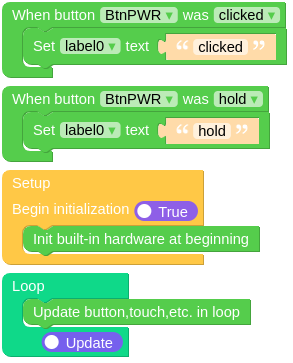
Micropython Example:
import os, sys, io
import M5
from M5 import *

def btnPWR_wasClicked_event(state):
    global label0
    label0.setText('clicked')

def btnPWR_wasHold_event(state):
    global label0
    label0.setText('hold')

M5.begin()
Widgets.fillScreen(0x222222)
label0 = Widgets.Label("Text", 58, 43, 1.0, 0xffffff, 0x222222, Widgets.FONTS.DejaVu24)

BtnPWR.setCallback(type=BtnPWR.CB_TYPE.WAS_CLICKED, cb=btnPWR_wasClicked_event)
BtnPWR.setCallback(type=BtnPWR.CB_TYPE.WAS_HOLD, cb=btnPWR_wasHold_event)

while True:
    M5.update()
UIFLOW2 Example:
class Button
Important
Methods of Button Class heavily rely on M5.begin()  and
and M5.update()  .
.
All calls to methods of Button objects should be placed after M5.begin() and M5.update() should be called in the main loop.
Methods
- Button.isHolding()
Returns whether the Button object is in a long press state.
UIFLOW2:

- Button.isPressed()
Returns whether the Button object is in a pressed state.
UIFLOW2:

- Button.isReleased()
Returns whether the Button object is in a released state.
UIFLOW2:

- Button.wasClicked()
Returns True when the Button object is briefly pressed and released.
UIFLOW2:

- Button.wasDoubleClicked()
Returns True when the Button object is double-clicked after a certain amount of time.
UIFLOW2:

- Button.wasHold()
Returns True when the Button object is held down for a certain amount of time.
UIFLOW2:

- Button.wasPressed()
Returns True when the Button object is pressed.
UIFLOW2:

- Button.wasReleased()
Returns True when the Button object is released.
UIFLOW2:

- Button.wasSingleClicked()
Returns True when the Button object is single-clicked after a certain amount of time.
UIFLOW2:

Event Handling
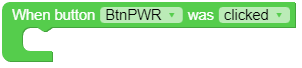
- Button.setCallback(type: Callback_Type, cb)
Sets the event callback function.
UIFLOW2:
Constants
- Button.CB_TYPE
A Callback_Type object.
class Callback_Type
Constants
- Callback_Type.WAS_CLICKED
Single click event type.
- Callback_Type.WAS_DOUBLECLICKED
Double click event type.
- Callback_Type.WAS_HOLD
Long press event type.
- Callback_Type.WAS_PRESSED
Press event type
- Callback_Type.WAS_RELEASED
Release event type