PwrCAN
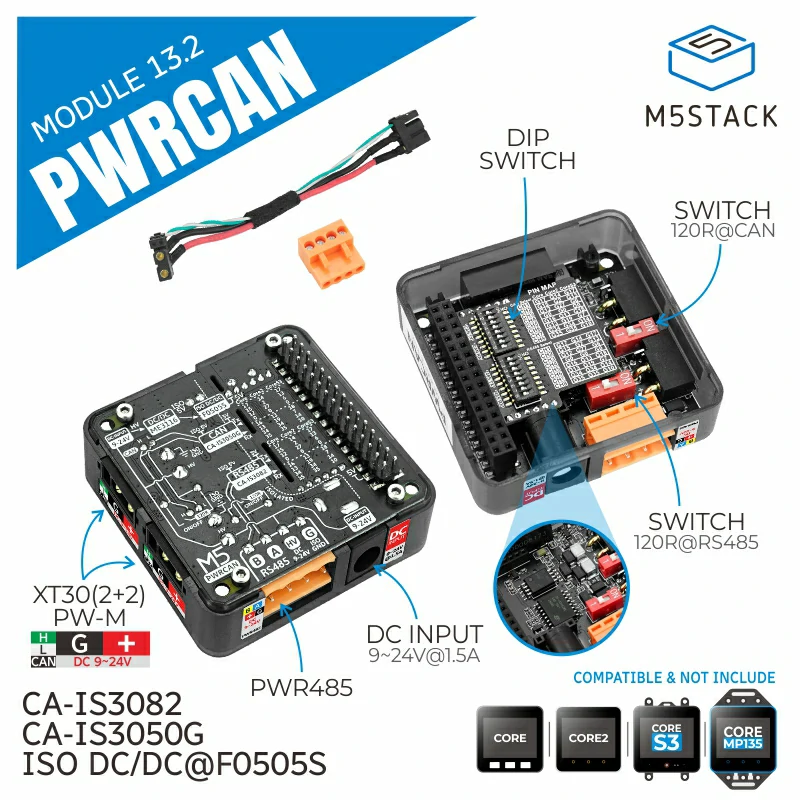
PwrCAN Module 13.2 is a multifunctional module designed for the PwrCAN bus, integrating isolated CAN communication and DC 9-24V power bus. The module also includes Pwr485 (with isolation) bus functionality and can provide isolated 5V power supply to the M5 host. The CAN communication part uses the CA-IS3050G isolated transceiver, and the RS485 part uses the CA-IS3082W isolated transceiver. The GPIOs related to CAN and RS485 communication can be selected through dip switches, and the 120-ohm terminal resistance at the CAN and RS485 outputs can also be selected through dip switches. The module’s power bus supports DC 9-24V wide voltage input, with the DC socket directly connected to the HT3.96 and XT30 power parts. The built-in isolated power module F0505S-2WR3 provides power to the M5 host. This module is suitable for fields such as robot control, protocol conversion, industrial automation, automotive communication systems, intelligent transportation, and building automation.
Supported Products:
UiFlow2 Example
Simple CAN and RS485 Communication
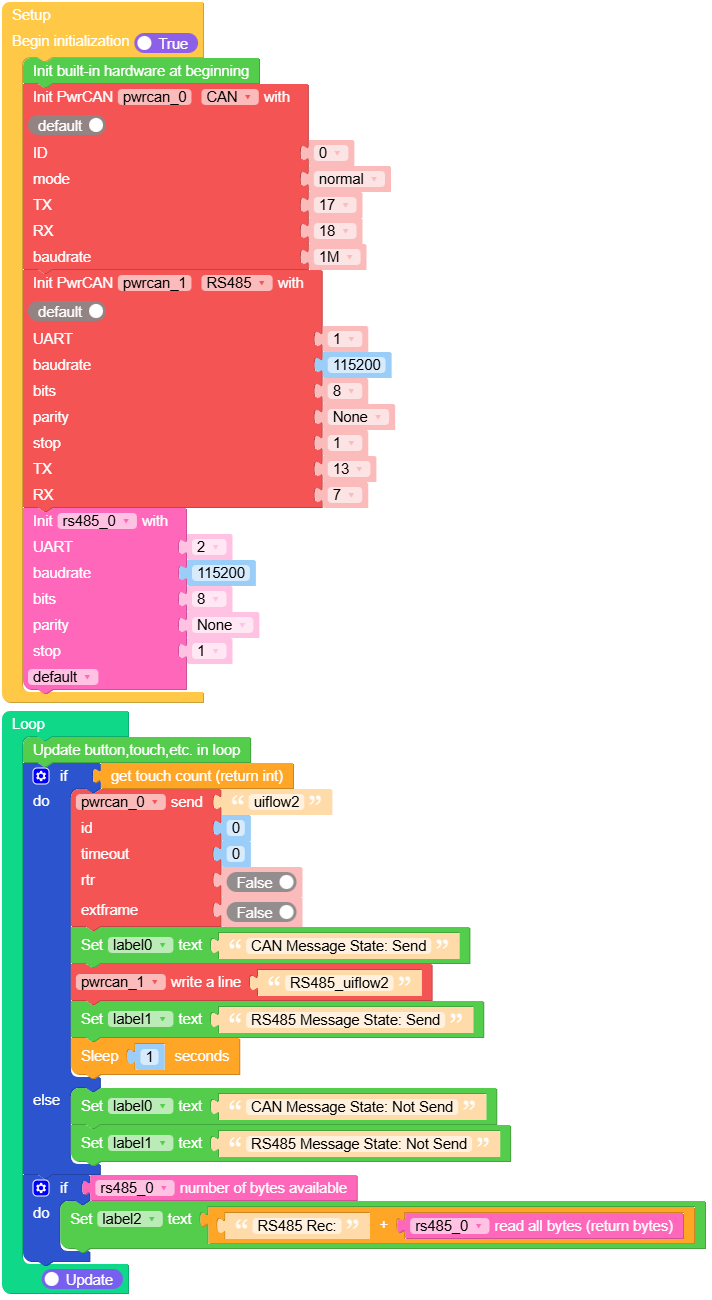
Open the pwrcan_cores3_example.m5f2 project in UiFlow2.
This example demonstrates how to use the PwrCAN module.
Touch the screen to send CAN messages and RS485 data. Received RS485 data will be printed in the label.
UiFlow2 Code Block:
Example output:
Screen will display the received RS485 data.
MicroPython Example
Simple CAN and RS485 Communication
This example demonstrates how to use the PwrCAN module in MicroPython.
Touch the screen to send CAN messages and RS485 data. Received RS485 data will be printed in the label.
MicroPython Code Block:
 1# SPDX-FileCopyrightText: 2024 M5Stack Technology CO LTD
 2#
 3# SPDX-License-Identifier: MIT
 4
 5import os, sys, io
 6import M5
 7from M5 import *
 8from module import PwrCANModule
 9from module import PwrCANModuleRS485
10from unit import RS485Unit
11import time
12
13
14title0 = None
15label3 = None
16label0 = None
17label1 = None
18label2 = None
19pwrcan_0 = None
20pwrcan_1 = None
21rs485_0 = None
22
23
24def setup():
25    global title0, label3, label0, label1, label2, pwrcan_0, pwrcan_1, rs485_0
26
27    M5.begin()
28    Widgets.fillScreen(0x222222)
29    title0 = Widgets.Title(
30        "PwrCANModule CoreS3 Example", 3, 0xFFFFFF, 0x0000FF, Widgets.FONTS.DejaVu18
31    )
32    label3 = Widgets.Label("CAN Rec:", 0, 95, 1.0, 0xFFFFFF, 0x222222, Widgets.FONTS.DejaVu18)
33    label0 = Widgets.Label(
34        "CAN Message State: ", 0, 49, 1.0, 0xFFFFFF, 0x222222, Widgets.FONTS.DejaVu18
35    )
36    label1 = Widgets.Label(
37        "RS485 Message State: ", 0, 138, 1.0, 0xFFFFFF, 0x222222, Widgets.FONTS.DejaVu18
38    )
39    label2 = Widgets.Label("RS485 Rec:", 0, 179, 1.0, 0xFFFFFF, 0x222222, Widgets.FONTS.DejaVu18)
40
41    pwrcan_0 = PwrCANModule(0, 17, 18, PwrCANModule.NORMAL, baudrate=1000000)
42    pwrcan_1 = PwrCANModuleRS485(1, baudrate=115200, bits=8, parity=None, stop=1, tx=13, rx=7)
43    rs485_0 = RS485Unit(
44        2,
45        port=(1, 2),
46        baudrate=115200,
47        bits=8,
48        parity=None,
49        stop=1,
50        txbuf=256,
51        rxbuf=256,
52        timeout=0,
53        timeout_char=0,
54        invert=0,
55        flow=0,
56    )
57
58
59def loop():
60    global title0, label3, label0, label1, label2, pwrcan_0, pwrcan_1, rs485_0
61    M5.update()
62    if M5.Touch.getCount():
63        pwrcan_0.send("uiflow2", 0, timeout=0, rtr=False, extframe=False)
64        label0.setText(str("CAN Message State: Send"))
65        pwrcan_1.write("RS485_uiflow2" + "\r\n")
66        label1.setText(str("RS485 Message State: Send"))
67        time.sleep(1)
68    else:
69        label0.setText(str("CAN Message State: Not Send"))
70        label1.setText(str("RS485 Message State: Not Send"))
71    if pwrcan_0.any(0):
72        label3.setText(str((str("CAN Rec:") + str((pwrcan_0.recv(0, timeout=5000))))))
73    if rs485_0.any():
74        label2.setText(str((str("RS485 Rec:") + str((rs485_0.read())))))
75
76
77if __name__ == "__main__":
78    try:
79        setup()
80        while True:
81            loop()
82    except (Exception, KeyboardInterrupt) as e:
83        try:
84            from utility import print_error_msg
85
86            print_error_msg(e)
87        except ImportError:
88            print("please update to latest firmware")
Example output:
Screen will display the received RS485 data.
API
PwrCANModule
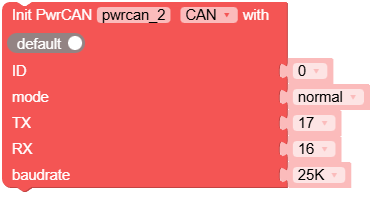
- class module.PwrCANModule(id, mode, tx, rx, prescaler=32, sjw=3, bs1=15, bs2=4, triple_sampling=False)
Initialise the CAN bus with the given parameters.
- Parameters:
id (int) – The CAN bus ID.
mode (int) – One of NORMAL, NO_ACKNOWLEDGE, LISTEN_ONLY.
tx (int) – The pin to use for transmitting data.
rx (int) – The pin to use for receiving data.
prescaler (int) – The value by which the CAN input clock is divided to generate the nominal bit time quanta. Value between 1 and 1024 inclusive for classic CAN.
sjw (int) – The resynchronisation jump width in units of time quanta for nominal bits; value between 1 and 4 inclusive for classic CAN.
bs1 (int) – Defines the location of the sample point in units of the time quanta for nominal bits; value between 1 and 16 inclusive for classic CAN.
bs2 (int) – Defines the location of the transmit point in units of the time quanta for nominal bits; value between 1 and 8 inclusive for classic CAN.
triple_sampling (bool) – Enables triple sampling when the TWAI controller samples a bit.
UiFlow2 Code Block:
MicroPython Code Block:
from module import PwrCANModule

can = PwrCANModule(0, PwrCANModule.NORMAL, 13, 14)
PwrCANModule class inherits CAN class. See
hardware.CANfor more details.
PwrCANModuleRS485
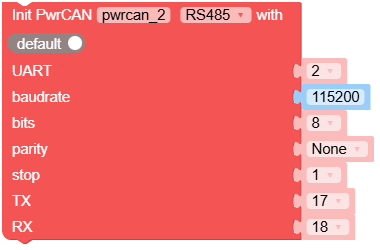
- class module.PwrCANModuleRS485(id, baudrate=9600, bits=8, parity=None, stop=1)
Construct a UART object of the given id.
- Parameters:
UiFlow2 Code Block:
MicroPython Code Block:
from module import PwrCANModuleRS485
rs485 = PwrCANModuleRS485(1, baudrate=115200)
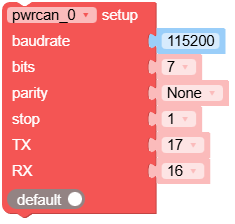
- init(baudrate=9600, bits=8, parity=None, stop=1, *, tx=None, rx=None, rts=None, cts=None, txbuf=None, rxbuf=None, timeout=None, timeout_char=None, invert=None, flow=None)
Initialise the UART bus with the given parameters.
- Parameters:
baudrate (int) – The clock rate.
bits (int) – The number of bits per character, 7, 8 or 9.
parity (int) – The parity,
None, 0 (even) or 1 (odd).stop (int) – The number of stop bits, 1 or 2.
tx (int) – The TX pin to use.
rx (int) – The RX pin to use.
rts (int) – The RTS (output) pin to use for hardware receive flow control.
cts (int) – The CTS (input) pin to use for hardware transmit flow control.
txbuf (int) – The length in characters of the TX buffer.
rxbuf (int) – The length in characters of the RX buffer.
timeout (int) – The time to wait for the first character (in ms).
timeout_char (int) – The time to wait between characters (in ms).
invert (int) – Specifies which lines to invert.
flow (int) – Specifies which hardware flow control signals to use.
Note
It is possible to call
init()multiple times on the same object in order to reconfigure UART on the fly. That allows using single UART peripheral to serve different devices attached to different GPIO pins. Only one device can be served at a time in that case. Also do not calldeinit()as it will prevent callinginit()again.UiFlow2 Code Block:
MicroPython Code Block:
rs485.init(baudrate=9600, bits=8, parity=None, stop=1)
- deinit()
Turn off the UART bus.
Note
You will not be able to call
init()on the object afterdeinit(). A new instance needs to be created in that case.UiFlow2 Code Block:

MicroPython Code Block:
rs485.deinit()
- any()
Returns an integer counting the number of characters that can be read without blocking.
- Returns:
int
UiFlow2 Code Block:

MicroPython Code Block:
rs485.any()
- read([nbytes])
Read characters.
- Parameters:
nbytes (int) – If specified then read at most that many bytes, otherwise read as much data as possible.
- Returns:
bytes
UiFlow2 Code Block:


MicroPython Code Block:
data = rs485.read()
- readinto(buf[, nbytes])
Read bytes into the
buf.- Parameters:
- Returns:
int
UiFlow2 Code Block:

MicroPython Code Block:
buf = bytearray(10)
rs485.readinto(buf)
- readline()
Read a line, ending in a newline character.
- Returns:
bytes
UiFlow2 Code Block:

MicroPython Code Block:
line = rs485.readline()
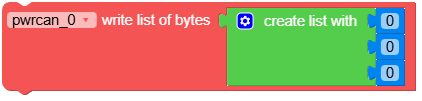
- write(buf)
Write the buffer of bytes to the bus.
- Parameters:
buf (bytes) – The buffer/bytes to write.
- Returns:
int
UiFlow2 Code Block:


MicroPython Code Block:
rs485.write(b'data')
- sendbreak()
Send a break condition on the bus.
UiFlow2 Code Block:

MicroPython Code Block:
rs485.sendbreak()
- flush()
Waits until all data has been sent.
UiFlow2 Code Block:

MicroPython Code Block:
rs485.flush()
- txdone()
Tells whether all data has been sent.
- Returns:
bool
UiFlow2 Code Block:

MicroPython Code Block:
rs485.txdone()