GatewayH2 Module
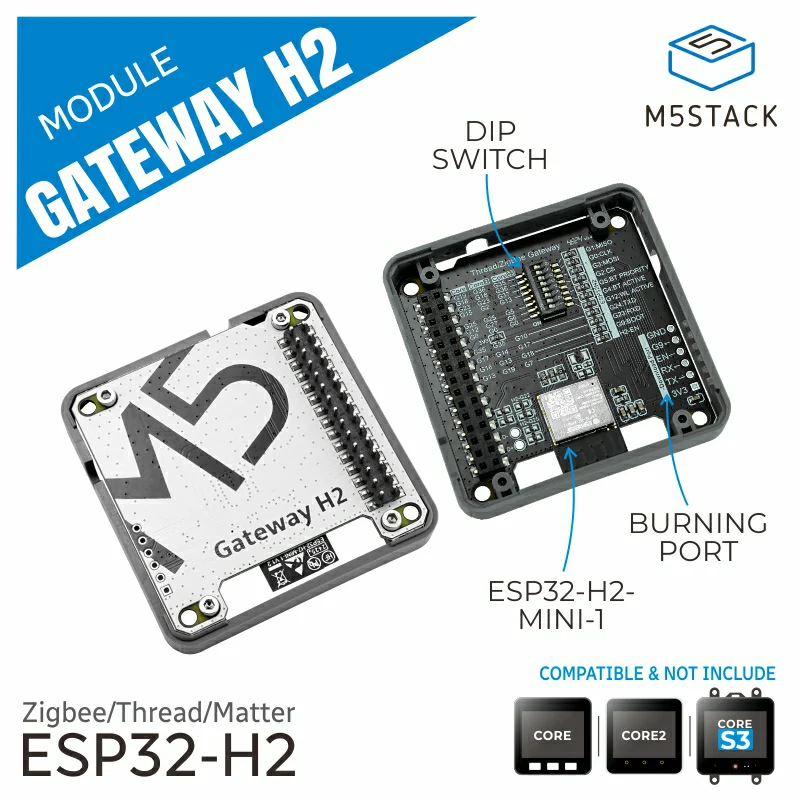
This library is the driver for Module Gateway H2, and the module communicates via UART.
Support the following products:
Note
When using this module, you need to flash the NCP firmware to the module. For details, refer to the ESP Zigbee NCP documentation.
UiFlow2 Example
Switch Control
Note
To use this example, you need to flash this program onto an ESP32C6 or similar module as a light node device. For details, refer to HA_on_off_light
Open the cores3_switch_endpoint_example.m5f2 project in UiFlow2.
The example demonstrates group control and targeted device operation for light nodes through SwitchEndpoint of Gateway H2 module.
UiFlow2 Code Block:
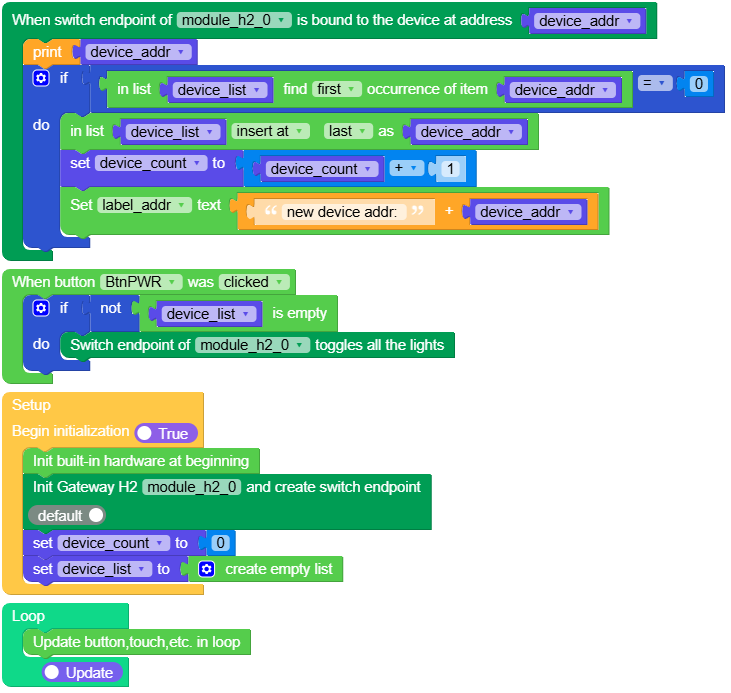
Example output:
None
MicroPython Example
Switch Control
The example demonstrates group control and targeted device operation for light nodes through SwitchEndpoint of Gateway H2 module.
MicroPython Code Block:
  1# SPDX-FileCopyrightText: 2025 M5Stack Technology CO LTD
  2#
  3# SPDX-License-Identifier: MIT
  4
  5import os, sys, io
  6import M5
  7from M5 import *
  8from module import GatewayH2Module
  9
 10
 11title0 = None
 12label0 = None
 13label1 = None
 14label2 = None
 15label_addr = None
 16module_h2_0 = None
 17module_h2_0_ep = None
 18device_addr = None
 19device_count = None
 20device_list = None
 21
 22
 23def first_index(my_list, elem):
 24    try:
 25        index = my_list.index(elem) + 1
 26    except:
 27        index = 0
 28    return index
 29
 30
 31def module_h2_0_ep_bind_event(addr):
 32    global \
 33        title0, \
 34        label0, \
 35        label1, \
 36        label2, \
 37        label_addr, \
 38        module_h2_0, \
 39        module_h2_0_ep, \
 40        device_addr, \
 41        device_count, \
 42        device_list
 43    device_addr = addr
 44    print(device_addr)
 45    if first_index(device_list, device_addr) == 0:
 46        device_list.append(device_addr)
 47        device_count = device_count + 1
 48        label_addr.setText(str((str("new device addr: ") + str(device_addr))))
 49
 50
 51def btn_pwr_was_clicked_event(state):
 52    global \
 53        title0, \
 54        label0, \
 55        label1, \
 56        label2, \
 57        label_addr, \
 58        module_h2_0, \
 59        module_h2_0_ep, \
 60        device_addr, \
 61        device_count, \
 62        device_list
 63    if not not len(device_list):
 64        module_h2_0_ep.toggle()
 65
 66
 67def setup():
 68    global \
 69        title0, \
 70        label0, \
 71        label1, \
 72        label2, \
 73        label_addr, \
 74        module_h2_0, \
 75        module_h2_0_ep, \
 76        device_addr, \
 77        device_count, \
 78        device_list
 79
 80    M5.begin()
 81    Widgets.fillScreen(0x222222)
 82    title0 = Widgets.Title(
 83        "Switch Endpoint Example", 3, 0xFFFFFF, 0x0000FF, Widgets.FONTS.DejaVu18
 84    )
 85    label0 = Widgets.Label(
 86        "press the power button toggle", 2, 50, 1.0, 0xFFFFFF, 0x222222, Widgets.FONTS.DejaVu18
 87    )
 88    label1 = Widgets.Label(
 89        "if has device connect", 2, 26, 1.0, 0xFFFFFF, 0x222222, Widgets.FONTS.DejaVu18
 90    )
 91    label2 = Widgets.Label(
 92        "connect device: ", 2, 90, 1.0, 0xFFFFFF, 0x222222, Widgets.FONTS.DejaVu18
 93    )
 94    label_addr = Widgets.Label("None", 5, 115, 1.0, 0x00FF00, 0x222222, Widgets.FONTS.DejaVu18)
 95    BtnPWR.setCallback(type=BtnPWR.CB_TYPE.WAS_CLICKED, cb=btn_pwr_was_clicked_event)
 96    module_h2_0 = GatewayH2Module(2, 17, 10)
 97    module_h2_0_ep = module_h2_0.create_switch_ep()
 98    module_h2_0_ep.set_bind_callback(module_h2_0_ep_bind_event)
 99    device_count = 0
100    device_list = []
101
102
103def loop():
104    global \
105        title0, \
106        label0, \
107        label1, \
108        label2, \
109        label_addr, \
110        module_h2_0, \
111        module_h2_0_ep, \
112        device_addr, \
113        device_count, \
114        device_list
115    M5.update()
116
117
118if __name__ == "__main__":
119    try:
120        setup()
121        while True:
122            loop()
123    except (Exception, KeyboardInterrupt) as e:
124        try:
125            from utility import print_error_msg
126
127            print_error_msg(e)
128        except ImportError:
129            print("please update to latest firmware")
Example output:
None
API
GatewayH2Module
- class module.gateway_h2.GatewayH2Module
Create an GatewayH2Module object.
UiFlow2 Code Block:

MicroPython Code Block:
from module import GatewayH2Module

module_gateway_h2 = GatewayH2Module(id = 1, tx = 10, rx = 17)
- create_switch_endpoint()
Create Switch Endpoint.
- Returns SwitchEndpoint:
zigbee switch endpoint object.
- Return type:
SwitchEndpoint
UiFlow2 Code Block:
MicroPython Code Block:
h2_switch_endpoint = module_gateway_h2.create_switch_endpoint()
SwitchEndpoint
- class SwitchEndpoint
Return by GatewayH2Module.create_switch_endpoint() or GatewayH2Unit.create_switch_endpoint()
- on([addr])
Turn on the light.
- Parameters:
addr – The device address (optional).
If called as
on(), turn on all devices.If called as
on(addr), turn on special address devices.
UiFlow2 Code Block:


MicroPython Code Block:
h2_switch_endpoint.on(addr)
h2_switch_endpoint.on()
- off([addr])
Turn off the light.
- Parameters:
addr – The device address (optional).
If called as
off(), turn off all devices.If called as
off(addr), turn off special address devices.
UiFlow2 Code Block:


MicroPython Code Block:
h2_switch_endpoint.off(addr)
h2_switch_endpoint.off()
- toggle([addr])
Toggle the light state.
- Parameters:
addr – The device address (optional).
If called as
toggle(), toggle all devices.If called as
toggle(addr), toggle special address devices.
UiFlow2 Code Block:


MicroPython Code Block:
h2_switch_endpoint.toggle(addr)
h2_switch_endpoint.toggle()