LoRa868 v1.2 Module
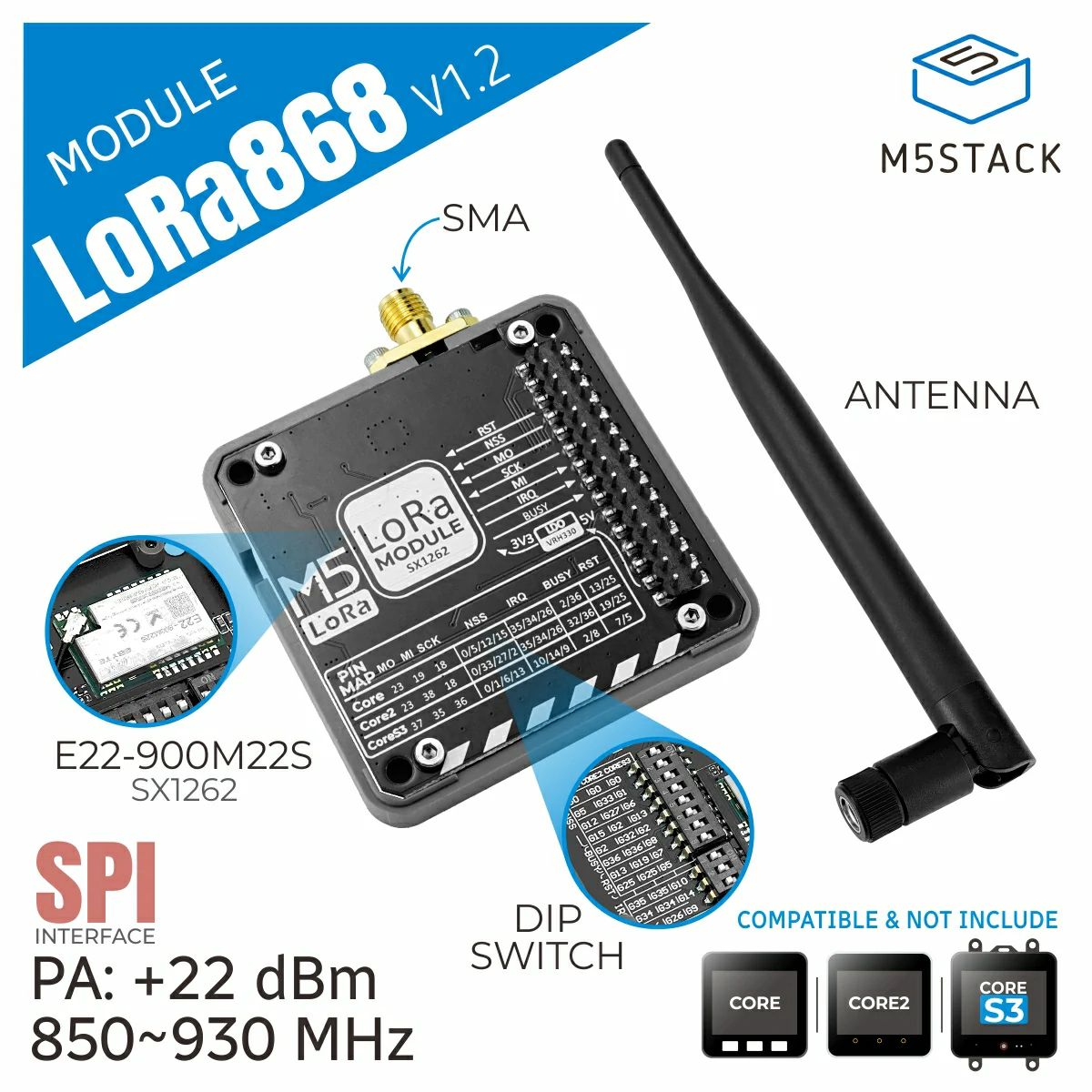
The LoRa868 v1.2 Module is part of the M5Stack stackable module series. It is a LoRa communication module that operates at a 900MHz frequency band and utilizes the SX1262 chip solution.
Support the following products:
UiFlow2 Example
Note
Before using the following examples, please check the DIP switches on the module to ensure that the pins used in the example match the DIP switch positions. For specific configurations, please refer to the product manual page. The SPI configuration has been implemented internally, so users do not need to worry about it.
Sender
Open the cores3_lora868_v12_tx_example.m5f2 project in UiFlow2.
This example sends data every second.
UiFlow2 Code Block:

Example output:
None
Receiver
Open the cores3_lora868_v12_rx_example.m5f2 project in UiFlow2.
This example receives and displays data.
UiFlow2 Code Block:
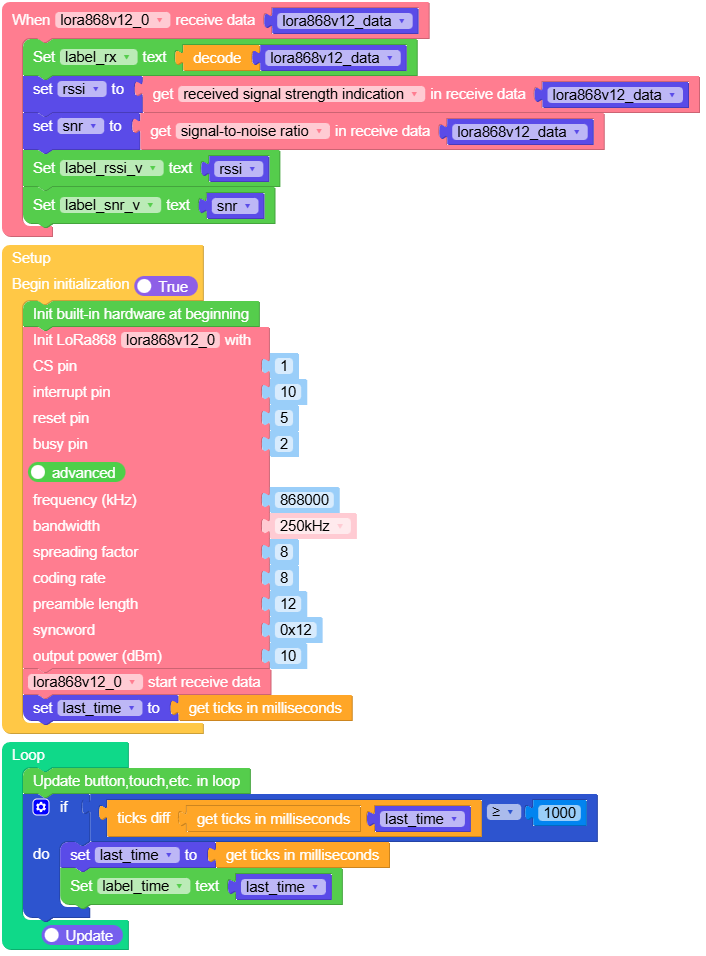
Example output:
None
MicroPython Example
Note
Before using the following examples, please check the DIP switches on the module to ensure that the pins used in the example match the DIP switch positions. For specific configurations, please refer to the product manual page. The SPI configuration has been implemented internally, so users do not need to worry about it.
Sender
This example sends data every second.
MicroPython Code Block:
 1# SPDX-FileCopyrightText: 2025 M5Stack Technology CO LTD
 2#
 3# SPDX-License-Identifier: MIT
 4
 5import os, sys, io
 6import M5
 7from M5 import *
 8from module import LoRa868V12Module
 9import time
10
11
12title0 = None
13label_t = None
14label_time = None
15label_tx = None
16label_ts = None
17lora868v12_0 = None
18count = None
19last_time = None
20timestamp = None
21
22
23def setup():
24    global \
25        title0, \
26        label_t, \
27        label_time, \
28        label_tx, \
29        label_ts, \
30        lora868v12_0, \
31        count, \
32        last_time, \
33        timestamp
34
35    M5.begin()
36    Widgets.fillScreen(0x222222)
37    title0 = Widgets.Title("LoRa Module Tx", 3, 0xFFFFFF, 0x0000FF, Widgets.FONTS.DejaVu18)
38    label_t = Widgets.Label("Send:", 5, 50, 1.0, 0xFFFFFF, 0x222222, Widgets.FONTS.DejaVu18)
39    label_time = Widgets.Label("1", 118, 150, 1.0, 0xFFFFFF, 0x222222, Widgets.FONTS.DejaVu18)
40    label_tx = Widgets.Label("hello", 65, 50, 1.0, 0xFFFFFF, 0x222222, Widgets.FONTS.DejaVu18)
41    label_ts = Widgets.Label("timestamp:", 5, 150, 1.0, 0xFFFFFF, 0x222222, Widgets.FONTS.DejaVu18)
42
43    count = 0
44    lora868v12_0 = LoRa868V12Module(
45        pin_rst=5,
46        pin_cs=1,
47        pin_irq=10,
48        pin_busy=2,
49        freq_khz=868000,
50        bw="250",
51        sf=8,
52        coding_rate=8,
53        preamble_len=12,
54        syncword=0x12,
55        output_power=10,
56    )
57    last_time = time.ticks_ms()
58
59
60def loop():
61    global \
62        title0, \
63        label_t, \
64        label_time, \
65        label_tx, \
66        label_ts, \
67        lora868v12_0, \
68        count, \
69        last_time, \
70        timestamp
71    M5.update()
72    if (time.ticks_diff((time.ticks_ms()), last_time)) >= 1000:
73        last_time = time.ticks_ms()
74        count = count + 1
75        timestamp = lora868v12_0.send((str("hello M5 ") + str(count)), None)
76        label_tx.setText(str((str("hello M5 ") + str(count))))
77        label_time.setText(str(last_time))
78
79
80if __name__ == "__main__":
81    try:
82        setup()
83        while True:
84            loop()
85    except (Exception, KeyboardInterrupt) as e:
86        try:
87            from utility import print_error_msg
88
89            print_error_msg(e)
90        except ImportError:
91            print("please update to latest firmware")
Example output:
None
Receiver
This example receives and displays data.
MicroPython Code Block:
  1# SPDX-FileCopyrightText: 2025 M5Stack Technology CO LTD
  2#
  3# SPDX-License-Identifier: MIT
  4
  5import os, sys, io
  6import M5
  7from M5 import *
  8from module import LoRa868V12Module
  9import time
 10
 11
 12title0 = None
 13label_r = None
 14label_rx = None
 15label_t = None
 16label_time = None
 17label_rssi = None
 18label_snr = None
 19label_rssi_v = None
 20label_snr_v = None
 21lora868v12_0 = None
 22lora868v12_data = None
 23rssi = None
 24snr = None
 25last_time = None
 26
 27
 28def lora868v12_0_receive_event(received_data):
 29    global \
 30        title0, \
 31        label_r, \
 32        label_rx, \
 33        label_t, \
 34        label_time, \
 35        label_rssi, \
 36        label_snr, \
 37        label_rssi_v, \
 38        label_snr_v, \
 39        lora868v12_0, \
 40        lora868v12_data, \
 41        rssi, \
 42        snr, \
 43        last_time
 44    lora868v12_data = received_data
 45    label_rx.setText(str(lora868v12_data.decode()))
 46    rssi = lora868v12_data.rssi
 47    snr = (lora868v12_data.snr) / 4
 48    label_rssi_v.setText(str(rssi))
 49    label_snr_v.setText(str(snr))
 50
 51
 52def setup():
 53    global \
 54        title0, \
 55        label_r, \
 56        label_rx, \
 57        label_t, \
 58        label_time, \
 59        label_rssi, \
 60        label_snr, \
 61        label_rssi_v, \
 62        label_snr_v, \
 63        lora868v12_0, \
 64        lora868v12_data, \
 65        rssi, \
 66        snr, \
 67        last_time
 68
 69    M5.begin()
 70    Widgets.fillScreen(0x222222)
 71    title0 = Widgets.Title("LoRa Module Rx", 3, 0xFFFFFF, 0x0000FF, Widgets.FONTS.DejaVu18)
 72    label_r = Widgets.Label("Recv:", 5, 50, 1.0, 0xFFFFFF, 0x222222, Widgets.FONTS.DejaVu18)
 73    label_rx = Widgets.Label(" ", 65, 50, 1.0, 0xFFFFFF, 0x222222, Widgets.FONTS.DejaVu18)
 74    label_t = Widgets.Label("timestamp:", 5, 150, 1.0, 0xFFFFFF, 0x222222, Widgets.FONTS.DejaVu18)
 75    label_time = Widgets.Label("1", 118, 150, 1.0, 0xFFFFFF, 0x222222, Widgets.FONTS.DejaVu18)
 76    label_rssi = Widgets.Label("RSSI: ", 5, 80, 1.0, 0xFFFFFF, 0x222222, Widgets.FONTS.DejaVu18)
 77    label_snr = Widgets.Label("SNR: ", 5, 108, 1.0, 0xFFFFFF, 0x222222, Widgets.FONTS.DejaVu18)
 78    label_rssi_v = Widgets.Label(" ", 65, 80, 1.0, 0xFFFFFF, 0x222222, Widgets.FONTS.DejaVu18)
 79    label_snr_v = Widgets.Label(" ", 65, 108, 1.0, 0xFFFFFF, 0x222222, Widgets.FONTS.DejaVu18)
 80
 81    lora868v12_0 = LoRa868V12Module(
 82        pin_rst=5,
 83        pin_cs=1,
 84        pin_irq=10,
 85        pin_busy=2,
 86        freq_khz=868000,
 87        bw="250",
 88        sf=8,
 89        coding_rate=8,
 90        preamble_len=12,
 91        syncword=0x12,
 92        output_power=10,
 93    )
 94    lora868v12_0.set_irq_callback(lora868v12_0_receive_event)
 95    lora868v12_0.start_recv()
 96    last_time = time.ticks_ms()
 97
 98
 99def loop():
100    global \
101        title0, \
102        label_r, \
103        label_rx, \
104        label_t, \
105        label_time, \
106        label_rssi, \
107        label_snr, \
108        label_rssi_v, \
109        label_snr_v, \
110        lora868v12_0, \
111        lora868v12_data, \
112        rssi, \
113        snr, \
114        last_time
115    M5.update()
116    if (time.ticks_diff((time.ticks_ms()), last_time)) >= 1000:
117        last_time = time.ticks_ms()
118        label_time.setText(str(last_time))
119
120
121if __name__ == "__main__":
122    try:
123        setup()
124        while True:
125            loop()
126    except (Exception, KeyboardInterrupt) as e:
127        try:
128            from utility import print_error_msg
129
130            print_error_msg(e)
131        except ImportError:
132            print("please update to latest firmware")
Example output:
None
API
class LoRa868V12Module
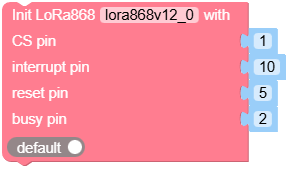
- class module.lora868_v12.LoRa868V12Module(pin_rst=5, pin_cs=1, pin_irq=10, pin_busy=2, freq_khz=868000, bw='250', sf=8, coding_rate=8, reamble_len=12, syncword=0x12, output_power=10)
Create an LoRa868V12Module object.
- Parameters:
pin_rst (int) – (RST) Reset pin number.
pin_cs (int) – (NSS) Chip select pin number.
pin_irq (int) – (IRQ) Interrupt pin number.
pin_busy (int) – (BUSY) Busy pin number.
freq_khz (int) – LoRa RF frequency in KHz, with a range of 850000 KHz to 930000 KHz.
bw (str) –
Bandwidth, options include:
"7.8": 7.8 KHz"10.4": 10.4 KHz"15.6": 15.6 KHz"20.8": 20.8 KHz"31.25": 31.25 KHz"41.7": 41.7 KHz"62.5": 62.5 KHz"125": 125 KHz"250": 250 KHz"500": 500 KHz
sf (int) – Spreading factor, range from 7 to 12. Higher spreading factors allow reception of weaker signals but with slower data rates.
coding_rate (int) – Forward Error Correction (FEC) coding rate expressed as 4/N, with a range from 5 to 8.
preamble_len (int) – Length of the preamble sequence in symbols, range from 0 to 255.
syncword (int) – Sync word to mark the start of the data frame, default is 0x12.
output_power (int) – Output power in dBm, range from -9 to 22.
UiFlow2 Code Block:
MicroPython Code Block:
from module import LoRa868V12Module

module_lora868v12_0 = LoRa868V12Module(5, 1, 10, 2, 868000, '250', 8, 8, 12, 0x12, 10)
- set_freq(freq_khz)
Set frequency in kHz.
- Parameters:
freq_khz (int) – Frequency in kHz (850000 ~ 930000), default is 868000.
UiFlow2 Code Block:

MicroPython Code Block:
module_lora868v12_0.set_freq(freq_khz)
- set_sf(sf)
Set spreading factor (SF).
- Parameters:
sf (int) – Spreading factor (7 ~ 12)
UiFlow2 Code Block:

MicroPython Code Block:
module_lora868v12_0.set_sf(sf)
- set_bw(bw)
Set bandwidth.
- Parameters:
bw (str) – Bandwidth in kHz as string. Must be one of: ‘7.8’, ‘10.4’, ‘15.6’, ‘20.8’, ‘31.25’, ‘41.7’, ‘62.5’, ‘125’, ‘250’, ‘500’.
UiFlow2 Code Block:

MicroPython Code Block:
module_lora868v12_0.set_bw(bw)
- set_coding_rate(coding_rate)
Set coding rate.
- Parameters:
coding_rate (int) – Coding rate (5 ~ 8)
UiFlow2 Code Block:

MicroPython Code Block:
module_lora868v12_0.set_coding_rate(coding_rate)
- set_syncword(syncword)
Set syncword.
- Parameters:
syncword (int) – Sync word (0 ~ 0xFF)
UiFlow2 Code Block:

MicroPython Code Block:
module_lora868v12_0.set_syncword(syncword)
- set_preamble_len(preamble_len)
Set preamble length.
- Parameters:
preamble_len (int) – Preamble length, range: 0~255.
UiFlow2 Code Block:

MicroPython Code Block:
module_lora868v12_0.set_preamble_len(preamble_len)
- set_output_power(output_power)
Set output power in dBm.
- Parameters:
output_power (int) – Output power in dBm (-9 ~ 22)
UiFlow2 Code Block:

MicroPython Code Block:
module_lora868v12_0.set_output_power(output_power)
- set_irq_callback(callback)
Set the interrupt callback function to be executed on IRQ.
- Parameters:
callback – The callback function to be invoked when the interrupt is triggered. The callback should not take any arguments and should return nothing.
Call start_recv() to begin receiving data.
UiFlow2 Code Block:

MicroPython Code Block:
module_lora868v12_0.set_irq_callback()
- start_recv()
Start receive data.
This method initiates the process to begin receiving data.
UiFlow2 Code Block:

MicroPython Code Block:
module_lora868v12_0.start_recv()
- recv(self, timeout_ms, rx_length, rx_packet)
Receive data.
- Parameters:
- Returns:
Received packet instance
- Return type:
Attempt to receive a LoRa packet. Returns None if timeout occurs, or returns the received packet instance.
UiFlow2 Code Block:

MicroPython Code Block:
data = module_lora868v12_0.recv()
- send(buf, tx_at_ms=None)
Send data.
- Parameters:
- Returns:
Returns a timestamp (result of time.ticks_ms()) indicating when the data packet was sent.
- Return type:
Send a data packet and return the timestamp after the packet is sent.
UiFlow2 Code Block:

MicroPython Code Block:
module_lora868v12_0.send()
- standby()
Set module to standby mode.
Puts the LoRa module into standby mode, consuming less power.
UiFlow2 Code Block:

MicroPython Code Block:
module_lora868v12_0.standby()
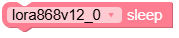
- sleep()
Put the module to sleep mode.
Reduces the power consumption by putting the module into deep sleep mode.
UiFlow2 Code Block:
MicroPython Code Block:
module_lora868v12_0.sleep()
