Audio Module
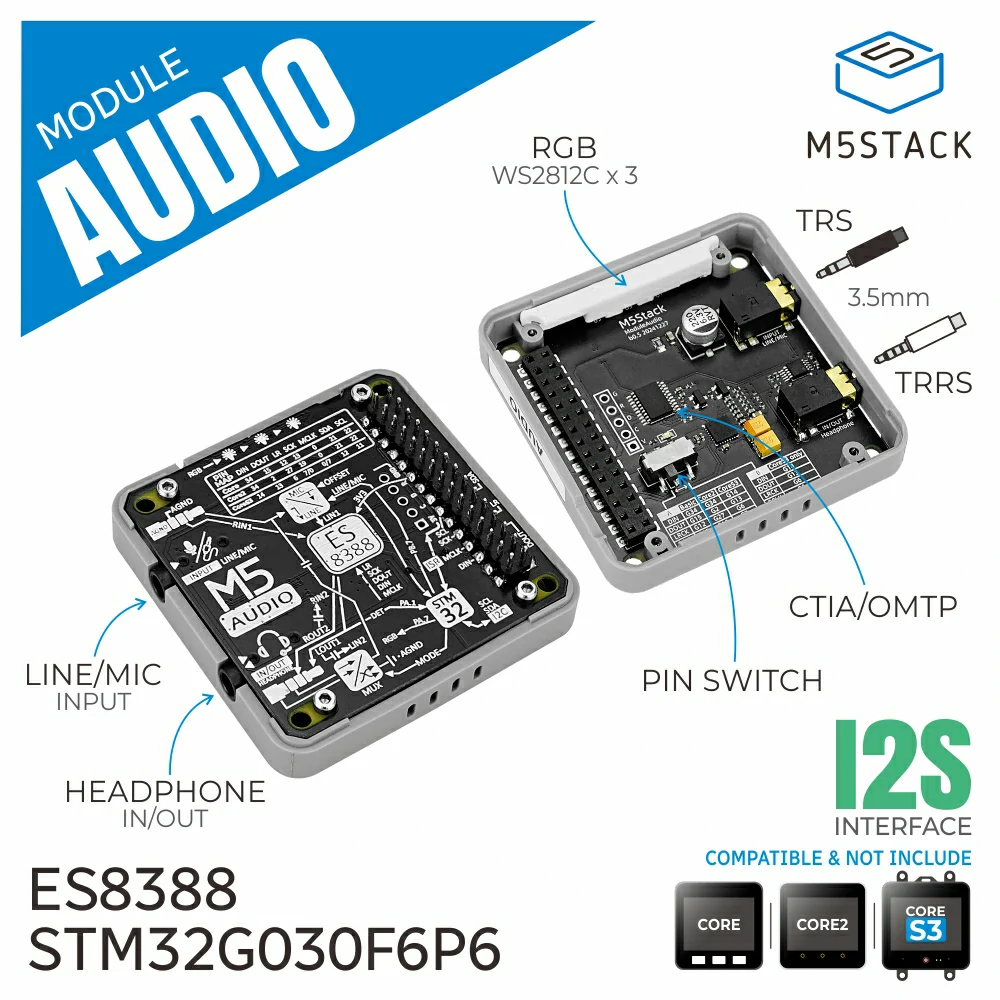
The AudioModule class implements playback and recording functions and supports resampling.
It is used to play audio files and streams, record audio from the microphone, and convert between different sample rates.
Support the following products:
UiFlow2 Example
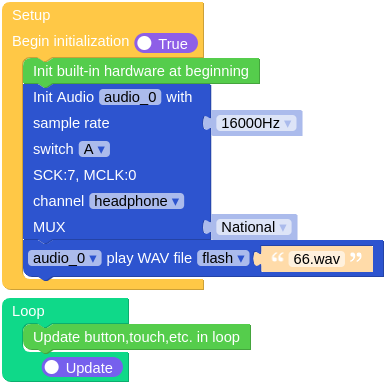
Play WAV file
Open the cores3_play_wav_example.m5f2 project in UiFlow2.
This example reads an audio file from the file system and plays it.
UiFlow2 Code Block:
Example output:
None
Playback Controls
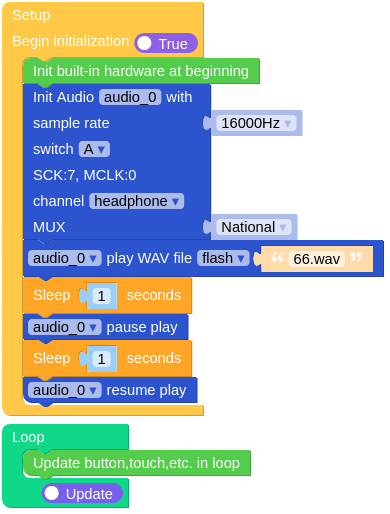
Open the cores3_playback_controls_example.m5f2 project in UiFlow2.
This example demonstrates how to control playback using the AudioModule class.
Play the audio for 1 second, pause for 1 second, and then resume playing.
UiFlow2 Code Block:
Example output:
None
Record Audio
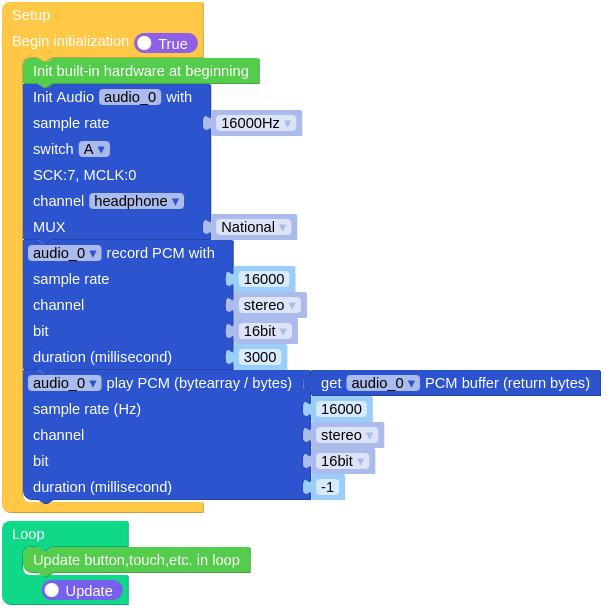
Open the cores3_record_audio_example.m5f2 project in UiFlow2.
This example records audio from the microphone and saves it to a PCM buffer, then plays it out through the speaker.
UiFlow2 Code Block:
Example output:
None
MicroPython Example
Play WAV file
This example reads an audio file from the file system and plays it.
MicroPython Code Block:
 1# SPDX-FileCopyrightText: 2025 M5Stack Technology CO LTD
 2#
 3# SPDX-License-Identifier: MIT
 4
 5import os, sys, io
 6import M5
 7from M5 import *
 8from module import AudioModule
 9import time
10
11
12audio_0 = None
13
14
15def setup():
16    global audio_0
17
18    M5.begin()
19    Widgets.fillScreen(0x222222)
20
21    audio_0 = AudioModule(
22        0,
23        16000,
24        i2s_sck=7,
25        i2s_ws=6,
26        i2s_di=14,
27        i2s_do=13,
28        i2s_mclk=0,
29        work_mode=AudioModule.MODE_HEADPHONE,
30        offset=False,
31        mux=AudioModule.MUX_NATIONAL,
32    )
33    audio_0.play_wav_file("/flash/res/audio/66.wav")
34    time.sleep(1)
35    audio_0.pause()
36    time.sleep(1)
37    audio_0.resume()
38
39
40def loop():
41    global audio_0
42    M5.update()
43
44
45if __name__ == "__main__":
46    try:
47        setup()
48        while True:
49            loop()
50    except (Exception, KeyboardInterrupt) as e:
51        try:
52            audio_0.deinit()
53            from utility import print_error_msg
54
55            print_error_msg(e)
56        except ImportError:
57            print("please update to latest firmware")
Example output:
None
Playback Controls
This example demonstrates how to control playback using the AudioModule class.
Play the audio for 1 second, pause for 1 second, and then resume playing.
MicroPython Code Block:
 1# SPDX-FileCopyrightText: 2025 M5Stack Technology CO LTD
 2#
 3# SPDX-License-Identifier: MIT
 4
 5import os, sys, io
 6import M5
 7from M5 import *
 8from module import AudioModule
 9import time
10
11
12audio_0 = None
13
14
15def setup():
16    global audio_0
17
18    M5.begin()
19    Widgets.fillScreen(0x222222)
20
21    audio_0 = AudioModule(
22        0,
23        16000,
24        i2s_sck=7,
25        i2s_ws=6,
26        i2s_di=14,
27        i2s_do=13,
28        i2s_mclk=0,
29        work_mode=AudioModule.MODE_HEADPHONE,
30        offset=False,
31        mux=AudioModule.MUX_NATIONAL,
32    )
33    audio_0.play_wav_file("/flash/res/audio/66.wav")
34    time.sleep(1)
35    audio_0.pause()
36    time.sleep(1)
37    audio_0.resume()
38
39
40def loop():
41    global audio_0
42    M5.update()
43
44
45if __name__ == "__main__":
46    try:
47        setup()
48        while True:
49            loop()
50    except (Exception, KeyboardInterrupt) as e:
51        try:
52            audio_0.deinit()
53            from utility import print_error_msg
54
55            print_error_msg(e)
56        except ImportError:
57            print("please update to latest firmware")
Example output:
None
Record Audio
This example records audio from the microphone and saves it to a PCM buffer, then plays it out through the speaker.
MicroPython Code Block:
 1# SPDX-FileCopyrightText: 2025 M5Stack Technology CO LTD
 2#
 3# SPDX-License-Identifier: MIT
 4
 5import os, sys, io
 6import M5
 7from M5 import *
 8from module import AudioModule
 9
10
11audio_0 = None
12
13
14def setup():
15    global audio_0
16
17    M5.begin()
18    Widgets.fillScreen(0x222222)
19
20    audio_0 = AudioModule(
21        0,
22        16000,
23        i2s_sck=7,
24        i2s_ws=6,
25        i2s_di=14,
26        i2s_do=13,
27        i2s_mclk=0,
28        work_mode=AudioModule.MODE_HEADPHONE,
29        offset=False,
30        mux=AudioModule.MUX_NATIONAL,
31    )
32    audio_0.record(rate=16000, bits=16, channel=AudioModule.STEREO, duration=3000)
33    audio_0.play_raw(
34        audio_0.pcm_buffer, rate=16000, bits=16, channel=AudioModule.STEREO, duration=-1
35    )
36
37
38def loop():
39    global audio_0
40    M5.update()
41
42
43if __name__ == "__main__":
44    try:
45        setup()
46        while True:
47            loop()
48    except (Exception, KeyboardInterrupt) as e:
49        try:
50            audio_0.deinit()
51            from utility import print_error_msg
52
53            print_error_msg(e)
54        except ImportError:
55            print("please update to latest firmware")
Example output:
None
API
Class AudioModule
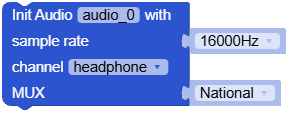
- class module.audio.AudioModule(i2s_port, sample_rate=16000, i2s_sck=19, i2s_ws=27, i2s_di=34, i2s_do=2, i2s_mclk=0, work_mode=1, offset=1, mux=0)
Bases:
objectInitialize the audio module.
- Parameters:
i2s_port – I2S port number.
sample_rate – Sample rate (default is 16000).
i2s_sck – I2S clock pin.
i2s_ws – I2S word select pin.
i2s_di – I2S data input pin.
i2s_do – I2S data output pin.
i2s_mclk – I2S master clock pin.
work_mode – Work mode (0: headphone, 1: line in).
offset – Generally speaking, when using line in, offset is False; if the input is connected to an ADC microphone, offset is True. (Only valid in line in mode).
mux – Select the TRRS plug to be used. (default is MUX_NATIONAL).
UiFlow2 Code Block:
MicroPython Code Block:
from module import AudioModule

audio_0 = AudioModule(0, 16000, i2s_sck=7, i2s_ws=6, i2s_di=14, i2s_do=13, i2s_mclk=0, work_mode=AudioModule.MODE_HEADPHONE, offset=False, mux=AudioModule.MUX_NATIONAL)
- MUX_NATIONAL = 0
National Standard audio mode (OMTP)
- MUX_AMERICAN = 1
American Standard audio mode (CTIA)
- MODE_LINE = 0
Line in mode
- MODE_HEADPHONE = 1
Headphone mode
- MONO = 1
Mono
- STEREO = 2
Stereo
- play_wav_file(file)
Play a WAV file.
- Parameters:
file (str) – The path of the WAV file to play.
- Returns:
None
- Return type:
None
UiFlow2 Code Block:

MicroPython Code Block:
audio_0.play_wav_file("/flash/res/audio/test.wav")
- tone(freq, duration)
Play simple tone sound.
- Parameters:
- Returns:
None
- Return type:
None
UiFlow2 Code Block:

MicroPython Code Block:
audio_0.tone(2000, 50)
- play_wav(buf, duration=-1)
Play a WAV buffer.
- Parameters:
- Returns:
None
- Return type:
None
UiFlow2 Code Block:

MicroPython Code Block:
audio_0.play_wav(wav_buffer, duration=1000)
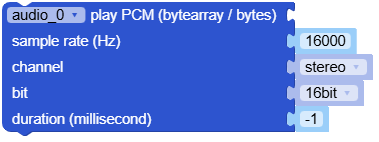
- play_raw(buf, rate=16000, bits=16, channel=2, duration=-1)
Play a pcm buffer.
- Parameters:
buf (bytes) – The PCM buffer to play.
rate (int) – Sample rate (default is 16000).
bits (int) – Bit depth (default is 16).
channel (int) – Number of channels (default is 2).
duration (int) – Duration of the PCM buffer in milliseconds. when duration is -1, it will play until stopped. (default is -1).
- Returns:
None
- Return type:
None
UiFlow2 Code Block:
MicroPython Code Block:
audio_0.play_raw(pcm_buffer, rate=16000, bits=16, channel=2, duration=1000)
- pause()
Pause the playback.
UiFlow2 Code Block:

MicroPython Code Block:
audio.tone(2000, 100)
time.sleep(0.05)
audio_0.pause()
time.sleep(0.05)
audio_0.resume()
- Return type:
None
- resume()
Resume the playback.
UiFlow2 Code Block:

MicroPython Code Block:
audio.tone(2000, 100)
time.sleep(0.05)
audio_0.pause()
time.sleep(0.05)
audio_0.resume()
- stop()
Stop the playback.
UiFlow2 Code Block:

MicroPython Code Block:
audio.tone(2000, 100)
time.sleep(0.05)
audio_0.stop()
- get_volume()
Get the speaker volume level.
- Returns:
The volume level (0-100).
- Return type:
UiFlow2 Code Block:

MicroPython Code Block:
audio_0.get_volume()
- set_volume(volume)
Set the speaker volume level.
- Parameters:
volume (int) – The volume level (0-100).
UiFlow2 Code Block:

MicroPython Code Block:
audio_0.set_volume(50)
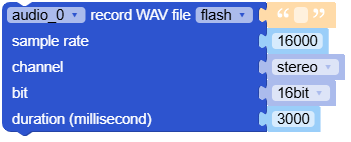
- record_wav_file(path, rate=16000, bits=16, channel=2, duration=3000)
Record audio to a WAV file.
- Parameters:
UiFlow2 Code Block:
MicroPython Code Block:
audio_0.record_wav_file("/flash/res/audio/test.wav", rate=16000, bits=16, channel=2, duration=3000)
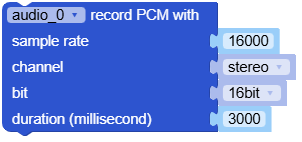
- record(rate=16000, bits=16, channel=2, duration=3000)
Record audio to a PCM buffer.
- Parameters:
UiFlow2 Code Block:
MicroPython Code Block:
audio_0.record(rate=16000, bits=16, channel=2, duration=3000)
- property pcm_buffer: bytes
Get the PCM buffer.
- Returns:
The PCM buffer.
UiFlow2 Code Block:

MicroPython Code Block:
audio_0.pcm_buffer
- set_color(num, color)
Set the RGB LED color.
UiFlow2 Code Block:

MicroPython Code Block:
audio_0.set_color(0, 0xFF0000)

