NB-IoT 模块
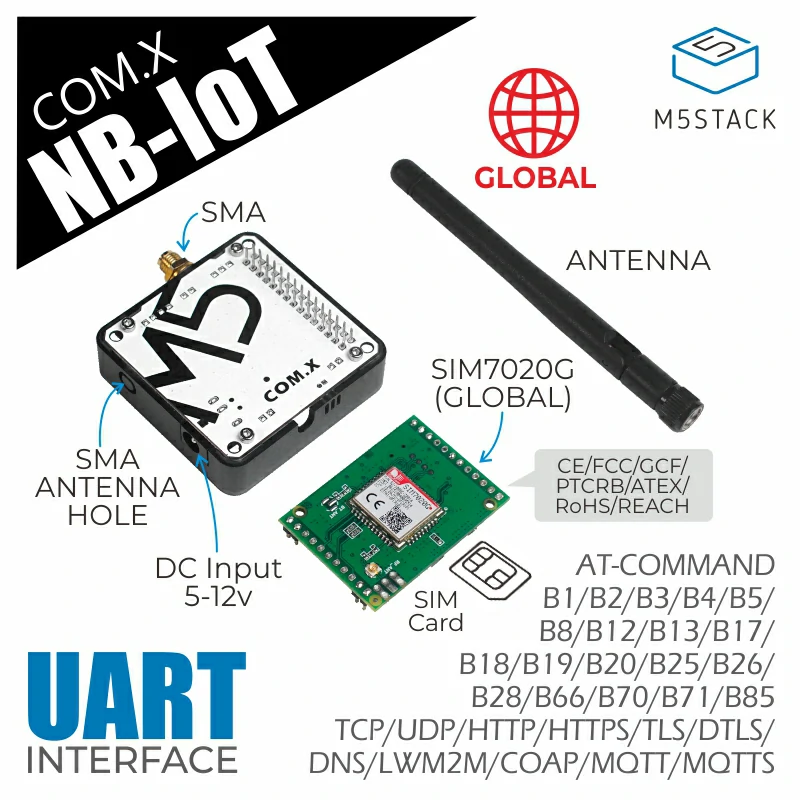
NB-IoT Module 是一款适用于全球 Cat-NB 频段的无线通信模块。它集成了 SIM7020G 通信模块,通过串口通信(使用 AT 指令)。
支持以下产品:
备注
请在使用前确认设备是否支持您所在地区的 NB-IoT 频段。
备注
请确保 SIM7020 的固件版本大于或等于 1752B12SIM7020C。
可以使用  来检查固件版本。
UiFlow2 示例
NBIoT HTTP 示例
在 UiFlow2 中打开 cores3_module_nbiot_http_example.m5f2 项目。
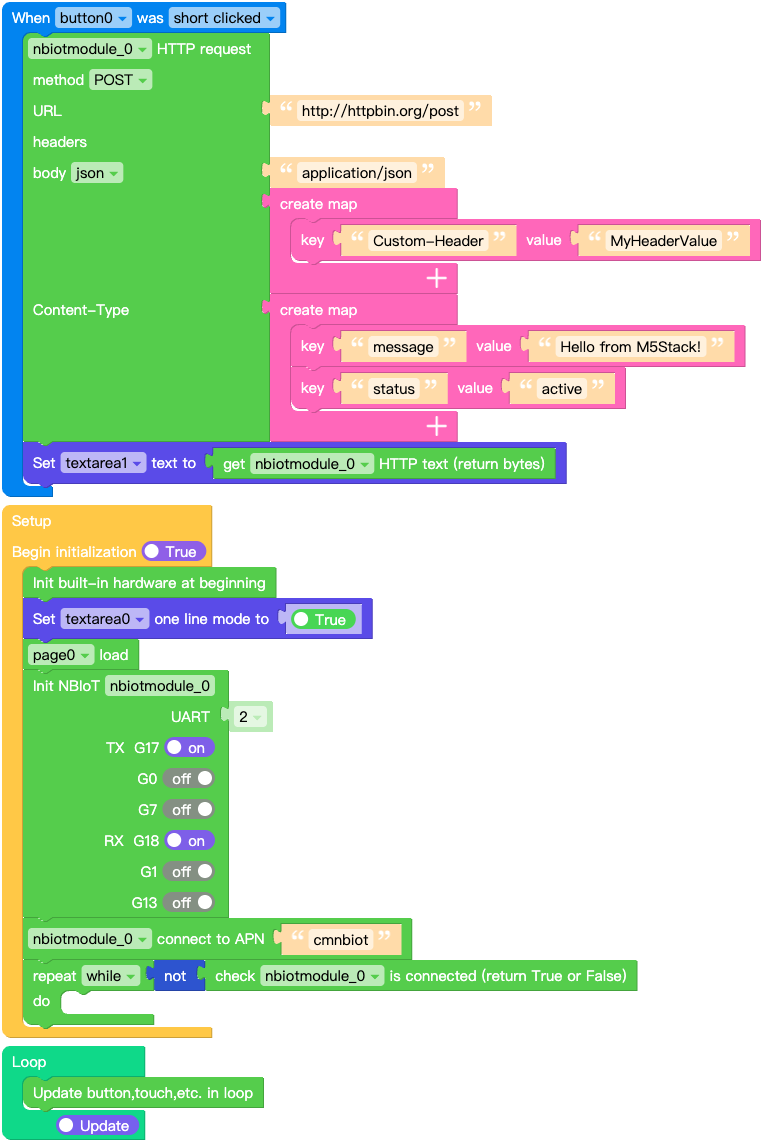
此示例展示了如何使用 NB-IoT Module 发送 HTTP 请求。
UiFlow2 代码块:
示例输出:
屏幕上显示接收到的NBIoT消息数据。
MQTT 示例
在 UiFlow2 中打开 cores3_module_nbiot_mqtt_example.m5f2 项目。
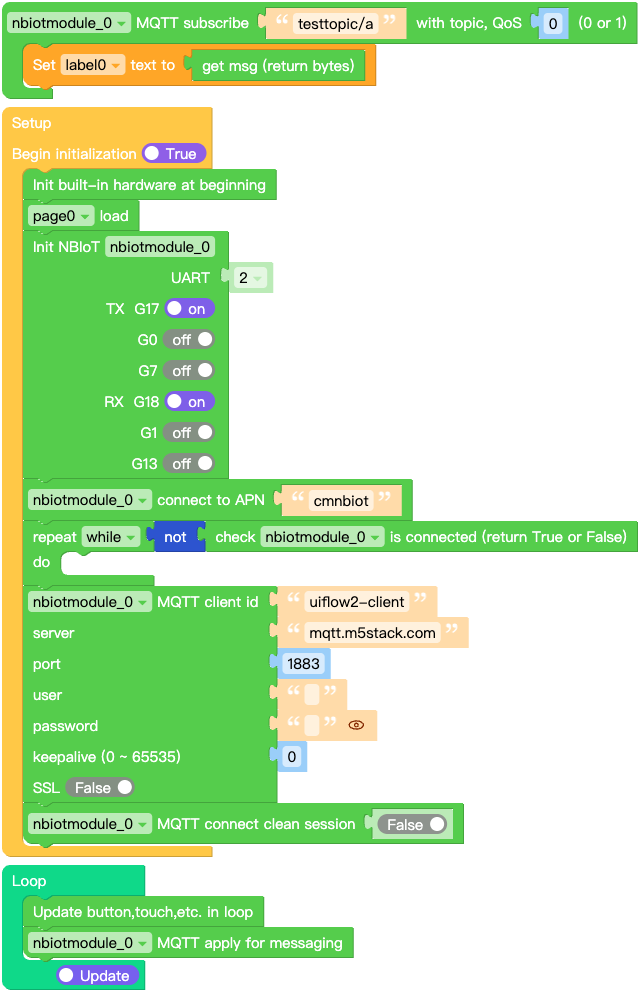
此示例展示了如何使用 NB-IoT Module 发送 MQTT 消息。
UiFlow2 代码块:
示例输出:
屏幕上显示接收到的NBIoT消息数据。
MicroPython 示例
NBIoT HTTP 示例
此示例展示了如何使用 NB-IoT Module 发送 HTTP 请求。
MicroPython 代码块:
  1# SPDX-FileCopyrightText: 2026 M5Stack Technology CO LTD
  2#
  3# SPDX-License-Identifier: MIT
  4
  5import os, sys, io
  6import M5
  7from M5 import *
  8import m5ui
  9import lvgl as lv
 10from module import NBIOTModule
 11
 12
 13page0 = None
 14label0 = None
 15label1 = None
 16button0 = None
 17textarea0 = None
 18textarea1 = None
 19nbiotmodule_0_http_req = None
 20nbiotmodule_0 = None
 21
 22
 23def button0_short_clicked_event(event_struct):
 24    global \
 25        page0, \
 26        label0, \
 27        label1, \
 28        button0, \
 29        textarea0, \
 30        textarea1, \
 31        nbiotmodule_0_http_req, \
 32        nbiotmodule_0
 33    nbiotmodule_0_http_req = nbiotmodule_0.post(
 34        "http://httpbin.org/post",
 35        json={"message": "Hello from M5Stack!", "status": "active"},
 36        headers={
 37            "Content-Type": "application/json",
 38            "Custom-Header": "MyHeaderValue",
 39        },
 40    )
 41    textarea1.set_text(str(nbiotmodule_0_http_req.text))
 42
 43
 44def button0_event_handler(event_struct):
 45    global \
 46        page0, \
 47        label0, \
 48        label1, \
 49        button0, \
 50        textarea0, \
 51        textarea1, \
 52        nbiotmodule_0_http_req, \
 53        nbiotmodule_0
 54    event = event_struct.code
 55    if event == lv.EVENT.SHORT_CLICKED and True:
 56        button0_short_clicked_event(event_struct)
 57    return
 58
 59
 60def setup():
 61    global \
 62        page0, \
 63        label0, \
 64        label1, \
 65        button0, \
 66        textarea0, \
 67        textarea1, \
 68        nbiotmodule_0_http_req, \
 69        nbiotmodule_0
 70
 71    M5.begin()
 72    Widgets.setRotation(1)
 73    m5ui.init()
 74    page0 = m5ui.M5Page(bg_c=0xFFFFFF)
 75    textarea0 = m5ui.M5TextArea(
 76        text="http://httpbin.org/post",
 77        placeholder="Placeholder...",
 78        x=46,
 79        y=10,
 80        w=195,
 81        h=21,
 82        font=lv.font_montserrat_14,
 83        bg_c=0xFFFFFF,
 84        border_c=0xE0E0E0,
 85        text_c=0x212121,
 86        parent=page0,
 87    )
 88    textarea1 = m5ui.M5TextArea(
 89        text="textarea1",
 90        placeholder="Placeholder...",
 91        x=10,
 92        y=68,
 93        w=300,
 94        h=162,
 95        font=lv.font_montserrat_14,
 96        bg_c=0xFFFFFF,
 97        border_c=0xE0E0E0,
 98        text_c=0x212121,
 99        parent=page0,
100    )
101    label0 = m5ui.M5Label(
102        "url:",
103        x=10,
104        y=10,
105        text_c=0x000000,
106        bg_c=0xFFFFFF,
107        bg_opa=0,
108        font=lv.font_montserrat_16,
109        parent=page0,
110    )
111    label1 = m5ui.M5Label(
112        "Response",
113        x=10,
114        y=44,
115        text_c=0x000000,
116        bg_c=0xFFFFFF,
117        bg_opa=0,
118        font=lv.font_montserrat_14,
119        parent=page0,
120    )
121    button0 = m5ui.M5Button(
122        text="Send",
123        x=251,
124        y=10,
125        bg_c=0x2196F3,
126        text_c=0xFFFFFF,
127        font=lv.font_montserrat_14,
128        parent=page0,
129    )
130
131    button0.add_event_cb(button0_event_handler, lv.EVENT.ALL, None)
132
133    textarea0.set_one_line(True)
134    page0.screen_load()
135    nbiotmodule_0 = NBIOTModule(2, 17, 18)
136    nbiotmodule_0.connect(apn="cmnbiot")
137    while not (nbiotmodule_0.isconnected()):
138        pass
139
140
141def loop():
142    global \
143        page0, \
144        label0, \
145        label1, \
146        button0, \
147        textarea0, \
148        textarea1, \
149        nbiotmodule_0_http_req, \
150        nbiotmodule_0
151    M5.update()
152
153
154if __name__ == "__main__":
155    try:
156        setup()
157        while True:
158            loop()
159    except (Exception, KeyboardInterrupt) as e:
160        try:
161            m5ui.deinit()
162            from utility import print_error_msg
163
164            print_error_msg(e)
165        except ImportError:
166            print("please update to latest firmware")
示例输出:
屏幕上显示接收到的NBIoT消息数据。
MQTT 示例
此示例展示了如何使用 NB-IoT Module 发送 MQTT 消息。
MicroPython 代码块:
 1# SPDX-FileCopyrightText: 2026 M5Stack Technology CO LTD
 2#
 3# SPDX-License-Identifier: MIT
 4
 5import os, sys, io
 6import M5
 7from M5 import *
 8import m5ui
 9import lvgl as lv
10from module import NBIOTModule
11
12
13page0 = None
14label0 = None
15nbiotmodule_0 = None
16nbiotmodule_0_mqtt = None
17
18
19def nbiotmodule_0__testtopic_a_event(data):
20    global page0, label0, nbiotmodule_0, nbiotmodule_0_mqtt
21    label0.set_text(str(data[1]))
22
23
24def setup():
25    global page0, label0, nbiotmodule_0, nbiotmodule_0_mqtt
26
27    M5.begin()
28    Widgets.setRotation(1)
29    m5ui.init()
30    page0 = m5ui.M5Page(bg_c=0xFFFFFF)
31    label0 = m5ui.M5Label(
32        "label0",
33        x=130,
34        y=105,
35        text_c=0x000000,
36        bg_c=0xFFFFFF,
37        bg_opa=0,
38        font=lv.font_montserrat_14,
39        parent=page0,
40    )
41
42    page0.screen_load()
43    nbiotmodule_0 = NBIOTModule(2, 17, 18)
44    nbiotmodule_0.connect(apn="cmnbiot")
45    while not (nbiotmodule_0.isconnected()):
46        pass
47    nbiotmodule_0_mqtt = nbiotmodule_0.MQTTClient(
48        "uiflow2-client", "mqtt.m5stack.com", port=1883, user="", password="", keepalive=0
49    )
50    nbiotmodule_0_mqtt.connect(clean_session=False)
51    nbiotmodule_0_mqtt.subscribe("testtopic/a", nbiotmodule_0__testtopic_a_event, qos=0)
52
53
54def loop():
55    global page0, label0, nbiotmodule_0, nbiotmodule_0_mqtt
56    M5.update()
57    nbiotmodule_0_mqtt.check_msg()
58
59
60if __name__ == "__main__":
61    try:
62        setup()
63        while True:
64            loop()
65    except (Exception, KeyboardInterrupt) as e:
66        try:
67            m5ui.deinit()
68            from utility import print_error_msg
69
70            print_error_msg(e)
71        except ImportError:
72            print("please update to latest firmware")
示例输出:
屏幕上显示接收到的NBIoT消息数据。
API参考
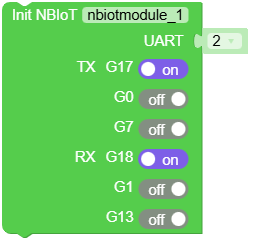
- class module.nbiot.NBIOTModule(uart_or_id, tx=None, rx=None, verbose=False)
基类:
SIM7020创建 NBIOTModule 对象。
- 参数:
uart_or_id (machine.UART | int) – UART 对象或 UART ID。
tx (int) – UART TX 引脚。如果 uart_or_id 为 ID,则此引脚为必填项。
rx (int) – UART RX 引脚。如果 uart_or_id 为 ID,则此引脚为必填项。
verbose (bool) – 是否打印调试信息。
UiFlow2 代码块:
MicroPython 代码块:
from module import NBIOTModule
import machine

# Using UART ID and pins (rx, tx)
nbiot = NBIOTModule(1, tx=17, rx=16)

# Or using UART object
uart = machine.UART(1, tx=17, rx=16)
nbiot = NBIOTModule(uart)
备注
有关更多详细信息,请参阅
NBIOTUnit。