GatewayH2 Module
这个库是 Module Gateway H2 的驱动,该模块使用 UART 通信。
支持以下产品:
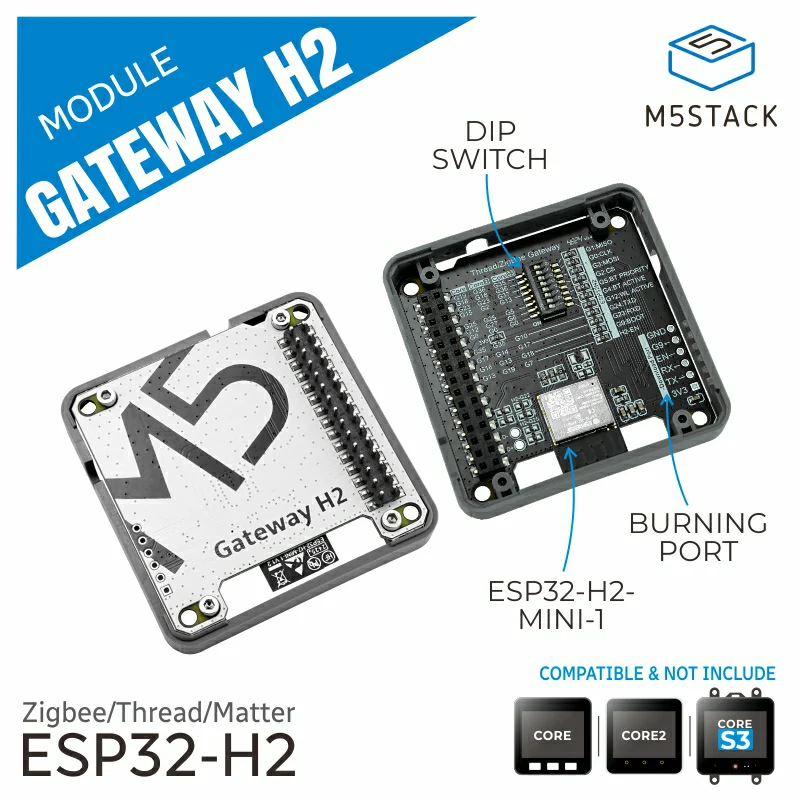
备注
当使用此模块时,需要先给模块烧录 NCP 固件,详情请查看 ESP Zigbee NCP
UiFlow2 应用示例:
开关控制
备注
要使用此示例,您还需要 ESP32C6 或类似模块,作为灯节点设备。详情请查看 HA_on_off_light
在 UiFlow2 上打开 cores3_switch_endpoint_example.m5f2 项目。
该示例演示了通过 Gateway H2 模块的 SwitchEndpoint 对光节点进行组控制和目标设备操作。
UiFlow2 代码块:
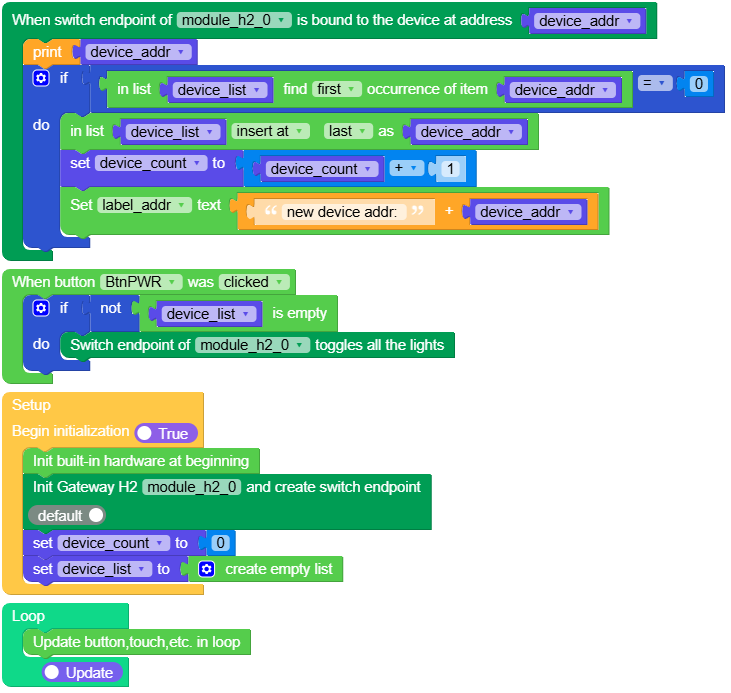
示例输出:
无
MicroPython 应用示例:
开关控制
该示例演示了通过 Gateway H2 模块的 SwitchEndpoint 对光节点进行组控制和目标设备操作。
MicroPython 代码块:
  1# SPDX-FileCopyrightText: 2025 M5Stack Technology CO LTD
  2#
  3# SPDX-License-Identifier: MIT
  4
  5import os, sys, io
  6import M5
  7from M5 import *
  8from module import GatewayH2Module
  9
 10
 11title0 = None
 12label0 = None
 13label1 = None
 14label2 = None
 15label_addr = None
 16module_h2_0 = None
 17module_h2_0_ep = None
 18device_addr = None
 19device_count = None
 20device_list = None
 21
 22
 23def first_index(my_list, elem):
 24    try:
 25        index = my_list.index(elem) + 1
 26    except:
 27        index = 0
 28    return index
 29
 30
 31def module_h2_0_ep_bind_event(addr):
 32    global \
 33        title0, \
 34        label0, \
 35        label1, \
 36        label2, \
 37        label_addr, \
 38        module_h2_0, \
 39        module_h2_0_ep, \
 40        device_addr, \
 41        device_count, \
 42        device_list
 43    device_addr = addr
 44    print(device_addr)
 45    if first_index(device_list, device_addr) == 0:
 46        device_list.append(device_addr)
 47        device_count = device_count + 1
 48        label_addr.setText(str((str("new device addr: ") + str(device_addr))))
 49
 50
 51def btn_pwr_was_clicked_event(state):
 52    global \
 53        title0, \
 54        label0, \
 55        label1, \
 56        label2, \
 57        label_addr, \
 58        module_h2_0, \
 59        module_h2_0_ep, \
 60        device_addr, \
 61        device_count, \
 62        device_list
 63    if not not len(device_list):
 64        module_h2_0_ep.toggle()
 65
 66
 67def setup():
 68    global \
 69        title0, \
 70        label0, \
 71        label1, \
 72        label2, \
 73        label_addr, \
 74        module_h2_0, \
 75        module_h2_0_ep, \
 76        device_addr, \
 77        device_count, \
 78        device_list
 79
 80    M5.begin()
 81    Widgets.fillScreen(0x222222)
 82    title0 = Widgets.Title(
 83        "Switch Endpoint Example", 3, 0xFFFFFF, 0x0000FF, Widgets.FONTS.DejaVu18
 84    )
 85    label0 = Widgets.Label(
 86        "press the power button toggle", 2, 50, 1.0, 0xFFFFFF, 0x222222, Widgets.FONTS.DejaVu18
 87    )
 88    label1 = Widgets.Label(
 89        "if has device connect", 2, 26, 1.0, 0xFFFFFF, 0x222222, Widgets.FONTS.DejaVu18
 90    )
 91    label2 = Widgets.Label(
 92        "connect device: ", 2, 90, 1.0, 0xFFFFFF, 0x222222, Widgets.FONTS.DejaVu18
 93    )
 94    label_addr = Widgets.Label("None", 5, 115, 1.0, 0x00FF00, 0x222222, Widgets.FONTS.DejaVu18)
 95    BtnPWR.setCallback(type=BtnPWR.CB_TYPE.WAS_CLICKED, cb=btn_pwr_was_clicked_event)
 96    module_h2_0 = GatewayH2Module(2, 17, 10)
 97    module_h2_0_ep = module_h2_0.create_switch_ep()
 98    module_h2_0_ep.set_bind_callback(module_h2_0_ep_bind_event)
 99    device_count = 0
100    device_list = []
101
102
103def loop():
104    global \
105        title0, \
106        label0, \
107        label1, \
108        label2, \
109        label_addr, \
110        module_h2_0, \
111        module_h2_0_ep, \
112        device_addr, \
113        device_count, \
114        device_list
115    M5.update()
116
117
118if __name__ == "__main__":
119    try:
120        setup()
121        while True:
122            loop()
123    except (Exception, KeyboardInterrupt) as e:
124        try:
125            from utility import print_error_msg
126
127            print_error_msg(e)
128        except ImportError:
129            print("please update to latest firmware")
示例输出:
无
API参考
GatewayH2Module
- class module.gateway_h2.GatewayH2Module
创建一个 GatewayH2Module 对象。
UiFlow2 代码块:

MicroPython 代码块:
from module import GatewayH2Module

module_gateway_h2 = GatewayH2Module(id = 1, tx = 10, rx = 17)
- create_switch_endpoint()
创建 Switch Endpoint。
- 返回 SwitchEndpoint:
Zigbee 开关端点对象。
- Return type:
SwitchEndpoint
UiFlow2 代码块:
MicroPython 代码块:
h2_switch_endpoint = module_gateway_h2.create_switch_endpoint()
SwitchEndpoint
- class SwitchEndpoint
由 GatewayH2Module.create_switch_endpoint() 或者 GatewayH2Unit.create_switch_endpoint() 返回
- on([addr])
开灯
- 参数:
addr – 设备地址(可选)
调用
on()打开所有设备。调用
on(addr)打开地址为 addr 的设备。
UiFlow2 代码块:


MicroPython 代码块:
h2_switch_endpoint.on(addr)
h2_switch_endpoint.on()
- off([addr])
关灯
- 参数:
addr – 设备地址(可选)
调用
off()关闭所有设备。调用
off(addr)关闭地址为 addr 的设备。
UiFlow2 代码块:


MicroPython 代码块:
h2_switch_endpoint.off(addr)
h2_switch_endpoint.off()
- toggle([addr])
翻转灯状态
- 参数:
addr – 设备地址(可选)
调用
toggle()翻转所有设备的状态。调用
toggle(addr)翻转地址为 addr 的设备的状态。
UiFlow2 代码块:


MicroPython 代码块:
h2_switch_endpoint.toggle(addr)
h2_switch_endpoint.toggle()