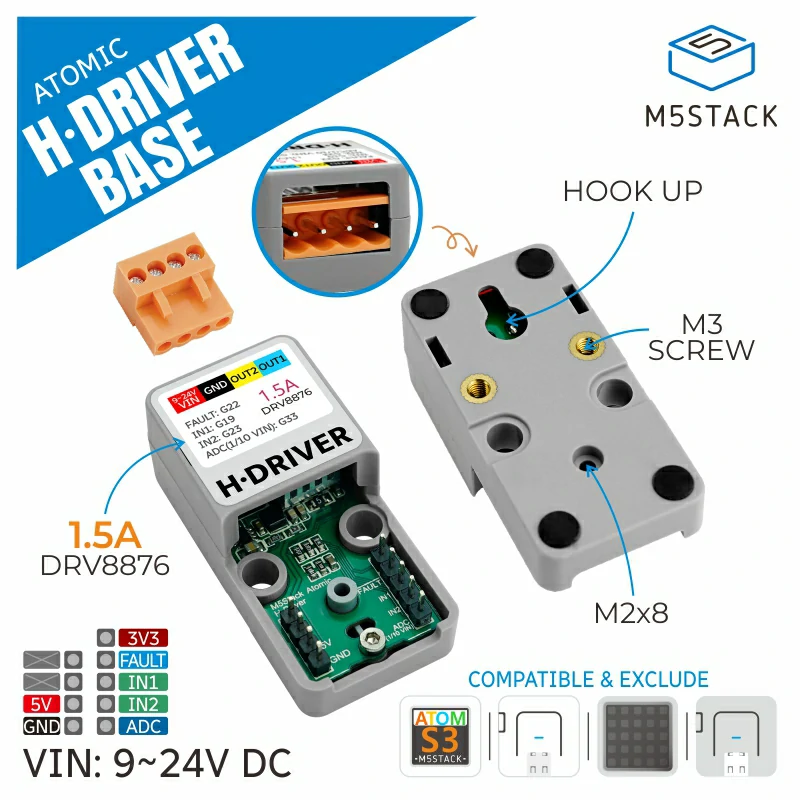
Atomic HDriver Base
Support the following products:
UiFlow2 Example:
Motor speed control
Open the atoms3r_hdriver_base_example.m5f2 project in UiFlow2.
The example demonstrates the motor speed changing from low to high, high to low, and then reversing, changing from low to high and high to low.
UiFlow2 Code Block:

Example output:
None
MicroPython Example:
Motor speed control
The example demonstrates the motor speed changing from low to high, high to low, and then reversing, changing from low to high and high to low.
MicroPython Code Block:
 1# SPDX-FileCopyrightText: 2025 M5Stack Technology CO LTD
 2#
 3# SPDX-License-Identifier: MIT
 4
 5import os, sys, io
 6import M5
 7from M5 import *
 8from base import AtomicHDriverBase
 9import time
10
11
12title0 = None
13label0 = None
14label1 = None
15label_vol = None
16label_speed = None
17base_hdriver = None
18i = None
19speed = None
20
21
22def setup():
23    global title0, label0, label1, label_vol, label_speed, base_hdriver, speed, i
24    M5.begin()
25    title0 = Widgets.Title("Speed Ctrl", 3, 0xFFFFFF, 0x0000FF, Widgets.FONTS.DejaVu18)
26    label0 = Widgets.Label("speed:", 5, 65, 1.0, 0xFFFFFF, 0x000000, Widgets.FONTS.DejaVu18)
27    label1 = Widgets.Label("vol:", 5, 35, 1.0, 0xFFFFFF, 0x000000, Widgets.FONTS.DejaVu18)
28    label_vol = Widgets.Label("12.0V", 45, 35, 1.0, 0xFFFFFF, 0x000000, Widgets.FONTS.DejaVu18)
29    label_speed = Widgets.Label("0", 70, 65, 1.0, 0xFFFFFF, 0x000000, Widgets.FONTS.DejaVu18)
30    base_hdriver = AtomicHDriverBase(6, 7, 5, 8, 1000)
31    label_vol.setText(str((str((base_hdriver.get_voltage())) + str("V"))))
32    speed = 0
33
34
35def loop():
36    global title0, label0, label1, label_vol, label_speed, base_hdriver, speed, i
37    M5.update()
38    for i in range(50):
39        speed = i
40        base_hdriver.set_speed(speed)
41        label_speed.setText(str(speed))
42        time.sleep_ms(40)
43    for i in range(50):
44        speed = 50 - i
45        base_hdriver.set_speed(speed)
46        label_speed.setText(str(speed))
47        time.sleep_ms(40)
48    for i in range(50):
49        speed = 1 - i
50        base_hdriver.set_speed(speed)
51        label_speed.setText(str(speed))
52        time.sleep_ms(40)
53    for i in range(50):
54        speed = i - 50
55        base_hdriver.set_speed(speed)
56        label_speed.setText(str(speed))
57        time.sleep_ms(40)
58
59
60if __name__ == "__main__":
61    try:
62        setup()
63        while True:
64            loop()
65    except (Exception, KeyboardInterrupt) as e:
66        try:
67            from utility import print_error_msg
68
69            print_error_msg(e)
70        except ImportError:
71            print("please update to latest firmware")
Example output:
None
API
AtomicHDriverBase
- class base.hdriver.AtomicHDriverBase(in1=6, in2=7, fault=5, vin=8, freq=1000)
Bases:
objectCreate an AtomicHDriverBase object.
- Parameters:
UiFlow2 Code Block:

MicroPython Code Block:
from base import AtomicHDriverBase

base_hdriver = AtomicHDriverBase(in1 = 6, in2 = 7, fault = 5, vin = 8, freq = 1000)
- set_freq(freq=1000)
Set PWM frequency.
- Parameters:
freq (int) – The PWM frequency. Default is 1000.
- Return type:
None
UiFlow2 Code Block:

MicroPython Code Block:
base_hdriver.set_freq()
- get_freq()
Get PWM frequency.
- Returns:
PWM frequency.
- Return type:
UiFlow2 Code Block:

MicroPython Code Block:
base_hdriver.get_freq()
- set_speed(speed=0)
Set motor speed.
- Parameters:
speed (float) – The motor speed. Range -100~100. Default is 0.
- Return type:
None
UiFlow2 Code Block:

MicroPython Code Block:
base_hdriver.set_speed()
- get_status()
Get driver status.
- Returns:
The driver status. Returns True if the driver is operating normally, or False if a fault is detected.
- Return type:
UiFlow2 Code Block:

MicroPython Code Block:
base_hdriver.get_status()
