Atomic Echo Pyramid Base
The following products are supported:
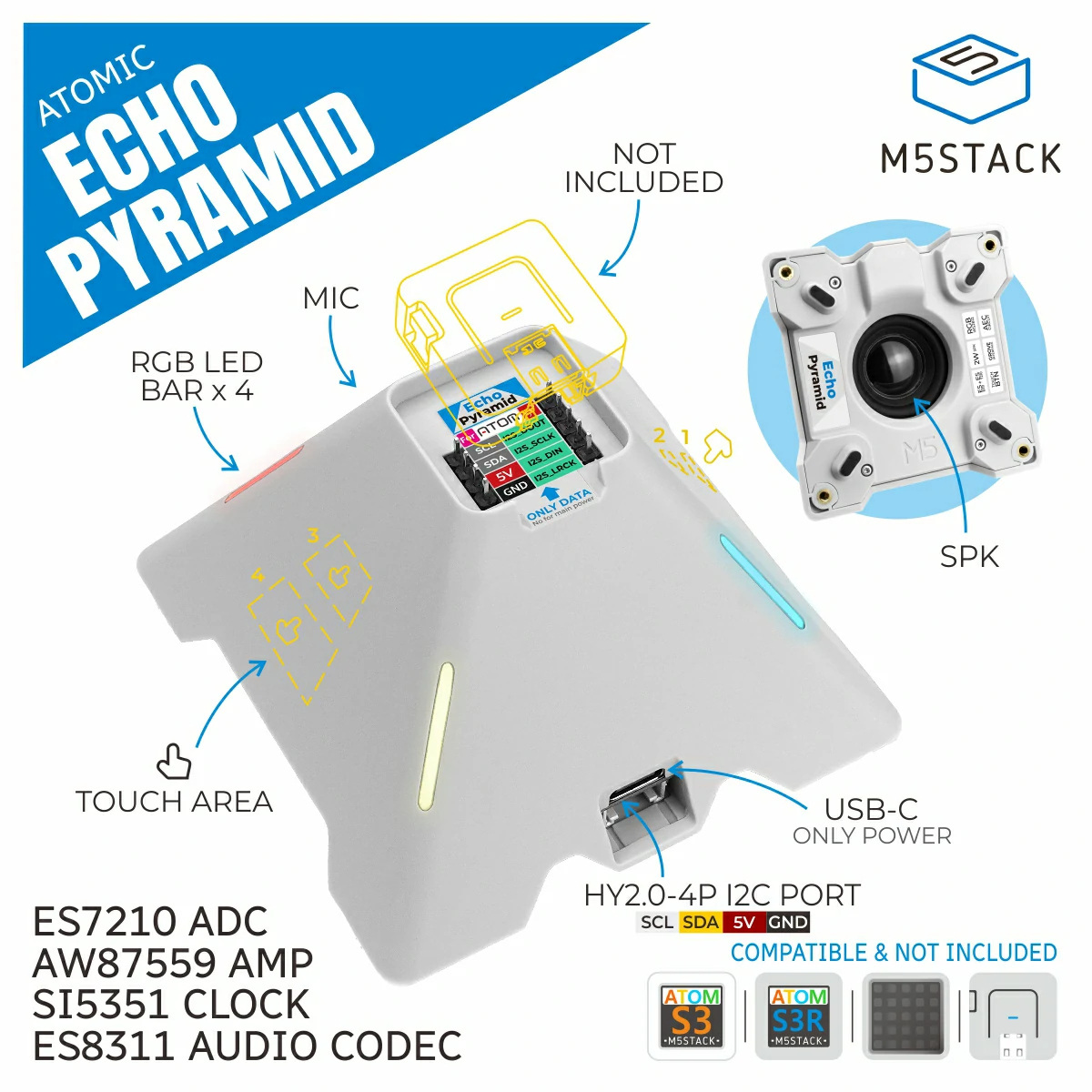
Below is the detailed support for Atomic Echo Pyramid Base on the host:
Controller |
Atomic Echo Pyramid Base |
|---|---|
Atom Echo |
⭕ |
Atom Lite |
✅ |
Atom Matrix |
✅ |
AtomS3 |
✅ |
AtomS3 Lite |
✅ |
AtomS3R |
✅ |
AtomS3R-CAM |
✅ |
AtomS3R-Ext |
✅ |
The AtomicEchoPyramidBase class controls the Echo Pyramid base for Atom Series, providing audio playback/recording, touch input, and dual RGB LED strips.
Note
Power must be supplied to both the EchoPyramid base and the Atom controller.
UiFlow2 Example
LED Strip Effects
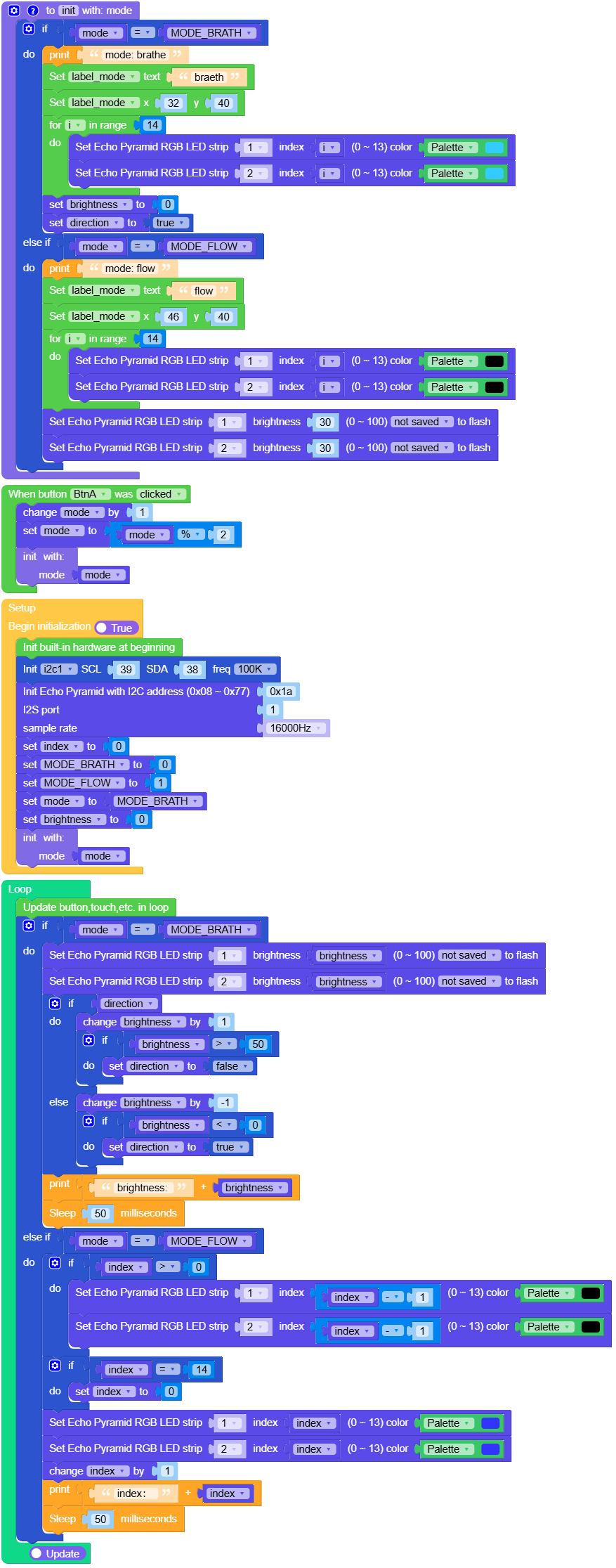
Open the atoms3r_echopyramid_led_strip_example.m5f2 project in UiFlow2.
This example demonstrates breathing and flowing effects on both RGB strips.
UiFlow2 Code Block:
Example output:
None
Touch Control
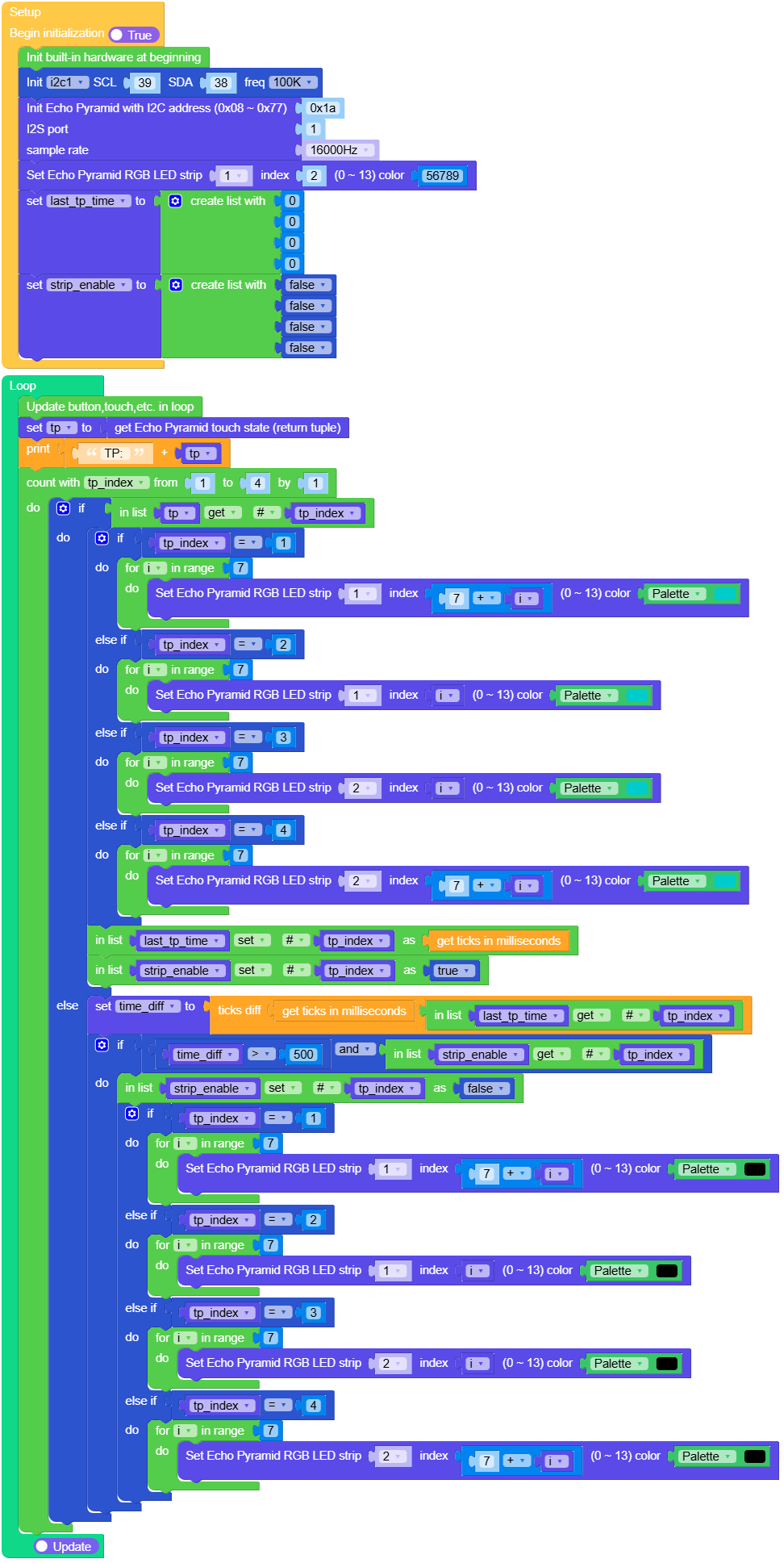
Open the atoms3r_echopyramid_touch_example.m5f2 project in UiFlow2.
This example uses the capacitive touch pads to light different LED segments.
UiFlow2 Code Block:
Example output:
None
Audio Record And Playback
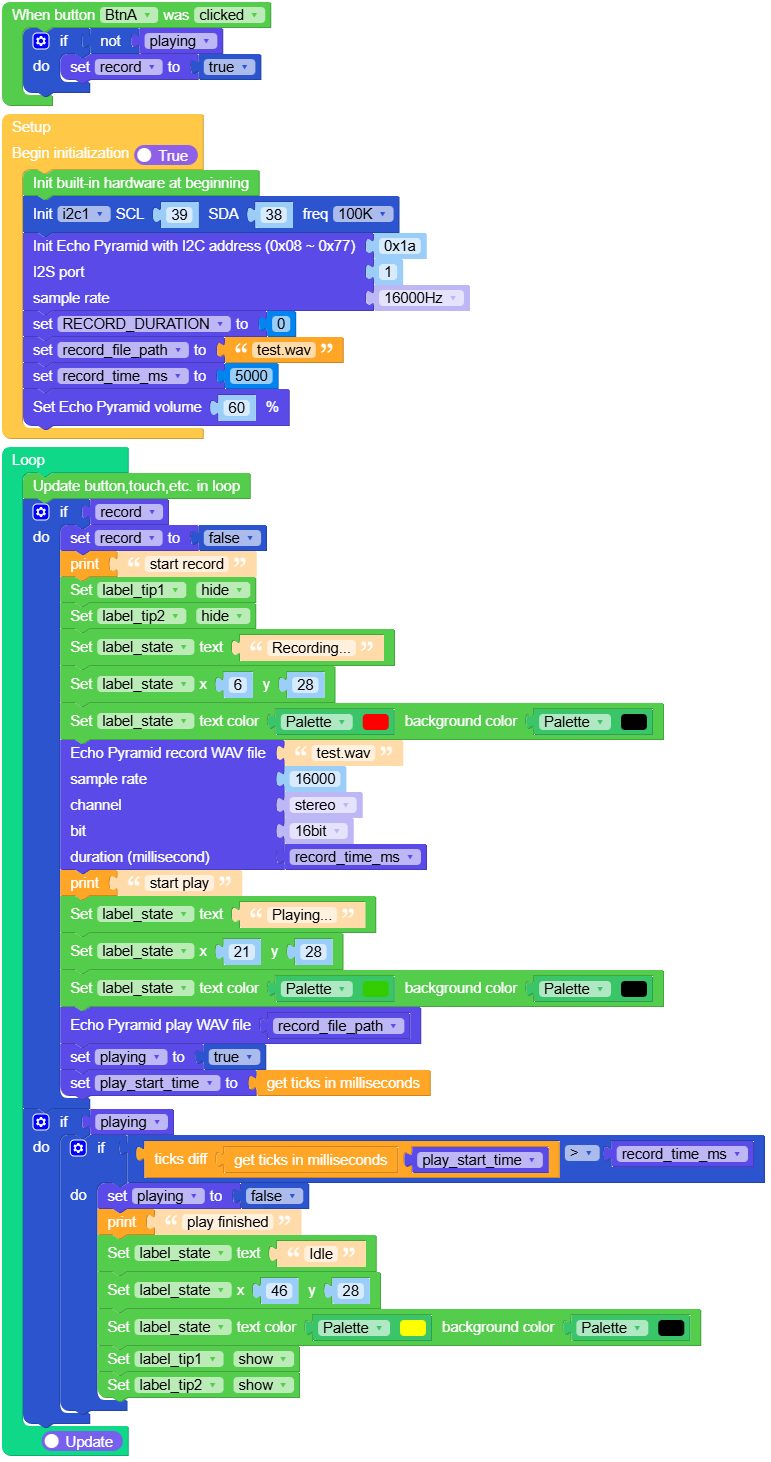
Open the atoms3r_echopyramid_audio_example.m5f2 project in UiFlow2.
This example records a short WAV clip and then plays it back.
UiFlow2 Code Block:
Example output:
None
Audio Beep
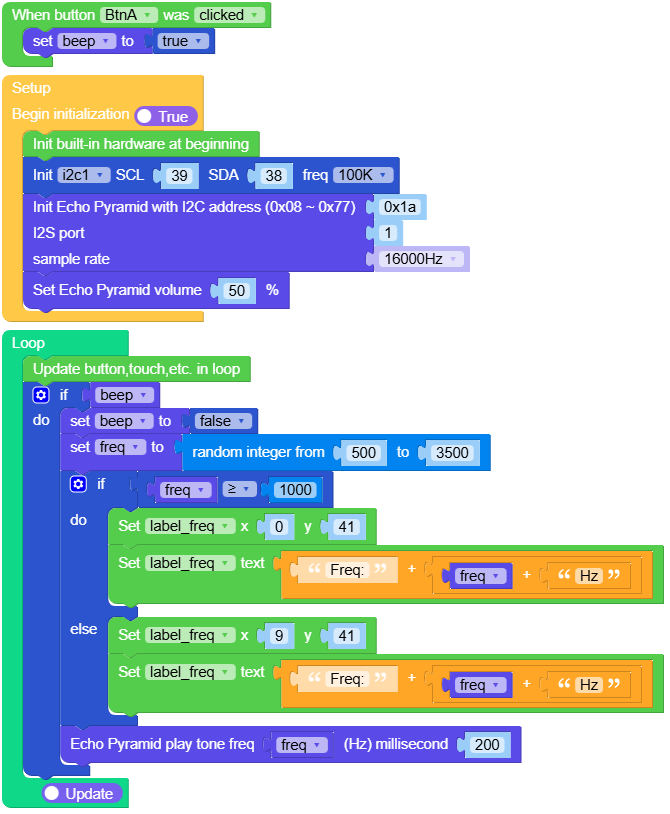
Open the atoms3r_echopyramid_audio_beep_example.m5f2 project in UiFlow2.
This example plays a random beep tone on each touch.
UiFlow2 Code Block:
Example output:
None
USB Voltage
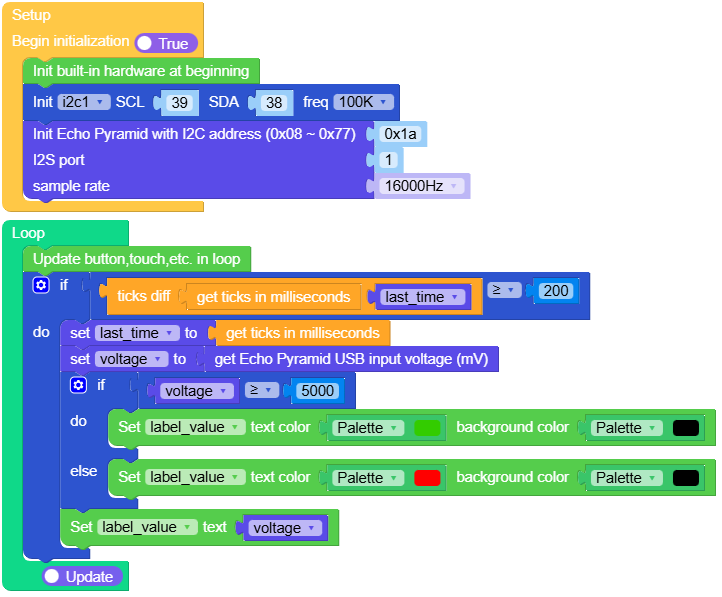
Open the atoms3r_echopyramid_usb_voltage_example.m5f2 project in UiFlow2.
This example reads USB input voltage (mV) from the base and displays it.
UiFlow2 Code Block:
Example output:
None
MicroPython Example
LED Strip Effects
This example demonstrates breathing and flowing effects on both RGB strips.
MicroPython Code Block:
  1# SPDX-FileCopyrightText: 2026 M5Stack Technology CO LTD
  2#
  3# SPDX-License-Identifier: MIT
  4import os, sys, io
  5import M5
  6from M5 import *
  7from hardware import Pin
  8from hardware import I2C
  9from base import AtomicEchoPyramidBase
 10import time
 11
 12
 13label_title = None
 14label_mode = None
 15label_tip1 = None
 16label_tipe = None
 17i2c1 = None
 18base_echopyramid = None
 19
 20
 21mode = None
 22MODE_BRATH = None
 23MODE_FLOW = None
 24index = None
 25brightness = None
 26i = None
 27direction = None
 28
 29
 30# Describe this function...
 31def init(mode):
 32    global \
 33        MODE_BRATH, \
 34        MODE_FLOW, \
 35        index, \
 36        brightness, \
 37        i, \
 38        direction, \
 39        label_title, \
 40        label_mode, \
 41        label_tip1, \
 42        label_tipe, \
 43        i2c1, \
 44        base_echopyramid
 45    if mode == MODE_BRATH:
 46        print("mode: brathe")
 47        label_mode.setText(str("braeth"))
 48        label_mode.setCursor(x=32, y=40)
 49        for i in range(14):
 50            base_echopyramid.set_rgb_color(1, i, 0x33CCFF)
 51            base_echopyramid.set_rgb_color(2, i, 0x33CCFF)
 52
 53        brightness = 0
 54        direction = True
 55    elif mode == MODE_FLOW:
 56        print("mode: flow")
 57        label_mode.setText(str("flow"))
 58        label_mode.setCursor(x=46, y=40)
 59        for i in range(14):
 60            base_echopyramid.set_rgb_color(1, i, 0x000000)
 61            base_echopyramid.set_rgb_color(2, i, 0x000000)
 62
 63        base_echopyramid.set_rgb_brightness(1, 30, False)
 64        base_echopyramid.set_rgb_brightness(2, 30, False)
 65
 66
 67def btna_was_clicked_event(state):
 68    global \
 69        label_title, \
 70        label_mode, \
 71        label_tip1, \
 72        label_tipe, \
 73        i2c1, \
 74        base_echopyramid, \
 75        mode, \
 76        MODE_BRATH, \
 77        MODE_FLOW, \
 78        index, \
 79        brightness, \
 80        direction, \
 81        i
 82    mode = (mode if isinstance(mode, (int, float)) else 0) + 1
 83    mode = mode % 2
 84    init(mode)
 85
 86
 87def setup():
 88    global \
 89        label_title, \
 90        label_mode, \
 91        label_tip1, \
 92        label_tipe, \
 93        i2c1, \
 94        base_echopyramid, \
 95        mode, \
 96        MODE_BRATH, \
 97        MODE_FLOW, \
 98        index, \
 99        brightness, \
100        direction, \
101        i
102
103    M5.begin()
104    Widgets.fillScreen(0x000000)
105    label_title = Widgets.Label(
106        "EchoPyramid", 1, 1, 1.0, 0x11CFE8, 0x000000, Widgets.FONTS.DejaVu18
107    )
108    label_mode = Widgets.Label("breath", 32, 36, 1.0, 0xD41194, 0x000000, Widgets.FONTS.DejaVu18)
109    label_tip1 = Widgets.Label(
110        "press display", 18, 88, 1.0, 0xFFFFFF, 0x000000, Widgets.FONTS.DejaVu12
111    )
112    label_tipe = Widgets.Label(
113        "change mode", 16, 106, 1.0, 0xFFFFFF, 0x000000, Widgets.FONTS.DejaVu12
114    )
115
116    BtnA.setCallback(type=BtnA.CB_TYPE.WAS_CLICKED, cb=btna_was_clicked_event)
117
118    i2c1 = I2C(1, scl=Pin(39), sda=Pin(38), freq=100000)
119    base_echopyramid = AtomicEchoPyramidBase(
120        i2c1, i2s_port=1, dev_addr=0x1A, sample_rate=16000, i2s_sck=6, i2s_ws=8, i2s_di=5, i2s_do=7
121    )
122    index = 0
123    MODE_BRATH = 0
124    MODE_FLOW = 1
125    mode = MODE_BRATH
126    brightness = 0
127    init(mode)
128
129
130def loop():
131    global \
132        label_title, \
133        label_mode, \
134        label_tip1, \
135        label_tipe, \
136        i2c1, \
137        base_echopyramid, \
138        mode, \
139        MODE_BRATH, \
140        MODE_FLOW, \
141        index, \
142        brightness, \
143        direction, \
144        i
145    M5.update()
146    if mode == MODE_BRATH:
147        base_echopyramid.set_rgb_brightness(1, brightness, False)
148        base_echopyramid.set_rgb_brightness(2, brightness, False)
149        if direction:
150            brightness = (brightness if isinstance(brightness, (int, float)) else 0) + 1
151            if brightness > 50:
152                direction = False
153        else:
154            brightness = (brightness if isinstance(brightness, (int, float)) else 0) + -1
155            if brightness < 0:
156                direction = True
157        print((str("brightness: ") + str(brightness)))
158        time.sleep_ms(50)
159    elif mode == MODE_FLOW:
160        if index > 0:
161            base_echopyramid.set_rgb_color(1, index - 1, 0x000000)
162            base_echopyramid.set_rgb_color(2, index - 1, 0x000000)
163        if index == 14:
164            index = 0
165        base_echopyramid.set_rgb_color(1, index, 0x3333FF)
166        base_echopyramid.set_rgb_color(2, index, 0x3333FF)
167        index = (index if isinstance(index, (int, float)) else 0) + 1
168        print((str("index: ") + str(index)))
169        time.sleep_ms(50)
170
171
172if __name__ == "__main__":
173    try:
174        setup()
175        while True:
176            loop()
177    except (Exception, KeyboardInterrupt) as e:
178        try:
179            from utility import print_error_msg
180
181            print_error_msg(e)
182        except ImportError:
183            print("please update to latest firmware")
Example output:
None
Touch Control
This example uses the capacitive touch pads to light different LED segments.
MicroPython Code Block:
  1# SPDX-FileCopyrightText: 2026 M5Stack Technology CO LTD
  2#
  3# SPDX-License-Identifier: MIT
  4
  5import os, sys, io
  6import M5
  7from M5 import *
  8from hardware import Pin
  9from hardware import I2C
 10from base import AtomicEchoPyramidBase
 11import time
 12
 13
 14label0 = None
 15label1 = None
 16label2 = None
 17i2c1 = None
 18base_echopyramid = None
 19tp = None
 20tp_index = None
 21last_tp_time = None
 22strip_enable = None
 23time_diff = None
 24i = None
 25
 26
 27def setup():
 28    global \
 29        label0, \
 30        label1, \
 31        label2, \
 32        i2c1, \
 33        base_echopyramid, \
 34        tp, \
 35        last_tp_time, \
 36        strip_enable, \
 37        time_diff, \
 38        tp_index, \
 39        i
 40
 41    M5.begin()
 42    Widgets.fillScreen(0x000000)
 43    label0 = Widgets.Label("EchoPyramid", 1, 2, 1.0, 0x12C7DE, 0x000000, Widgets.FONTS.DejaVu18)
 44    label1 = Widgets.Label("Touch", 36, 47, 1.0, 0xFFFFFF, 0x000000, Widgets.FONTS.DejaVu18)
 45    label2 = Widgets.Label("Control", 29, 75, 1.0, 0xFFFFFF, 0x000000, Widgets.FONTS.DejaVu18)
 46
 47    i2c1 = I2C(1, scl=Pin(39), sda=Pin(38), freq=100000)
 48    base_echopyramid = AtomicEchoPyramidBase(
 49        i2c1, i2s_port=1, dev_addr=0x1A, sample_rate=16000, i2s_sck=6, i2s_ws=8, i2s_di=5, i2s_do=7
 50    )
 51    base_echopyramid.set_rgb_color(1, 2, 56789)
 52    last_tp_time = [0, 0, 0, 0]
 53    strip_enable = [False, False, False, False]
 54
 55
 56def loop():
 57    global \
 58        label0, \
 59        label1, \
 60        label2, \
 61        i2c1, \
 62        base_echopyramid, \
 63        tp, \
 64        last_tp_time, \
 65        strip_enable, \
 66        time_diff, \
 67        tp_index, \
 68        i
 69    M5.update()
 70    tp = base_echopyramid.get_touch()
 71    print((str("TP: ") + str(tp)))
 72    for tp_index in range(1, 5):
 73        if tp[int(tp_index - 1)]:
 74            if tp_index == 1:
 75                for i in range(7):
 76                    base_echopyramid.set_rgb_color(1, 7 + i, 0x00CCCC)
 77
 78            elif tp_index == 2:
 79                for i in range(7):
 80                    base_echopyramid.set_rgb_color(1, i, 0x00CCCC)
 81
 82            elif tp_index == 3:
 83                for i in range(7):
 84                    base_echopyramid.set_rgb_color(2, i, 0x00CCCC)
 85
 86            elif tp_index == 4:
 87                for i in range(7):
 88                    base_echopyramid.set_rgb_color(2, 7 + i, 0x00CCCC)
 89
 90            last_tp_time[int(tp_index - 1)] = time.ticks_ms()
 91            strip_enable[int(tp_index - 1)] = True
 92        else:
 93            time_diff = time.ticks_diff((time.ticks_ms()), (last_tp_time[int(tp_index - 1)]))
 94            if time_diff > 500 and strip_enable[int(tp_index - 1)]:
 95                strip_enable[int(tp_index - 1)] = False
 96                if tp_index == 1:
 97                    for i in range(7):
 98                        base_echopyramid.set_rgb_color(1, 7 + i, 0x000000)
 99
100                elif tp_index == 2:
101                    for i in range(7):
102                        base_echopyramid.set_rgb_color(1, i, 0x000000)
103
104                elif tp_index == 3:
105                    for i in range(7):
106                        base_echopyramid.set_rgb_color(2, i, 0x000000)
107
108                elif tp_index == 4:
109                    for i in range(7):
110                        base_echopyramid.set_rgb_color(2, 7 + i, 0x000000)
111
112
113if __name__ == "__main__":
114    try:
115        setup()
116        while True:
117            loop()
118    except (Exception, KeyboardInterrupt) as e:
119        try:
120            from utility import print_error_msg
121
122            print_error_msg(e)
123        except ImportError:
124            print("please update to latest firmware")
Example output:
None
Audio Record And Playback
This example records a short WAV clip and then plays it back.
MicroPython Code Block:
  1# SPDX-FileCopyrightText: 2026 M5Stack Technology CO LTD
  2#
  3# SPDX-License-Identifier: MIT
  4
  5import os, sys, io
  6import M5
  7from M5 import *
  8from hardware import Pin
  9from hardware import I2C
 10from base import AtomicEchoPyramidBase
 11import time
 12
 13
 14label_title = None
 15label_state = None
 16label_tip1 = None
 17label_tip2 = None
 18i2c1 = None
 19base_echopyramid = None
 20record = None
 21playing = None
 22record_file_path = None
 23record_time_ms = None
 24play_start_time = None
 25RECORD_DURATION = None
 26
 27
 28def btna_was_clicked_event(state):
 29    global \
 30        label_title, \
 31        label_state, \
 32        label_tip1, \
 33        label_tip2, \
 34        i2c1, \
 35        base_echopyramid, \
 36        record, \
 37        playing, \
 38        RECORD_DURATION, \
 39        record_file_path, \
 40        record_time_ms, \
 41        play_start_time
 42    if not playing:
 43        record = True
 44
 45
 46def setup():
 47    global \
 48        label_title, \
 49        label_state, \
 50        label_tip1, \
 51        label_tip2, \
 52        i2c1, \
 53        base_echopyramid, \
 54        record, \
 55        playing, \
 56        RECORD_DURATION, \
 57        record_file_path, \
 58        record_time_ms, \
 59        play_start_time
 60
 61    M5.begin()
 62    Widgets.fillScreen(0x000000)
 63    label_title = Widgets.Label("Audio", 36, 0, 1.0, 0x2293CB, 0x000000, Widgets.FONTS.DejaVu18)
 64    label_state = Widgets.Label("Idle", 46, 28, 1.0, 0xDED413, 0x000000, Widgets.FONTS.DejaVu18)
 65    label_tip1 = Widgets.Label(
 66        "press display", 1, 83, 1.0, 0xFFFFFF, 0x000000, Widgets.FONTS.DejaVu18
 67    )
 68    label_tip2 = Widgets.Label(
 69        "start record", 8, 103, 1.0, 0xFFFFFF, 0x000000, Widgets.FONTS.DejaVu18
 70    )
 71
 72    BtnA.setCallback(type=BtnA.CB_TYPE.WAS_CLICKED, cb=btna_was_clicked_event)
 73
 74    i2c1 = I2C(1, scl=Pin(39), sda=Pin(38), freq=100000)
 75    base_echopyramid = AtomicEchoPyramidBase(
 76        i2c1, i2s_port=1, dev_addr=0x1A, sample_rate=16000, i2s_sck=6, i2s_ws=8, i2s_di=5, i2s_do=7
 77    )
 78    RECORD_DURATION = 0
 79    record_file_path = "test.wav"
 80    record_time_ms = 5000
 81    base_echopyramid.set_volume(60)
 82
 83
 84def loop():
 85    global \
 86        label_title, \
 87        label_state, \
 88        label_tip1, \
 89        label_tip2, \
 90        i2c1, \
 91        base_echopyramid, \
 92        record, \
 93        playing, \
 94        RECORD_DURATION, \
 95        record_file_path, \
 96        record_time_ms, \
 97        play_start_time
 98    M5.update()
 99    if record:
100        record = False
101        print("start record")
102        label_tip1.setVisible(False)
103        label_tip2.setVisible(False)
104        label_state.setText(str("Recording..."))
105        label_state.setCursor(x=6, y=28)
106        label_state.setColor(0xFF0000, 0x000000)
107        base_echopyramid.record_wav_file(
108            "/flash/res/audio/test.wav",
109            rate=16000,
110            bits=16,
111            channel=AtomicEchoPyramidBase.STEREO,
112            duration=record_time_ms,
113        )
114        print("start play")
115        label_state.setText(str("Playing..."))
116        label_state.setCursor(x=21, y=28)
117        label_state.setColor(0x33CC00, 0x000000)
118        base_echopyramid.play_wav_file("/flash/res/audio/" + str(record_file_path))
119        playing = True
120        play_start_time = time.ticks_ms()
121    if playing:
122        if (time.ticks_diff((time.ticks_ms()), play_start_time)) > record_time_ms:
123            playing = False
124            print("play finished")
125            label_state.setText(str("Idle"))
126            label_state.setCursor(x=46, y=28)
127            label_state.setColor(0xFFFF00, 0x000000)
128            label_tip1.setVisible(True)
129            label_tip2.setVisible(True)
130
131
132if __name__ == "__main__":
133    try:
134        setup()
135        while True:
136            loop()
137    except (Exception, KeyboardInterrupt) as e:
138        try:
139            from utility import print_error_msg
140
141            print_error_msg(e)
142        except ImportError:
143            print("please update to latest firmware")
Example output:
None
Audio Beep
This example plays a random beep tone on each touch.
MicroPython Code Block:
 1# SPDX-FileCopyrightText: 2026 M5Stack Technology CO LTD
 2#
 3# SPDX-License-Identifier: MIT
 4
 5import os, sys, io
 6import M5
 7from M5 import *
 8from hardware import Pin
 9from hardware import I2C
10from base import AtomicEchoPyramidBase
11import random
12
13
14label_title = None
15label_tip1 = None
16label_freq = None
17label_tip2 = None
18i2c1 = None
19base_echopyramid = None
20beep = None
21freq = None
22
23
24def btna_was_eclicked_event(state):
25    global label_title, label_tip1, label_freq, label_tip2, i2c1, base_echopyramid, beep, freq
26    beep = True
27
28
29def setup():
30    global label_title, label_tip1, label_freq, label_tip2, i2c1, base_echopyramid, beep, freq
31
32    M5.begin()
33    Widgets.fillScreen(0x000000)
34    label_title = Widgets.Label(
35        "Audio Play", 13, 2, 1.0, 0x0EE9EE, 0x000000, Widgets.FONTS.DejaVu18
36    )
37    label_tip1 = Widgets.Label(
38        "press display", 1, 83, 1.0, 0xFFFFFF, 0x000000, Widgets.FONTS.DejaVu18
39    )
40    label_freq = Widgets.Label(
41        "Freq: -- Hz", 15, 41, 1.0, 0xFFFFFF, 0x000000, Widgets.FONTS.DejaVu18
42    )
43    label_tip2 = Widgets.Label("beep", 39, 103, 1.0, 0xFFFFFF, 0x000000, Widgets.FONTS.DejaVu18)
44
45    BtnA.setCallback(type=BtnA.CB_TYPE.WAS_CLICKED, cb=btna_was_eclicked_event)
46
47    i2c1 = I2C(1, scl=Pin(39), sda=Pin(38), freq=100000)
48    base_echopyramid = AtomicEchoPyramidBase(
49        i2c1, i2s_port=1, dev_addr=0x1A, sample_rate=16000, i2s_sck=6, i2s_ws=8, i2s_di=5, i2s_do=7
50    )
51    base_echopyramid.set_volume(50)
52
53
54def loop():
55    global label_title, label_tip1, label_freq, label_tip2, i2c1, base_echopyramid, beep, freq
56    M5.update()
57    if beep:
58        beep = False
59        freq = random.randint(500, 3500)
60        if freq >= 1000:
61            label_freq.setCursor(x=0, y=41)
62            label_freq.setText(str((str("Freq:") + str((str(freq) + str("Hz"))))))
63        else:
64            label_freq.setCursor(x=9, y=41)
65            label_freq.setText(str((str("Freq:") + str((str(freq) + str("Hz"))))))
66        base_echopyramid.tone(freq, 200)
67
68
69if __name__ == "__main__":
70    try:
71        setup()
72        while True:
73            loop()
74    except (Exception, KeyboardInterrupt) as e:
75        try:
76            from utility import print_error_msg
77
78            print_error_msg(e)
79        except ImportError:
80            print("please update to latest firmware")
Example output:
None
USB Voltage
This example reads USB input voltage (mV) from the base and displays it.
MicroPython Code Block:
 1# SPDX-FileCopyrightText: 2026 M5Stack Technology CO LTD
 2#
 3# SPDX-License-Identifier: MIT
 4
 5import time
 6import M5
 7from M5 import *
 8from base import AtomicEchoPyramidBase
 9from hardware import Pin
10from hardware import I2C
11
12
13label_title = None
14label_voltage = None
15label_unit = None
16label_value = None
17i2c1 = None
18base_echopyramid = None
19last_time = None
20voltage = None
21
22
23def setup():
24    global \
25        label_title, \
26        label_voltage, \
27        label_unit, \
28        label_value, \
29        i2c1, \
30        base_echopyramid, \
31        last_time, \
32        voltage
33
34    M5.begin()
35    Widgets.fillScreen(0x000000)
36    label_title = Widgets.Label(
37        "EchoPyramid", 1, 1, 1.0, 0x12C4E6, 0x000000, Widgets.FONTS.DejaVu18
38    )
39    label_voltage = Widgets.Label(
40        "USB Volatge", 5, 31, 1.0, 0xFFFFFF, 0x000000, Widgets.FONTS.DejaVu18
41    )
42    label_unit = Widgets.Label("mV", 47, 105, 1.0, 0xFFFFFF, 0x000000, Widgets.FONTS.DejaVu18)
43    label_value = Widgets.Label("5000", 31, 66, 1.0, 0xFFFFFF, 0x000000, Widgets.FONTS.DejaVu24)
44
45    i2c1 = I2C(1, scl=Pin(39), sda=Pin(38), freq=100000)
46    base_echopyramid = AtomicEchoPyramidBase(
47        i2c1, i2s_port=1, dev_addr=0x1A, sample_rate=16000, i2s_sck=6, i2s_ws=8, i2s_di=5, i2s_do=7
48    )
49
50
51def loop():
52    global \
53        label_title, \
54        label_voltage, \
55        label_unit, \
56        label_value, \
57        i2c1, \
58        base_echopyramid, \
59        last_time, \
60        voltage
61    M5.update()
62    if (time.ticks_diff((time.ticks_ms()), last_time)) >= 200:
63        last_time = time.ticks_ms()
64        voltage = base_echopyramid.get_input_voltage()
65        if voltage >= 5000:
66            label_value.setColor(0x33CC00, 0x000000)
67        else:
68            label_value.setColor(0xFF0000, 0x000000)
69        label_value.setText(str(voltage))
70
71
72if __name__ == "__main__":
73    try:
74        setup()
75        while True:
76            loop()
77    except (Exception, KeyboardInterrupt) as e:
78        try:
79            from utility import print_error_msg
80
81            print_error_msg(e)
82        except ImportError:
83            print("please update to latest firmware")
Example output:
None
API
AtomicEchoPyramidBase
- class base.echo_pyramid.AtomicEchoPyramidBase(*args, **kwargs)
Bases:
objectEcho Pyramid base for AtomS3R + Echo Pyramid.
- Parameters:
i2c – I2C bus.
dev_addr (int) – STM32 I2C address. Default 0x1A.
es8311_addr (int) – ES8311 I2C address. Default 0x18.
i2s_port (int) – I2S port number. Default 1.
sample_rate (int) – Sample rate. Default 24000.
i2s_sck (int) – I2S BCLK pin. Default 6.
i2s_ws (int) – I2S WS pin. Default 8.
i2s_di (int) – I2S DIN (mic) pin. Default 5.
i2s_do (int) – I2S DOUT (spk) pin. Default 7.
UiFlow2 Code Block:

MicroPython Code Block:
from hardware import I2C, Pin
from base import AtomicEchoPyramidBase

i2c = I2C(1, scl=Pin(39), sda=Pin(38), freq=100000)
echo_pyramid = AtomicEchoPyramidBase(i2c, dev_addr=0x1A, i2s_sck=6, i2s_ws=8, i2s_di=5, i2s_do=7)
echo_pyramid.speaker.tone(2000, 500)
- MONO = 1
Mono.
- STEREO = 2
Stereo.
- get_touch()
Get touch status.
- Returns:
(tp1, tp2, tp3, tp4), True=pressed False=released.
- Return type:
UiFlow2 Code Block:

MicroPython Code Block:
tp1, tp2, tp3, tp4 = echo_pyramid.get_touch()
- set_rgb_brightness(strip, brightness, save=False)
Set RGB strip brightness.
- Parameters:
- Return type:
None
UiFlow2 Code Block:

MicroPython Code Block:
echo_pyramid.set_rgb_brightness(1, 50, False)
- get_rgb_brightness(strip)
Get RGB strip brightness.
- Parameters:
strip (int) – Strip index (1 or 2).
- Returns:
Brightness 0~100, or 0 on error/invalid strip.
- Return type:
UiFlow2 Code Block:

MicroPython Code Block:
brightness = echo_pyramid.get_rgb_brightness(1)
- set_rgb_color(strip, index, color)
Set single RGB LED color.
- Parameters:
- Return type:
None
UiFlow2 Code Block:

MicroPython Code Block:
echo_pyramid.set_rgb_color(1, 0, 0x33CCFF)
- get_rgb_color(strip, index)
Get single RGB LED color.
- Parameters:
- Returns:
24-bit color (R << 16 | G << 8 | B), or 0 on error.
- Return type:
UiFlow2 Code Block:

MicroPython Code Block:
color = echo_pyramid.get_rgb_color(1, 0)
- set_addr(new_addr)
Set STM32 I2C address. Takes effect after a short delay.
- Parameters:
new_addr (int) – New address 0x08~0x77.
- Return type:
None
UiFlow2 Code Block:

MicroPython Code Block:
echo_pyramid.set_addr(0x1B)
- get_addr()
Get current STM32 I2C address.
- Returns:
I2C address, or 0 on error.
- Return type:
UiFlow2 Code Block:

MicroPython Code Block:
addr = echo_pyramid.get_addr()
- get_firmware_version()
Get STM32 firmware version.
- Returns:
Version number, or 0 on error.
- Return type:
UiFlow2 Code Block:

MicroPython Code Block:
ver = echo_pyramid.get_firmware_version()
- get_input_voltage()
Get input voltage (from STM32 ADC).
- Returns:
Voltage in mV, or 0 on error.
- Return type:
UiFlow2 Code Block:

MicroPython Code Block:
mv = echo_pyramid.get_input_voltage()
- set_mute(mute)
Mute or unmute speaker (AW87559).
- Parameters:
mute (bool) – True to mute, False to unmute.
- Return type:
None
UiFlow2 Code Block:

MicroPython Code Block:
echo_pyramid.set_mute(True)
- change_sample_rate(sample_rate)
Change audio sample rate. Affects playback and recording.
- Parameters:
sample_rate (int) – Sample rate in Hz (e.g. 16000, 24000).
- Return type:
None
MicroPython Code Block:
echo_pyramid.change_sample_rate(24000)
- play_wav_file(file)
Play a WAV file from storage.
- Parameters:
file (str) – WAV file path.
- Return type:
None
UiFlow2 Code Block:

MicroPython Code Block:
echo_pyramid.play_wav_file("/flash/res/audio/test.wav")
- tone(freq, duration)
Play a beep tone.
- Parameters:
- Return type:
None
UiFlow2 Code Block:

MicroPython Code Block:
echo_pyramid.tone(1000, 200)
- play_wav(buf, duration=-1)
Play WAV data from buffer.
- Parameters:
- Return type:
None
UiFlow2 Code Block:

MicroPython Code Block:
echo_pyramid.play_wav(wav_bytes, duration=1000)
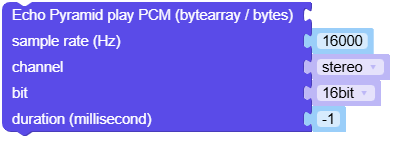
- play_raw(buf, rate=16000, bits=16, channel=2, duration=-1)
Play raw PCM data.
- Parameters:
- Return type:
None
UiFlow2 Code Block:
MicroPython Code Block:
echo_pyramid.play_raw(pcm_bytes, rate=16000, bits=16, channel=2)
- pause()
Pause playback.
UiFlow2 Code Block:

MicroPython Code Block:
echo_pyramid.pause()
- Return type:
None
- resume()
Resume playback.
UiFlow2 Code Block:

MicroPython Code Block:
echo_pyramid.resume()
- Return type:
None
- stop()
Stop playback.
UiFlow2 Code Block:

MicroPython Code Block:
echo_pyramid.stop()
- Return type:
None
- get_volume()
Get speaker volume.
- Returns:
Current volume value.
- Return type:
UiFlow2 Code Block:

MicroPython Code Block:
volume = echo_pyramid.get_volume()
- set_volume(volume)
Set speaker volume.
- Parameters:
volume (int) – Volume value.
- Return type:
None
UiFlow2 Code Block:

MicroPython Code Block:
echo_pyramid.set_volume(60)
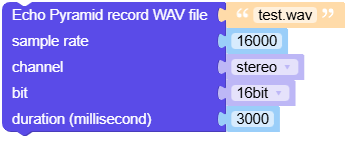
- record_wav_file(path, rate=16000, bits=16, channel=2, duration=3000)
Record audio to a WAV file.
- Parameters:
- Return type:
None
UiFlow2 Code Block:
MicroPython Code Block:
echo_pyramid.record_wav_file("/flash/res/audio/test.wav", rate=16000, bits=16, channel=echo_pyramid.STEREO, duration=3000)
- record(rate=16000, bits=16, channel=2, duration=3000)
Record audio to PCM buffer.
- Parameters:
- Returns:
Record result (implementation-dependent).
UiFlow2 Code Block:
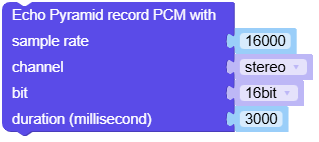
MicroPython Code Block:
buf = echo_pyramid.record(rate=16000, bits=16, channel=2, duration=3000)
- property pcm_buffer: bytes
PCM buffer from the microphone (read-only). Available after recording.
UiFlow2 Code Block:

MicroPython Code Block:
data = echo_pyramid.pcm_buffer
- deinit()
Deinitialize speaker and microphone, and mute output.
MicroPython Code Block:
echo_pyramid.deinit()
- Return type:
None