Atom DTU NBIoT2
This is the driver library for the ATOM DTU NBIoT2 to accept and send data from the DTU NBIoT.
Support the following products:
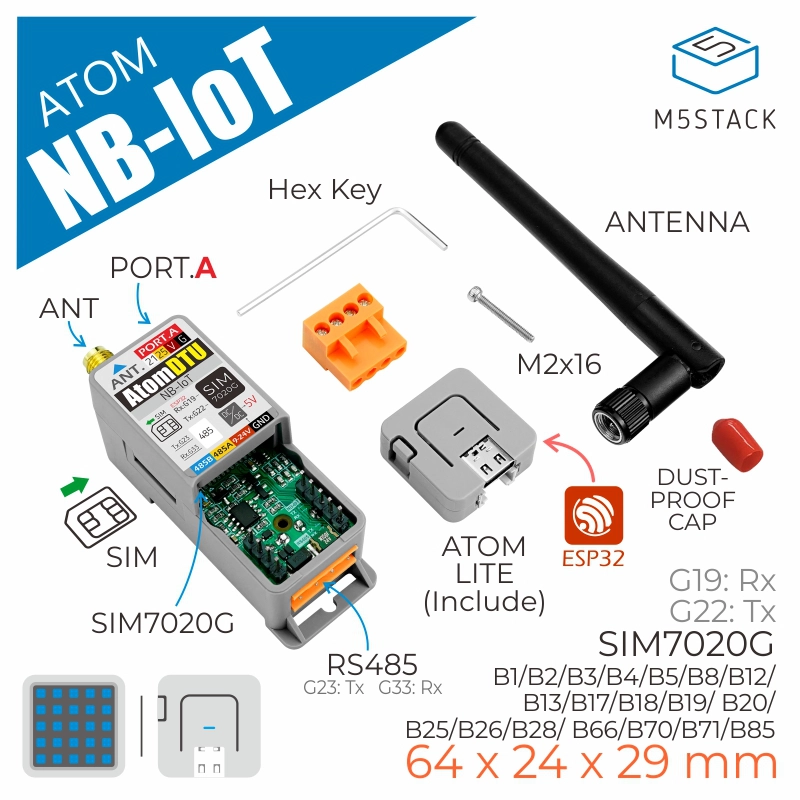
Note
Please ensure that the device supports the NB-IoT frequency bands in your area before use.
Note
Please ensure that the firmware version of SIM7028 is greater than or equal to 2110B07SIM7028.
 can be used to check the firmware version.
UiFlow2 Example
NBIoT HTTP Example
Open the atoms3_base_nbiot2_http_example.m5f2 project in UiFlow2.
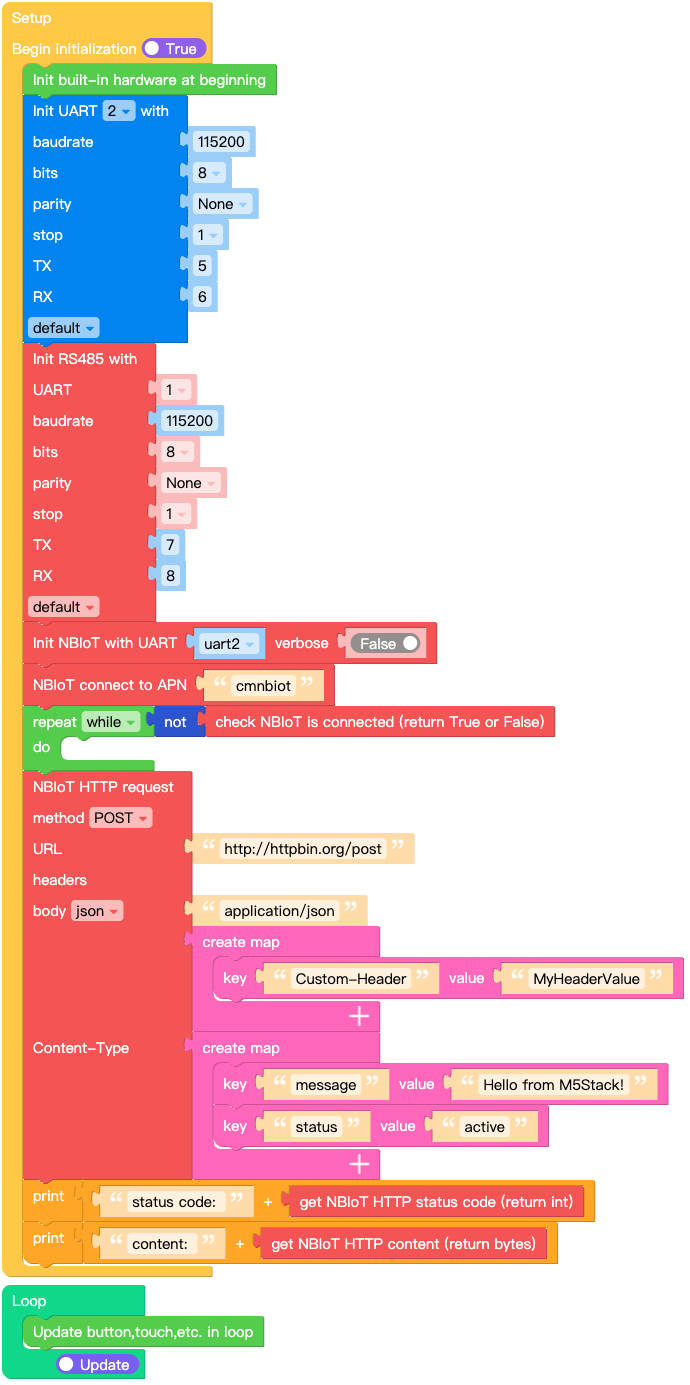
This example shows how to send HTTP request using the Atom DTU NBIoT2.
UiFlow2 Code Block:
Example output:
Output of received NBIoT message data via serial port.
MQTT Example
Open the atoms3_base_nbiot2_mqtt_example.m5f2 project in UiFlow2.
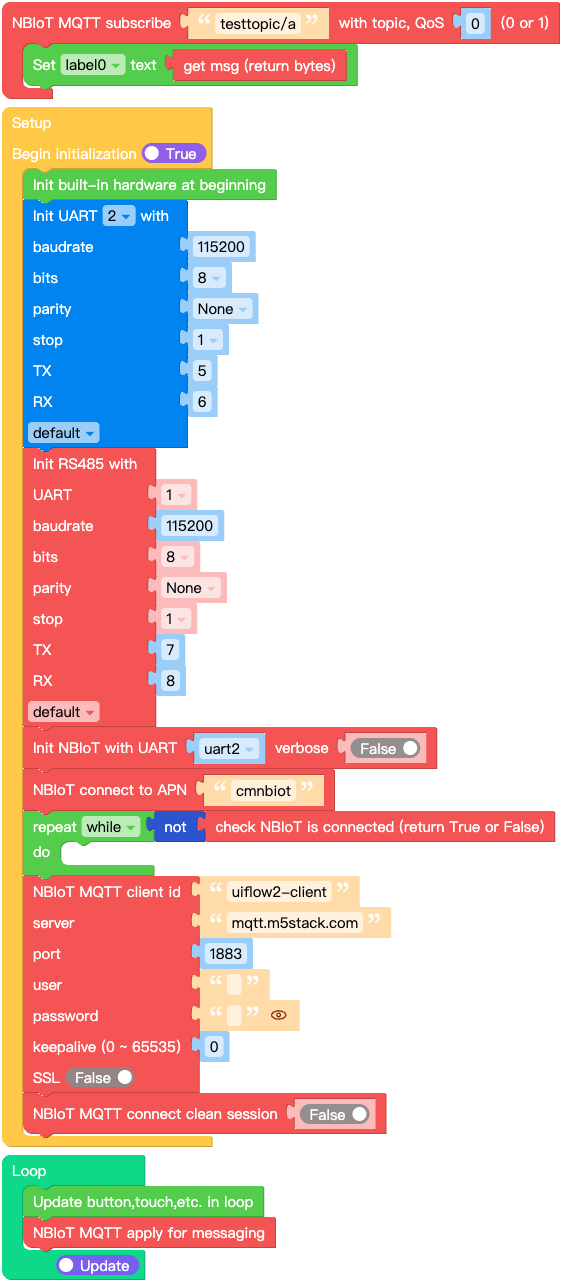
This example shows how to send MQTT message using the Atom DTU NBIoT2.
UiFlow2 Code Block:
Example output:
Output of received NBIoT message data on screen.
MicroPython Example
NBIoT HTTP Example
This example shows how to send HTTP request using the Atom DTU NBIoT2.
MicroPython Code Block:
 1# SPDX-FileCopyrightText: 2026 M5Stack Technology CO LTD
 2#
 3# SPDX-License-Identifier: MIT
 4
 5import os, sys, io
 6import M5
 7from M5 import *
 8from hardware import UART
 9from base import AtomRS485
10from base import AtomDTUNBIoT2
11
12
13label0 = None
14uart2 = None
15base_rs485 = None
16base_nbiot2 = None
17base_nbiot2_http_req = None
18
19
20def setup():
21    global label0, uart2, base_rs485, base_nbiot2, base_nbiot2_http_req
22
23    M5.begin()
24    Widgets.fillScreen(0x000000)
25    label0 = Widgets.Label("label0", 8, 7, 1.0, 0xFFFFFF, 0x222222, Widgets.FONTS.DejaVu18)
26
27    uart2 = UART(2, baudrate=115200, bits=8, parity=None, stop=1, tx=5, rx=6)
28    base_rs485 = AtomRS485(
29        1,
30        baudrate=115200,
31        bits=8,
32        parity=None,
33        stop=1,
34        tx=7,
35        rx=8,
36        txbuf=256,
37        rxbuf=256,
38        timeout=0,
39        timeout_char=0,
40        invert=0,
41        flow=0,
42    )
43    base_nbiot2 = AtomDTUNBIoT2(uart2, verbose=False)
44    base_nbiot2.connect(apn="cmnbiot")
45    while not (base_nbiot2.isconnected()):
46        pass
47    base_nbiot2_http_req = base_nbiot2.post(
48        "http://httpbin.org/post",
49        json={"message": "Hello from M5Stack!", "status": "active"},
50        headers={
51            "Content-Type": "application/json",
52            "Custom-Header": "MyHeaderValue",
53        },
54    )
55    print((str("status code: ") + str((base_nbiot2_http_req.status_code))))
56    print((str("content: ") + str((base_nbiot2_http_req.content))))
57
58
59def loop():
60    global label0, uart2, base_rs485, base_nbiot2, base_nbiot2_http_req
61    M5.update()
62
63
64if __name__ == "__main__":
65    try:
66        setup()
67        while True:
68            loop()
69    except (Exception, KeyboardInterrupt) as e:
70        try:
71            from utility import print_error_msg
72
73            print_error_msg(e)
74        except ImportError:
75            print("please update to latest firmware")
Example output:
Output of received NBIoT message data via serial port.
MQTT Example
This example shows how to send MQTT message using the Atom DTU NBIoT2.
MicroPython Code Block:
 1# SPDX-FileCopyrightText: 2026 M5Stack Technology CO LTD
 2#
 3# SPDX-License-Identifier: MIT
 4import os, sys, io
 5import M5
 6from M5 import *
 7from hardware import UART
 8from base import AtomRS485
 9from base import AtomDTUNBIoT2
10
11
12label0 = None
13base_nbiot2 = None
14uart2 = None
15base_rs485 = None
16base_nbiot2_mqtt = None
17
18
19def base_nbiot2_testtopic_a_event(data):
20    global label0, base_nbiot2, uart2, base_rs485, base_nbiot2_mqtt
21    label0.setText(str(data[1]))
22
23
24def setup():
25    global label0, base_nbiot2, uart2, base_rs485, base_nbiot2_mqtt
26
27    M5.begin()
28    Widgets.fillScreen(0x000000)
29    label0 = Widgets.Label("label0", 8, 7, 1.0, 0xFFFFFF, 0x222222, Widgets.FONTS.DejaVu18)
30
31    uart2 = UART(2, baudrate=115200, bits=8, parity=None, stop=1, tx=5, rx=6)
32    base_rs485 = AtomRS485(
33        1,
34        baudrate=115200,
35        bits=8,
36        parity=None,
37        stop=1,
38        tx=7,
39        rx=8,
40        txbuf=256,
41        rxbuf=256,
42        timeout=0,
43        timeout_char=0,
44        invert=0,
45        flow=0,
46    )
47    base_nbiot2 = AtomDTUNBIoT2(uart2, verbose=False)
48    base_nbiot2.connect(apn="cmnbiot")
49    while not (base_nbiot2.isconnected()):
50        pass
51    base_nbiot2_mqtt = base_nbiot2.MQTTClient(
52        "uiflow2-client", "mqtt.m5stack.com", port=1883, user="", password="", keepalive=0
53    )
54    base_nbiot2_mqtt.connect(clean_session=False)
55    base_nbiot2_mqtt.subscribe("testtopic/a", base_nbiot2_testtopic_a_event, qos=0)
56
57
58def loop():
59    global label0, base_nbiot2, uart2, base_rs485, base_nbiot2_mqtt
60    M5.update()
61    base_nbiot2_mqtt.check_msg()
62
63
64if __name__ == "__main__":
65    try:
66        setup()
67        while True:
68            loop()
69    except (Exception, KeyboardInterrupt) as e:
70        try:
71            from utility import print_error_msg
72
73            print_error_msg(e)
74        except ImportError:
75            print("please update to latest firmware")
Example output:
Output of received NBIoT message data on screen.
API
AtomDTUNBIoT2
- class base.dtu_nbiot2.AtomDTUNBIoT2(uart, verbose=False)
Bases:
SIM7028Create an AtomDTUNBIoT2 object.
- Parameters:
uart (machine.UART) – The UART object to use.
verbose (bool) – Whether to print debug information.
UiFlow2 Code Block:

MicroPython Code Block:
from base import AtomDTUNBIoT2
from hardware import UART

uart2 = UART(2, baudrate=115200, bits=8, parity=None, stop=1, tx=22, rx=19)
base_nbiot2 = AtomDTUNBIoT2(uart2, verbose=False)
Note
See
NBIOT2Unitfor more details.
AtomRS485
Note
See AtomRS485 for more details.