USB Module
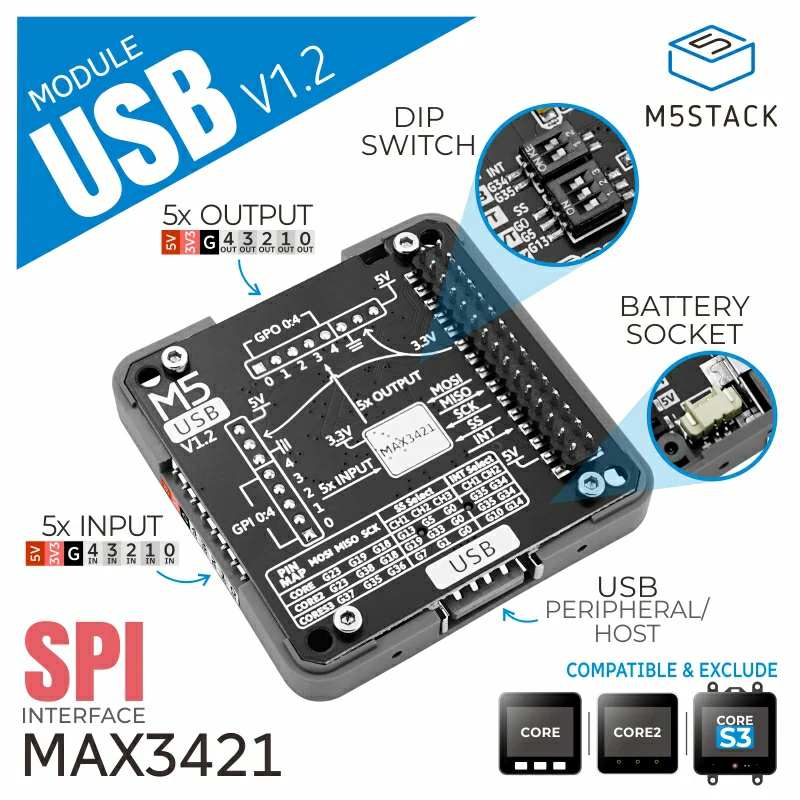
Module USB 是使用 SPI 接口实现扩展 USB 功能的模块,使用 MAX3421E 实现。
支持以下产品:
MicroPython 应用示例
备注
使用下列案例前请检查模块拨码开关,确保案例使用相关引脚与模块拨码开关位置一致,具体配置请查看产品说明手册页面。SPI 配置已在内部实现,用户无需关心。
输入/输出引脚控制
模块通过排针引出 5 个 IN(输入)引脚和 5 个 OUT (输出引脚),本案例控制输出引脚高低电平切换,读取并打印输入引脚电平状态。
 1# SPDX-FileCopyrightText: 2025 M5Stack Technology CO LTD
 2#
 3# SPDX-License-Identifier: MIT
 4import os, sys, io
 5import M5
 6from M5 import *
 7from module import USBModule
 8import time
 9
10
11module_usb_0 = None
12last_time = None
13i = None
14last_set_time = None
15value = None
16state = None
17toggle = None
18
19
20def setup():
21    global module_usb_0, last_time, last_set_time, value, state, toggle, i
22    M5.begin()
23    Widgets.fillScreen(0x222222)
24    module_usb_0 = USBModule(pin_cs=1, pin_int=10)
25    module_usb_0.write_gpout(0, 0)
26    module_usb_0.write_gpout(1, 1)
27    module_usb_0.write_gpout(2, 0)
28    module_usb_0.write_gpout(3, 1)
29    module_usb_0.write_gpout(4, 0)
30    state = [0] * 5
31    toggle = True
32
33
34def loop():
35    global module_usb_0, last_time, last_set_time, value, state, toggle, i
36    M5.update()
37    module_usb_0.poll_data()
38    if (time.ticks_diff((time.ticks_ms()), last_time)) > 200:
39        last_time = time.ticks_ms()
40        for i in range(5):
41            value = module_usb_0.read_gpin(i)
42            state[int((i + 1) - 1)] = value
43        print(state)
44    if (time.ticks_diff((time.ticks_ms()), last_set_time)) > 1000:
45        last_set_time = time.ticks_ms()
46        if toggle:
47            for i in range(5):
48                module_usb_0.write_gpout(i, 1)
49        else:
50            for i in range(5):
51                module_usb_0.write_gpout(i, 0)
52        toggle = not toggle
53
54
55if __name__ == "__main__":
56    try:
57        setup()
58        while True:
59            loop()
60    except (Exception, KeyboardInterrupt) as e:
61        try:
62            from utility import print_error_msg
63
64            print_error_msg(e)
65        except ImportError:
66            print("please update to latest firmware")
鼠标
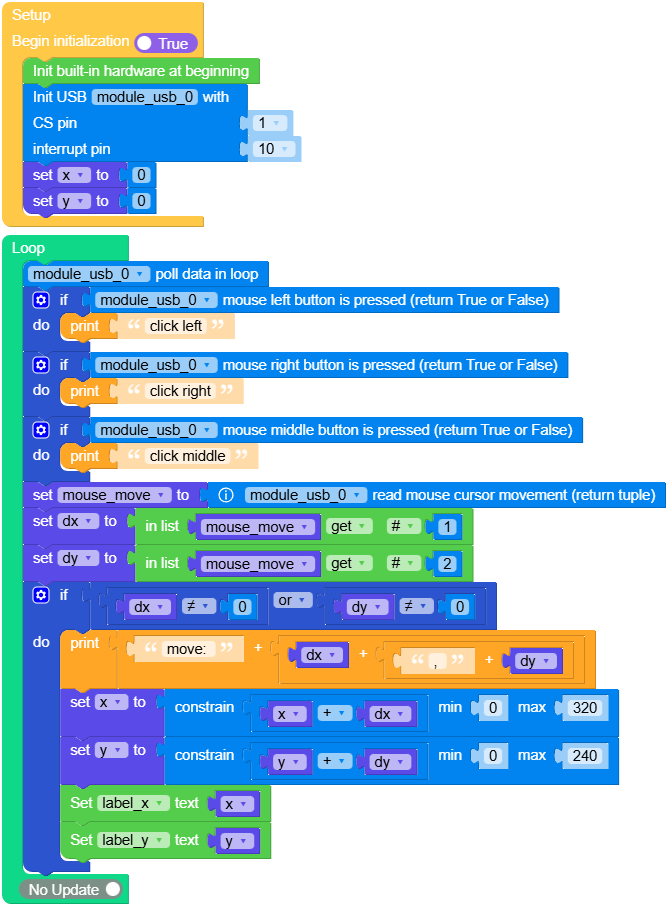
案例实现 USB 主机,获取鼠标输入
 1# SPDX-FileCopyrightText: 2025 M5Stack Technology CO LTD
 2#
 3# SPDX-License-Identifier: MIT
 4import os, sys, io
 5import M5
 6from M5 import *
 7from module import USBModule
 8
 9
10title0 = None
11label_x = None
12label_y = None
13module_usb_0 = None
14x = None
15y = None
16mouse_move = None
17dx = None
18dy = None
19
20
21def setup():
22    global title0, label_x, label_y, module_usb_0, x, y, mouse_move, dx, dy
23    M5.begin()
24    Widgets.fillScreen(0x222222)
25    title0 = Widgets.Title(
26        "Module USB Example mouse", 3, 0xFFFFFF, 0x0000FF, Widgets.FONTS.DejaVu18
27    )
28    label_x = Widgets.Label("x", 130, 90, 1.0, 0xFFFFFF, 0x222222, Widgets.FONTS.DejaVu18)
29    label_y = Widgets.Label("y", 180, 90, 1.0, 0xFFFFFF, 0x222222, Widgets.FONTS.DejaVu18)
30    module_usb_0 = USBModule(pin_cs=1, pin_int=10)
31    x = 0
32    y = 0
33
34
35def loop():
36    global title0, label_x, label_y, module_usb_0, x, y, mouse_move, dx, dy
37    module_usb_0.poll_data()
38    if module_usb_0.is_left_btn_pressed():
39        print("click left")
40    if module_usb_0.is_right_btn_pressed():
41        print("click right")
42    if module_usb_0.is_middle_btn_pressed():
43        print("click middle")
44    mouse_move = module_usb_0.read_mouse_move()
45    dx = mouse_move[0]
46    dy = mouse_move[1]
47    if dx != 0 or dy != 0:
48        print((str("move: ") + str((str(dx) + str((str(", ") + str(dy)))))))
49        x = min(max(x + dx, 0), 320)
50        y = min(max(y + dy, 0), 240)
51        label_x.setText(str(x))
52        label_y.setText(str(y))
53
54
55if __name__ == "__main__":
56    try:
57        setup()
58        while True:
59            loop()
60    except (Exception, KeyboardInterrupt) as e:
61        try:
62            from utility import print_error_msg
63
64            print_error_msg(e)
65        except ImportError:
66            print("please update to latest firmware")
键盘
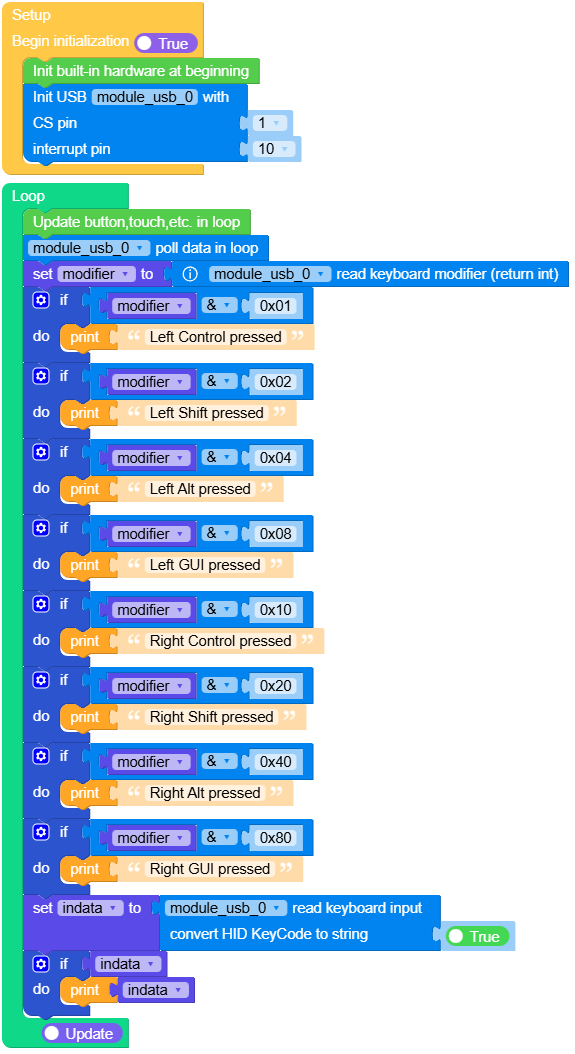
案例实现 USB 主机,获取键盘输入
 1# SPDX-FileCopyrightText: 2025 M5Stack Technology CO LTD
 2#
 3# SPDX-License-Identifier: MIT
 4import os, sys, io
 5import M5
 6from M5 import *
 7from module import USBModule
 8
 9
10module_usb_0 = None
11modifier = None
12indata = None
13
14
15def setup():
16    global module_usb_0, modifier, indata
17    M5.begin()
18    Widgets.fillScreen(0x222222)
19    module_usb_0 = USBModule(pin_cs=1, pin_int=10)
20
21
22def loop():
23    global module_usb_0, modifier, indata
24    M5.update()
25    module_usb_0.poll_data()
26    modifier = module_usb_0.read_kb_modifier()
27    if modifier & 0x01:
28        print("Left Control pressed")
29    if modifier & 0x02:
30        print("Left Shift pressed")
31    if modifier & 0x04:
32        print("Left Alt pressed")
33    if modifier & 0x08:
34        print("Left GUI pressed")
35    if modifier & 0x10:
36        print("Right Control pressed")
37    if modifier & 0x20:
38        print("Right Shift pressed")
39    if modifier & 0x40:
40        print("Right Alt pressed")
41    if modifier & 0x80:
42        print("Right GUI pressed")
43    indata = module_usb_0.read_kb_input(True)
44    if indata:
45        print(indata)
46
47
48if __name__ == "__main__":
49    try:
50        setup()
51        while True:
52            loop()
53    except (Exception, KeyboardInterrupt) as e:
54        try:
55            from utility import print_error_msg
56
57            print_error_msg(e)
58        except ImportError:
59            print("please update to latest firmware")
UiFlow2 应用示例
输入/输出引脚控制

鼠标
键盘
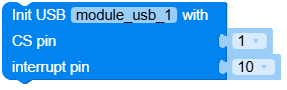
class USBModule
Constructors
- poll_data()
轮询数据。
注意:需要在主循环中调用。
UIFlow2.0






- read_mouse_move() tuple[int, int]
读取鼠标光标移动
返回包含鼠标水平位移 x 和垂直位移 y 的元组 (x, y);x 范围: -127~127,静止为0,负值为向左移动,正值为向右移动;y 范围: -127~127,静止为0,负值为向上移动,正值为向下移动。
示例:
move = usb_module.read_mouse_move()
x = move[0]
y = move[1]
UIFlow2.0


- read_kb_input(convert: bool = True) list
读取键盘输入
convert是否转为 HID Keycode 为对应的字符串。
返回一个包含键盘输入的列表(元素个数最大为6,即一次最多输入6个按键值)
示例:
res = usb_module.read_kb_input(convert=True)
# output ['a', 'b', 'Enter']

res = usb_module.read_kb_input(convert=False)
# output [0x04, 0x05, 0x28]
UIFlow2.0

- read_kb_modifier() int
读取键盘修饰键,即 “Ctrl”,“Shift”,“Alt”,“Win” 按键。
返回键盘修饰键的状态,通常是通过位掩码来表示不同修饰键的状态。0x01: 左侧控制键(Left Control)
0x02: 左侧 Shift 键(Left Shift)
0x04: 左侧 Alt 键(Left Alt)
0x08: 左侧 Windows 键(Left GUI)
0x10: 右侧控制键(Right Control)
0x20: 右侧 Shift 键(Right Shift)
0x40: 右侧 Alt 键(Right Alt)
0x80: 右侧 Windows 键(Right GUI)
示例:
modifier = module_usb.read_kb_modifier()
if modifier & 0x01:
    print("left ctrl key pressed")
UIFlow2.0


- write_gpout(pin, value)
设置输出引脚电平
pin引脚号返回1 为高电平,0 为低电平
UIFlow2.0
