CC1101 Module
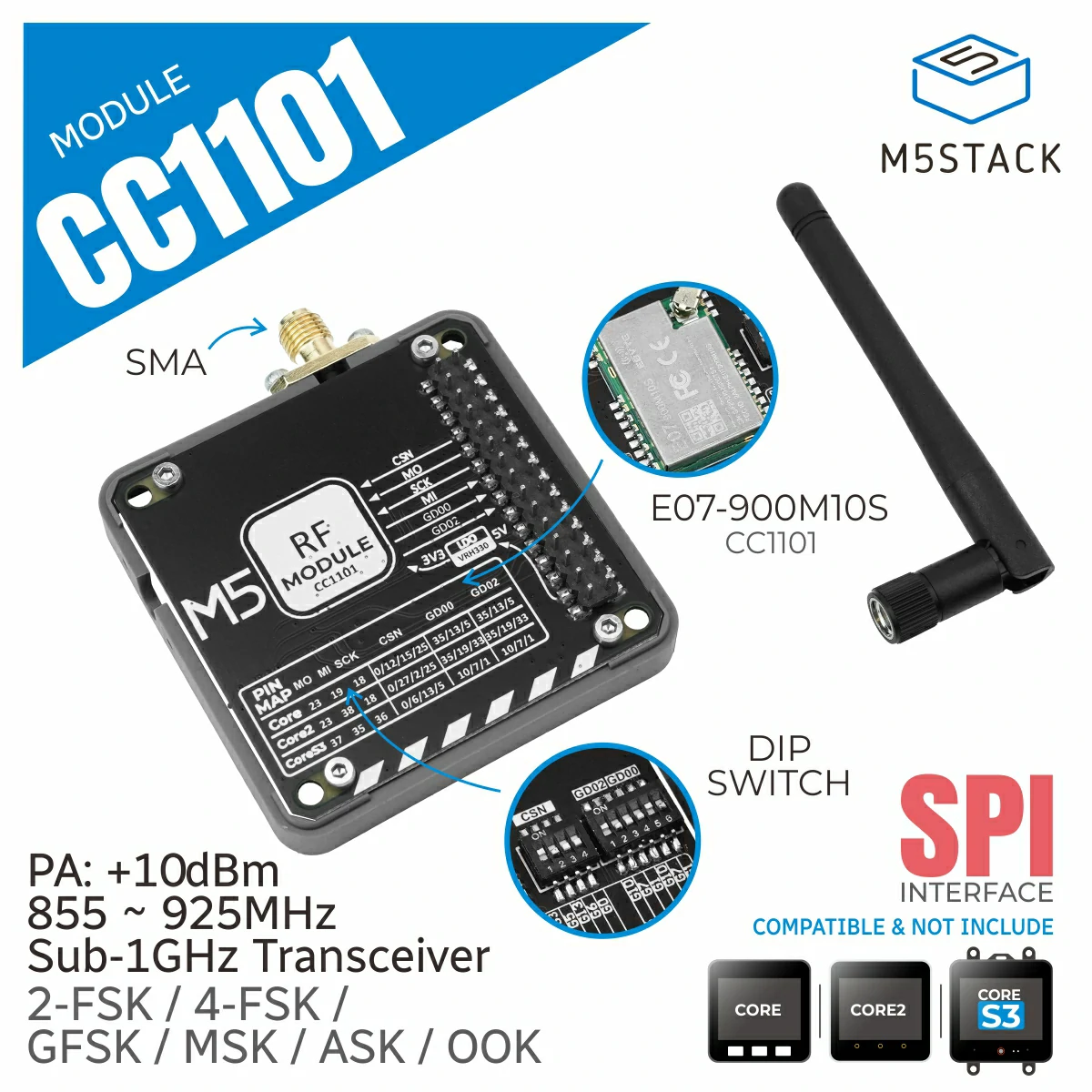
这个库是 CC1101 模块的驱动,CC1101 是一款专为超低功耗无线应用设计的低成本亚 1GHz 收发器。它工作在 855-928 MHz 频段,在极低电流消耗下提供出色的性能。
该模块具有高度可配置的基带调制解调器,支持各种调制格式,数据速率灵活,从 0.6 到 6.0 kbps。它内置支持数据包处理、数据缓冲、突发传输、空闲信道评估、链路质量指示和无线电唤醒功能。
支持以下产品:
UiFlow2 应用示例
发送数据
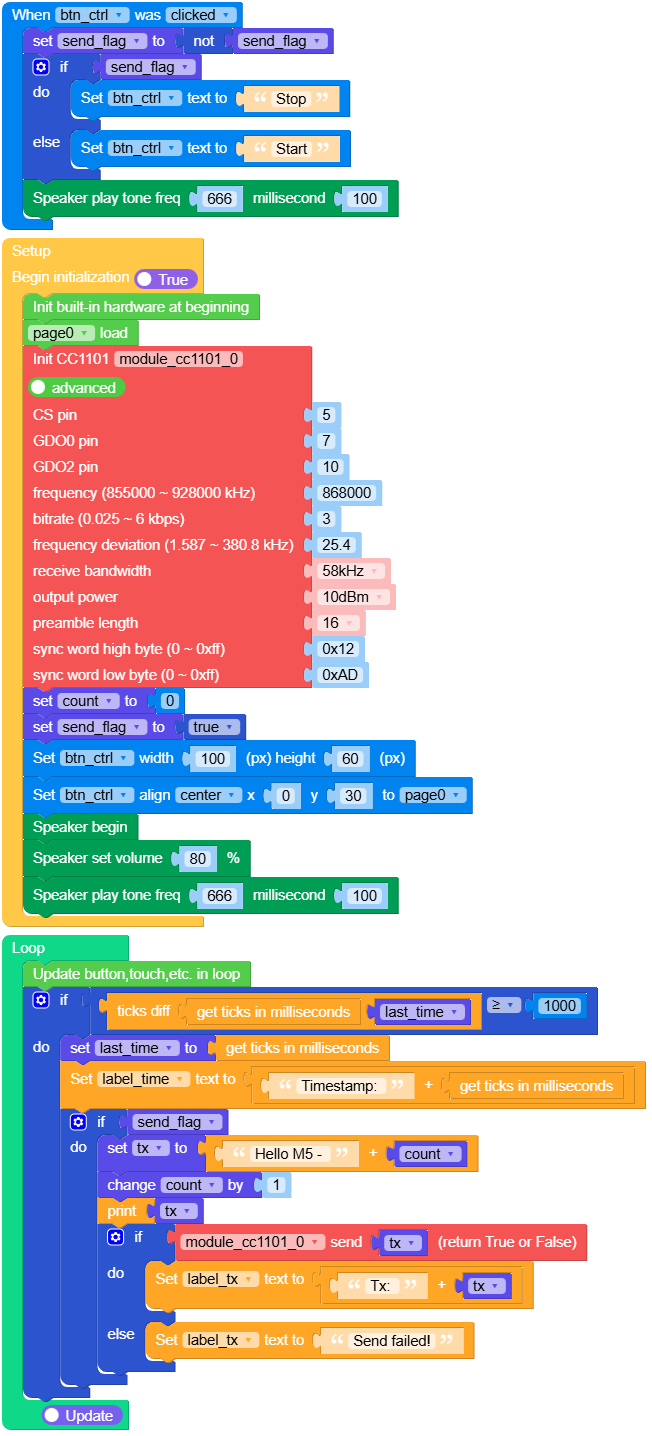
在 UiFlow2 中打开 m5cores3_cc1101_tx_example.m5f2 项目。
此示例展示如何使用 CC1101 模块发送数据。模块将持续发送带有递增计数器值的消息。
UiFlow2 代码块:
示例输出:
无
中断接收数据
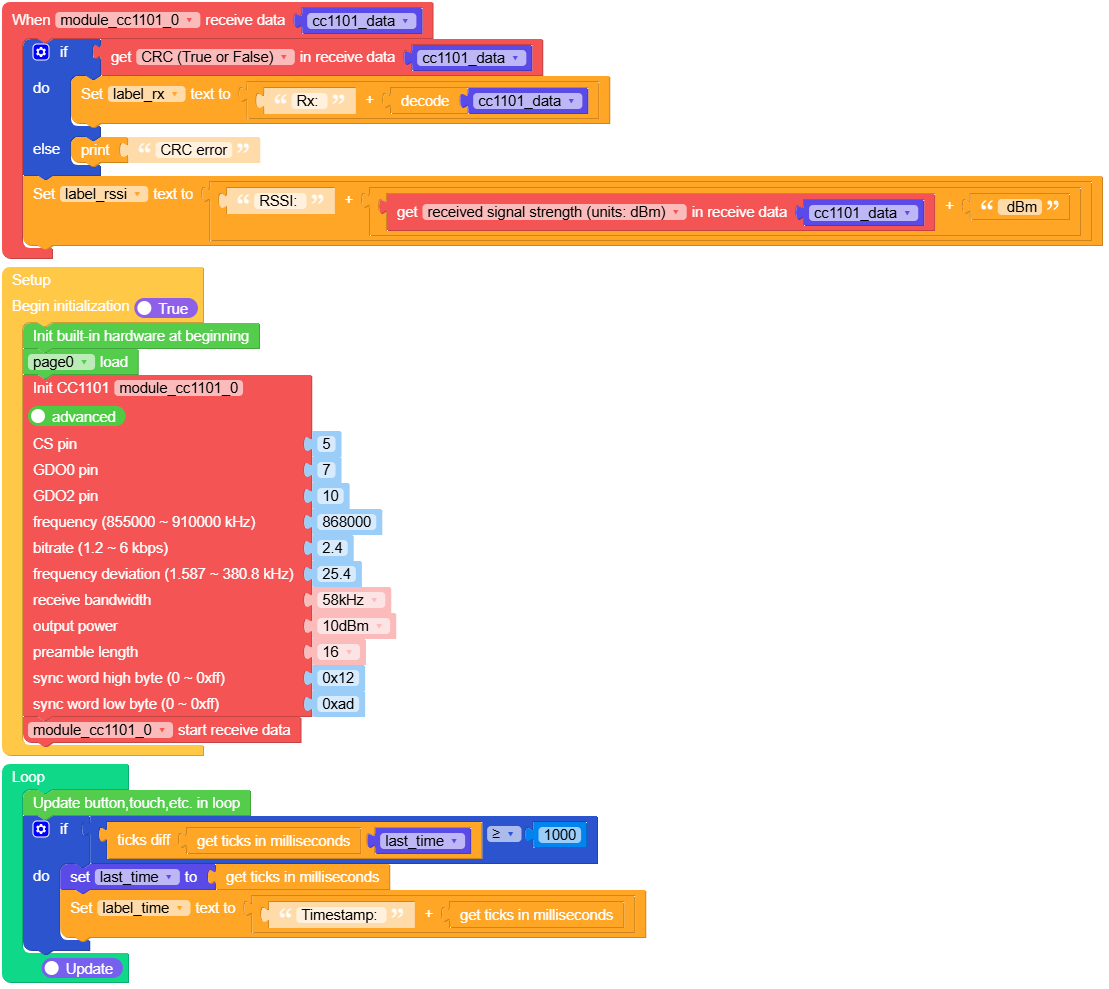
在 UiFlow2 中打开 m5cores3_cc1101_rx_example.m5f2 项目。
此示例展示如何使用基于中断的接收方式接收数据。模块将在屏幕上显示接收到的消息和 RSSI 值。
UiFlow2 代码块:
示例输出:
无
MicroPython 应用示例
发送数据
此示例展示如何使用 CC1101 模块发送数据。模块每秒持续发送带有递增计数器值的消息。
MicroPython 代码块:
  1# SPDX-FileCopyrightText: 2025 M5Stack Technology CO LTD
  2#
  3# SPDX-License-Identifier: MIT
  4
  5import os, sys, io
  6import M5
  7from M5 import *
  8import m5ui
  9import lvgl as lv
 10from module import CC1101Module
 11import time
 12
 13
 14page0 = None
 15lable_title = None
 16label_tx = None
 17label_time = None
 18btn_ctrl = None
 19module_cc1101_0 = None
 20send_flag = None
 21last_time = None
 22count = None
 23tx = None
 24
 25
 26def btn_ctrl_clicked_event(event_struct):
 27    global \
 28        page0, \
 29        lable_title, \
 30        label_tx, \
 31        label_time, \
 32        btn_ctrl, \
 33        module_cc1101_0, \
 34        send_flag, \
 35        last_time, \
 36        count, \
 37        tx
 38    send_flag = not send_flag
 39    if send_flag:
 40        btn_ctrl.set_btn_text(str("Stop"))
 41    else:
 42        btn_ctrl.set_btn_text(str("Start"))
 43    Speaker.tone(666, 100)
 44
 45
 46def btn_ctrl_event_handler(event_struct):
 47    global \
 48        page0, \
 49        lable_title, \
 50        label_tx, \
 51        label_time, \
 52        btn_ctrl, \
 53        module_cc1101_0, \
 54        send_flag, \
 55        last_time, \
 56        count, \
 57        tx
 58    event = event_struct.code
 59    if event == lv.EVENT.CLICKED and True:
 60        btn_ctrl_clicked_event(event_struct)
 61    return
 62
 63
 64def setup():
 65    global \
 66        page0, \
 67        lable_title, \
 68        label_tx, \
 69        label_time, \
 70        btn_ctrl, \
 71        module_cc1101_0, \
 72        send_flag, \
 73        last_time, \
 74        count, \
 75        tx
 76
 77    M5.begin()
 78    Widgets.setRotation(1)
 79    m5ui.init()
 80    page0 = m5ui.M5Page(bg_c=0xFFFFFF)
 81    lable_title = m5ui.M5Label(
 82        "ModuleCC1101 Tx",
 83        x=58,
 84        y=2,
 85        text_c=0x0000FF,
 86        bg_c=0xFFFFFF,
 87        bg_opa=0,
 88        font=lv.font_montserrat_24,
 89        parent=page0,
 90    )
 91    label_tx = m5ui.M5Label(
 92        "Tx:",
 93        x=5,
 94        y=64,
 95        text_c=0x0000FF,
 96        bg_c=0xFFFFFF,
 97        bg_opa=0,
 98        font=lv.font_montserrat_16,
 99        parent=page0,
100    )
101    label_time = m5ui.M5Label(
102        "Timestamp:",
103        x=5,
104        y=210,
105        text_c=0x0000FF,
106        bg_c=0xFFFFFF,
107        bg_opa=0,
108        font=lv.font_montserrat_16,
109        parent=page0,
110    )
111    btn_ctrl = m5ui.M5Button(
112        text="Stop",
113        x=127,
114        y=130,
115        bg_c=0x2196F3,
116        text_c=0xFFFFFF,
117        font=lv.font_montserrat_14,
118        parent=page0,
119    )
120
121    btn_ctrl.add_event_cb(btn_ctrl_event_handler, lv.EVENT.ALL, None)
122
123    page0.screen_load()
124    module_cc1101_0 = CC1101Module(
125        pin_cs=5,
126        pin_gdo0=7,
127        pin_gdo2=10,
128        freq_khz=868000,
129        bitrate_kbps=3,
130        freq_dev_khz=25.4,
131        rx_bw_khz=58,
132        output_power=10,
133        preamble_length=16,
134        sync_word_h=0x12,
135        sync_word_l=0xAD,
136    )
137    count = 0
138    send_flag = True
139    btn_ctrl.set_size(100, 60)
140    btn_ctrl.align_to(page0, lv.ALIGN.CENTER, 0, 30)
141    Speaker.begin()
142    Speaker.setVolumePercentage(0.8)
143    Speaker.tone(666, 100)
144
145
146def loop():
147    global \
148        page0, \
149        lable_title, \
150        label_tx, \
151        label_time, \
152        btn_ctrl, \
153        module_cc1101_0, \
154        send_flag, \
155        last_time, \
156        count, \
157        tx
158    M5.update()
159    if (time.ticks_diff((time.ticks_ms()), last_time)) >= 1000:
160        last_time = time.ticks_ms()
161        label_time.set_text(str((str("Timestamp: ") + str((time.ticks_ms())))))
162        if send_flag:
163            tx = str("Hello M5 - ") + str(count)
164            count = (count if isinstance(count, (int, float)) else 0) + 1
165            print(tx)
166            if module_cc1101_0.send(tx):
167                label_tx.set_text(str((str("Tx: ") + str(tx))))
168            else:
169                label_tx.set_text(str("Send failed!"))
170
171
172if __name__ == "__main__":
173    try:
174        setup()
175        while True:
176            loop()
177    except (Exception, KeyboardInterrupt) as e:
178        try:
179            m5ui.deinit()
180            from utility import print_error_msg
181
182            print_error_msg(e)
183        except ImportError:
184            print("please update to latest firmware")
示例输出:
无
中断接收数据
此示例展示如何使用基于中断的接收方式接收数据。模块将在屏幕上显示接收到的消息和 RSSI 值。
MicroPython 代码块:
  1# SPDX-FileCopyrightText: 2025 M5Stack Technology CO LTD
  2#
  3# SPDX-License-Identifier: MIT
  4
  5import os, sys, io
  6import M5
  7from M5 import *
  8import m5ui
  9import lvgl as lv
 10from module import CC1101Module
 11import time
 12
 13
 14page0 = None
 15label_title = None
 16label_rssi = None
 17label_rx = None
 18label_time = None
 19module_cc1101_0 = None
 20cc1101_data = None
 21last_time = None
 22
 23
 24def module_cc1101_0_receive_event(received_data):
 25    global \
 26        page0, \
 27        label_title, \
 28        label_rssi, \
 29        label_rx, \
 30        label_time, \
 31        module_cc1101_0, \
 32        cc1101_data, \
 33        last_time
 34    cc1101_data = received_data
 35    if cc1101_data.crc_ok:
 36        label_rx.set_text(str((str("Rx: ") + str((cc1101_data.decode())))))
 37    else:
 38        print("CRC error")
 39    label_rssi.set_text(str((str("RSSI: ") + str((str((cc1101_data.rssi)) + str(" dBm"))))))
 40
 41
 42def setup():
 43    global \
 44        page0, \
 45        label_title, \
 46        label_rssi, \
 47        label_rx, \
 48        label_time, \
 49        module_cc1101_0, \
 50        cc1101_data, \
 51        last_time
 52
 53    M5.begin()
 54    Widgets.setRotation(1)
 55    m5ui.init()
 56    page0 = m5ui.M5Page(bg_c=0xFFFFFF)
 57    label_title = m5ui.M5Label(
 58        "ModuleCC1101 Rx",
 59        x=56,
 60        y=2,
 61        text_c=0x0000FF,
 62        bg_c=0xFFFFFF,
 63        bg_opa=0,
 64        font=lv.font_montserrat_24,
 65        parent=page0,
 66    )
 67    label_rssi = m5ui.M5Label(
 68        "RSSI:",
 69        x=5,
 70        y=95,
 71        text_c=0x0000FF,
 72        bg_c=0xFFFFFF,
 73        bg_opa=0,
 74        font=lv.font_montserrat_16,
 75        parent=page0,
 76    )
 77    label_rx = m5ui.M5Label(
 78        "Rx:",
 79        x=5,
 80        y=65,
 81        text_c=0x0000FF,
 82        bg_c=0xFFFFFF,
 83        bg_opa=0,
 84        font=lv.font_montserrat_16,
 85        parent=page0,
 86    )
 87    label_time = m5ui.M5Label(
 88        "Timestamp:",
 89        x=5,
 90        y=210,
 91        text_c=0x0000FF,
 92        bg_c=0xFFFFFF,
 93        bg_opa=0,
 94        font=lv.font_montserrat_16,
 95        parent=page0,
 96    )
 97
 98    page0.screen_load()
 99    module_cc1101_0 = CC1101Module(
100        pin_cs=5,
101        pin_gdo0=7,
102        pin_gdo2=10,
103        freq_khz=868000,
104        bitrate_kbps=3,
105        freq_dev_khz=25.4,
106        rx_bw_khz=58,
107        output_power=10,
108        preamble_length=16,
109        sync_word_h=0x12,
110        sync_word_l=0xAD,
111    )
112    module_cc1101_0.set_rx_irq_callback(module_cc1101_0_receive_event)
113    module_cc1101_0.start_recv()
114
115
116def loop():
117    global \
118        page0, \
119        label_title, \
120        label_rssi, \
121        label_rx, \
122        label_time, \
123        module_cc1101_0, \
124        cc1101_data, \
125        last_time
126    M5.update()
127    if (time.ticks_diff((time.ticks_ms()), last_time)) >= 1000:
128        last_time = time.ticks_ms()
129        label_time.set_text(str((str("Timestamp: ") + str((time.ticks_ms())))))
130
131
132if __name__ == "__main__":
133    try:
134        setup()
135        while True:
136            loop()
137    except (Exception, KeyboardInterrupt) as e:
138        try:
139            m5ui.deinit()
140            from utility import print_error_msg
141
142            print_error_msg(e)
143        except ImportError:
144            print("please update to latest firmware")
示例输出:
无
API
class CC1101Module
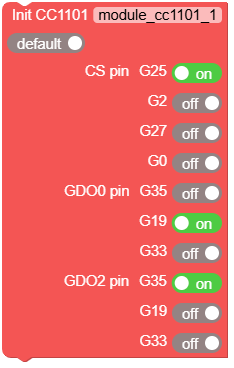
- class module.cc1101.CC1101Module(pin_cs=5, pin_gdo0=7, pin_gdo2=10, freq_khz=868000, bitrate_kbps=2.4, freq_dev_khz=25.4, rx_bw_khz=58.0, output_power=10, preamble_length=16, sync_word_h=0x12, sync_word_l=0xAD)
创建 CC1101Module 对象。
- 参数:
pin_cs (int) – (CS)片选引脚号。
pin_gdo0 (int) – (GDO0)中断引脚号。
pin_gdo2 (int) – (GDO2)可选中断引脚号。
freq_khz (int) – CC1101 射频频率(kHz),范围:855000 到 928000 kHz。
bitrate_kbps (float) – 数据速率(kbps),范围:0.6 到 6.0 kbps。
freq_dev_khz (float) – 频率偏差(kHz),范围:1.6 到 380 kHz。
rx_bw_khz (float) – 接收带宽(kHz),范围:58 到 812 kHz。
output_power (int) – 输出功率(dBm),范围:-30 到 10 dBm。
preamble_length (int) – 前导码长度(位),选项:16、24、32、48、64、96、128、192。
sync_word_h (int) – 同步字高字节(0x00 到 0xFF)。
sync_word_l (int) – 同步字低字节(0x00 到 0xFF)。
UiFlow2 代码块:
MicroPython 代码块:
from module import CC1101Module

module_cc1101_0 = CC1101Module(5, 7, 10, 868000, 2.4, 25.4, 58.0, 10, 16, 0x12, 0xAD)
- set_freq(freq_khz)
设置频率(kHz)。
- 参数:
freq_khz (int) – 频率(kHz)(855000 ~ 928000),默认值为 868000。
UiFlow2 代码块:

MicroPython 代码块:
module_cc1101_0.set_freq(868000)
- set_bitrate(bitrate_kbps)
设置数据速率(kbps)。
- 参数:
bitrate_kbps (float) – 数据速率(kbps)(0.6 ~ 6.0)
UiFlow2 代码块:

MicroPython 代码块:
module_cc1101_0.set_bitrate(2.4)
- set_freq_dev(freq_dev_khz)
设置频率偏差(kHz)。
- 参数:
freq_dev_khz (float) – 频率偏差(kHz)(1.6 ~ 380)
UiFlow2 代码块:

MicroPython 代码块:
module_cc1101_0.set_freq_dev(25.4)
- set_rx_bw(rx_bw_khz)
设置接收带宽(kHz)。
- 参数:
rx_bw_khz (float) – 接收带宽(kHz)(58 ~ 812)
UiFlow2 代码块:

MicroPython 代码块:
module_cc1101_0.set_rx_bw(58.0)
- set_output_power(output_power)
设置输出功率(dBm)。
- 参数:
output_power (int) – 输出功率(dBm)(-30 ~ 10)
UiFlow2 代码块:

MicroPython 代码块:
module_cc1101_0.set_output_power(10)
- set_preamble_length(preamble_length)
设置前导码长度(位)。
- 参数:
preamble_length (int) – 前导码长度(位),必须是以下之一:16、24、32、48、64、96、128、192。
UiFlow2 代码块:

MicroPython 代码块:
module_cc1101_0.set_preamble_length(16)
- set_sync_word(sync_word_h, sync_word_l)
设置同步字。
UiFlow2 代码块:

MicroPython 代码块:
module_cc1101_0.set_sync_word(0x12, 0xAD)
- send(packet)
发送数据。
发送数据包,成功时返回 True。
UiFlow2 代码块:

MicroPython 代码块:
module_cc1101_0.send("Hello World")
- recv(timeout_ms)
接收数据。
- 参数:
timeout_ms (int) – 超时时间(毫秒)(可选)。默认为 None。
- 返回:
接收到的数据包实例或超时时返回 None
- 返回类型:
CC1101Packet | None
尝试接收 CC1101 数据包。如果发生超时则返回 None,否则返回接收到的数据包实例。
UiFlow2 代码块:

MicroPython 代码块:
packet = module_cc1101_0.recv()
if packet:
    if packet.crc_ok:
        print(f"Received: {packet.decode()}")
        print(f"RSSI: {packet.rssi} dBm")
        print(f"LQI: {packet.lqi}")
    else:
        print("CRC error")
- start_recv()
开始接收数据。
此方法启动开始接收数据的过程。
UiFlow2 代码块:

MicroPython 代码块:
module_cc1101_0.start_recv()
- set_rx_irq_callback(callback)
设置接收中断回调函数,在 IRQ 触发时执行。
- 参数:
callback – 当中断触发时要调用的回调函数。回调函数应接受一个 CC1101Packet 参数且不返回任何值。
UiFlow2 代码块:

MicroPython 代码块:
def on_packet_received(packet):
    print(f"Received: {packet.decode()}")

module_cc1101_0.set_rx_irq_callback(on_packet_received)
- set_tx_irq_callback(callback)
设置发送中断回调函数,在 IRQ 触发时执行。
- 参数:
callback – 当中断触发时要调用的回调函数。回调函数应接受一个参数(引脚对象,可以忽略)且不返回任何值。
UiFlow2 代码块:
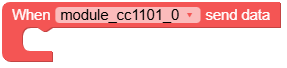
MicroPython 代码块:
def on_packet_sent(_):
    print("Packet sent successfully")

module_cc1101_0.set_tx_irq_callback(on_packet_sent)
- standby()
将模块设置为待机模式。
将 CC1101 模块置于待机模式,消耗更少的功率。
UiFlow2 代码块:

MicroPython 代码块:
module_cc1101_0.standby()
- rx_irq_triggered()
检查 RX IRQ 触发。
- 返回:
如果自上次发送或接收开始以来已触发中断服务例程(ISR),则返回 True。
- 返回类型:
UiFlow2 代码块:

MicroPython 代码块:
module_cc1101_0.rx_irq_triggered()
