M5Calendar
M5Calendar 是一个可在用户界面中创建日历的控件,可用于显示并选择日期。
UiFlow2 示例
事件日历
在 UiFlow2 中打开 calendar_core2_example.m5f2 项目。
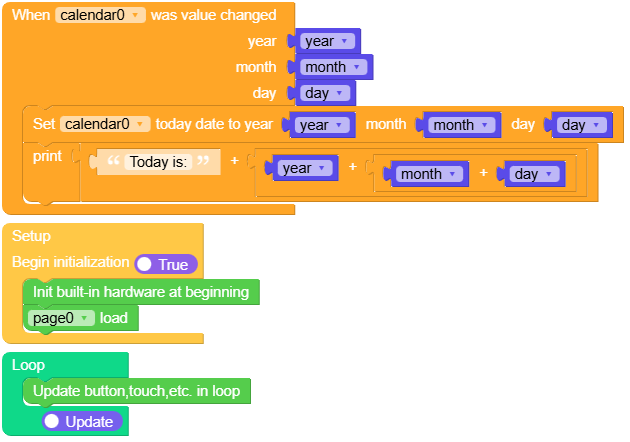
本示例创建了一个日历,当日期更改时会触发事件。
UiFlow2 代码块:
示例输出:
None
MicroPython 示例
事件日历
本示例创建了一个日历,当日期更改时会触发事件。
MicroPython 代码块:
 1# SPDX-FileCopyrightText: 2025 M5Stack Technology CO LTD
 2#
 3# SPDX-License-Identifier: MIT
 4
 5import os, sys, io
 6import M5
 7from M5 import *
 8import m5ui
 9import lvgl as lv
10
11
12page0 = None
13calendar0 = None
14
15
16year = None
17month = None
18day = None
19
20
21def calendar0_value_changed_event(date):
22    global page0, calendar0, year, month, day
23    year = date.year
24    month = date.month
25    day = date.day
26    calendar0.set_today_date(year, month, day)
27    print((str("Today is:") + str((str(year) + str((str(month) + str(day)))))))
28
29
30def calendar0_event_handler(event_struct):
31    global page0, calendar0, year, month, day
32    event = event_struct.code
33    if event == lv.EVENT.VALUE_CHANGED:
34        date = lv.calendar_date_t()
35        if calendar0.get_pressed_date(date) == lv.RESULT.OK:
36            calendar0_value_changed_event(date)
37    return
38
39
40def setup():
41    global page0, calendar0, year, month, day
42
43    M5.begin()
44    Widgets.setRotation(1)
45    m5ui.init()
46    page0 = m5ui.M5Page(bg_c=0xFFFFFF)
47    calendar0 = m5ui.M5Calendar(
48        x=0,
49        y=0,
50        w=320,
51        h=240,
52        style="arrow",
53        today_date=[2025, 8, 7],
54        show_month=[2025, 8],
55        parent=page0,
56    )
57
58    calendar0.add_event_cb(calendar0_event_handler, lv.EVENT.ALL, None)
59
60    page0.screen_load()
61
62
63def loop():
64    global page0, calendar0, year, month, day
65    M5.update()
66
67
68if __name__ == "__main__":
69    try:
70        setup()
71        while True:
72            loop()
73    except (Exception, KeyboardInterrupt) as e:
74        try:
75            m5ui.deinit()
76            from utility import print_error_msg
77
78            print_error_msg(e)
79        except ImportError:
80            print("please update to latest firmware")
示例输出:
None
API参考
M5Calendar
- class m5ui.calendar.M5Calendar(*args, **kwargs)
基类:
calendar创建一个日历对象。
- 参数:
MicroPython 代码块:
from m5ui import M5Calendar
import lvgl as lv

m5ui.init()
calendar_0 = M5Calendar(x=0, y=0, w=200, h=200, style=None, today_date=[2024, 1, 1], show_month=[2024, 1], parent=page0)
- set_month_shown(year, month)
设置日历显示的年份和月份。
UiFlow2 代码块:

MicroPython 代码块:
calendar_0.set_month_shown(2023, 3)
- set_pos(x, y)
设置日历的位置。
UiFlow2 代码块:

MicroPython 代码块:
calendar_0.set_pos(100, 100)
- set_size(width, height)
设置日历的尺寸。
UiFlow2 代码块:

MicroPython 代码块:
calendar_0.set_size(100, 50)
- align_to(obj, align, x, y)
将日历对齐到另一个对象。
UiFlow2 代码块:

MicroPython 代码块:
calendar_0.align_to(page_0, lv.ALIGN.CENTER, 0, 0)
- add_event_cb(handler, event, user_data)
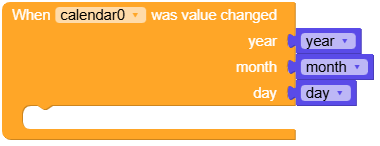
为日历添加事件回调。当指定事件发生时,将调用该回调函数。
- 参数:
handler (function) – 要调用的回调函数。
event (int) – 要监听的事件。
user_data (Any) – 可选用户数据,将传递给回调函数。
UiFlow2 代码块:
MicroPython 代码块:
def calendar_event_handler(event_struct):
    if event_struct.get_code() == lv.EVENT.VALUE_CHANGED:
        date = lv.calendar_date_t()
        if calendar_0.get_pressed_date(date) == lv.RESULT.OK:
            calendar_0.set_today_date(date.year, date.month, date.day)
            print("Clicked date: %02d.%02d.%02d" % (date.year, date.month, date.day))

calendar_0.add_event_cb(calendar_event_handler, lv.EVENT.ALL, None)