HAT 18650C
HAT 18650C V1.1 集成 AW32257 充电管理芯片和 INA226 功率监测芯片,可测量电池电压、电流和功率,控制电池充电、设置充电电流、读取充电状态及故障状态,并控制 AW32257 Boost/OTG 输出。
支持以下产品:

备注
按照当前硬件的电流方向,充电电流通常为负值,放电电流通常为正值。充电电流和电压通过 AW32257 寄存器档位设置,因此实际值会映射到支持的档位,而不是任意值。
UiFlow2 Example
Charge Test
在 UiFlow2 中打开 sticks3_hat18650c_charge_example.m5f2 项目。
此示例读取电池电压和电流、显示充电状态,并通过 StickS3 按键控制充电开启或关闭。
UiFlow2 代码块:
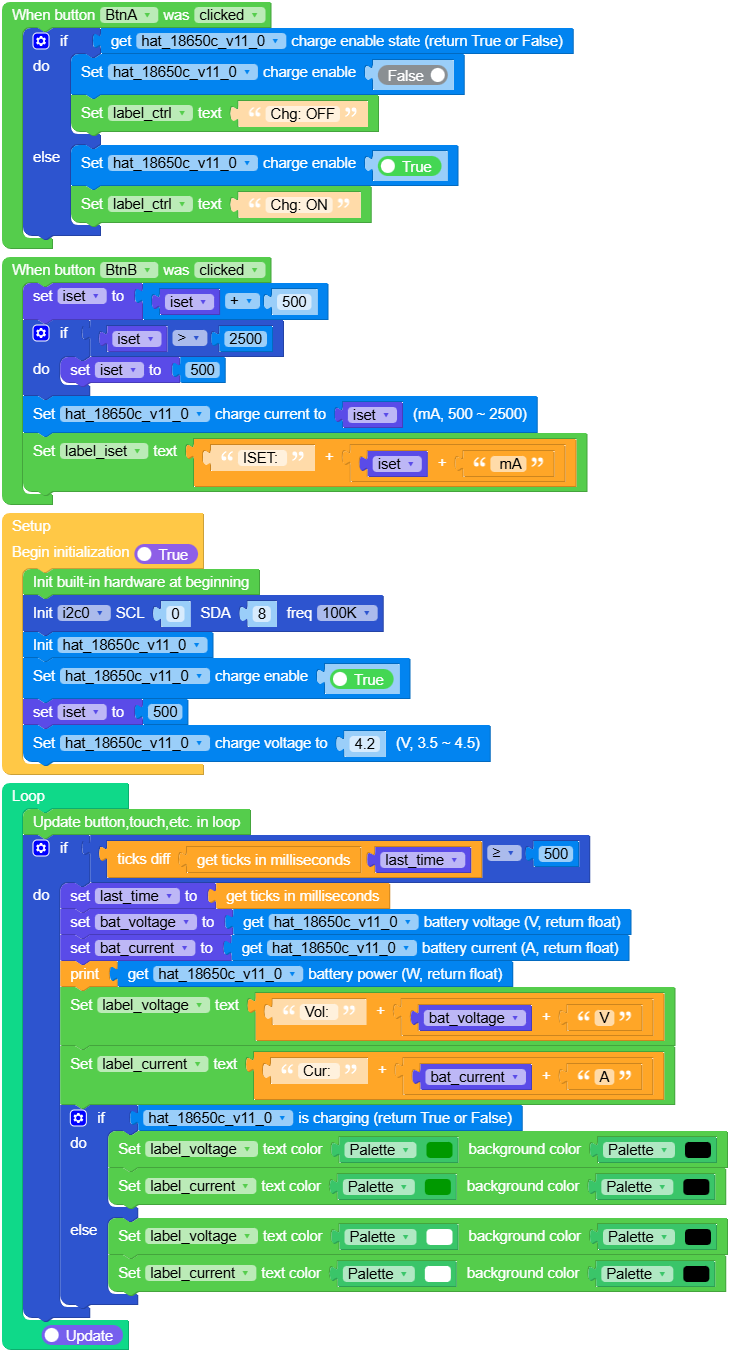
示例输出:
None
Output Test
在 UiFlow2 中打开 sticks3_hat18650c_output_example.m5f2 项目。
此示例读取电池电压和电流、显示 OTG 输出状态,并通过 StickS3 按键控制 OTG 输出开启或关闭。
UiFlow2 代码块:
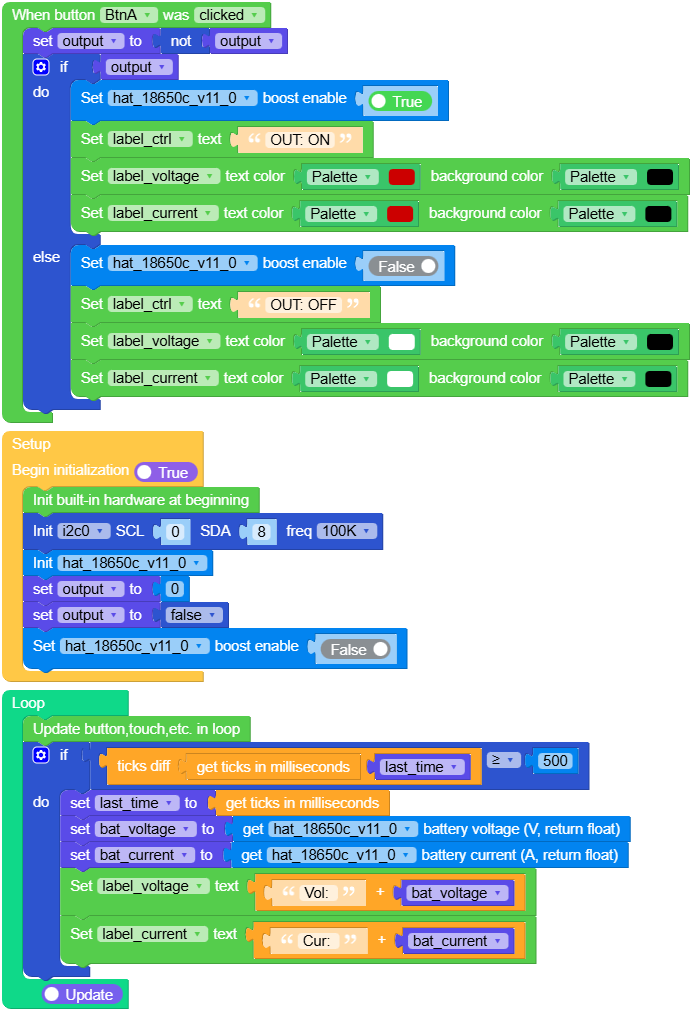
示例输出:
None
MicroPython Example
Charge Test
读取电池电压和电流,显示充电状态,并通过 StickS3 按键控制充电开启或关闭。
MicroPython 代码块:
  1# SPDX-FileCopyrightText: 2024 M5Stack Technology CO LTD
  2#
  3# SPDX-License-Identifier: MIT
  4
  5import os, sys, io
  6import M5
  7from M5 import *
  8from hat import HAT18650CHat
  9from hardware import Pin
 10from hardware import I2C
 11import time
 12
 13
 14label_title = None
 15label_voltage = None
 16label_current = None
 17label_iset = None
 18label_ctrl = None
 19i2c0 = None
 20hat_18650c_v11_0 = None
 21
 22
 23iset = None
 24last_time = None
 25bat_voltage = None
 26bat_current = None
 27
 28
 29def btna_was_clicked_event(state):
 30    global \
 31        label_title, \
 32        label_voltage, \
 33        label_current, \
 34        label_iset, \
 35        label_ctrl, \
 36        i2c0, \
 37        hat_18650c_v11_0, \
 38        iset, \
 39        last_time, \
 40        bat_voltage, \
 41        bat_current
 42    if hat_18650c_v11_0.get_charge_enable():
 43        hat_18650c_v11_0.set_charge_enable(False)
 44        label_ctrl.setText(str("Chg: OFF"))
 45    else:
 46        hat_18650c_v11_0.set_charge_enable(True)
 47        label_ctrl.setText(str("Chg: ON"))
 48
 49
 50def btnb_was_clicked_event(state):
 51    global \
 52        label_title, \
 53        label_voltage, \
 54        label_current, \
 55        label_iset, \
 56        label_ctrl, \
 57        i2c0, \
 58        hat_18650c_v11_0, \
 59        iset, \
 60        last_time, \
 61        bat_voltage, \
 62        bat_current
 63    iset = iset + 500
 64    if iset > 2500:
 65        iset = 500
 66    hat_18650c_v11_0.set_charge_current(iset)
 67    label_iset.setText(str((str("ISET: ") + str((str(iset) + str(" mA"))))))
 68
 69
 70def setup():
 71    global \
 72        label_title, \
 73        label_voltage, \
 74        label_current, \
 75        label_iset, \
 76        label_ctrl, \
 77        i2c0, \
 78        hat_18650c_v11_0, \
 79        iset, \
 80        last_time, \
 81        bat_voltage, \
 82        bat_current
 83
 84    M5.begin()
 85    Widgets.setRotation(0)
 86    Widgets.fillScreen(0x000000)
 87    label_title = Widgets.Label(
 88        "Charge", 22, 5, 1.0, 0x17EE6A, 0x000000, Widgets.FONTS.Montserrat24
 89    )
 90    label_voltage = Widgets.Label(
 91        "Vol:", 7, 45, 1.0, 0xFFFFFF, 0x000000, Widgets.FONTS.Montserrat18
 92    )
 93    label_current = Widgets.Label(
 94        "Cur:", 3, 70, 1.0, 0xFFFFFF, 0x000000, Widgets.FONTS.Montserrat18
 95    )
 96    label_iset = Widgets.Label(
 97        "ISET: 500mA", 3, 179, 1.0, 0xFFFFFF, 0x000000, Widgets.FONTS.Montserrat18
 98    )
 99    label_ctrl = Widgets.Label(
100        "CHG: ON", 26, 214, 1.0, 0xFFFFFF, 0x000000, Widgets.FONTS.Montserrat18
101    )
102
103    BtnA.setCallback(type=BtnA.CB_TYPE.WAS_CLICKED, cb=btna_was_clicked_event)
104    BtnB.setCallback(type=BtnB.CB_TYPE.WAS_CLICKED, cb=btnb_was_clicked_event)
105
106    i2c0 = I2C(0, scl=Pin(0), sda=Pin(8), freq=100000)
107    hat_18650c_v11_0 = HAT18650CHat(i2c0)
108    hat_18650c_v11_0.set_charge_enable(True)
109    iset = 500
110    hat_18650c_v11_0.set_charge_voltage(4.2)
111
112
113def loop():
114    global \
115        label_title, \
116        label_voltage, \
117        label_current, \
118        label_iset, \
119        label_ctrl, \
120        i2c0, \
121        hat_18650c_v11_0, \
122        iset, \
123        last_time, \
124        bat_voltage, \
125        bat_current
126    M5.update()
127    if (time.ticks_diff((time.ticks_ms()), last_time)) >= 500:
128        last_time = time.ticks_ms()
129        bat_voltage = hat_18650c_v11_0.get_battery_voltage()
130        bat_current = hat_18650c_v11_0.get_battery_current()
131        print(hat_18650c_v11_0.get_battery_power())
132        label_voltage.setText(str((str("Vol: ") + str((str(bat_voltage) + str("V"))))))
133        label_current.setText(str((str("Cur: ") + str((str(bat_current) + str("A"))))))
134        if hat_18650c_v11_0.is_charging():
135            label_voltage.setColor(0x009900, 0x000000)
136            label_current.setColor(0x009900, 0x000000)
137        else:
138            label_voltage.setColor(0xFFFFFF, 0x000000)
139            label_current.setColor(0xFFFFFF, 0x000000)
140
141
142if __name__ == "__main__":
143    try:
144        setup()
145        while True:
146            loop()
147    except (Exception, KeyboardInterrupt) as e:
148        try:
149            from utility import print_error_msg
150
151            print_error_msg(e)
152        except ImportError:
153            print("please update to latest firmware")
示例输出:
None
Output Test
读取电池电压和电流,显示 OTG 输出状态,并通过 StickS3 按键控制 OTG 输出开启或关闭。
MicroPython 代码块:
  1# SPDX-FileCopyrightText: 2024 M5Stack Technology CO LTD
  2#
  3# SPDX-License-Identifier: MIT
  4
  5import os, sys, io
  6import M5
  7from M5 import *
  8from hardware import Pin
  9from hardware import I2C
 10from hat import HAT18650CHat
 11import time
 12
 13
 14label_title = None
 15label_voltage = None
 16label_current = None
 17label_ctrl = None
 18i2c0 = None
 19hat_18650c_v11_0 = None
 20
 21
 22output = None
 23last_time = None
 24bat_voltage = None
 25bat_current = None
 26
 27
 28def btna_was_clicked_event(state):
 29    global \
 30        label_title, \
 31        label_voltage, \
 32        label_current, \
 33        label_ctrl, \
 34        i2c0, \
 35        hat_18650c_v11_0, \
 36        output, \
 37        last_time, \
 38        bat_voltage, \
 39        bat_current
 40    output = not output
 41    if output:
 42        hat_18650c_v11_0.set_boost_enable(True)
 43        label_ctrl.setText(str("OUT: ON"))
 44        label_voltage.setColor(0xCC0000, 0x000000)
 45        label_current.setColor(0xCC0000, 0x000000)
 46    else:
 47        hat_18650c_v11_0.set_boost_enable(False)
 48        label_ctrl.setText(str("OUT: OFF"))
 49        label_voltage.setColor(0xFFFFFF, 0x000000)
 50        label_current.setColor(0xFFFFFF, 0x000000)
 51
 52
 53def setup():
 54    global \
 55        label_title, \
 56        label_voltage, \
 57        label_current, \
 58        label_ctrl, \
 59        i2c0, \
 60        hat_18650c_v11_0, \
 61        output, \
 62        last_time, \
 63        bat_voltage, \
 64        bat_current
 65
 66    M5.begin()
 67    Widgets.setRotation(0)
 68    Widgets.fillScreen(0x000000)
 69    label_title = Widgets.Label(
 70        "OUTPUT", 28, 5, 1.0, 0x17EE6A, 0x000000, Widgets.FONTS.Montserrat18
 71    )
 72    label_voltage = Widgets.Label(
 73        "Vol:", 7, 45, 1.0, 0xFFFFFF, 0x000000, Widgets.FONTS.Montserrat18
 74    )
 75    label_current = Widgets.Label(
 76        "Cur:", 3, 70, 1.0, 0xFFFFFF, 0x000000, Widgets.FONTS.Montserrat18
 77    )
 78    label_ctrl = Widgets.Label(
 79        "OUT: OFF", 23, 205, 1.0, 0xFFFFFF, 0x000000, Widgets.FONTS.Montserrat18
 80    )
 81
 82    BtnA.setCallback(type=BtnA.CB_TYPE.WAS_CLICKED, cb=btna_was_clicked_event)
 83
 84    i2c0 = I2C(0, scl=Pin(0), sda=Pin(8), freq=100000)
 85    hat_18650c_v11_0 = HAT18650CHat(i2c0)
 86    output = 0
 87    output = False
 88    hat_18650c_v11_0.set_boost_enable(False)
 89
 90
 91def loop():
 92    global \
 93        label_title, \
 94        label_voltage, \
 95        label_current, \
 96        label_ctrl, \
 97        i2c0, \
 98        hat_18650c_v11_0, \
 99        output, \
100        last_time, \
101        bat_voltage, \
102        bat_current
103    M5.update()
104    if (time.ticks_diff((time.ticks_ms()), last_time)) >= 500:
105        last_time = time.ticks_ms()
106        bat_voltage = hat_18650c_v11_0.get_battery_voltage()
107        bat_current = hat_18650c_v11_0.get_battery_current()
108        label_voltage.setText(str((str("Vol: ") + str(bat_voltage))))
109        label_current.setText(str((str("Cur: ") + str(bat_current))))
110
111
112if __name__ == "__main__":
113    try:
114        setup()
115        while True:
116            loop()
117    except (Exception, KeyboardInterrupt) as e:
118        try:
119            from utility import print_error_msg
120
121            print_error_msg(e)
122        except ImportError:
123            print("please update to latest firmware")
示例输出:
None
API
HAT18650CHat
- class hat.hat18650c.HAT18650CHat(i2c, charger_address=micropython.const, monitor_address=micropython.const, shunt_resistor=0.01, max_expected_current=10)
基类:
object创建 HAT18650CHat 对象。
AW32257 用于控制电池充电和 Boost/OTG 输出,INA226 用于测量电池总线电压、电流和功率。
- 参数:
UiFlow2 代码块:

MicroPython 代码块:
from hardware import I2C, Pin
from hat import HAT18650CHat

i2c0 = I2C(0, scl=Pin(0), sda=Pin(8), freq=100000)
hat18650c = HAT18650CHat(i2c0)
- set_charge_enable(enable)
开启或关闭电池充电。
- 参数:
enable (bool) – True 表示开启充电,False 表示关闭充电。
- 返回类型:
None
UiFlow2 代码块:

MicroPython 代码块:
hat18650c.set_charge_enable(True)
hat18650c.set_charge_enable(False)
- get_charge_enable()
获取电池充电使能状态。
- 返回:
充电已开启时返回 True,否则返回 False。
- 返回类型:
UiFlow2 代码块:

MicroPython 代码块:
charge_enable = hat18650c.get_charge_enable()
- set_charge_current(current_ma)
设置快速充电电流。
目标电流会限制在 HAT 18650C 支持的档位表范围内,并使用不大于目标值的最接近档位,因此实际写入值可能低于请求值。
- 参数:
current_ma (int) – 目标充电电流,单位为 mA。
- 返回类型:
None
UiFlow2 代码块:

MicroPython 代码块:
hat18650c.set_charge_current(1000)
- get_charge_current()
获取快速充电电流设置。
返回实际选中的电流档位值。
- 返回:
充电电流设置值,单位为 mA。
- 返回类型:
UiFlow2 代码块:

MicroPython 代码块:
current_ma = hat18650c.get_charge_current()
- set_charge_voltage(voltage)
设置充电调节电压。
目标电压会限制在 AW32257 的有效范围内,并舍入到最接近的寄存器档位,因此实际写入值只是接近请求值。
- 参数:
voltage (float) – 目标充电电压,单位为伏特,有效范围为 3.50V 至 4.50V。
- 返回类型:
None
UiFlow2 代码块:

MicroPython 代码块:
hat18650c.set_charge_voltage(4.2)
- get_charge_voltage()
获取充电调节电压。
返回实际选中的电压档位。
- 返回:
充电调节电压,单位为伏特。
- 返回类型:
UiFlow2 代码块:

MicroPython 代码块:
voltage = hat18650c.get_charge_voltage()
- set_termination_current(current_ma)
设置充电终止电流。
目标电流会舍入到 AW32257 支持的最接近终止电流档位。
- 参数:
current_ma (int) – 目标终止电流,单位为 mA,可选范围为 62 至 496 mA。
- 返回类型:
None
UiFlow2 代码块:

MicroPython 代码块:
hat18650c.set_termination_current(124)
- get_termination_current()
获取充电终止电流设置。
返回实际选中的终止电流档位值。
- 返回:
终止电流设置值,单位为 mA。
- 返回类型:
UiFlow2 代码块:

MicroPython 代码块:
current_ma = hat18650c.get_termination_current()
- set_safety_charge_current(current_ma)
设置允许的最大充电电流。
目标电流会舍入到 AW32257 支持的最接近充电电流档位。
- 参数:
current_ma (int) – 目标安全充电电流,单位为 mA,有效范围为 496 至 2480 mA。
- 返回类型:
None
UiFlow2 代码块:

MicroPython 代码块:
hat18650c.set_safety_charge_current(1000)
- get_safety_charge_current()
获取允许的最大充电电流。
返回实际选中的安全充电电流档位值。
- 返回:
安全充电电流限制值,单位为 mA。
- 返回类型:
UiFlow2 代码块:

MicroPython 代码块:
current_ma = hat18650c.get_safety_charge_current()
- set_safety_charge_voltage(voltage)
设置允许的最大充电调节电压。
目标电压会舍入到 AW32257 支持的最接近安全电压档位。
- 参数:
voltage (float) – 目标安全电压,单位为伏特,有效范围为 4.20V 至 4.50V。
- 返回类型:
None
UiFlow2 代码块:

MicroPython 代码块:
hat18650c.set_safety_charge_voltage(4.2)
- get_safety_charge_voltage()
获取允许的最大充电调节电压。
返回实际选中的安全电压档位值。
- 返回:
安全电压限制值,单位为伏特。
- 返回类型:
UiFlow2 代码块:

MicroPython 代码块:
voltage = hat18650c.get_safety_charge_voltage()
- set_recharge_threshold(threshold_mv)
设置低于 VOREG 的自动再充电阈值。
- 参数:
threshold_mv (int) – 目标再充电阈值,单位为 mV,可选值为 50、100、150 和 200。
- 返回类型:
None
UiFlow2 代码块:

MicroPython 代码块:
hat18650c.set_recharge_threshold(100)
- get_recharge_threshold()
获取低于 VOREG 的自动再充电阈值。
- 返回类型:
UiFlow2 代码块:

MicroPython 代码块:
threshold_mv = hat18650c.get_recharge_threshold()
- get_charge_status()
获取充电器状态文本。
- 返回:
充电状态文本:
ready、charging、done或fault。- 返回类型:
UiFlow2 代码块:

MicroPython 代码块:
status = hat18650c.get_charge_status()
- get_charge_status_code()
获取充电器状态码。
- 返回:
返回
STAT_READY、STAT_CHARGING、STAT_DONE或STAT_FAULT之一。- 返回类型:
UiFlow2 代码块:

MicroPython 代码块:
status = hat18650c.get_charge_status_code()
- is_charging()
检查是否正在充电。
- 返回:
正在充电时返回 True,否则返回 False。
- 返回类型:
UiFlow2 代码块:

MicroPython 代码块:
charging = hat18650c.is_charging()
- is_charge_done()
检查充电是否完成。
- 返回:
充电完成时返回 True,否则返回 False。
- 返回类型:
UiFlow2 代码块:

MicroPython 代码块:
done = hat18650c.is_charge_done()
- get_charge_fault()
获取充电器故障文本。
- 返回:
充电故障文本。
- 返回类型:
UiFlow2 代码块:

MicroPython 代码块:
fault = hat18650c.get_charge_fault()
- get_charge_fault_code()
获取充电器故障码。
- 返回:
充电故障码,使用
CHARGE_FAULT_*常量进行比较。- 返回类型:
UiFlow2 代码块:


MicroPython 代码块:
fault = hat18650c.get_charge_fault_code()
if fault == HAT18650CHat.CHARGE_FAULT_NO_BATTERY:
    print("No battery")
- set_boost_enable(enable)
开启或关闭 AW32257 Boost/OTG 模式。
- 参数:
enable (bool) – True 表示开启 Boost/OTG 模式,False 表示关闭。
- 返回类型:
None
UiFlow2 代码块:

MicroPython 代码块:
hat18650c.set_boost_enable(True)
hat18650c.set_boost_enable(False)
- get_boost_enable()
获取 AW32257 Boost/OTG 使能状态。
- 返回:
Boost/OTG 模式已开启时返回 True,否则返回 False。
- 返回类型:
UiFlow2 代码块:

MicroPython 代码块:
boost_enable = hat18650c.get_boost_enable()
- get_boost_fault()
获取 Boost/OTG 故障文本。
- 返回:
Boost/OTG 故障文本。
- 返回类型:
UiFlow2 代码块:

MicroPython 代码块:
fault = hat18650c.get_boost_fault()
- get_boost_fault_code()
获取 Boost/OTG 故障码。
- 返回:
Boost/OTG 故障码,使用
BOOST_FAULT_*常量进行比较。- 返回类型:
UiFlow2 代码块:


MicroPython 代码块:
fault = hat18650c.get_boost_fault_code()
if fault == HAT18650CHat.BOOST_FAULT_BATTERY_LOW:
    print("Battery low")
- get_battery_voltage()
通过 INA226 获取电池总线电压。
- 返回:
电池电压,单位为伏特。
- 返回类型:
UiFlow2 代码块:

MicroPython 代码块:
voltage = hat18650c.get_battery_voltage()
- get_battery_current()
通过 INA226 获取电池电流。
按照当前硬件的电流方向,充电电流通常为负值,放电电流通常为正值。
- 返回:
电池电流,单位为安培。
- 返回类型:
UiFlow2 代码块:

MicroPython 代码块:
current = hat18650c.get_battery_current()
