INA226 Unit
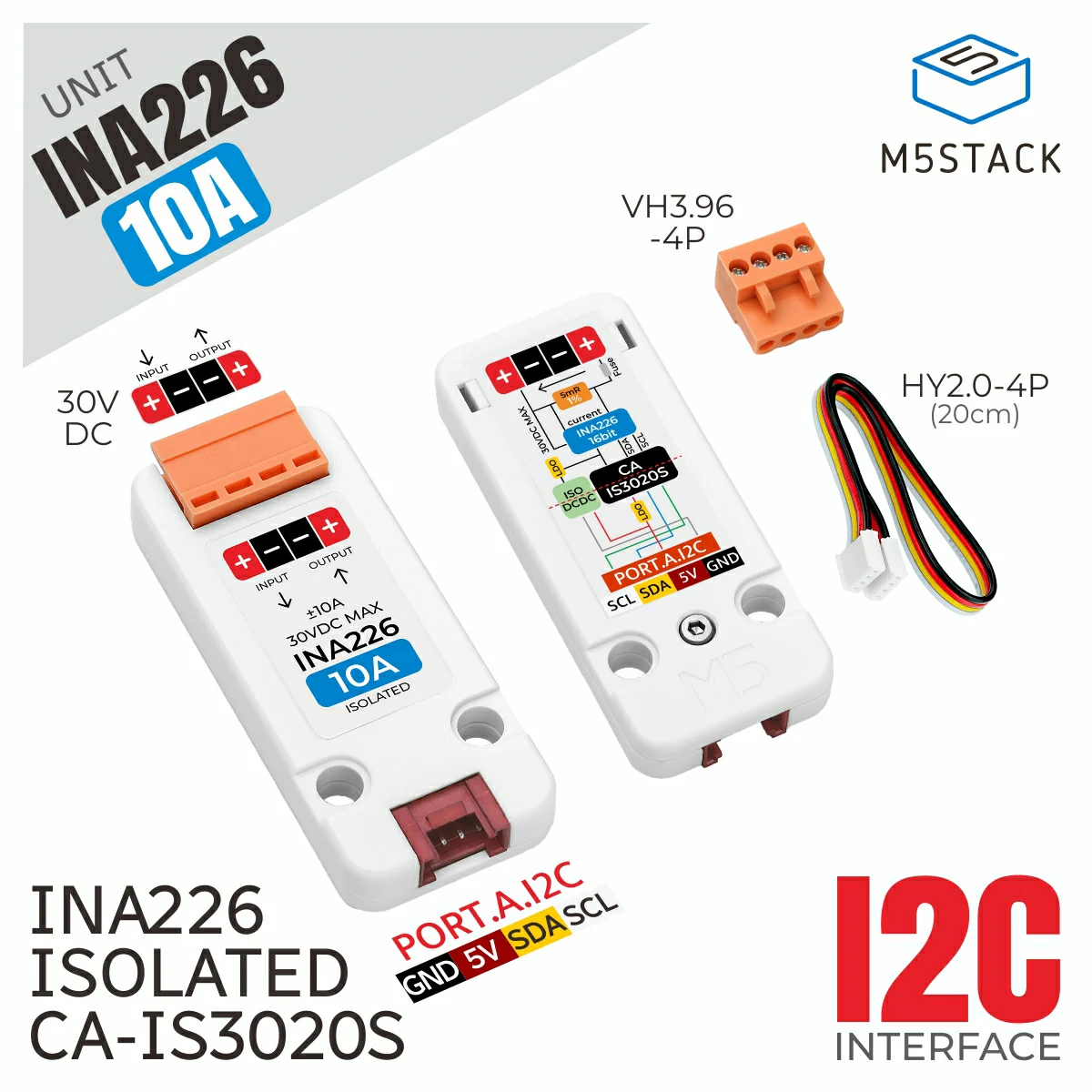
This is the driver library of INA226 Unit, which is used to obtain current and power data from the INA226 sensor.
Support the following products:
UiFlow2 Example
get value
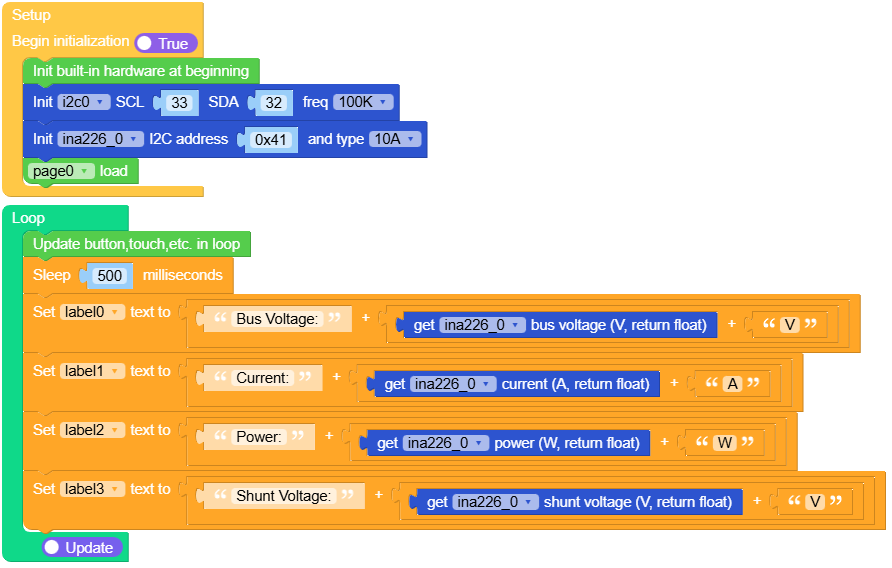
Open the ina226_core2_example.m5f2 project in UiFlow2.
This example gets the current, voltage, and power values from the INA226 Unit and displays them on the screen.
UiFlow2 Code Block:
Example output:
None
MicroPython Example
get value
This example gets the current, voltage, and power values from the INA226 Unit and displays them on the screen.
MicroPython Code Block:
  1# SPDX-FileCopyrightText: 2025 M5Stack Technology CO LTD
  2#
  3# SPDX-License-Identifier: MIT
  4
  5import os, sys, io
  6import M5
  7from M5 import *
  8import m5ui
  9import lvgl as lv
 10from hardware import I2C
 11from hardware import Pin
 12import time
 13from unit import INA226Unit
 14
 15
 16page0 = None
 17label0 = None
 18label1 = None
 19label2 = None
 20label3 = None
 21i2c0 = None
 22ina226_0 = None
 23
 24
 25def setup():
 26    global page0, label0, label1, label2, label3, i2c0, ina226_0
 27
 28    M5.begin()
 29    Widgets.setRotation(1)
 30    m5ui.init()
 31    page0 = m5ui.M5Page(bg_c=0xFFFFFF)
 32    label0 = m5ui.M5Label(
 33        "Bus Voltage:",
 34        x=0,
 35        y=56,
 36        text_c=0x000000,
 37        bg_c=0xFFFFFF,
 38        bg_opa=0,
 39        font=lv.font_montserrat_16,
 40        parent=page0,
 41    )
 42    label1 = m5ui.M5Label(
 43        "Current:",
 44        x=0,
 45        y=88,
 46        text_c=0x000000,
 47        bg_c=0xFFFFFF,
 48        bg_opa=0,
 49        font=lv.font_montserrat_16,
 50        parent=page0,
 51    )
 52    label2 = m5ui.M5Label(
 53        "Power:",
 54        x=0,
 55        y=124,
 56        text_c=0x000000,
 57        bg_c=0xFFFFFF,
 58        bg_opa=0,
 59        font=lv.font_montserrat_16,
 60        parent=page0,
 61    )
 62    label3 = m5ui.M5Label(
 63        "Shunt Voltage:",
 64        x=0,
 65        y=161,
 66        text_c=0x000000,
 67        bg_c=0xFFFFFF,
 68        bg_opa=0,
 69        font=lv.font_montserrat_16,
 70        parent=page0,
 71    )
 72
 73    i2c0 = I2C(0, scl=Pin(33), sda=Pin(32), freq=100000)
 74    ina226_0 = INA226Unit(i2c0, 0x41, type="1A")
 75    page0.screen_load()
 76
 77
 78def loop():
 79    global page0, label0, label1, label2, label3, i2c0, ina226_0
 80    M5.update()
 81    time.sleep_ms(500)
 82    label0.set_text(
 83        str((str("Bus Voltage:") + str((str((ina226_0.read_bus_voltage())) + str("V")))))
 84    )
 85    label1.set_text(str((str("Current:") + str((str((ina226_0.read_current())) + str("A"))))))
 86    label2.set_text(str((str("Power:") + str((str((ina226_0.read_power())) + str("W"))))))
 87    label3.set_text(
 88        str((str("Shunt Voltage:") + str((str((ina226_0.read_shunt_voltage())) + str("V")))))
 89    )
 90
 91
 92if __name__ == "__main__":
 93    try:
 94        setup()
 95        while True:
 96            loop()
 97    except (Exception, KeyboardInterrupt) as e:
 98        try:
 99            m5ui.deinit()
100            from utility import print_error_msg
101
102            print_error_msg(e)
103        except ImportError:
104            print("please update to latest firmware")
Example output:
None
API
INA226Unit
- class unit.ina226.INA226Unit(i2c, address=65, type='10A')
Bases:
INA226Create an INA226Unit object.
- Parameters:
UiFlow2 Code Block:

MicroPython Code Block:
from hardware import I2C
from unit import INA226Unit

i2c0 = I2C(0, scl=Pin(1), sda=Pin(2), freq=100000)
ina226_0 = INA226Unit(i2c0, address=0x41, type="10A")
INA226
- class driver.ina226.INA226(i2c, addr=64, shunt_resistor=0.02)
Bases:
objectCreate an INA226 object.
- Parameters:
UiFlow2 Code Block:
MicroPython Code Block:
from hardware import I2C
from driver import INA226

i2c0 = I2C(0, scl=Pin(1), sda=Pin(2), freq=100000)
ina226 = INA226(i2c0, 0x40, shunt_resistor=0.02)
- calibrate(max_expected_current=0, cal_value=None)
Calibrate the INA226.
- Parameters:
MicroPython Code Block:
ina226_0.calibrate(10)

ina226_0.calibrate(cal_value=0xC80)
- read_shunt_voltage()
Read the shunt voltage in Volts.
- Returns:
The shunt voltage in Volts.
- Return type:
UiFlow2 Code Block:

MicroPython Code Block:
ina226_0.read_shunt_voltage()
- read_bus_voltage()
Read the bus voltage in Volts.
- Returns:
The bus voltage in Volts.
- Return type:
UiFlow2 Code Block:

MicroPython Code Block:
ina226_0.read_bus_voltage()
- read_current()
Read the current in Amperes.
- Returns:
The current in Amperes.
- Return type:
UiFlow2 Code Block:

MicroPython Code Block:
ina226_0.read_current()
