CardKB2 Unit
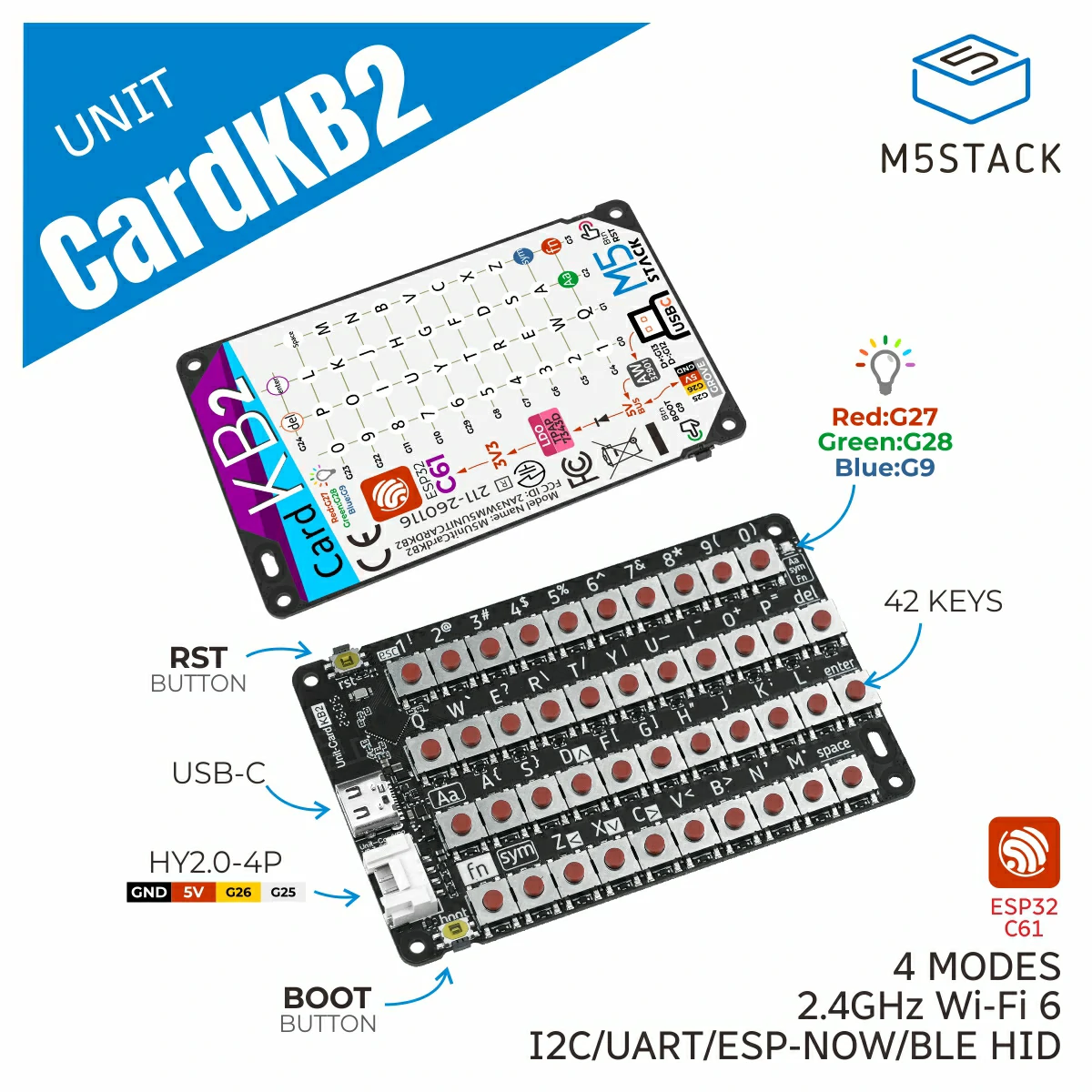
This is the driver library of CardKB2 Unit, which is used to obtain key input data.
Support the following products:
UiFlow2 Example
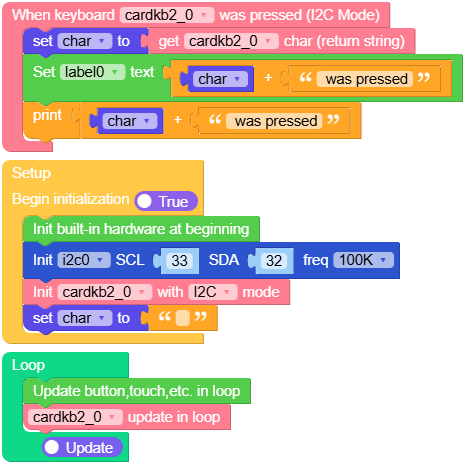
CardKB2 I2C Mode
Open the cardkb2_i2c_core2_example.m5f2 project in UiFlow2.
This example display the keyboard input on the screen and serial.
UiFlow2 Code Block:
Example output:
input key char
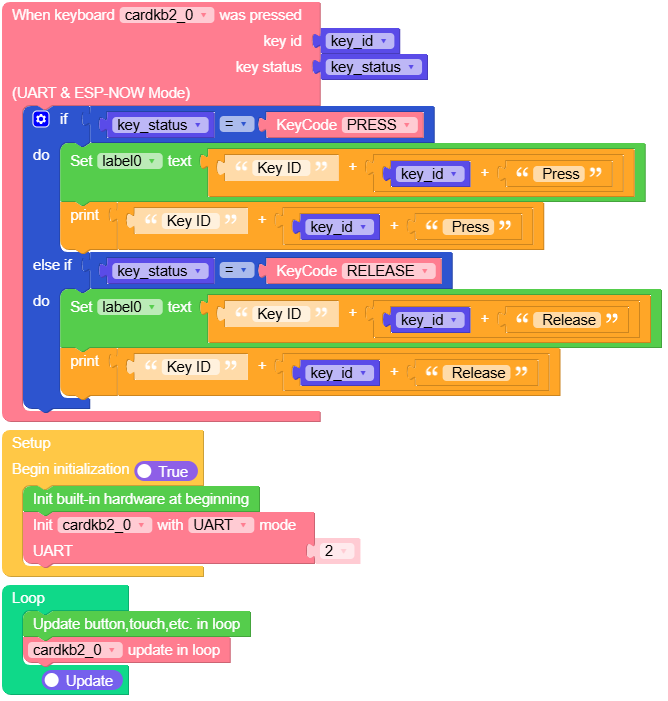
CardKB2 UART Mode
Open the cardkb2_uart_core2_example.m5f2 project in UiFlow2.
This example display the keyboard input on the screen and serial.
UiFlow2 Code Block:
Example output:
input key char and state
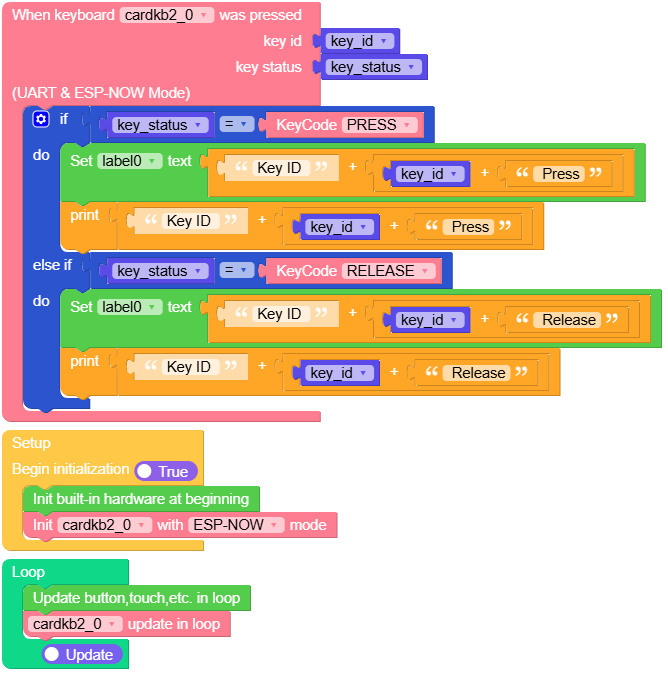
CardKB2 ESP-NOW Mode
Open the cardkb2_espnow_core2_example.m5f2 project in UiFlow2.
This example display the keyboard input on the screen and serial.
UiFlow2 Code Block:
Example output:
input key char and state
MicroPython Example
CardKB2 I2C Mode
This example display the keyboard input on the screen and serial.
MicroPython Code Block:
 1# SPDX-FileCopyrightText: 2026 M5Stack Technology CO LTD
 2#
 3# SPDX-License-Identifier: MIT
 4
 5import os, sys, io
 6import M5
 7from M5 import *
 8from unit import CardKBUnit
 9from hardware import Pin
10from hardware import I2C
11
12
13title0 = None
14label0 = None
15i2c0 = None
16cardkb2_0 = None
17
18
19char = None
20
21
22def cardkb2_0_i2c_pressed_event(kb):
23    global title0, label0, i2c0, cardkb2_0, char
24    char = cardkb2_0.get_char()
25    label0.setText(str((str(char) + str(" was pressed"))))
26    print((str(char) + str(" was pressed")))
27
28
29def setup():
30    global title0, label0, i2c0, cardkb2_0, char
31
32    M5.begin()
33    Widgets.setRotation(1)
34    Widgets.fillScreen(0x222222)
35    title0 = Widgets.Title(
36        "CardKB2 I2C Mode Example", 3, 0xFFFFFF, 0x0000FF, Widgets.FONTS.DejaVu18
37    )
38    label0 = Widgets.Label("label0", 3, 90, 1.0, 0xFFFFFF, 0x222222, Widgets.FONTS.DejaVu18)
39
40    i2c0 = I2C(0, scl=Pin(33), sda=Pin(32), freq=100000)
41    cardkb2_0 = CardKBUnit(i2c0, mode=CardKBUnit.CardKB_I2C_MODE)
42    cardkb2_0.set_callback(cardkb2_0_i2c_pressed_event)
43    char = ""
44
45
46def loop():
47    global title0, label0, i2c0, cardkb2_0, char
48    M5.update()
49    cardkb2_0.tick()
50
51
52if __name__ == "__main__":
53    try:
54        setup()
55        while True:
56            loop()
57    except (Exception, KeyboardInterrupt) as e:
58        try:
59            from utility import print_error_msg
60
61            print_error_msg(e)
62        except ImportError:
63            print("please update to latest firmware")
Example output:
input key char
CardKB2 UART Mode
This example display the keyboard input on the screen and serial.
MicroPython Code Block:
 1# SPDX-FileCopyrightText: 2026 M5Stack Technology CO LTD
 2#
 3# SPDX-License-Identifier: MIT
 4
 5import os, sys, io
 6import M5
 7from M5 import *
 8from unit import CardKBUnit
 9
10
11title0 = None
12label0 = None
13cardkb2_0 = None
14
15
16key_id = None
17key_status = None
18
19
20def cardkb2_0_pressed_event(kb):
21    global title0, label0, cardkb2_0, key_id, key_status
22    key_id, key_status = kb
23    if key_status == (CardKBUnit.KEY_STATE_PRESS):
24        label0.setText(str((str("Key ID ") + str((str(key_id) + str(" Press"))))))
25        print((str("Key ID ") + str((str(key_id) + str(" Press")))))
26    elif key_status == (CardKBUnit.KEY_STATE_RELEASE):
27        label0.setText(str((str("Key ID ") + str((str(key_id) + str(" Release"))))))
28        print((str("Key ID ") + str((str(key_id) + str(" Release")))))
29
30
31def setup():
32    global title0, label0, cardkb2_0, key_id, key_status
33
34    M5.begin()
35    Widgets.setRotation(1)
36    Widgets.fillScreen(0x222222)
37    title0 = Widgets.Title(
38        "CardKB2 UART Mode Example", 3, 0xFFFFFF, 0x0000FF, Widgets.FONTS.DejaVu18
39    )
40    label0 = Widgets.Label("label0", 3, 107, 1.0, 0xFFFFFF, 0x222222, Widgets.FONTS.DejaVu18)
41
42    cardkb2_0 = CardKBUnit(2, port=(33, 32), mode=CardKBUnit.CardKB_UART_MODE)
43    cardkb2_0.set_callback(cardkb2_0_pressed_event)
44
45
46def loop():
47    global title0, label0, cardkb2_0, key_id, key_status
48    M5.update()
49    cardkb2_0.tick()
50
51
52if __name__ == "__main__":
53    try:
54        setup()
55        while True:
56            loop()
57    except (Exception, KeyboardInterrupt) as e:
58        try:
59            from utility import print_error_msg
60
61            print_error_msg(e)
62        except ImportError:
63            print("please update to latest firmware")
Example output:
input key char and state
CardKB2 ESP-NOW Mode
This example display the keyboard input on the screen and serial.
MicroPython Code Block:
 1# SPDX-FileCopyrightText: 2026 M5Stack Technology CO LTD
 2#
 3# SPDX-License-Identifier: MIT
 4
 5import os, sys, io
 6import M5
 7from M5 import *
 8from unit import CardKBUnit
 9
10
11title0 = None
12label0 = None
13cardkb2_0 = None
14
15
16key_id = None
17key_status = None
18
19
20def cardkb2_0_pressed_event(kb):
21    global title0, label0, cardkb2_0, key_id, key_status
22    key_id, key_status = kb
23    if key_status == (CardKBUnit.KEY_STATE_PRESS):
24        label0.setText(str((str("Key ID ") + str((str(key_id) + str(" Press"))))))
25        print((str("Key ID ") + str((str(key_id) + str(" Press")))))
26    elif key_status == (CardKBUnit.KEY_STATE_RELEASE):
27        label0.setText(str((str("Key ID ") + str((str(key_id) + str(" Release"))))))
28        print((str("Key ID ") + str((str(key_id) + str(" Release")))))
29
30
31def setup():
32    global title0, label0, cardkb2_0, key_id, key_status
33
34    M5.begin()
35    Widgets.setRotation(1)
36    Widgets.fillScreen(0x222222)
37    title0 = Widgets.Title(
38        "CardKB2 ESPNOW Mode Example", 3, 0xFFFFFF, 0x0000FF, Widgets.FONTS.DejaVu18
39    )
40    label0 = Widgets.Label("label0", 3, 107, 1.0, 0xFFFFFF, 0x222222, Widgets.FONTS.DejaVu18)
41
42    cardkb2_0 = CardKBUnit(mode=CardKBUnit.CardKB_ESP_NOW_MODE)
43    cardkb2_0.set_callback(cardkb2_0_pressed_event)
44
45
46def loop():
47    global title0, label0, cardkb2_0, key_id, key_status
48    M5.update()
49    cardkb2_0.tick()
50
51
52if __name__ == "__main__":
53    try:
54        setup()
55        while True:
56            loop()
57    except (Exception, KeyboardInterrupt) as e:
58        try:
59            from utility import print_error_msg
60
61            print_error_msg(e)
62        except ImportError:
63            print("please update to latest firmware")
Example output:
input key char and state
API
Class CardKB2Unit
- class unit.cardkb.CardKBUnit(*args, **kwargs)
Bases:
objectCreate a CardKBUnit object.
- Parameters:
args – Positional arguments passed to the underlying communication class.
mode (int) –
The communication mode. Default modes are:
CardKBUnit.CardKB_I2C_MODE: I2C modeCardKBUnit.CardKB_UART_MODE: UART modeCardKBUnit.CardKB_ESP_NOW_MODE: ESP-NOW mode
Note
This is a factory class. It returns an instance of the appropriate subclass based on the specified mode.
UiFlow2 Code Block:

MicroPython Code Block:
from cardkb import CardKBUnit
from hardware import I2C, Pin

# I2C mode
i2c0 = I2C(0, scl=Pin(33), sda=Pin(32), freq=100000)
cardkb_0 = CardKBUnit(i2c0, mode=CardKBUnit.CardKB_I2C_MODE)

# UART mode
cardkb_0 = CardKBUnit(2, port=(33, 32), mode=CardKBUnit.CardKB_UART_MODE)

# ESP-NOW mode
cardkb_0 = CardKBUnit(mode=CardKBUnit.CardKB_ESP_NOW_MODE)
- class unit.cardkb.CardKBBase
Bases:
objectBase class for CardKB unit communication.
This class provides the common interface and logic for all CardKB communication modes.
- get_key()
Get the next key from the key buffer.
- Returns:
The key value (int or tuple depending on mode)
UiFlow2 Code Block:

MicroPython Code Block:
key = cardkb_0.get_key()
print(key)
- get_string()
Get the next key as a string.
- Returns:
The string representation of the next key.
- Return type:
UiFlow2 Code Block:

MicroPython Code Block:
s = cardkb_0.get_string()
print(s)
- get_char()
Get the next key as a character.
- Returns:
The character corresponding to the next key code.
- Return type:
UiFlow2 Code Block:

MicroPython Code Block:
c = cardkb_0.get_char()
print(c)
- is_pressed()
Check whether any key is currently pressed.
- Returns:
Trueif a key is pressed,Falseotherwise.- Return type:
UiFlow2 Code Block:

MicroPython Code Block:
if cardkb_0.is_pressed():
    print("Key pressed!")
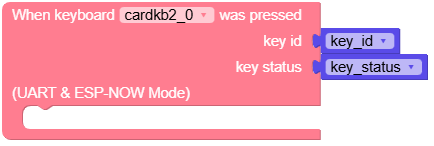
- set_callback(handler)
Set the callback function for key press events.
- Parameters:
handler – The callback function to invoke when a key is pressed. The callback receives the CardKB instance as its argument.
UiFlow2 Code Block:

MicroPython Code Block:
# I2C mode example
def on_key_pressed(kb):
    print("Key pressed:", kb.get_char())

cardkb_0.set_callback(on_key_pressed)

# UART/ESP-NOW mode example
def on_key_event(kb):
    key_id, key_state = kb.get_key()
    print("Key event - ID:", key_id, "State:", key_state)
- tick()
Poll for key events and trigger the callback if a key is pressed.
This method should be called periodically in the main loop to process key events.
UiFlow2 Code Block:

MicroPython Code Block:
while True:
    cardkb_0.tick()
- Return type:
None
- class unit.cardkb.CardKBI2C(i2c, address=95, mode=None)
Bases:
CardKBBaseCardKB unit driver over I2C communication.
- Parameters:
i2c (I2C) – The I2C bus instance.
address (int) – The I2C address of the CardKB unit. Defaults to
0x5F.mode – Ignored. Reserved for factory compatibility.
- Raises:
Exception – If the CardKB unit is not found on the I2C bus.
Note
Do not instantiate this class directly. Use
CardKBUnitwithmode=CardKBUnit.CardKB_I2C_MODEinstead.MicroPython Code Block:
from hardware import I2C, Pin
from cardkb import CardKBUnit

i2c0 = I2C(0, scl=Pin(33), sda=Pin(32), freq=100000)
cardkb_0 = CardKBUnit(i2c0, mode=CardKBUnit.CardKB_I2C_MODE)
- class unit.cardkb.CardKBUART(id=1, port=None, mode=None)
Bases:
CardKBBaseCardKB unit driver over UART communication.
- Parameters:
Note
Do not instantiate this class directly. Use
CardKBUnitwithmode=CardKBUnit.CardKB_UART_MODEinstead.MicroPython Code Block:
from cardkb import CardKBUnit

cardkb_0 = CardKBUnit(2, port=(33, 32), mode=CardKBUnit.CardKB_UART_MODE)
- tick()
Poll the key buffer and trigger the callback if a key is available.
This method should be called periodically in the main loop to process key events received via UART.
MicroPython Code Block:
while True:
    cardkb_0.tick()
- class unit.cardkb.CardKBESPNOW(mode=None)
Bases:
CardKBBaseCardKB unit driver over ESP-NOW wireless communication.
- Parameters:
mode – Ignored. Reserved for factory compatibility.
Note
Do not instantiate this class directly. Use
CardKBUnitwithmode=CardKBUnit.CardKB_ESP_NOW_MODEinstead.Note
This class uses a broadcast MAC address (
ffffffffffff) and fixes the Wi-Fi channel to 0. Key data is received asynchronously via IRQ callback.MicroPython Code Block:
from cardkb import CardKBUnit

cardkb_0 = CardKBUnit(mode=CardKBUnit.CardKB_ESP_NOW_MODE)
- espnow_recv_callback(espnow_obj)
Callback function invoked when an ESP-NOW packet is received.
- Parameters:
espnow_obj – The ESP-NOW object containing the received data.
- Returns:
Trueif the frame is valid and a key was appended,Falseotherwise.- Return type:
- get_key()
Get the next key from the buffer received via ESP-NOW.
- Returns:
The key tuple
(key_id, key_state), orNoneif the buffer is empty.- Return type:
tuple or None
MicroPython Code Block:
key = cardkb_0.get_key()
if key:
    print("key_id:", key[0], "key_state:", key[1])
- is_pressed()
Check whether any key data is buffered from ESP-NOW.
- Returns:
Trueif there is buffered key data,Falseotherwise.- Return type:
MicroPython Code Block:
if cardkb_0.is_pressed():
    print("Key received via ESP-NOW!")
- tick()
Poll the key buffer and trigger the callback if a key is available.
This method should be called periodically in the main loop to process key events received via ESP-NOW.
MicroPython Code Block:
while True:
    cardkb_0.tick()