LoRa
LoRa is used to control the built-in long-range wireless communication module inside the host device. Below is the detailed LoRa support for the host:
Controllers |
LoRa |
|---|---|
UnitC6L |
✔ |
Nesso N1 |
✔ |
UiFlow2 Example
Sender
Open the unit_c6l_tx_example.m5f2 project in UiFlow2.
Open the nesso_n1_sender_example.m5f2 project in UiFlow2.
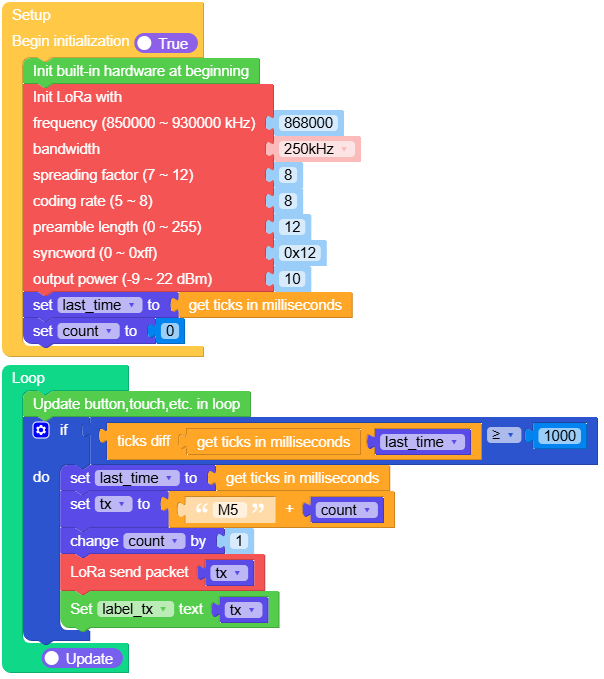
This example sends data every second.
UiFlow2 Code Block:
Example output:
None
Receiver
Open the unit_c6l_rx_example.m5f2 project in UiFlow2.
Open the nesso_n1_receiver_example.m5f2 project in UiFlow2.
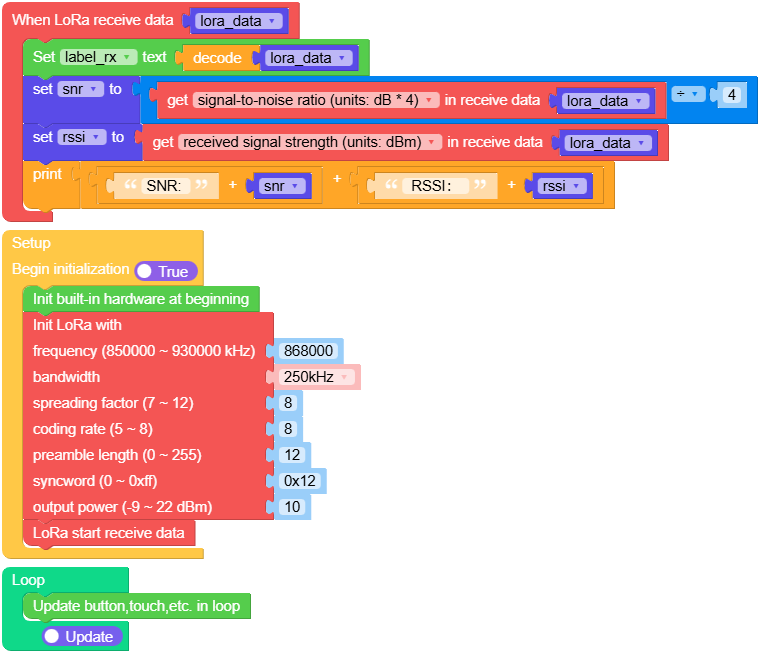
This example receives and displays data.
UiFlow2 Code Block:
Example output:
None
MicroPython Example
Sender
This example sends data every second.
MicroPython Code Block:
 1# SPDX-FileCopyrightText: 2025 M5Stack Technology CO LTD
 2#
 3# SPDX-License-Identifier: MIT
 4
 5import os, sys, io
 6import M5
 7from M5 import *
 8from hardware import LoRa
 9import time
10
11
12title0 = None
13label_tx = None
14lora = None
15last_time = None
16count = None
17tx = None
18
19
20def setup():
21    global title0, label_tx, lora, last_time, count, tx
22    M5.begin()
23    Widgets.fillScreen(0x000000)
24    title0 = Widgets.Title("Tx", 3, 0x000000, 0xFFFFFF, Widgets.FONTS.DejaVu12)
25    label_tx = Widgets.Label("label0", 2, 23, 1.0, 0xFFFFFF, 0x000000, Widgets.FONTS.DejaVu12)
26    lora = LoRa(
27        freq_khz=868000,
28        bw="250",
29        sf=8,
30        coding_rate=8,
31        preamble_len=12,
32        syncword=0x12,
33        output_power=10,
34    )
35    last_time = time.ticks_ms()
36    count = 0
37
38
39def loop():
40    global title0, label_tx, lora, last_time, count, tx
41    M5.update()
42    if (time.ticks_diff((time.ticks_ms()), last_time)) >= 1000:
43        last_time = time.ticks_ms()
44        tx = str("M5 ") + str(count)
45        count = (count if isinstance(count, (int, float)) else 0) + 1
46        lora.send(tx, None)
47        label_tx.setText(str(tx))
48
49
50if __name__ == "__main__":
51    try:
52        setup()
53        while True:
54            loop()
55    except (Exception, KeyboardInterrupt) as e:
56        try:
57            from utility import print_error_msg
58
59            print_error_msg(e)
60        except ImportError:
61            print("please update to latest firmware")
Example output:
None
Receiver
This example receives and displays data.
MicroPython Code Block:
 1# SPDX-FileCopyrightText: 2025 M5Stack Technology CO LTD
 2#
 3# SPDX-License-Identifier: MIT
 4
 5import os, sys, io
 6import M5
 7from M5 import *
 8from hardware import LoRa
 9
10
11title0 = None
12label_rx = None
13lora = None
14lora_data = None
15snr = None
16rssi = None
17
18
19def lora_receive_event(received_data):
20    global title0, label_rx, lora, lora_data, snr, rssi
21    lora_data = received_data
22    label_rx.setText(str(lora_data.decode()))
23    snr = (lora_data.snr) / 4
24    rssi = lora_data.rssi
25    print((str((str("SNR: ") + str(snr))) + str((str(" RSSI: ") + str(rssi)))))
26
27
28def setup():
29    global title0, label_rx, lora, lora_data, snr, rssi
30    M5.begin()
31    Widgets.fillScreen(0x000000)
32    title0 = Widgets.Title("Rx", 3, 0x000000, 0xFFFFFF, Widgets.FONTS.DejaVu12)
33    label_rx = Widgets.Label("label0", 2, 23, 1.0, 0xFFFFFF, 0x000000, Widgets.FONTS.DejaVu12)
34    lora = LoRa(
35        freq_khz=868000,
36        bw="250",
37        sf=8,
38        coding_rate=8,
39        preamble_len=12,
40        syncword=0x12,
41        output_power=10,
42    )
43    lora.set_irq_callback(lora_receive_event)
44    lora.start_recv()
45
46
47def loop():
48    global title0, label_rx, lora, lora_data, snr, rssi
49    M5.update()
50
51
52if __name__ == "__main__":
53    try:
54        setup()
55        while True:
56            loop()
57    except (Exception, KeyboardInterrupt) as e:
58        try:
59            from utility import print_error_msg
60
61            print_error_msg(e)
62        except ImportError:
63            print("please update to latest firmware")
Example output:
None
Important: IRQ when using interrupt receive
Note
When receiving data with the interrupt method (set_irq_callback and
start_recv()), the firmware automatically clears the LoRa IRQ flag
after interrupt handling.
In this case, polling irq_triggered() may always return False
because the flag has already been cleared. This is not a receive failure.
Please use synchronous receive mode (recv()) for testing.
API
class LoRa
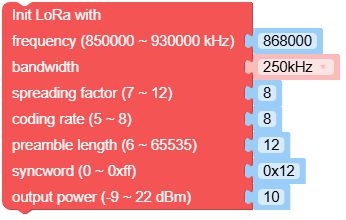
- class hardware.LoRa(freq_khz=868000, bw='250', sf=8, coding_rate=8, reamble_len=12, syncword=0x12, output_power=10)
Create an LoRa object.
- Parameters:
freq_khz (int) – LoRa RF frequency in KHz, with a range of 850000 KHz to 930000 KHz.
bw (str) –
Bandwidth, options include:
"7.8": 7.8 KHz"10.4": 10.4 KHz"15.6": 15.6 KHz"20.8": 20.8 KHz"31.25": 31.25 KHz"41.7": 41.7 KHz"62.5": 62.5 KHz"125": 125 KHz"250": 250 KHz"500": 500 KHz
sf (int) – Spreading factor, range from 7 to 12. Higher spreading factors allow reception of weaker signals but with slower data rates.
coding_rate (int) – Forward Error Correction (FEC) coding rate expressed as 4/N, with a range from 5 to 8.
preamble_len (int) – Length of the preamble sequence in symbols, range from 0 to 255.
syncword (int) – Sync word to mark the start of the data frame, default is 0x12.
output_power (int) – Output power in dBm, range from -9 to 22.
UiFlow2 Code Block:
MicroPython Code Block:
from hardware import LoRa

lora_0 = LoRa(868000, '250', 8, 8, 12, 0x12, 10)
- set_freq(freq_khz)
Set frequency in kHz.
- Parameters:
freq_khz (int) – Frequency in kHz (850000 ~ 930000), default is 868000.
UiFlow2 Code Block:

MicroPython Code Block:
lora_0.set_freq(freq_khz)
- set_sf(sf)
Set spreading factor (SF).
- Parameters:
sf (int) – Spreading factor (7 ~ 12)
UiFlow2 Code Block:

MicroPython Code Block:
lora_0.set_sf(sf)
- set_bw(bw)
Set bandwidth.
- Parameters:
bw (str) – Bandwidth in kHz as string. Must be one of: ‘7.8’, ‘10.4’, ‘15.6’, ‘20.8’, ‘31.25’, ‘41.7’, ‘62.5’, ‘125’, ‘250’, ‘500’.
UiFlow2 Code Block:

MicroPython Code Block:
lora_0.set_bw(bw)
- set_coding_rate(coding_rate)
Set coding rate.
- Parameters:
coding_rate (int) – Coding rate (5 ~ 8)
UiFlow2 Code Block:

MicroPython Code Block:
lora_0.set_coding_rate(coding_rate)
- set_syncword(syncword)
Set syncword.
- Parameters:
syncword (int) – Sync word (0 ~ 0xFF)
UiFlow2 Code Block:

MicroPython Code Block:
lora_0.set_syncword(syncword)
- set_preamble_len(preamble_len)
Set preamble length.
- Parameters:
preamble_len (int) – Preamble length, range: 0~255.
UiFlow2 Code Block:

MicroPython Code Block:
lora_0.set_preamble_len(preamble_len)
- set_output_power(output_power)
Set output power in dBm.
- Parameters:
output_power (int) – Output power in dBm (-9 ~ 22)
UiFlow2 Code Block:

MicroPython Code Block:
lora_0.set_output_power(output_power)
- set_irq_callback(callback)
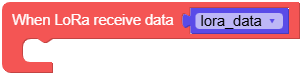
Set the interrupt callback function to be executed on IRQ.
- Parameters:
callback – The callback function to be invoked when the interrupt is triggered. The callback should not take any arguments and should return nothing.
Call start_recv() to begin receiving data.
UiFlow2 Code Block:
MicroPython Code Block:
lora_0.set_irq_callback()
- start_recv()
Start receive data.
This method initiates the process to begin receiving data.
UiFlow2 Code Block:

MicroPython Code Block:
lora_0.start_recv()
- recv(self, timeout_ms, rx_length, rx_packet)
Receive data.
- Parameters:
- Returns:
Received packet instance
- Return type:
Attempt to receive a LoRa packet. Returns None if timeout occurs, or returns the received packet instance.
UiFlow2 Code Block:

MicroPython Code Block:
data = lora_0.recv()
- send(buf, tx_at_ms=None)
Send data.
- Parameters:
- Returns:
Returns a timestamp (result of time.ticks_ms()) indicating when the data packet was sent.
- Return type:
Send a data packet and return the timestamp after the packet is sent.
UiFlow2 Code Block:

MicroPython Code Block:
lora_0.send()
- standby()
Set module to standby mode.
Puts the LoRa module into standby mode, consuming less power.
UiFlow2 Code Block:

MicroPython Code Block:
lora_0.standby()
- sleep()
Put the module to sleep mode.
Reduces the power consumption by putting the module into deep sleep mode.
UiFlow2 Code Block:

MicroPython Code Block:
lora_0.sleep()
- irq_triggered()
Check IRQ trigger.
- Returns:
Returns
Trueif an interrupt service routine (ISR) has been triggered since the last send or receive started. In interrupt receive mode the IRQ is usually cleared inside the driver when the callback runs, so this method may stayFalse. Use synchronousrecv()to test reception (see the note above).- Return type:
UiFlow2 Code Block:

MicroPython Code Block:
lora_0.irq_triggered()
Refer to class RxPacket for more details about RxPacket.