UART
UART implements the standard UART/USART duplex serial communications protocol. At the physical level it consists of 2 lines: RX and TX. The unit of communication is a character (not to be confused with a string character) which can be 8 or 9 bits wide.
UiFlow2 Example
Echo
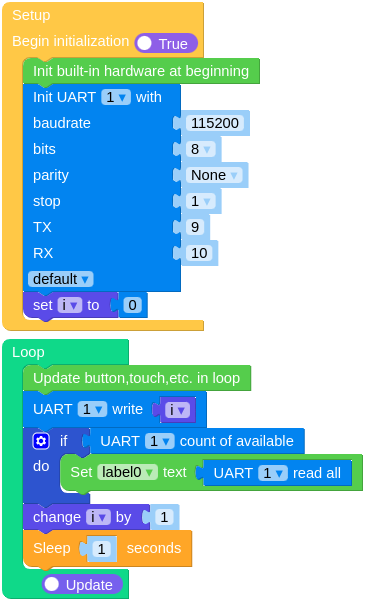
Open the cores3_echo_exmaple.m5f2 project in UiFlow2.
This example demonstrates how to utilize UART interfaces by echoing back to the sender any data received on configured UART.
UiFlow2 Code Block:
Example output:
None
MicroPython Example
Echo
This example demonstrates how to utilize UART interfaces by echoing back to the sender any data received on configured UART.
MicroPython Code Block:
 1# SPDX-FileCopyrightText: 2024 M5Stack Technology CO LTD
 2#
 3# SPDX-License-Identifier: MIT
 4
 5import os, sys, io
 6import M5
 7from M5 import *
 8from hardware import UART
 9import time
10
11
12label0 = None
13uart1 = None
14
15
16i = None
17
18
19def setup():
20    global label0, uart1, i
21
22    M5.begin()
23    Widgets.fillScreen(0x222222)
24    label0 = Widgets.Label("label0", 102, 85, 1.0, 0xFFFFFF, 0x222222, Widgets.FONTS.DejaVu18)
25
26    uart1 = UART(1, baudrate=115200, bits=8, parity=None, stop=1, tx=9, rx=10)
27    i = 0
28
29
30def loop():
31    global label0, uart1, i
32    M5.update()
33    uart1.write(i)
34    if uart1.any():
35        label0.setText(str(uart1.read()))
36    i = (i if isinstance(i, (int, float)) else 0) + 1
37    time.sleep(1)
38
39
40if __name__ == "__main__":
41    try:
42        setup()
43        while True:
44            loop()
45    except (Exception, KeyboardInterrupt) as e:
46        try:
47            from utility import print_error_msg
48
49            print_error_msg(e)
50        except ImportError:
51            print("please update to latest firmware")
Example output:
None
API
class UART
- class UART(id, baudrate=9600, bits=8, parity=None, stop=1, *, ...)
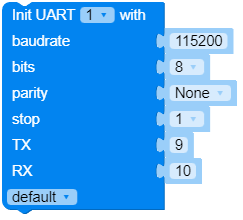
Construct a UART object of the given id.
For more parameters, please refer to init.
UiFlow2 Code Block:
MicroPython Code Block:
from hadrware import UART

uart1 = UART(1, baudrate=115200, bits=8, parity=None, stop=1, tx=9, rx=10)
- init(baudrate=9600, bits=8, parity=None, stop=1, *, ...)
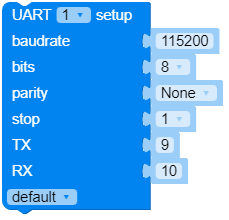
Initialise the UART bus with the given parameters.
- Parameters:
- Keyword Arguments:
tx – the TX pin to use.
rx – the RX pin to use.
rts – the RTS (output) pin to use for hardware receive flow control.
cts – the CTS (input) pin to use for hardware transmit flow control.
txbuf (int) – the length in characters of the TX buffer.
rxbuf (int) – the length in characters of the RX buffer.
timeout (int) – the time to wait for the first character (in ms).
timeout_char (int) – the time to wait between characters (in ms).
invert (int) –
which lines to invert.
0will not invert lines (idle state of both lines is logic high).UART.INV_TXwill invert TX line (idle state of TX line now logic low).UART.INV_RXwill invert RX line (idle state of RX line now logic low).UART.INV_TX | UART.INV_RXwill invert both lines (idle state at logic low).
flow (int) –
which hardware flow control signals to use. The value is a bitmask.
0will ignore hardware flow control signals.UART.RTSwill enable receive flow control by using the RTS output pin to signal if the receive FIFO has sufficient space to accept more data.UART.CTSwill enable transmit flow control by pausing transmission when the CTS input pin signals that the receiver is running low on buffer space.UART.RTS | UART.CTSwill enable both, for full hardware flow control.
mode (int) –
the mode of the UART. The value is a bitmask.
UART.MODE_UARTspecifies regular UART mode.UART.MODE_RS485_HALF_DUPLEXspecifies half duplex RS485 UART mode control by RTS pin.UART.MODE_IRDAspecifies IRDA UART mode.UART.MODE_RS485_COLLISION_DETECTspecifies RS485 collision detection UART mode (used for test purposes).UART.MODE_RS485_APP_CTRLspecifies application control RS485 UART mode (used for test purposes).
Note
It is possible to call
init()multiple times on the same object in order to reconfigure UART on the fly. That allows using single UART peripheral to serve different devices attached to different GPIO pins. Only one device can be served at a time in that case. Also do not calldeinit()as it will prevent callinginit()again.UiFlow2 Code Block:
MicroPython Code Block:
uart1.init(baudrate=115200, bits=8, parity=None, stop=1, tx=9, rx=10)
- deinit()
Turn off the UART bus.
Note
You will not be able to call
init()on the object afterdeinit(). A new instance needs to be created in that case.UiFlow2 Code Block:

MicroPython Code Block:
uart1.deinit()
- any()
Returns an integer counting the number of characters that can be read without blocking. It will return 0 if there are no characters available and a positive number if there are characters. The method may return 1 even if there is more than one character available for reading.
- Returns:
the number of characters available for reading.
- Return type:
For more sophisticated querying of available characters use select.poll:
poll = select.poll()
poll.register(uart, select.POLLIN)
poll.poll(timeout)
UiFlow2 Code Block:

MicroPython Code Block:
print(uart1.any())
- read([nbytes])
Read characters. If
nbytesis specified then read at most that many bytes, otherwise read as much data as possible. It may return sooner if a timeout is reached. The timeout is configurable in the constructor.- Returns:
a bytes object containing the bytes read in. Returns
Noneon timeout.- Return type:
bytes or None
UiFlow2 Code Block:



MicroPython Code Block:
print(uart1.read())
- readinto(buf[, nbytes])
Read bytes into the
buf. Ifnbytesis specified then read at most that many bytes. Otherwise, read at mostlen(buf)bytes. It may return sooner if a timeout is reached. The timeout is configurable in the constructor.- Returns:
number of bytes read and stored into
buforNoneon timeout.- Return type:
int or None
UiFlow2 Code Block:

MicroPython Code Block:
buf = bytearray(10)
uart1.readinto(buf)
- readline()
Read a line, ending in a newline character. It may return sooner if a timeout is reached. The timeout is configurable in the constructor.
- Returns:
the line read or
Noneon timeout.- Return type:
str or None
UiFlow2 Code Block:

MicroPython Code Block:
print(uart1.readline())
- write(buf)
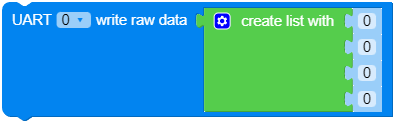
Write the buffer of bytes to the bus.
- Parameters:
buf (bytes or bytearray or str) – the buffer of bytes to write.
- Returns:
number of bytes written or
Noneon timeout.- Return type:
int or None
UiFlow2 Code Block:





MicroPython Code Block:
uart1.write('1234!')
- sendbreak()
Send a break condition on the bus. This drives the bus low for a duration longer than required for a normal transmission of a character.
UiFlow2 Code Block:

MicroPython Code Block:
uart1.sendbreak()
- flush()
Waits until all data has been sent. In case of a timeout, an exception is raised. The timeout duration depends on the tx buffer size and the baud rate. Unless flow control is enabled, a timeout should not occur.
Note
For the rp2, esp8266 and nrf ports the call returns while the last byte is sent. If required, a one character wait time has to be added in the calling script.
UiFlow2 Code Block:

MicroPython Code Block:
uart1.flush()
- txdone()
Tells whether all data has been sent or no data transfer is happening. In this case, it returns
True. If a data transmission is ongoing it returnsFalse.Note
For the rp2, esp8266 and nrf ports the call may return
Trueeven if the last byte of a transfer is still being sent. If required, a one character wait time has to be added in the calling script.UiFlow2 Code Block:

MicroPython Code Block:
print(uart1.txdone())
- irq(handler=None, trigger=0, hard=False)
Configure an interrupt handler to be called when a UART event occurs.
- Parameters:
handler (func) – an optional function to be called when the interrupt event triggers. The handler must take exactly one argument which is the
UARTinstance.trigger (int) –
configures the event(s) which can generate an interrupt. Possible values are a mask of one or more of the following:
UART.IRQ_RXIDLEinterrupt after receiving at least one character and then the RX line goes idle.UART.IRQ_RXinterrupt after each received character.UART.IRQ_TXIDLEinterrupt after or while the last character(s) of a message are or have been sent.UART.IRQ_BREAKinterrupt when a break state is detected at RX
hard (bool) – if true a hardware interrupt is used. This reduces the delay between the pin change and the handler being called. Hard interrupt handlers may not allocate memory; see Writing interrupt handlers.
- Returns:
Returns an irq object.
Due to limitations of the hardware not all trigger events are available on all ports.
Availability of triggers Port / Trigger
IRQ_RXIDLE
IRQ_RX
IRQ_TXIDLE
IRQ_BREAK
CC3200
yes
ESP32
yes
yes
yes
MIMXRT
yes
yes
NRF
yes
yes
RENESAS-RA
yes
yes
RP2
yes
yes
yes
SAMD
yes
yes
yes
STM32
yes
yes
Note
The ESP32 port does not support the option hard=True.
The rp2 port’s UART.IRQ_TXIDLE is only triggered when the message is longer than 5 characters and the trigger happens when still 5 characters are to be sent.
The rp2 port’s UART.IRQ_BREAK needs receiving valid characters for triggering again.
The SAMD port’s UART.IRQ_TXIDLE is triggered while the last character is sent.
On STM32F4xx MCU’s, using the trigger UART.IRQ_RXIDLE the handler will be called once after the first character and then after the end of the message, when the line is idle.
Availability: cc3200, esp32, mimxrt, nrf, renesas-ra, rp2, samd, stm32.
- RTS
- CTS
Flow control options.
- MODE_UART
- MODE_RS485_HALF_DUPLEX
- MODE_IRDA
- MODE_RS485_COLLISION_DETECT
- MODE_RS485_APP_CTRL
UART mode options.
- IRQ_RXIDLE
- IRQ_RX
- IRQ_TXIDLE
- IRQ_BREAK
IRQ trigger sources.