Touch
The Touch class provides methods for reading touch coordinates, the number of touch points, and detailed touch information on M5Stack devices with touch screens.
UiFlow2 Example
Getting Touch Coordinates
Open the cores3_touch_example.m5f2 project in UiFlow2.
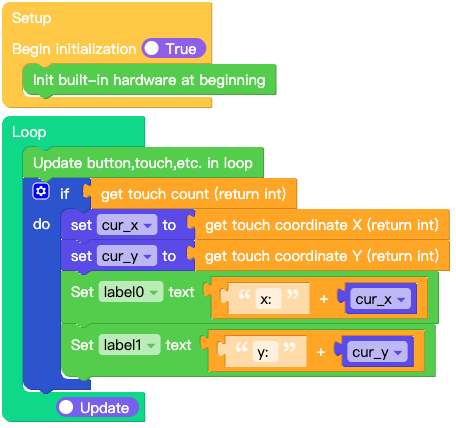
This example demonstrates how to obtain the X and Y coordinates of a touch event and display them on the screen.
UiFlow2 Code Block:
Example output:
Screen displays the current X and Y coordinates of the touch event.
MicroPython Example
Getting Touch Coordinates
This example demonstrates how to obtain the X and Y coordinates of a touch event and display them on the screen.
MicroPython Code Block:
 1# SPDX-FileCopyrightText: 2026 M5Stack Technology CO LTD
 2#
 3# SPDX-License-Identifier: MIT
 4
 5import os, sys, io
 6import M5
 7from M5 import *
 8
 9
10label0 = None
11label1 = None
12
13
14cur_x = None
15cur_y = None
16
17
18def setup():
19    global label0, label1, cur_x, cur_y
20
21    M5.begin()
22    Widgets.setRotation(1)
23    Widgets.fillScreen(0x222222)
24    label0 = Widgets.Label("x: 0", 32, 41, 1.0, 0xFFFFFF, 0x222222, Widgets.FONTS.DejaVu18)
25    label1 = Widgets.Label("y: 0", 33, 84, 1.0, 0xFFFFFF, 0x222222, Widgets.FONTS.DejaVu18)
26
27
28def loop():
29    global label0, label1, cur_x, cur_y
30    M5.update()
31    if M5.Touch.getCount():
32        cur_x = M5.Touch.getX()
33        cur_y = M5.Touch.getY()
34        label0.setText(str((str("x: ") + str(cur_x))))
35        label1.setText(str((str("y: ") + str(cur_y))))
36
37
38if __name__ == "__main__":
39    try:
40        setup()
41        while True:
42            loop()
43    except (Exception, KeyboardInterrupt) as e:
44        try:
45            from utility import print_error_msg
46
47            print_error_msg(e)
48        except ImportError:
49            print("please update to latest firmware")
Example output:
Screen displays the current X and Y coordinates of the touch event.
API
Touch
- class M5.Touch
- getX()
Get the current X coordinate of the touch.
- Returns:
int - The X coordinate.
UiFlow2 Code Block:

MicroPython Code Block:
x = M5.Touch.getX()
- getY()
Get the current Y coordinate of the touch.
- Returns:
int - The Y coordinate.
UiFlow2 Code Block:

MicroPython Code Block:
y = M5.Touch.getY()
- getCount()
Get the number of current touch points.
- Returns:
int - Number of active touches (0 if no touch).
UiFlow2 Code Block:

MicroPython Code Block:
count = M5.Touch.getCount()
- getDetail(index=0)
Get detailed information about a specific touch point.
- Parameters:
index (int) – Index of the touch point (default is 0).
- Returns:
tuple - A tuple of 11 elements containing detailed touch status:
[0] deltaX(int): The X-axis difference since the last measurement.[1] deltaY(int): The Y-axis difference since the last measurement.[2] distanceX(int): The total X-axis distance moved since touched.[3] distanceY(int): The total Y-axis distance moved since touched.[4] isPressed(bool): True if currently being pressed.[5] wasPressed(bool): True if just transitioned to pressed state.[6] wasClicked(bool): True if just clicked.[7] isReleased(bool): True if currently released.[8] wasReleased(bool): True if just transitioned to released state.[9] isHolding(bool): True if currently being held.[10] wasHold(bool): True if it was held.
MicroPython Code Block:
detail = M5.Touch.getDetail(0)
- getTouchPointRaw(index=0)
Get the raw touch point coordinates.
- Parameters:
index (int) – Index of the touch point (default is 0).
- Returns:
tuple - A tuple of 4 elements containing raw touch point data:
[0] x(int): The raw X coordinate.[1] y(int): The raw Y coordinate.[2] size(int): The size or pressure of the touch point.[3] id(int): The unique identifier for tracking the touch point.
UiFlow2 Code Block:


MicroPython Code Block:
raw = M5.Touch.getTouchPointRaw(0)