Atomic QRCode2 Base
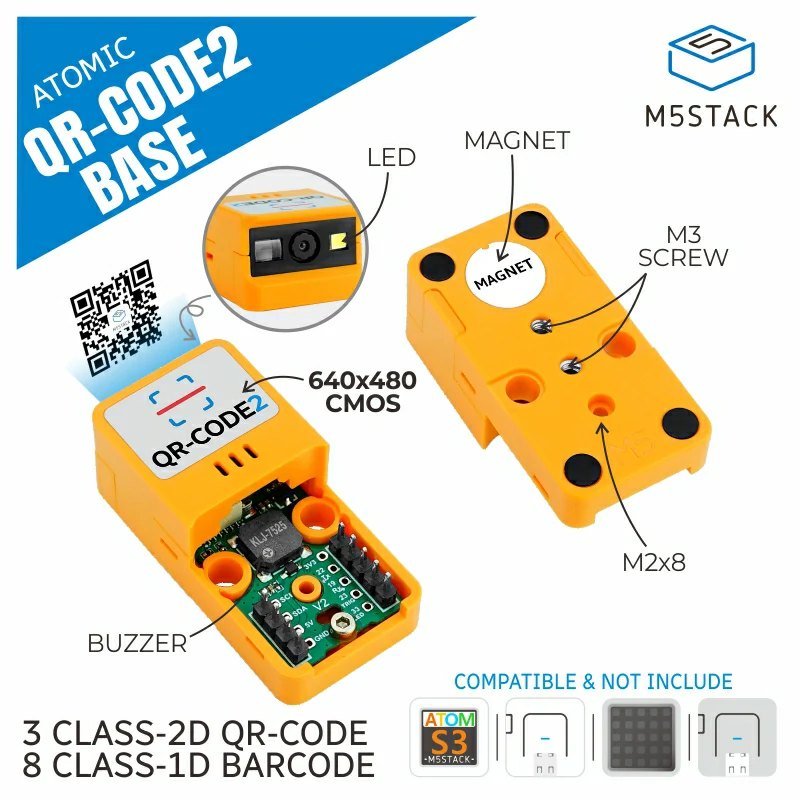
这个库是 Atomic QRCode2 Base 的驱动,该模块使用 UART 通信。
支持以下产品:
UiFlow2 应用示例:
按键模式二维码识别
在 UiFlow2 上打开 atoms3_qrcode2_key_mode_example.m5f2 项目。
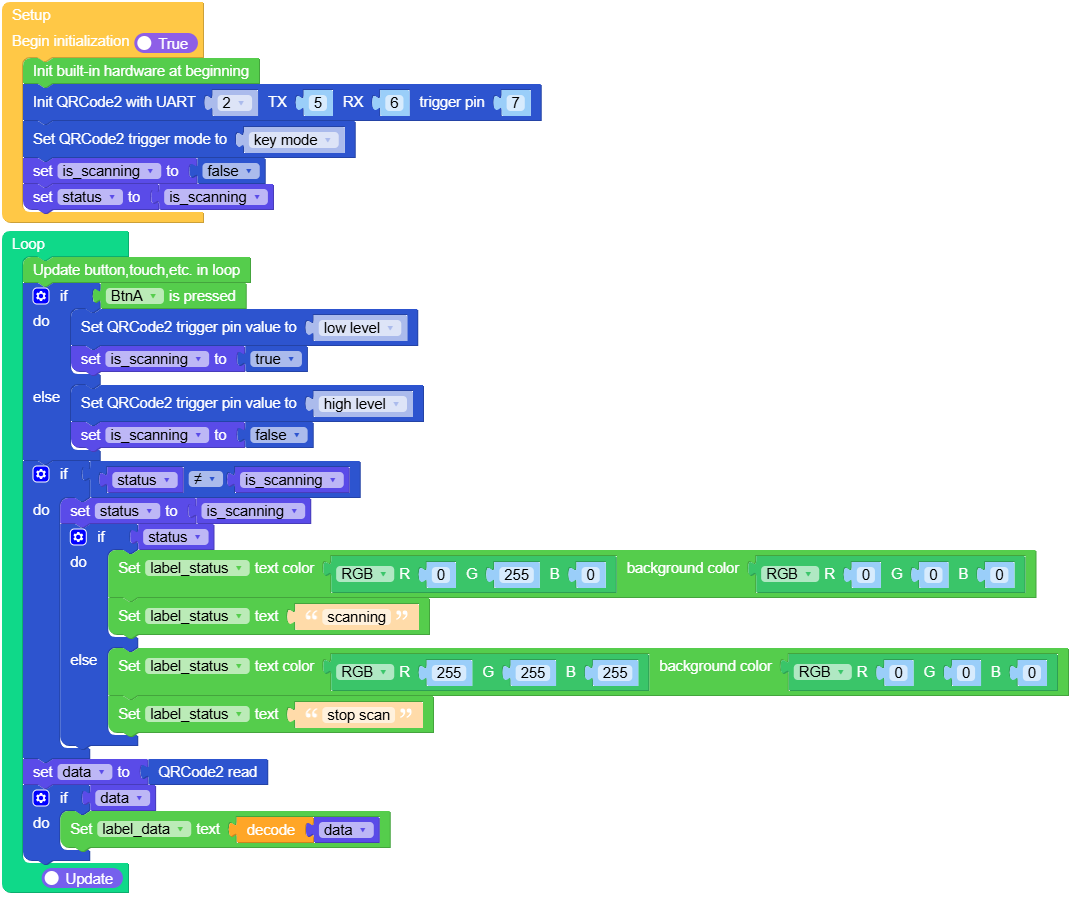
在**按键模式**下,模块在按下按钮时开始解码,在松开按钮时停止解码。解码成功后,解码过程会自动停止。要继续解码,必须松开按钮并再次按下。
UiFlow2 代码块:
示例输出:
None
连续模式二维码识别
在 UiFlow2 上打开 atoms3_qrcode2_continuous_mode_example.m5f2 项目。
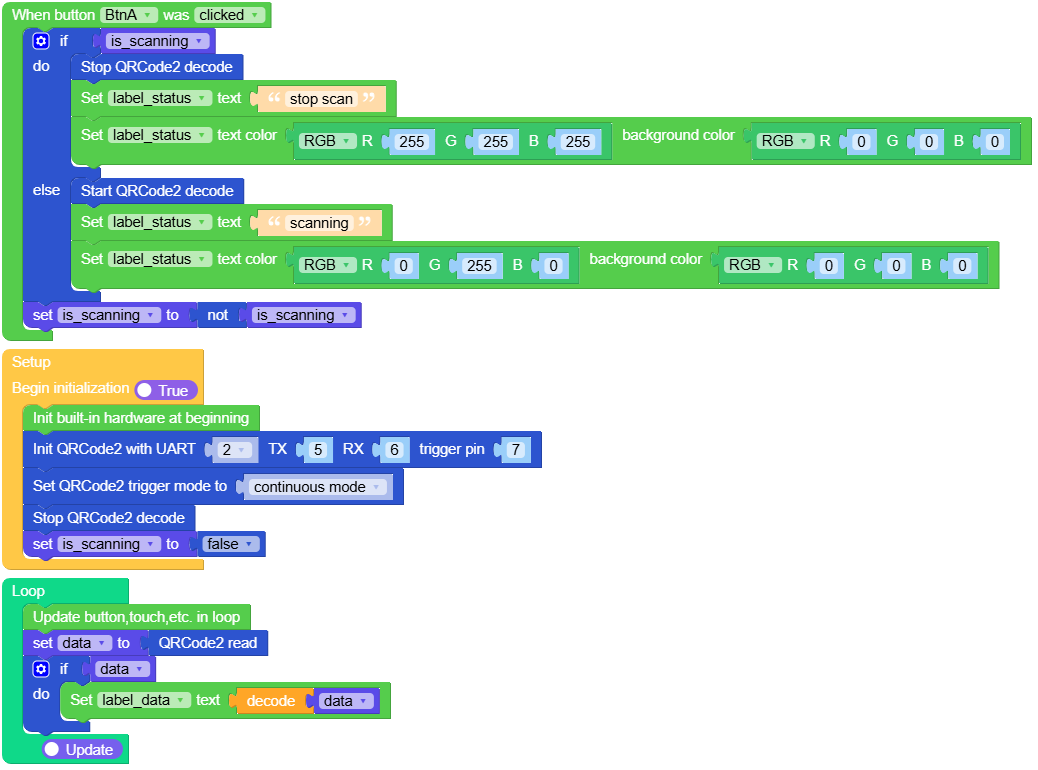
在**连续模式**下,按一次按钮开始解码,再按一次按钮停止解码。
UiFlow2 代码块:
示例输出:
None
自动模式二维码识别
在 UiFlow2 上打开 atoms3_qrcode2_auto_mode_example.m5f2 项目。
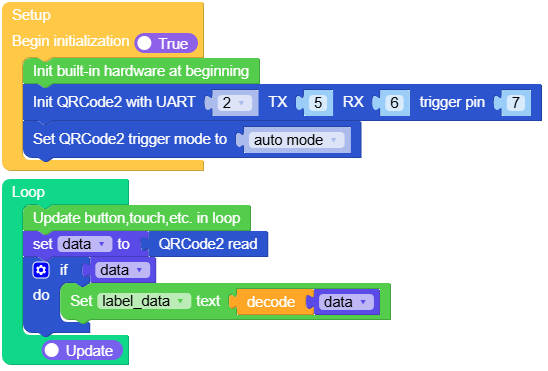
在**自动模式**下,模块通电后即开始解码,且无法停止。
UiFlow2 代码块:
示例输出:
None
脉冲模式二维码识别
在 UiFlow2 上打开 atoms3_qrcode2_pulse_mode_example.m5f2 项目。
在**脉冲模式**中,将 TRIG 引脚设置为保持低电平超过 20ms,以触发一次解码。
UiFlow2 代码块:
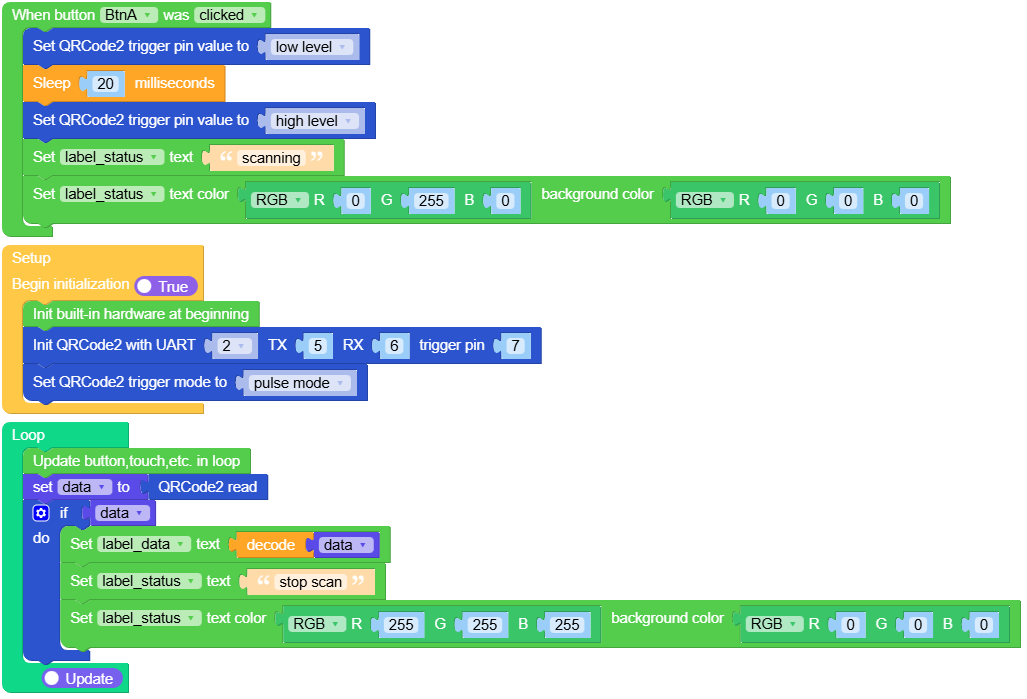
示例输出:
None
感应模式二维码识别
在 UiFlow2 上打开 atoms3_qrcode2_motion_sensing_mode_example.m5f2 项目。
在**运动感应模式**中,当模块根据视觉识别信息检测到场景变化时,会自动触发解码。
UiFlow2 代码块:
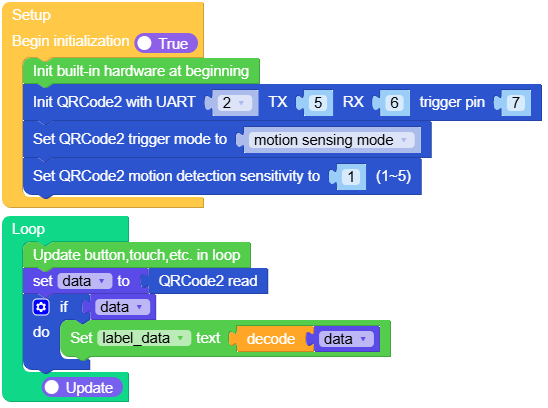
示例输出:
None
MicroPython 应用示例:
按键模式二维码识别
在**按键模式**下,模块在按下按钮时开始解码,在松开按钮时停止解码。解码成功后,解码过程会自动停止。要继续解码,必须松开按钮并再次按下。
MicroPython 代码块:
 1# SPDX-FileCopyrightText: 2025 M5Stack Technology CO LTD
 2#
 3# SPDX-License-Identifier: MIT
 4
 5import os, sys, io
 6import M5
 7from M5 import *
 8from base import AtomicQRCode2Base
 9
10
11title0 = None
12label_data = None
13label_status = None
14base_qrcode2 = None
15is_scanning = None
16status = None
17data = None
18
19
20def setup():
21    global title0, label_data, label_status, base_qrcode2, is_scanning, status, data
22    M5.begin()
23    title0 = Widgets.Title("QRCode", 3, 0xFFFFFF, 0x0000FF, Widgets.FONTS.DejaVu18)
24    label_data = Widgets.Label("data", 5, 60, 1.0, 0xFFFFFF, 0x000000, Widgets.FONTS.DejaVu18)
25    label_status = Widgets.Label(
26        "stop scan", 5, 25, 1.0, 0xFFFFFF, 0x000000, Widgets.FONTS.DejaVu18
27    )
28    base_qrcode2 = AtomicQRCode2Base(2, 5, 6, 7)
29    base_qrcode2.set_trigger_mode(base_qrcode2.TRIGGER_MODE_KEY)
30    is_scanning = False
31    status = is_scanning
32
33
34def loop():
35    global title0, label_data, label_status, base_qrcode2, is_scanning, status, data
36    M5.update()
37    if BtnA.isPressed():
38        base_qrcode2.set_trig(0)
39        is_scanning = True
40    else:
41        base_qrcode2.set_trig(1)
42        is_scanning = False
43    if status != is_scanning:
44        status = is_scanning
45        if status:
46            label_status.setColor(0x00FF00, 0x000000)
47            label_status.setText(str("scanning"))
48        else:
49            label_status.setColor(0xFFFFFF, 0x000000)
50            label_status.setText(str("stop scan"))
51    data = base_qrcode2.read()
52    if data:
53        label_data.setText(str(data.decode()))
54
55
56if __name__ == "__main__":
57    try:
58        setup()
59        while True:
60            loop()
61    except (Exception, KeyboardInterrupt) as e:
62        try:
63            from utility import print_error_msg
64
65            print_error_msg(e)
66        except ImportError:
67            print("please update to latest firmware")
示例输出:
None
连续模式二维码识别
在**连续模式**下,按一次按钮开始解码,再按一次按钮停止解码。
MicroPython 代码块:
 1# SPDX-FileCopyrightText: 2025 M5Stack Technology CO LTD
 2#
 3# SPDX-License-Identifier: MIT
 4
 5import os, sys, io
 6import M5
 7from M5 import *
 8from base import AtomicQRCode2Base
 9
10
11title0 = None
12label_data = None
13label_status = None
14base_qrcode2 = None
15is_scanning = None
16data = None
17
18
19def btna_was_clicked_event(state):
20    global title0, label_data, label_status, base_qrcode2, is_scanning, data
21    if is_scanning:
22        base_qrcode2.stop_decode()
23        label_status.setText(str("stop scan"))
24        label_status.setColor(0xFFFFFF, 0x000000)
25    else:
26        base_qrcode2.start_decode()
27        label_status.setText(str("scanning"))
28        label_status.setColor(0x00FF00, 0x000000)
29    is_scanning = not is_scanning
30
31
32def setup():
33    global title0, label_data, label_status, base_qrcode2, is_scanning, data
34    M5.begin()
35    title0 = Widgets.Title("QRCode", 3, 0xFFFFFF, 0x0000FF, Widgets.FONTS.DejaVu18)
36    label_data = Widgets.Label("data", 5, 60, 1.0, 0xFFFFFF, 0x000000, Widgets.FONTS.DejaVu18)
37    label_status = Widgets.Label(
38        "stop scan", 5, 25, 1.0, 0xFFFFFF, 0x000000, Widgets.FONTS.DejaVu18
39    )
40    BtnA.setCallback(type=BtnA.CB_TYPE.WAS_CLICKED, cb=btna_was_clicked_event)
41    base_qrcode2 = AtomicQRCode2Base(2, 5, 6, 7)
42    base_qrcode2.set_trigger_mode(base_qrcode2.TRIGGER_MODE_CONTINUOUS)
43    base_qrcode2.set_startup_tone(1)
44    base_qrcode2.set_decode_success_beep(2)
45    base_qrcode2.stop_decode()
46    is_scanning = False
47
48
49def loop():
50    global title0, label_data, label_status, base_qrcode2, is_scanning, data
51    M5.update()
52    data = base_qrcode2.read()
53    if data:
54        label_data.setText(str(data.decode()))
55
56
57if __name__ == "__main__":
58    try:
59        setup()
60        while True:
61            loop()
62    except (Exception, KeyboardInterrupt) as e:
63        try:
64            from utility import print_error_msg
65
66            print_error_msg(e)
67        except ImportError:
68            print("please update to latest firmware")
示例输出:
None
自动模式二维码识别
在**自动模式**下,模块通电后即开始解码,且无法停止。
MicroPython 代码块:
 1# SPDX-FileCopyrightText: 2025 M5Stack Technology CO LTD
 2#
 3# SPDX-License-Identifier: MIT
 4
 5import os, sys, io
 6import M5
 7from M5 import *
 8from base import AtomicQRCode2Base
 9
10
11title0 = None
12label_data = None
13label_status = None
14base_qrcode2 = None
15data = None
16
17
18def setup():
19    global title0, label_data, label_status, base_qrcode2, data
20    M5.begin()
21    title0 = Widgets.Title("QRCode", 3, 0xFFFFFF, 0x0000FF, Widgets.FONTS.DejaVu18)
22    label_data = Widgets.Label("data", 5, 60, 1.0, 0xFFFFFF, 0x000000, Widgets.FONTS.DejaVu18)
23    label_status = Widgets.Label(
24        "scanning", 5, 25, 1.0, 0x00FF00, 0x000000, Widgets.FONTS.DejaVu18
25    )
26    base_qrcode2 = AtomicQRCode2Base(2, 5, 6, 7)
27    base_qrcode2.set_trigger_mode(base_qrcode2.TRIGGER_MODE_AUTO)
28
29
30def loop():
31    global title0, label_data, label_status, base_qrcode2, data
32    M5.update()
33    data = base_qrcode2.read()
34    if data:
35        label_data.setText(str(data.decode()))
36
37
38if __name__ == "__main__":
39    try:
40        setup()
41        while True:
42            loop()
43    except (Exception, KeyboardInterrupt) as e:
44        try:
45            from utility import print_error_msg
46
47            print_error_msg(e)
48        except ImportError:
49            print("please update to latest firmware")
示例输出:
None
脉冲模式二维码识别
在**脉冲模式**中,将 TRIG 引脚设置为保持低电平超过 20ms,以触发一次解码。
MicroPython 代码块:
 1# SPDX-FileCopyrightText: 2025 M5Stack Technology CO LTD
 2#
 3# SPDX-License-Identifier: MIT
 4
 5import os, sys, io
 6import M5
 7from M5 import *
 8from base import AtomicQRCode2Base
 9import time
10
11
12title0 = None
13label_data = None
14label_status = None
15base_qrcode2 = None
16data = None
17
18
19def btna_was_clicked_event(state):
20    global title0, label_data, label_status, base_qrcode2, data
21    base_qrcode2.set_trig(0)
22    time.sleep_ms(20)
23    base_qrcode2.set_trig(1)
24    label_status.setText(str("scanning"))
25    label_status.setColor(0x00FF00, 0x000000)
26
27
28def setup():
29    global title0, label_data, label_status, base_qrcode2, data
30    M5.begin()
31    title0 = Widgets.Title("QRCode", 3, 0xFFFFFF, 0x0000FF, Widgets.FONTS.DejaVu18)
32    label_data = Widgets.Label("data", 5, 60, 1.0, 0xFFFFFF, 0x000000, Widgets.FONTS.DejaVu18)
33    label_status = Widgets.Label(
34        "stop scan", 5, 25, 1.0, 0xFFFFFF, 0x000000, Widgets.FONTS.DejaVu18
35    )
36    BtnA.setCallback(type=BtnA.CB_TYPE.WAS_CLICKED, cb=btna_was_clicked_event)
37    base_qrcode2 = AtomicQRCode2Base(2, 5, 6, 7)
38    base_qrcode2.set_trigger_mode(base_qrcode2.TRIGGER_MODE_PULSE)
39
40
41def loop():
42    global title0, label_data, label_status, base_qrcode2, data
43    M5.update()
44    data = base_qrcode2.read()
45    if data:
46        label_data.setText(str(data.decode()))
47        label_status.setText(str("stop scan"))
48        label_status.setColor(0xFFFFFF, 0x000000)
49
50
51if __name__ == "__main__":
52    try:
53        setup()
54        while True:
55            loop()
56    except (Exception, KeyboardInterrupt) as e:
57        try:
58            from utility import print_error_msg
59
60            print_error_msg(e)
61        except ImportError:
62            print("please update to latest firmware")
示例输出:
None
感应模式二维码识别
在**运动感应模式**中,当模块根据视觉识别信息检测到场景变化时,会自动触发解码。
MicroPython 代码块:
 1# SPDX-FileCopyrightText: 2025 M5Stack Technology CO LTD
 2#
 3# SPDX-License-Identifier: MIT
 4
 5import os, sys, io
 6import M5
 7from M5 import *
 8from base import AtomicQRCode2Base
 9
10
11title0 = None
12label_data = None
13label_status = None
14base_qrcode2 = None
15data = None
16
17
18def setup():
19    global title0, label_data, label_status, base_qrcode2, data
20    M5.begin()
21    title0 = Widgets.Title("QRCode", 3, 0xFFFFFF, 0x0000FF, Widgets.FONTS.DejaVu18)
22    label_data = Widgets.Label("data", 5, 60, 1.0, 0xFFFFFF, 0x000000, Widgets.FONTS.DejaVu18)
23    label_status = Widgets.Label(
24        "detecting", 5, 25, 1.0, 0x00FF00, 0x000000, Widgets.FONTS.DejaVu18
25    )
26    base_qrcode2 = AtomicQRCode2Base(2, 5, 6, 7)
27    base_qrcode2.set_trigger_mode(base_qrcode2.TRIGGER_MODE_MOTION_SENSING)
28    base_qrcode2.set_motion_sensitivity(1)
29
30
31def loop():
32    global title0, label_data, label_status, base_qrcode2, data
33    M5.update()
34    data = base_qrcode2.read()
35    if data:
36        label_data.setText(str(data.decode()))
37
38
39if __name__ == "__main__":
40    try:
41        setup()
42        while True:
43            loop()
44    except (Exception, KeyboardInterrupt) as e:
45        try:
46            from utility import print_error_msg
47
48            print_error_msg(e)
49        except ImportError:
50            print("please update to latest firmware")
示例输出:
None
API参考
AtomicQRCode2Base
- class base.qrcode2.AtomicQRCode2Base
创建一个 AtomicQRCode2Base 对象。
UiFlow2 代码块:

MicroPython 代码块:
from base import AtomicQRCode2Base

base_qrcode2 = AtomicQRCode2Base(id = 1, tx = 6, rx = 5, trig = 7)
- set_trig(value)
设置触发引脚电平。
- 参数:
value (int) –
0:低电平。1:高电平。
UiFlow2 代码块:

MicroPython 代码块:
base_qrcode2.set_trig(value)
- start_decode()
开始解码。
UiFlow2 代码块:

MicroPython 代码块:
base_qrcode2.start_decode()
- stop_decode()
停止解码。
UiFlow2 代码块:

MicroPython 代码块:
base_qrcode2.stop_decode()
- read()
读取二维码数据。
- 返回:
二维码数据。
- 返回类型:
None | bytes
如果未识别到,则返回 None。
UiFlow2 代码块:

MicroPython 代码块:
base_qrcode2.read()
- set_trigger_mode(mode)
设置触发模式。
- 参数:
mode (int) – 触发模式。可用选项:-
TRIGGER_MODE_KEY:按键模式,触发引脚为低电平时开始解码,触发引脚为高电平时停止解码。-TRIGGER_MODE_CONTINUOUS:调用 start_decode() 开始解码,调用 stop_decode() 停止解码。-TRIGGER_MODE_AUTO:自动模式,上电后持续解码,无法停止。-TRIGGER_MODE_PULSE:脉冲模式,触发引脚上施加一个 20ms 的低电平脉冲,即可启动一次解码操作。-TRIGGER_MODE_MOTION_SENSING:运动感应模式,使用图像识别;检测到场景变化时开始解码。
UiFlow2 代码块:

MicroPython 代码块:
base_qrcode2.set_trigger_mode(mode)
- set_decode_delay(delay_ms)
设置命令解码延迟 (按键模式下)。
- 参数:
delay_ms (int) – 解码延迟时间(单位:毫秒),0 表示持续解码直到成功。
UiFlow2 代码块:

MicroPython 代码块:
base_qrcode2.set_decode_delay(delay_ms)
- set_trigger_timeout(timeout_ms)
设置触发超时。(脉冲模式下)。
- 参数:
timeout_ms – 触发超时时间(毫秒),当持续时间超过此值时,解码将自动停止。
UiFlow2 代码块:

MicroPython 代码块:
base_qrcode2.set_trigger_timeout(timeout_ms)
- set_motion_sensitivity(level)
设置移动感应灵敏度。(感应模式下)
- 参数:
level (int) – 灵敏度等级。范围:1~5。等级越高,对场景变化越敏感。
UiFlow2 代码块:

MicroPython 代码块:
base_qrcode2.set_motion_sensitivity(level)
- set_continuous_decode_delay(delay_ms)
设置持续解码延迟时间。(感应模式下)
- 参数:
delay_ms (int) – 延迟时间,单位为 100 毫秒。值为 0 表示持续解码直到超时。
UiFlow2 代码块:

MicroPython 代码块:
base_qrcode2.set_continuous_decode_delay(delay_ms)
- set_trigger_decode_delay(delay_ms):
设置触发解码延迟时间(感应模式下)
设置触发解码延迟时间。当重新进入检测场景变化阶段,到检测到变化再次开始识读之间的延迟时长。
- 参数:
delay_ms (int) – 触发解码延迟时间,单位为毫秒。
UiFlow2 代码块:

MicroPython 代码块:
base_qrcode2.set_trigger_decode_delay(delay_ms)
- set_same_code_interval(interval_ms)
设置同码间隔时间。
- 参数:
interval_ms (int) – 相同条码的重复识读间隔时间,单位为毫秒。
UiFlow2 代码块:

MicroPython 代码块:
base_qrcode2.set_same_code_interval(interval_ms)
- set_diff_code_interval(interval_ms)
设置异码间隔时间。
- 参数:
interval_ms (int) – 不同条码的识读间隔时间,单位为毫秒。
UiFlow2 代码块:

MicroPython 代码块:
base_qrcode2.set_diff_code_interval(interval_ms)
- set_same_code_no_delay(enable)
设置同码非延迟输出。
- 参数:
enable (bool) – 是否开启同码非延迟输出,True 表示开启,False 表示关闭。
UiFlow2 代码块:

MicroPython 代码块:
base_qrcode2.set_same_code_no_delay(enable)
- set_fill_light_mode(mode)
设置补光灯模式。
- 参数:
mode (int) – 补光灯模式,可选项:-
FILL_LIGHT_OFF: 常灭。-FILL_LIGHT_ON: 常亮。-FILL_LIGHT_ON_DECODE: 解码时亮。
UiFlow2 代码块:

MicroPython 代码块:
base_qrcode2.set_fill_light_mode(mode)
- set_fill_light_brightness(brightness)
设置补光灯亮度。
- 参数:
brightness (int) – 补光灯亮度,范围:0~100。
UiFlow2 代码块:

MicroPython 代码块:
base_qrcode2.set_fill_light_brightness(brightness)
- set_pos_light_mode(mode)
设置定位灯模式。
- 参数:
mode (int) – 定位灯模式,可选项:
POS_LIGHT_OFF·: 常灭。POS_LIGHT_ON_DECODE: 解码时亮。POS_LIGHT_FLASH_ON_DECODE: 解码时闪烁。
UiFlow2 代码块:

MicroPython 代码块:
base_qrcode2.set_pos_light_mode(mode)
- set_startup_tone(mode)
设置启动音
- 参数:
mode (int) –
0: 关闭启动音。1: 4 声。2: 2 声。
UiFlow2 代码块:

MicroPython 代码块:
base_qrcode2.set_startup_tone(mode)
- set_decode_success_beep(count)
设置解码成功提示音。
- 参数:
count (int) –
0: 无提示音。1: 播放1次。2: 播放2次。
UiFlow2 代码块:

MicroPython 代码块:
base_qrcode2.set_decode_success_beep(count)
- set_case_conversion(mode)
设置大小写转换。
- 参数:
mode (int) –
0: 不转换。1: 转为大写。2: 转为小写。
UiFlow2 代码块:

MicroPython 代码块:
base_qrcode2.set_case_conversion(mode)
- set_protocol_format(mode)
- 参数:
mode (int) –
0`: 无协议 “
1: 格式 1:[0x03] + 数据长度(2bytes) + 数据2: 格式 2:[0x03] + 数据长度 + 条码个数 + 条码 1 数据长度 + 条码 1 数据 +… + CRC3: 格式 3:[0x03] + 数据长度 + 条码个数 + 条码 1ID 号 + 条码 1 数据长度 + 条码 1 数据 + … + CRC
CRC 生成参考程序。
def crc16_calc(data: bytes) -> int:
    ca_crc = 0
    for byte in data:
        for i in range(7, -1, -1):
            if ca_crc & 0x8000:
                ca_crc = (ca_crc << 1) ^ 0x18005
            else:
                ca_crc <<= 1
            if (byte & (1 << i)) != 0:
                ca_crc ^= 0x18005
    return ca_crc & 0xFFFF
UiFlow2 代码块:

MicroPython 代码块:
base_qrcode2.set_protocol_format(mode)