Atomic Echo Base
支持以下产品:
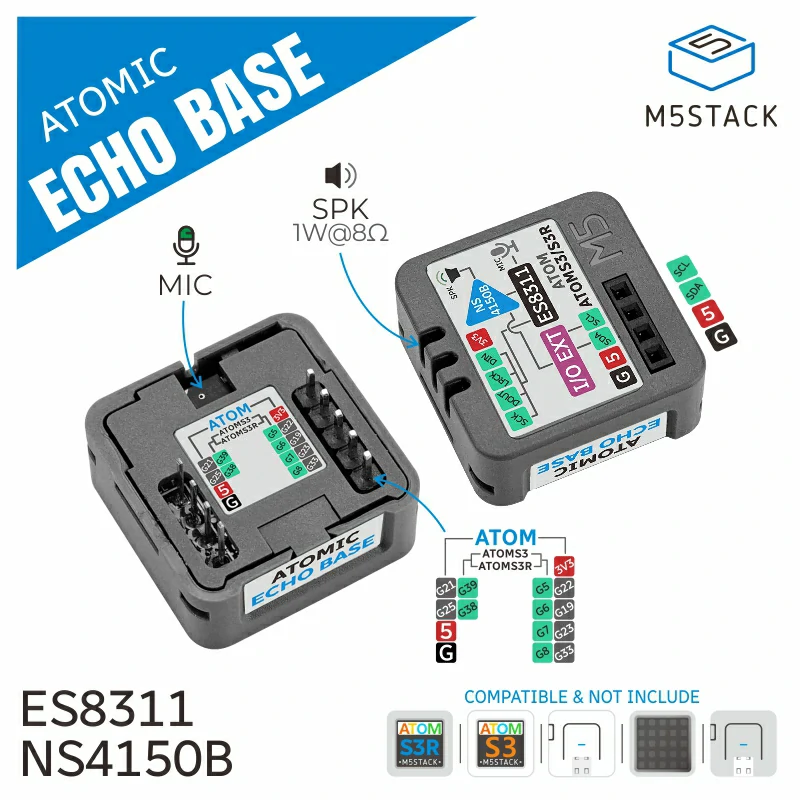
以下是主机对 Atomic Echo Base 的详细支持:
控制器 |
Atomic Echo Base |
|---|---|
Atom Echo |
⭕ |
Atom Lite |
✅ |
Atom Matrix |
✅ |
AtomS3 |
✅ |
AtomS3 Lite |
✅ |
AtomS3R |
✅ |
AtomS3R-CAM |
✅ |
AtomS3R-Ext |
✅ |
UiFlow2 应用示例
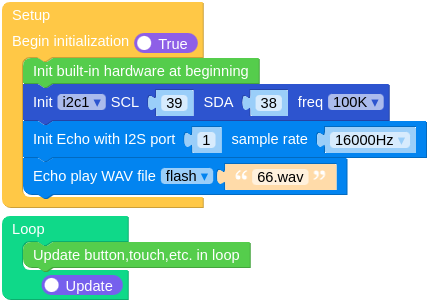
播放 WAV 文件
在 UiFlow2 中打开 atoms3_play_wav_example.m5f2 项目。
此示例从文件系统读取音频文件并播放。
UiFlow2 代码块:
示例输出:
None
播放控制
在 UiFlow2 中打开 atoms3_playback_controls_example.m5f2 项目。
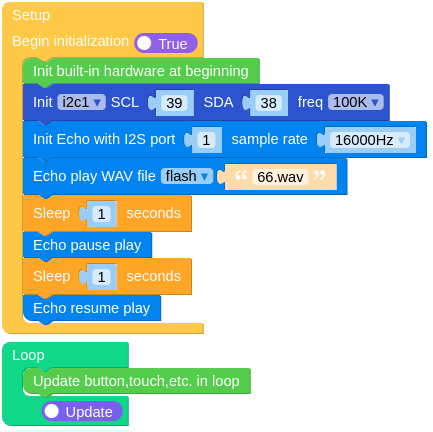
此示例演示如何使用 AtomicEchoBase 类控制播放。
播放音频 1 秒,暂停 1 秒,然后继续播放。
UiFlow2 代码块:
示例输出:
None
录制音频
在 UiFlow2 中打开 atoms3_record_audio_example.m5f2 项目。
此示例从麦克风录制音频并将其保存到 PCM 缓冲区,然后通过扬声器播放。
UiFlow2 代码块:

示例输出:
None
MicroPython 应用示例
播放 WAV 文件
此示例从文件系统读取音频文件并播放。
MicroPython 代码块:
 1# SPDX-FileCopyrightText: 2025 M5Stack Technology CO LTD
 2#
 3# SPDX-License-Identifier: MIT
 4
 5import os, sys, io
 6import M5
 7from M5 import *
 8from hardware import I2C
 9from hardware import Pin
10from base import AtomicEchoBase
11import time
12
13
14i2c1 = None
15base_echo = None
16
17
18def setup():
19    global i2c1, base_echo
20
21    M5.begin()
22    i2c1 = I2C(1, scl=Pin(39), sda=Pin(38), freq=100000)
23    base_echo = AtomicEchoBase(i2c1, 0x18, 1, 16000, 8, 6, 7, 5)
24    base_echo.play_wav_file("/flash/res/audio/66.wav")
25    time.sleep(1)
26    base_echo.pause()
27    time.sleep(1)
28    base_echo.resume()
29
30
31def loop():
32    global i2c1, base_echo
33    M5.update()
34
35
36if __name__ == "__main__":
37    try:
38        setup()
39        while True:
40            loop()
41    except (Exception, KeyboardInterrupt) as e:
42        try:
43            from utility import print_error_msg
44
45            print_error_msg(e)
46        except ImportError:
47            print("please update to latest firmware")
示例输出:
None
播放控制
此示例演示如何使用 AtomicEchoBase 类控制播放。
播放音频 1 秒,暂停 1 秒,然后继续播放。
MicroPython 代码块:
 1# SPDX-FileCopyrightText: 2025 M5Stack Technology CO LTD
 2#
 3# SPDX-License-Identifier: MIT
 4
 5import os, sys, io
 6import M5
 7from M5 import *
 8from hardware import I2C
 9from hardware import Pin
10from base import AtomicEchoBase
11import time
12
13
14i2c1 = None
15base_echo = None
16
17
18def setup():
19    global i2c1, base_echo
20
21    M5.begin()
22    i2c1 = I2C(1, scl=Pin(39), sda=Pin(38), freq=100000)
23    base_echo = AtomicEchoBase(i2c1, 0x18, 1, 16000, 8, 6, 7, 5)
24    base_echo.play_wav_file("/flash/res/audio/66.wav")
25    time.sleep(1)
26    base_echo.pause()
27    time.sleep(1)
28    base_echo.resume()
29
30
31def loop():
32    global i2c1, base_echo
33    M5.update()
34
35
36if __name__ == "__main__":
37    try:
38        setup()
39        while True:
40            loop()
41    except (Exception, KeyboardInterrupt) as e:
42        try:
43            from utility import print_error_msg
44
45            print_error_msg(e)
46        except ImportError:
47            print("please update to latest firmware")
示例输出:
None
录制音频
此示例从麦克风录制音频并将其保存到 PCM 缓冲区,然后通过扬声器播放。
MicroPython 代码块:
 1# SPDX-FileCopyrightText: 2025 M5Stack Technology CO LTD
 2#
 3# SPDX-License-Identifier: MIT
 4
 5import os, sys, io
 6import M5
 7from M5 import *
 8from hardware import I2C
 9from hardware import Pin
10from base import AtomicEchoBase
11
12
13i2c1 = None
14base_echo = None
15
16
17def setup():
18    global i2c1, base_echo
19
20    M5.begin()
21    i2c1 = I2C(1, scl=Pin(39), sda=Pin(38), freq=100000)
22    base_echo = AtomicEchoBase(i2c1, 0x18, 1, 16000, 8, 6, 7, 5)
23    base_echo.record(rate=16000, bits=16, channel=AtomicEchoBase.STEREO, duration=500)
24    base_echo.play_raw(
25        base_echo.pcm_buffer, rate=16000, bits=16, channel=AtomicEchoBase.STEREO, duration=-1
26    )
27
28
29def loop():
30    global i2c1, base_echo
31    M5.update()
32
33
34if __name__ == "__main__":
35    try:
36        setup()
37        while True:
38            loop()
39    except (Exception, KeyboardInterrupt) as e:
40        try:
41            from utility import print_error_msg
42
43            print_error_msg(e)
44        except ImportError:
45            print("please update to latest firmware")
示例输出:
None
AtomicEchoBase
- class base.echo.AtomicEchoBase(*args, **kwargs)
基类:
object创建一个 AtomicEchoBase 对象。
- 参数:
UIFLOW2:

MicroPython:
from hardware import I2C
from hardware import Pin
from base import AtomicEchoBase

# atom echo
i2c1 = I2C(1, scl=Pin(21), sda=Pin(25), freq=100000)
base_echo = AtomicEchoBase(i2c1, address=0x18, i2s_port=1, sample_rate=44100, i2s_sck=33, i2s_ws=19, i2s_di=23, i2s_do=22)

# atom lite
i2c1 = I2C(1, scl=Pin(21), sda=Pin(25), freq=100000)
base_echo = AtomicEchoBase(i2c1, address=0x18, i2s_port=1, sample_rate=44100, i2s_sck=33, i2s_ws=19, i2s_di=23, i2s_do=22)

# atom matrix
i2c1 = I2C(1, scl=Pin(21), sda=Pin(25), freq=100000)
base_echo = AtomicEchoBase(i2c1, address=0x18, i2s_port=1, sample_rate=44100, i2s_sck=33, i2s_ws=19, i2s_di=23, i2s_do=22)

# atoms3 / atoms3 lite
i2c1 = I2C(1, scl=Pin(39), sda=Pin(38), freq=100000)
base_echo = AtomicEchoBase(i2c1, address=0x18, i2s_port=1, sample_rate=44100, i2s_sck=8, i2s_ws=6, i2s_di=7, i2s_do=5)

# atoms3r / atoms3r-cam / atoms3-ext
i2c1 = I2C(1, scl=Pin(39), sda=Pin(38), freq=100000)
base_echo = AtomicEchoBase(i2c1, address=0x18, i2s_port=1, sample_rate=44100, i2s_sck=8, i2s_ws=6, i2s_di=7, i2s_do=5)

base_echo.speaker.tone(2000, 1000)
base_echo.speaker.playWavFile('res/audio/66.wav')
- MONO = 1
单声道
- STEREO = 2
立体声
- play_wav_file(file)
播放 WAV 文件。
- 参数:
file (str) – 要播放的 WAV 文件的路径。
- 返回:
None
- 返回类型:
None
UiFlow2 代码块:

MicroPython 代码块:
base_echo.play_wav_file("/flash/res/audio/test.wav")
- tone(freq, duration)
播放简单的音调声音。
UiFlow2 代码块:

MicroPython 代码块:
base_echo.tone(2000, 50)
- play_wav(buf, duration=-1)
播放 WAV 缓冲区。
- 参数:
- 返回:
None
- 返回类型:
None
UiFlow2 代码块:

MicroPython 代码块:
base_echo.play_wav(wav_buffer, duration=1000)
- play_raw(buf, rate=16000, bits=16, channel=2, duration=-1)
播放 pcm 缓冲区。
- 参数:
- 返回:
None
- 返回类型:
None
UiFlow2 代码块:

MicroPython 代码块:
base_echo.play_raw(pcm_buffer, rate=16000, bits=16, channel=2, duration=1000)
- pause()
暂停播放。
UiFlow2 代码块:

MicroPython 代码块:
audio.tone(2000, 100)
time.sleep(0.05)
base_echo.pause()
time.sleep(0.05)
base_echo.resume()
- 返回类型:
None
- resume()
继续播放。
UiFlow2 代码块:

MicroPython 代码块:
audio.tone(2000, 100)
time.sleep(0.05)
base_echo.pause()
time.sleep(0.05)
base_echo.resume()
- stop()
停止播放。
UiFlow2 代码块:

MicroPython 代码块:
audio.tone(2000, 100)
time.sleep(0.05)
base_echo.stop()
- get_volume()
获取扬声器音量级别。
- 返回:
音量级别(0-100)。
- 返回类型:
UiFlow2 代码块:

MicroPython 代码块:
base_echo.get_volume()
- set_volume(volume)
设置扬声器音量。
- 参数:
volume (int) – 音量级别(0-100)。
UiFlow2 代码块:

MicroPython 代码块:
base_echo.set_volume(50)
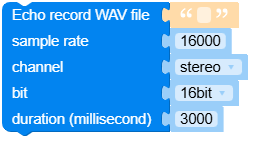
- record_wav_file(path, rate=16000, bits=16, channel=2, duration=3000)
将音频录制为 WAV 文件。
- 参数:
UiFlow2 代码块:
MicroPython 代码块:
base_echo.record_wav_file("/flash/res/audio/test.wav", rate=16000, bits=16, channel=2, duration=3000)
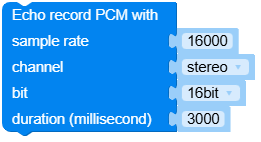
- record(rate=16000, bits=16, channel=2, duration=3000)
将音频录制到 PCM 缓冲区。
- 参数:
UiFlow2 代码块:
MicroPython 代码块:
base_echo.record(rate=16000, bits=16, channel=2, duration=3000)
